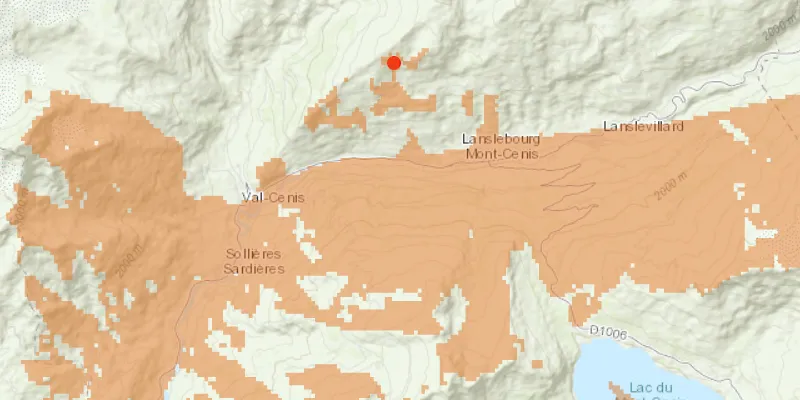
Calculate a viewshed using a geoprocessing service, in this case showing what parts of a landscape are visible from points on mountainous terrain.
Use case
A viewshed is used to highlight what is visible from a given point. A viewshed could be created to show what a hiker might be able to see from a given point at the top of a mountain. Equally, a viewshed could also be created from a point representing the maximum height of a proposed wind turbine to see from what areas the turbine would be visible.
How to use the sample
Click the map to see all areas visible from that point within a 15km radius. Clicking on an elevated area will highlight a larger part of the surrounding landscape. It may take a few seconds for the task to run and send back the results.
How it works
- Create a
GeoprocessingTaskobject with the URL set to a geoprocessing service endpoint. - Create a
FeatureCollectionTableobject and add a newFeatureobject whose geometry is the viewshed’s observerPoint. - Make a
GeoprocessingParametersobject passing in the observer point. - Use the geoprocessing task to create a
GeoprocessingJobobject with the parameters. - Start the job and wait for it to complete and return a
GeoprocessingResultobject. - Get the resulting
GeoprocessingFeaturesobject. - Iterate through the viewshed features to use their geometry or display the geometry in a new
Graphicobject.
Relevant API
- FeatureCollectionTable
- GeoprocessingFeatures
- GeoprocessingJob
- GeoprocessingParameters
- GeoprocessingResult
- GeoprocessingTask
Tags
geoprocessing, heat map, heatmap, viewshed
Sample code
/* * Copyright 2018 Esri. * * Licensed under the Apache License, Version 2.0 (the "License"); you may not * use this file except in compliance with the License. You may obtain a copy of * the License at * * http://www.apache.org/licenses/LICENSE-2.0 * * Unless required by applicable law or agreed to in writing, software * distributed under the License is distributed on an "AS IS" BASIS, WITHOUT * WARRANTIES OR CONDITIONS OF ANY KIND, either express or implied. See the * License for the specific language governing permissions and limitations under * the License. */
package com.esri.samples.viewshed_geoprocessing;
import java.util.Arrays;import java.util.Collections;import java.util.List;import java.util.concurrent.ExecutionException;
import javafx.application.Application;import javafx.geometry.Point2D;import javafx.geometry.Pos;import javafx.scene.Scene;import javafx.scene.control.Alert;import javafx.scene.control.Alert.AlertType;import javafx.scene.control.ProgressIndicator;import javafx.scene.input.MouseButton;import javafx.scene.layout.StackPane;import javafx.scene.paint.Color;import javafx.stage.Stage;
import com.esri.arcgisruntime.ArcGISRuntimeEnvironment;import com.esri.arcgisruntime.concurrent.Job;import com.esri.arcgisruntime.concurrent.ListenableFuture;import com.esri.arcgisruntime.data.Feature;import com.esri.arcgisruntime.data.FeatureCollectionTable;import com.esri.arcgisruntime.data.FeatureSet;import com.esri.arcgisruntime.data.Field;import com.esri.arcgisruntime.geometry.GeometryType;import com.esri.arcgisruntime.geometry.Point;import com.esri.arcgisruntime.loadable.LoadStatus;import com.esri.arcgisruntime.mapping.ArcGISMap;import com.esri.arcgisruntime.mapping.BasemapStyle;import com.esri.arcgisruntime.mapping.Viewpoint;import com.esri.arcgisruntime.mapping.view.Graphic;import com.esri.arcgisruntime.mapping.view.GraphicsOverlay;import com.esri.arcgisruntime.mapping.view.MapView;import com.esri.arcgisruntime.symbology.FillSymbol;import com.esri.arcgisruntime.symbology.SimpleFillSymbol;import com.esri.arcgisruntime.symbology.SimpleMarkerSymbol;import com.esri.arcgisruntime.symbology.SimpleRenderer;import com.esri.arcgisruntime.tasks.geoprocessing.GeoprocessingFeatures;import com.esri.arcgisruntime.tasks.geoprocessing.GeoprocessingJob;import com.esri.arcgisruntime.tasks.geoprocessing.GeoprocessingParameters;import com.esri.arcgisruntime.tasks.geoprocessing.GeoprocessingResult;import com.esri.arcgisruntime.tasks.geoprocessing.GeoprocessingTask;
public class ViewshedGeoprocessingSample extends Application {
  private MapView mapView;  private GeoprocessingJob geoprocessingJob;  // keep loadables in scope to avoid garbage collection  private GeoprocessingTask geoprocessingTask;  private FeatureCollectionTable featureCollectionTable;
  @Override  public void start(Stage stage) {
    try {      // create stack pane and application scene      StackPane stackPane = new StackPane();      Scene scene = new Scene(stackPane);
      // set title, size, and add scene to stage      stage.setTitle("Viewshed Geoprocessing Sample");      stage.setWidth(800);      stage.setHeight(700);      stage.setScene(scene);      stage.show();
      // authentication with an API key or named user is required to access basemaps and other location services      String yourAPIKey = System.getProperty("apiKey");      ArcGISRuntimeEnvironment.setApiKey(yourAPIKey);
      // create a map with the topographic basemap style      ArcGISMap map = new ArcGISMap(BasemapStyle.ARCGIS_TOPOGRAPHIC);
      // create a map view and set the map to it      mapView = new MapView();      mapView.setMap(map);
      // set a viewpoint on the map view      mapView.setViewpoint(new Viewpoint(45.3790902612337, 6.84905317262762, 144447));
      // create an input graphics overlay to show red point markers where the user clicks      SimpleMarkerSymbol pointSymbol = new SimpleMarkerSymbol(SimpleMarkerSymbol.Style.CIRCLE, Color.RED, 10);      SimpleRenderer renderer = new SimpleRenderer(pointSymbol);      GraphicsOverlay inputGraphicsOverlay = new GraphicsOverlay();      inputGraphicsOverlay.setRenderer(renderer);
      // create an output graphics overlay to show the viewsheds as orange areas      Color fillColor = Color.rgb(226, 119, 40, 0.5);      FillSymbol fillSymbol = new SimpleFillSymbol(SimpleFillSymbol.Style.SOLID, fillColor, null);      GraphicsOverlay outputGraphicsOverlay = new GraphicsOverlay();      outputGraphicsOverlay.setRenderer(new SimpleRenderer(fillSymbol));
      // add the graphics overlays to the map view      mapView.getGraphicsOverlays().addAll(Arrays.asList(inputGraphicsOverlay, outputGraphicsOverlay));
      // show progress indicator when geoprocessing task is loading or geoprocessing job is running      ProgressIndicator progress = new ProgressIndicator(ProgressIndicator.INDETERMINATE_PROGRESS);      progress.setMaxWidth(30);
      // create the geoprocessing task with the service URL and load it      geoprocessingTask = new GeoprocessingTask("https://sampleserver6.arcgisonline" +          ".com/arcgis/rest/services/Elevation/ESRI_Elevation_World/GPServer/Viewshed");      geoprocessingTask.loadAsync();
      geoprocessingTask.addDoneLoadingListener(() -> {        if (geoprocessingTask.getLoadStatus() == LoadStatus.LOADED) {          // hide the progress when the geoprocessing task is done loading and enable the click event          progress.setVisible(false);
          mapView.setOnMouseClicked(e -> {            // check that the primary mouse button was clicked and any previous geoprocessing job has been canceled            if (e.isStillSincePress() && e.getButton() == MouseButton.PRIMARY && geoprocessingJob == null) {
              // clear previous user click location and the viewshed geoprocessing task results              inputGraphicsOverlay.getGraphics().clear();              outputGraphicsOverlay.getGraphics().clear();
              // show a graphic in the input graphics overlay at the clicked location              Point2D point2D = new Point2D(e.getX(), e.getY());              Point point = mapView.screenToLocation(point2D);              Graphic inputGraphic = new Graphic(point);              inputGraphicsOverlay.getGraphics().add(inputGraphic);
              progress.setVisible(true);              // get the default geoprocessing parameters              ListenableFuture<GeoprocessingParameters> defaultParameters = geoprocessingTask.createDefaultParametersAsync();              defaultParameters.addDoneListener(() -> {                try {                  GeoprocessingParameters parameters = defaultParameters.get();
                  // create required viewshed fields                  List<Field> fields = Collections.singletonList(Field.createString("observer", "", 8));
                  // create a feature collection table (used as a parameter to the geoprocessing job)                  featureCollectionTable = new FeatureCollectionTable(fields,                      GeometryType.POINT, point.getSpatialReference());                  featureCollectionTable.loadAsync();
                  featureCollectionTable.addDoneLoadingListener(() -> {                    // create a new feature with the geometry of the clicked location and add it to the table                    Feature newFeature = featureCollectionTable.createFeature();                    newFeature.setGeometry(point);
                    featureCollectionTable.addFeatureAsync(newFeature).addDoneListener(() -> {                      // set the required parameters for viewshed                      parameters.setProcessSpatialReference(featureCollectionTable.getSpatialReference());                      parameters.setOutputSpatialReference(featureCollectionTable.getSpatialReference());                      parameters.getInputs().put("Input_Observation_Point", new GeoprocessingFeatures(featureCollectionTable));
                      // create a geoprocessing job from the task with the parameters                      geoprocessingJob = geoprocessingTask.createJob(parameters);
                      // start the job and wait for the result                      geoprocessingJob.start();                      geoprocessingJob.addJobDoneListener(() -> {                        if (geoprocessingJob.getStatus() == Job.Status.SUCCEEDED) {                          // get the viewshed from the job's result                          GeoprocessingResult geoprocessingResult = geoprocessingJob.getResult();                          GeoprocessingFeatures resultFeatures = (GeoprocessingFeatures) geoprocessingResult.getOutputs().get("Viewshed_Result");
                          // loop through the result features to get the viewshed geometries                          FeatureSet featureSet = resultFeatures.getFeatures();                          for (Feature feature : featureSet) {                            // add the viewshed geometry as a graphic to the output graphics overlay                            Graphic graphic = new Graphic(feature.getGeometry());                            outputGraphicsOverlay.getGraphics().add(graphic);                          }                        } else {                          // remove the input and show an error if the job fails                          inputGraphicsOverlay.getGraphics().remove(inputGraphic);                          new Alert(AlertType.ERROR, "Geoprocessing job failed. Try again.").show();                        }                        // hide the progress when the job is complete                        progress.setVisible(false);                        // cancel the job if it's still going and set it to null to re-enable the mouse click listener                        if (geoprocessingJob != null) {                          geoprocessingJob.cancelAsync();                          geoprocessingJob = null;                        }                      });                    });                  });                } catch (InterruptedException | ExecutionException ex) {                  new Alert(AlertType.ERROR, "Error creating default geoprocessing parameters").show();                }              });            }          });        } else {          new Alert(AlertType.ERROR, "Failed to load geoprocessing task").show();        }      });
      // and the mapView and progress indicator to the stack pane      stackPane.getChildren().addAll(mapView, progress);      StackPane.setAlignment(progress, Pos.CENTER);    } catch (Exception e) {      // on any error, display the stack trace.      e.printStackTrace();    }  }
  /**   * Stops and releases all resources used in application.   */  @Override  public void stop() {
    if (mapView != null) {      mapView.dispose();    }  }
  /**   * Opens and runs application.   *   * @param args arguments passed to this application   */  public static void main(String[] args) {
    Application.launch(args);  }}