Find dynamic entities from a data source that match a query.
Use case
Developers can query a DynamicEntityDataSource to find dynamic entities that meet spatial and/or attribute criteria. The query returns a collection of dynamic entities matching the DynamicEntityQueryParameters at the moment the query is executed. An example of this is a flight tracking app that monitors airspace near a particular airport, allowing the user to monitor flights based on different criteria such as arrival airport or flight number.
How to use the sample
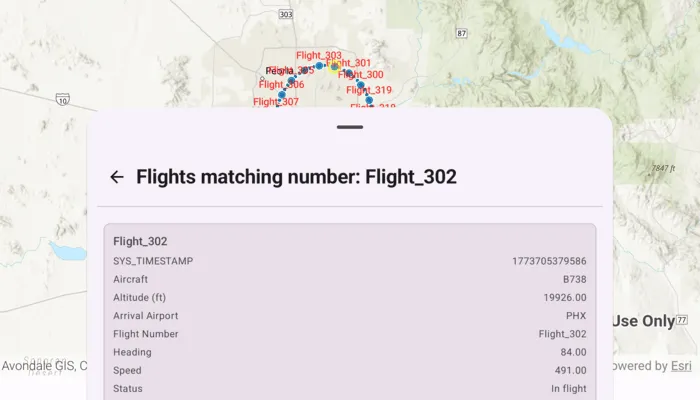
Tap the “Query Flights” button and select a query to perform from the menu. Once the query is complete, a list of the resulting flights will be displayed. Tap on a flight to see its latest attributes in real-time.
How it works
- Create a
DynamicEntityDataSourceto stream dynamic entity events. - Create
DynamicEntityQueryParametersand set its properties to specify the parameters for the query:- To spatially filter results, set the
geometryandspatialRelationship. The spatial relationship isintersectsby default. - To query entities with certain attribute values, set the
whereClause. - To get entities with specific track IDs, modify the
trackIdscollection.
- To spatially filter results, set the
- To perform a dynamic entities query, use
DynamicEntityDataSource.queryDynamicEntities(parameters)to query with multiple criteria (such as track IDs, spatial, and/or attribute filters), or useDynamicEntityDataSource.queryDynamicEntities(trackIds)if you want to query only by track IDs. - When complete, get the dynamic entities from the result using
DynamicEntityQueryResult.entities(). - Use
DynamicEntity.dynamicEntityChangedEventto get the entities’ change notifications. - Get the new observation from the resulting
DynamicEntityChangedInfoobjects usingreceivedObservationand usedynamicEntityWasPurgedto determine whether a dynamic entity has been purged.
Relevant API
- DynamicEntity
- DynamicEntityChangedInfo
- DynamicEntityDataSource
- DynamicEntityLayer
- DynamicEntityObservation
- DynamicEntityObservationInfo
- DynamicEntityQueryParameters
- DynamicEntityQueryResult
About the data
This sample uses the PHX Air Traffic JSON portal item, which is hosted on ArcGIS Online and downloaded automatically. The file contains JSON data for mock air traffic around the Phoenix Sky Harbor International Airport in Phoenix, AZ, USA. The decoded data is used to simulate dynamic entity events through a CustomDynamicEntityDataSource, which is displayed on the map with a DynamicEntityLayer.
Additional information
A dynamic entities query is performed on the most recent observation of each dynamic entity in the data source at the time the query is executed. As the dynamic entities change, they may no longer match the query parameters.
Tags
data, dynamic, entity, live, query, real-time, search, stream, track
Sample code
/* Copyright 2026 Esri * * Licensed under the Apache License, Version 2.0 (the "License"); * you may not use this file except in compliance with the License. * You may obtain a copy of the License at * *    http://www.apache.org/licenses/LICENSE-2.0 * * Unless required by applicable law or agreed to in writing, software * distributed under the License is distributed on an "AS IS" BASIS, * WITHOUT WARRANTIES OR CONDITIONS OF ANY KIND, either express or implied. * See the License for the specific language governing permissions and * limitations under the License. * */
package com.esri.arcgismaps.sample.querydynamicentities.components
import android.app.Applicationimport androidx.lifecycle.AndroidViewModelimport androidx.lifecycle.viewModelScopeimport com.arcgismaps.Colorimport com.arcgismaps.arcgisservices.LabelingPlacementimport com.arcgismaps.data.Fieldimport com.arcgismaps.data.FieldTypeimport com.arcgismaps.data.SpatialRelationshipimport com.arcgismaps.geometry.GeodeticCurveTypeimport com.arcgismaps.geometry.Geometryimport com.arcgismaps.geometry.GeometryEngineimport com.arcgismaps.geometry.LinearUnitimport com.arcgismaps.geometry.Pointimport com.arcgismaps.geometry.SpatialReferenceimport com.arcgismaps.mapping.ArcGISMapimport com.arcgismaps.mapping.BasemapStyleimport com.arcgismaps.mapping.Viewpointimport com.arcgismaps.mapping.labeling.LabelDefinitionimport com.arcgismaps.mapping.labeling.SimpleLabelExpressionimport com.arcgismaps.mapping.layers.DynamicEntityLayerimport com.arcgismaps.mapping.symbology.SimpleFillSymbolimport com.arcgismaps.mapping.symbology.SimpleFillSymbolStyleimport com.arcgismaps.mapping.symbology.SimpleLineSymbolimport com.arcgismaps.mapping.symbology.SimpleLineSymbolStyleimport com.arcgismaps.mapping.symbology.TextSymbolimport com.arcgismaps.mapping.view.Graphicimport com.arcgismaps.mapping.view.GraphicsOverlayimport com.arcgismaps.realtime.CustomDynamicEntityDataSourceimport com.arcgismaps.realtime.DynamicEntityimport com.arcgismaps.realtime.DynamicEntityDataSourceInfoimport com.arcgismaps.realtime.DynamicEntityQueryParametersimport com.esri.arcgismaps.sample.sampleslib.components.MessageDialogViewModelimport kotlinx.coroutines.CancellationExceptionimport kotlinx.coroutines.CoroutineScopeimport kotlinx.coroutines.Dispatchersimport kotlinx.coroutines.Jobimport kotlinx.coroutines.NonCancellableimport kotlinx.coroutines.cancelAndJoinimport kotlinx.coroutines.channels.BufferOverflowimport kotlinx.coroutines.delayimport kotlinx.coroutines.flow.MutableSharedFlowimport kotlinx.coroutines.flow.MutableStateFlowimport kotlinx.coroutines.flow.SharedFlowimport kotlinx.coroutines.flow.asSharedFlowimport kotlinx.coroutines.flow.asStateFlowimport kotlinx.coroutines.launchimport kotlinx.coroutines.withContextimport kotlin.math.cosimport kotlin.math.sinimport kotlin.time.Duration.Companion.milliseconds
class QueryDynamicEntitiesViewModel(application: Application) : AndroidViewModel(application) {
    // Map centered on Phoenix Sky Harbor International Airport    val arcGISMap = ArcGISMap(BasemapStyle.ArcGISTopographic).apply {        initialViewpoint = Viewpoint(center = phoenixAirport, scale = 1_266_500.0)    }
    // Graphics overlay to display the 15-mile buffer around the airport    val graphicsOverlay = GraphicsOverlay()    private val bufferGraphic = Graphic(        symbol = SimpleFillSymbol(            style = SimpleFillSymbolStyle.Solid,            color = Color.fromRgba(255, 0, 0, 64),            outline = SimpleLineSymbol(SimpleLineSymbolStyle.Solid, Color.black, 1f)        )    )
    // Simulated plane feed and dynamic entity layer    private val planeFeedProvider = PlaneFeedProvider()    private val dynamicEntityDataSource = CustomDynamicEntityDataSource(planeFeedProvider)    private val dynamicEntityLayer = DynamicEntityLayer(dynamicEntityDataSource).apply {        trackDisplayProperties.apply {            showPreviousObservations = true            showTrackLine = true            maximumObservations = 20        }
        // Display flight numbers above entities        val labelDefinition = LabelDefinition(            labelExpression = SimpleLabelExpression("[flight_number]"),            textSymbol = TextSymbol().apply {                color = Color.red                size = 12f            }        ).apply { placement = LabelingPlacement.PointAboveCenter }        labelDefinitions.add(labelDefinition)        labelsEnabled = true    }
    // Message dialog for error handling    val messageDialogVM = MessageDialogViewModel()
    // Query UI states    private val _isQueryRunning = MutableStateFlow(false)    val isQueryRunning = _isQueryRunning.asStateFlow()
    private val _queryResultEntities = MutableStateFlow<List<DynamicEntity>>(emptyList())    val queryResultEntities = _queryResultEntities.asStateFlow()
    private val _resultLabel = MutableStateFlow("")    val resultLabel = _resultLabel.asStateFlow()
    init {        // Add layer to the map        arcGISMap.operationalLayers.add(dynamicEntityLayer)
        // Prepare buffer graphic; keep overlay hidden until used        graphicsOverlay.graphics.add(bufferGraphic)        graphicsOverlay.isVisible = false
        // Connect the data source to start streaming observations        viewModelScope.launch {            dynamicEntityDataSource.connect().onFailure {                messageDialogVM.showMessageDialog(                    title = "Failed to connect data source",                    description = it.message.toString()                )            }        }    }
    // Query: Flights within 15 miles of PHX    fun queryFlightsWithinPhoenixBuffer() {        viewModelScope.launch {            _isQueryRunning.value = true            val buffer = createPhoenixAirportBuffer()            bufferGraphic.geometry = buffer            graphicsOverlay.isVisible = true
            val parameters = DynamicEntityQueryParameters().apply {                geometry = buffer                spatialRelationship = SpatialRelationship.Intersects            }
            val queryResult = dynamicEntityDataSource.queryDynamicEntities(parameters)            queryResult.onSuccess { result ->                val entities = result.toList()                dynamicEntityLayer.clearSelection()                dynamicEntityLayer.selectDynamicEntities(entities)                _queryResultEntities.value = entities                _resultLabel.value = "Flights within 15 miles of PHX"            }.onFailure { error ->                messageDialogVM.showMessageDialog(                    title = "Query failed",                    description = error.message.toString()                )            }            _isQueryRunning.value = false        }    }
    // Query: Flights arriving in PHX (attribute query)    fun queryFlightsArrivingInPHX() {        viewModelScope.launch {            _isQueryRunning.value = true            graphicsOverlay.isVisible = false
            val parameters = DynamicEntityQueryParameters().apply {                whereClause = "status = 'In flight' AND arrival_airport = 'PHX'"            }
            val queryResult = dynamicEntityDataSource.queryDynamicEntities(parameters)            queryResult.onSuccess { result ->                val entities = result.toList()                dynamicEntityLayer.clearSelection()                dynamicEntityLayer.selectDynamicEntities(entities)                _queryResultEntities.value = entities                _resultLabel.value = "Flights arriving in PHX"            }.onFailure { error ->                messageDialogVM.showMessageDialog(                    title = "Query failed",                    description = error.message.toString()                )            }            _isQueryRunning.value = false        }    }
    // Query: Flights with a specific flight number (trackId)    fun queryFlightsWithNumber(flightNumber: String) {        viewModelScope.launch {            _isQueryRunning.value = true            graphicsOverlay.isVisible = false
            val parameters = DynamicEntityQueryParameters().apply {                trackIds.add(flightNumber)            }
            val queryResult = dynamicEntityDataSource.queryDynamicEntities(parameters)            queryResult.onSuccess { result ->                val entities = result.toList()                dynamicEntityLayer.clearSelection()                dynamicEntityLayer.selectDynamicEntities(entities)                _queryResultEntities.value = entities                _resultLabel.value = "Flights matching number: $flightNumber"            }.onFailure { error ->                messageDialogVM.showMessageDialog(                    title = "Query failed",                    description = error.message.toString()                )            }            _isQueryRunning.value = false        }    }
    // Reset selection and overlay    fun resetDisplay() {        _queryResultEntities.value = emptyList()        dynamicEntityLayer.clearSelection()        graphicsOverlay.isVisible = false        _resultLabel.value = ""    }
    // Create a 15-mile geodetic buffer around PHX    private fun createPhoenixAirportBuffer(): Geometry {        return GeometryEngine.bufferGeodeticOrNull(            geometry = phoenixAirport,            distance = 15.0,            distanceUnit = LinearUnit.miles,            maxDeviation = Double.NaN,            curveType = GeodeticCurveType.Geodesic        ) ?: phoenixAirport    }
    companion object {        // Phoenix Sky Harbor Intl Airport (lon, lat) in WGS84        private val phoenixAirport = Point(            -112.0101,            33.4352,            SpatialReference.wgs84()        )    }}
// Simulated plane feed provider that emits observations near Phoenixprivate class PlaneFeedProvider : CustomDynamicEntityDataSource.EntityFeedProvider {
    private val scope = CoroutineScope(Dispatchers.Default)
    private val _feed = MutableSharedFlow<CustomDynamicEntityDataSource.FeedEvent>(        extraBufferCapacity = Int.MAX_VALUE,        onBufferOverflow = BufferOverflow.DROP_OLDEST    )    override val feed: SharedFlow<CustomDynamicEntityDataSource.FeedEvent> = _feed.asSharedFlow()
    private var feedJob: Job? = null
    // Schema for attributes used in the sample    private val schema: List<Field> by lazy {        listOf(            Field(FieldType.Text, "flight_number", "", 128),            Field(FieldType.Text, "aircraft", "", 128),            Field(FieldType.Float64, "altitude_feet", "", 8),            Field(FieldType.Text, "arrival_airport", "", 32),            Field(FieldType.Float64, "heading", "", 8),            Field(FieldType.Float64, "speed", "", 8),            Field(FieldType.Text, "status", "", 64)        )    }
    override suspend fun onLoad(): DynamicEntityDataSourceInfo {        return DynamicEntityDataSourceInfo(            entityIdFieldName = "flight_number",            fields = schema        ).apply { spatialReference = SpatialReference.wgs84() }    }
    override suspend fun onConnect() {        startEmitting()    }
    override suspend fun onDisconnect() {        feedJob?.cancelAndJoin()        feedJob = null    }
    private fun startEmitting() {        val flights = buildList { repeat(20) { add("Flight_${300 + it}") } }        val phoenix = Point(-112.0101, 33.4352, SpatialReference.wgs84())        val radiusDegrees = 0.18 // ~12-13 miles radius        var tick = 0
        feedJob = scope.launch(Dispatchers.IO) {            try {                while (true) {                    tick++                    flights.forEachIndexed { idx, flightId ->                        val angleDeg = (tick * 6 + idx * 18) % 360                        val angleRad = Math.toRadians(angleDeg.toDouble())                        val lon = phoenix.x + radiusDegrees * cos(angleRad)                        val lat = phoenix.y + radiusDegrees * sin(angleRad)                        val point = Point(lon, lat, SpatialReference.wgs84())
                        val attributes = mapOf(                            "flight_number" to flightId,                            "aircraft" to listOf("A320", "B737", "B738", "E175", "A321")[idx % 5],                            "altitude_feet" to (14000..36000).random().toDouble(),                            "arrival_airport" to "PHX",                            "heading" to (angleDeg.toDouble()),                            "speed" to (350..520).random().toDouble(),                            "status" to "In flight"                        )
                        _feed.tryEmit(                            CustomDynamicEntityDataSource.FeedEvent.NewObservation(                                geometry = point,                                attributes = attributes                            )                        )                    }                    delay(1000.milliseconds)                }            } catch (e: Exception) {                if (e is CancellationException) throw e                withContext(NonCancellable) {                    _feed.tryEmit(                        CustomDynamicEntityDataSource.FeedEvent.ConnectionFailure(                            e,                            true                        )                    )                }            }        }    }}
/* Copyright 2026 Esri * * Licensed under the Apache License, Version 2.0 (the "License"); * you may not use this file except in compliance with the License. * You may obtain a copy of the License at * * http://www.apache.org/licenses/LICENSE-2.0 * * Unless required by applicable law or agreed to in writing, software * distributed under the License is distributed on an "AS IS" BASIS, * WITHOUT WARRANTIES OR CONDITIONS OF ANY KIND, either express or implied. * See the License for the specific language governing permissions and * limitations under the License. * */
package com.esri.arcgismaps.sample.querydynamicentities
import android.content.Intentimport android.os.Bundleimport com.esri.arcgismaps.sample.sampleslib.DownloaderActivity
class DownloadActivity : DownloaderActivity() { override fun onCreate(savedInstanceState: Bundle?) { super.onCreate(savedInstanceState) downloadAndStartSample( Intent(this, MainActivity::class.java), getString(R.string.query_dynamic_entities_app_name), listOf( "https://www.arcgis.com/home/item.html?id=c78e297e99ad4572a48cdcd0b54bed30" ) ) }}/* Copyright 2026 Esri * * Licensed under the Apache License, Version 2.0 (the "License"); * you may not use this file except in compliance with the License. * You may obtain a copy of the License at * * http://www.apache.org/licenses/LICENSE-2.0 * * Unless required by applicable law or agreed to in writing, software * distributed under the License is distributed on an "AS IS" BASIS, * WITHOUT WARRANTIES OR CONDITIONS OF ANY KIND, either express or implied. * See the License for the specific language governing permissions and * limitations under the License. * */
package com.esri.arcgismaps.sample.querydynamicentities
import android.os.Bundleimport androidx.activity.ComponentActivityimport androidx.activity.enableEdgeToEdgeimport androidx.activity.compose.setContentimport androidx.compose.material3.MaterialThemeimport androidx.compose.material3.Surfaceimport androidx.compose.runtime.Composableimport com.esri.arcgismaps.sample.sampleslib.theme.SampleAppThemeimport com.esri.arcgismaps.sample.querydynamicentities.screens.QueryDynamicEntitiesScreen
class MainActivity : ComponentActivity() {
override fun onCreate(savedInstanceState: Bundle?) { super.onCreate(savedInstanceState)
enableEdgeToEdge() setContent { SampleAppTheme { QueryDynamicEntitiesApp() } } }
@Composable private fun QueryDynamicEntitiesApp() { Surface(color = MaterialTheme.colorScheme.background) { QueryDynamicEntitiesScreen( sampleName = getString(R.string.query_dynamic_entities_app_name) ) } }}/* Copyright 2026 Esri * * Licensed under the Apache License, Version 2.0 (the "License"); * you may not use this file except in compliance with the License. * You may obtain a copy of the License at * * http://www.apache.org/licenses/LICENSE-2.0 * * Unless required by applicable law or agreed to in writing, software * distributed under the License is distributed on an "AS IS" BASIS, * WITHOUT WARRANTIES OR CONDITIONS OF ANY KIND, either express or implied. * See the License for the specific language governing permissions and * limitations under the License. * */
package com.esri.arcgismaps.sample.querydynamicentities.screens
import androidx.compose.animation.animateContentSizeimport androidx.compose.foundation.BorderStrokeimport androidx.compose.foundation.layout.Arrangementimport androidx.compose.foundation.layout.Columnimport androidx.compose.foundation.layout.Rowimport androidx.compose.foundation.layout.fillMaxSizeimport androidx.compose.foundation.layout.fillMaxWidthimport androidx.compose.foundation.layout.paddingimport androidx.compose.foundation.lazy.LazyColumnimport androidx.compose.foundation.lazy.itemsimport androidx.compose.foundation.shape.RoundedCornerShapeimport androidx.compose.material.icons.Iconsimport androidx.compose.material.icons.automirrored.filled.ArrowBackimport androidx.compose.material.icons.filled.AirplanemodeActiveimport androidx.compose.material3.AlertDialogimport androidx.compose.material3.BottomSheetScaffoldimport androidx.compose.material3.Buttonimport androidx.compose.material3.ExperimentalMaterial3Apiimport androidx.compose.material3.HorizontalDividerimport androidx.compose.material3.Iconimport androidx.compose.material3.IconButtonimport androidx.compose.material3.MaterialThemeimport androidx.compose.material3.OutlinedButtonimport androidx.compose.material3.OutlinedTextFieldimport androidx.compose.material3.SheetValueimport androidx.compose.material3.Surfaceimport androidx.compose.material3.Textimport androidx.compose.material3.rememberBottomSheetScaffoldStateimport androidx.compose.material3.rememberStandardBottomSheetStateimport androidx.compose.runtime.Composableimport androidx.compose.runtime.LaunchedEffectimport androidx.compose.runtime.getValueimport androidx.compose.runtime.mutableStateOfimport androidx.compose.runtime.rememberimport androidx.compose.runtime.setValueimport androidx.compose.ui.Alignmentimport androidx.compose.ui.Modifierimport androidx.compose.ui.text.font.FontWeightimport androidx.compose.ui.unit.dpimport androidx.lifecycle.compose.collectAsStateWithLifecycleimport androidx.lifecycle.viewmodel.compose.viewModelimport com.arcgismaps.Colorimport com.arcgismaps.mapping.view.SelectionPropertiesimport com.arcgismaps.realtime.DynamicEntityimport com.arcgismaps.toolkit.geoviewcompose.MapViewimport com.esri.arcgismaps.sample.querydynamicentities.components.QueryDynamicEntitiesViewModelimport com.esri.arcgismaps.sample.sampleslib.components.LoadingDialogimport com.esri.arcgismaps.sample.sampleslib.components.MessageDialogimport com.esri.arcgismaps.sample.sampleslib.components.SampleTopAppBarimport java.util.Locale
private enum class SheetMode { Options, Results }
@OptIn(ExperimentalMaterial3Api::class)@Composablefun QueryDynamicEntitiesScreen(sampleName: String) { val viewModel: QueryDynamicEntitiesViewModel = viewModel()
// Bottom sheet state and visibility val scaffoldState = rememberBottomSheetScaffoldState( bottomSheetState = rememberStandardBottomSheetState(initialValue = SheetValue.Expanded) ) var sheetMode by remember { mutableStateOf(SheetMode.Options) }
// Flight number dialog var isFlightNumberDialogVisible by remember { mutableStateOf(false) } var flightNumber by remember { mutableStateOf("") }
// Observe ViewModel states val isQueryRunning by viewModel.isQueryRunning.collectAsStateWithLifecycle(false) val queryEntities by viewModel.queryResultEntities.collectAsStateWithLifecycle(emptyList()) val resultLabel by viewModel.resultLabel.collectAsStateWithLifecycle("")
BottomSheetScaffold( topBar = { SampleTopAppBar(title = sampleName) }, scaffoldState = scaffoldState, sheetContent = { QueryBottomSheet( sheetMode = sheetMode, resultLabel = resultLabel.ifEmpty { "Query Results" }, entities = queryEntities, isQueryRunning = isQueryRunning, onBackFromResults = { sheetMode = SheetMode.Options viewModel.resetDisplay() }, onWithinPhoenixSelected = { sheetMode = SheetMode.Results viewModel.queryFlightsWithinPhoenixBuffer() }, onArrivingInPhoenixSelected = { sheetMode = SheetMode.Results viewModel.queryFlightsArrivingInPHX() }, onFlightNumberSelected = { isFlightNumberDialogVisible = true } ) } ) { innerPadding -> MapView( modifier = Modifier .fillMaxSize() .padding(innerPadding), arcGISMap = viewModel.arcGISMap, graphicsOverlays = listOf(viewModel.graphicsOverlay), selectionProperties = SelectionProperties(color = Color.yellow) )
// Error dialog viewModel.messageDialogVM.apply { if (dialogStatus) { MessageDialog( title = messageTitle, description = messageDescription, onDismissRequest = ::dismissDialog ) } }
// Dialog to input a flight number if (isFlightNumberDialogVisible) { AlertDialog( onDismissRequest = { isFlightNumberDialogVisible = false }, title = { Text("Enter a Flight Number to Query") }, text = { OutlinedTextField( value = flightNumber, onValueChange = { flightNumber = it }, singleLine = true, label = { Text("Flight Number: (e.g. Flight_302)") } ) }, confirmButton = { Button( enabled = flightNumber.isNotBlank(), onClick = { isFlightNumberDialogVisible = false sheetMode = SheetMode.Results viewModel.queryFlightsWithNumber(flightNumber) } ) { Text("Done") } }, dismissButton = { OutlinedButton( onClick = { isFlightNumberDialogVisible = false } ) { Text("Cancel") } } ) }
// Loading dialog while querying if (isQueryRunning) { LoadingDialog(loadingMessage = "Querying dynamic entities…") } }}
@Composableprivate fun QueryBottomSheet( sheetMode: SheetMode, resultLabel: String, entities: List<DynamicEntity>, isQueryRunning: Boolean, onBackFromResults: () -> Unit, onWithinPhoenixSelected: () -> Unit, onArrivingInPhoenixSelected: () -> Unit, onFlightNumberSelected: () -> Unit) { Column( modifier = Modifier .fillMaxWidth() .padding(12.dp) .animateContentSize(), verticalArrangement = Arrangement.spacedBy(12.dp), horizontalAlignment = Alignment.CenterHorizontally ) { SheetHeader( title = when (sheetMode) { SheetMode.Options -> "Query Flights" SheetMode.Results -> resultLabel }, showBack = sheetMode == SheetMode.Results, onBack = onBackFromResults )
HorizontalDivider()
when (sheetMode) { SheetMode.Options -> QueryFlightsMenu( onWithinPhoenixSelected = onWithinPhoenixSelected, onArrivingInPhoenixSelected = onArrivingInPhoenixSelected, onFlightNumberSelected = onFlightNumberSelected )
SheetMode.Results -> QueryResultsList( entities = entities, isQueryRunning = isQueryRunning ) } }}
@Composableprivate fun SheetHeader( title: String, showBack: Boolean, onBack: () -> Unit) { Row( modifier = Modifier.fillMaxWidth(), horizontalArrangement = Arrangement.SpaceBetween, verticalAlignment = Alignment.CenterVertically ) { Row(verticalAlignment = Alignment.CenterVertically) { if (showBack) { IconButton(onClick = onBack) { Icon(Icons.AutoMirrored.Filled.ArrowBack, contentDescription = "Back") } } Text( text = title, fontWeight = FontWeight.Bold, style = MaterialTheme.typography.headlineSmall ) } }}
@Composableprivate fun QueryFlightsMenu( onWithinPhoenixSelected: () -> Unit, onArrivingInPhoenixSelected: () -> Unit, onFlightNumberSelected: () -> Unit) { Column( modifier = Modifier .fillMaxWidth() .padding(horizontal = 12.dp, vertical = 8.dp), verticalArrangement = Arrangement.spacedBy(12.dp), horizontalAlignment = Alignment.CenterHorizontally ) { Button(onClick = onWithinPhoenixSelected) { Text("Within 15 Miles of PHX") } Button(onClick = onArrivingInPhoenixSelected) { Text("Arriving in PHX") } Button(onClick = onFlightNumberSelected) { Text("With Flight Number") } }}
@Composableprivate fun QueryResultsList( entities: List<DynamicEntity>, isQueryRunning: Boolean) { Column( modifier = Modifier .fillMaxWidth() .padding(8.dp), verticalArrangement = Arrangement.spacedBy(8.dp), horizontalAlignment = Alignment.CenterHorizontally ) { if (entities.isEmpty() && !isQueryRunning) { Column( modifier = Modifier .fillMaxWidth() .padding(24.dp), horizontalAlignment = Alignment.CenterHorizontally, verticalArrangement = Arrangement.spacedBy(8.dp) ) { Icon(Icons.Filled.AirplanemodeActive, contentDescription = null) Text("No Results", style = MaterialTheme.typography.titleMedium) Text( "There are no flights to display for this query.", style = MaterialTheme.typography.bodyMedium ) } } else { LazyColumn( modifier = Modifier.fillMaxWidth(), verticalArrangement = Arrangement.spacedBy(8.dp) ) { items(entities, key = { it.hashCode() }) { entity -> DynamicEntityObservationItem(entity = entity) } } } }}
@Composableprivate fun DynamicEntityObservationItem(entity: DynamicEntity) { var attributes by remember { mutableStateOf<Map<String, Any?>>(emptyMap()) }
LaunchedEffect(entity) { attributes = entity.latestObservation?.attributes ?: emptyMap() entity.dynamicEntityChangedEvent.collect { info -> attributes = info.receivedObservation?.attributes ?: emptyMap() } }
val flightNumber = (attributes["flight_number"] as? String) ?: "N/A"
Surface( tonalElevation = 4.dp, shape = RoundedCornerShape(8.dp), color = MaterialTheme.colorScheme.surfaceVariant, border = BorderStroke(1.dp, MaterialTheme.colorScheme.outlineVariant) ) { Column( modifier = Modifier.padding(12.dp), verticalArrangement = Arrangement.spacedBy(6.dp) ) { Text( text = flightNumber, style = MaterialTheme.typography.titleSmall ) val pretty = attributes.entries .sortedBy { it.key } .filter { it.value != null } .map { labelForKey(it.key) to valueToString(it.value) } pretty.forEach { (label, value) -> Row( modifier = Modifier.fillMaxWidth(), horizontalArrangement = Arrangement.SpaceBetween ) { Text(label, style = MaterialTheme.typography.bodySmall) Text(value, style = MaterialTheme.typography.bodySmall) } } } }}
private fun labelForKey(key: String): String { return when (key) { "aircraft" -> "Aircraft" "altitude_feet" -> "Altitude (ft)" "arrival_airport" -> "Arrival Airport" "flight_number" -> "Flight Number" "heading" -> "Heading" "speed" -> "Speed" "status" -> "Status" else -> key }}
private fun valueToString(value: Any?): String { return when (value) { is Double -> String.format(Locale.getDefault(), "%.2f", value) is Float -> String.format(Locale.getDefault(), "%.2f", value) is Number -> value.toString() is String -> value else -> value?.toString() ?: "" }}