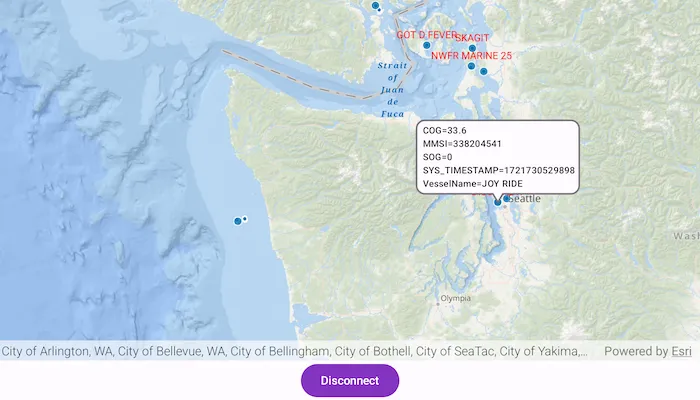
Create a custom dynamic entity data source and display it using a dynamic entity layer.
Use case
Developers can create a custom DynamicEntityDataSource to be able to visualize data from a variety of different feeds as dynamic entities using a DynamicEntityLayer. An example of this is in a mobile situational awareness app, where a custom DynamicEntityDataSource can be used to connect to peer-to-peer feeds in order to visualize real-time location tracks from teammates in the field.
How to use the sample
Run the sample to view the map and the dynamic entity layer displaying the latest observation from the custom data source. Tap on a dynamic entity to view its attributes in LogCat.
How it works
Configure the custom data source:
- Create a custom data source using a
CustomDynamicEntityDataSource.EntityFeedProvider. - Override
feedwith aSharedFlow<CustomDynamicEntityDataSource.FeedEvent>. - Override
onLoad()to specify theDynamicEntityDataSourceInfofor a given unique entity ID field and a list ofFieldobjects matching the fields in the data source. - Override
OnConnect()to begin asynchronously processing observations from the custom data source. - Loop through the observations and deserialize each observation into a
Pointobject and aMap<String, Any?>containing the attributes. - Emit an observation in the custom data source
feedwithCustomDynamicEntityDataSource.FeedEvent.NewObservation(point, attributes).
Configure the MapView:
- Create a
DynamicEntityLayerusing the custom data source implementation. - Update values in the layer’s
trackDisplayPropertiesto customize the layer’s appearance. - Set up the layer’s
labelDefinitionsto display labels for each dynamic entity. - Use
MapView.identify(...)to display a dynamic entity’s attributes in aCallout.
Relevant API
- CustomDynamicEntityDataSource.EntityFeedProvider
- DynamicEntity
- DynamicEntityDataSource
- DynamicEntityLayer
- LabelDefinition
- TrackDisplayProperties
About the data
This sample uses a .json file containing observations of marine vessels in the Pacific North West hosted on ArcGIS Online.
Additional information
In this sample, we iterate through features in a GeoJSON file to mimic messages coming from a real-time feed. You can create a custom dynamic entity data source to process any data that contains observations which can be translated into map points (com.arcgismaps.geometry.Point objects) with associated Map<String, Any?> attributes.
This sample uses the GeoView-Compose Toolkit module to implement a composable MapView, which supports the use of Callouts.
Tags
callout, data, dynamic, entity, flow, geoview-compose, label, labeling, live, real-time, stream, track
Sample code
/* Copyright 2024 Esri * * Licensed under the Apache License, Version 2.0 (the "License"); * you may not use this file except in compliance with the License. * You may obtain a copy of the License at * *    http://www.apache.org/licenses/LICENSE-2.0 * * Unless required by applicable law or agreed to in writing, software * distributed under the License is distributed on an "AS IS" BASIS, * WITHOUT WARRANTIES OR CONDITIONS OF ANY KIND, either express or implied. * See the License for the specific language governing permissions and * limitations under the License. * */
package com.esri.arcgismaps.sample.addcustomdynamicentitydatasource.components
import android.app.Applicationimport androidx.compose.runtime.getValueimport androidx.compose.runtime.mutableStateOfimport androidx.compose.runtime.setValueimport androidx.compose.ui.unit.dpimport androidx.lifecycle.AndroidViewModelimport androidx.lifecycle.viewModelScopeimport com.arcgismaps.arcgisservices.LabelingPlacementimport com.arcgismaps.mapping.ArcGISMapimport com.arcgismaps.mapping.BasemapStyleimport com.arcgismaps.mapping.GeoElementimport com.arcgismaps.mapping.Viewpointimport com.arcgismaps.mapping.labeling.LabelDefinitionimport com.arcgismaps.mapping.labeling.SimpleLabelExpressionimport com.arcgismaps.mapping.layers.DynamicEntityLayerimport com.arcgismaps.mapping.layers.Layerimport com.arcgismaps.mapping.symbology.TextSymbolimport com.arcgismaps.mapping.view.SingleTapConfirmedEventimport com.arcgismaps.realtime.ConnectionStatusimport com.arcgismaps.realtime.CustomDynamicEntityDataSourceimport com.arcgismaps.realtime.DynamicEntityObservationimport com.arcgismaps.toolkit.geoviewcompose.MapViewProxyimport com.esri.arcgismaps.sample.addcustomdynamicentitydatasource.Rimport com.esri.arcgismaps.sample.sampleslib.components.MessageDialogViewModelimport kotlinx.coroutines.Dispatchersimport kotlinx.coroutines.Jobimport kotlinx.coroutines.cancelAndJoinimport kotlinx.coroutines.launchimport java.io.Fileimport kotlin.time.Duration.Companion.milliseconds
class MapViewModel(application: Application) : AndroidViewModel(application) {
    // Keep track of connected status string state.    var connectionStatusString by mutableStateOf("")        private set
    // Set connection status string in he UI.    private fun updateConnectionStatusString(connectionStatus: String) {        connectionStatusString = connectionStatus    }
    private val provisionPath: String by lazy {        application.getExternalFilesDir(null)?.path.toString() + File.separator + application.getString(            R.string.add_custom_dynamic_entity_data_source_app_name        )    }
    // Create a new custom feed provider that processes observations from a JSON file.    // This takes the path to the simulation file, field name that will be used as the entity id,    // and the delay between each observation that is processed.    // In this example we are using a json file as our custom data source.    // This field value should be a unique identifier for each entity.    // Adjusting the value for the delay will change the speed at which the entities and their    // observations are displayed.    private val feedProvider = CustomEntityFeedProvider(        fileName = "$provisionPath/AIS_MarineCadastre_SelectedVessels_CustomDataSource.jsonl",        entityIdField = "MMSI",        delayDuration = 10.milliseconds    )
    private val dynamicEntityDataSource = CustomDynamicEntityDataSource(feedProvider).apply {        // Observe the connection status of the custom data source.        viewModelScope.launch {            connectionStatus.collect { connectionStatus ->                updateConnectionStatusString(                    when (connectionStatus) {                        is ConnectionStatus.Connected -> "Connected"                        is ConnectionStatus.Disconnected -> "Disconnected"                        is ConnectionStatus.Connecting -> "Connecting"                        is ConnectionStatus.Failed -> "Failed"                    }                )            }        }    }
    // Create the dynamic entity layer using the custom data source.    private val dynamicEntityLayer = DynamicEntityLayer(dynamicEntityDataSource).apply {        trackDisplayProperties.apply {            // Set up the track display properties, these properties will be used to configure the appearance of the track line and previous observations.            showPreviousObservations = true            showTrackLine = true            maximumObservations = 20        }
        // Define the label expression to be used, in this case we will use the "VesselName" for each of the dynamic entities.        val simpleLabelExpression = SimpleLabelExpression("[VesselName]")
        // Set the text symbol color and size for the labels.        val labelSymbol = TextSymbol().apply {            color = com.arcgismaps.Color.red            size = 12.0F        }
        // Add the label definition to the dynamic entity layer and enable labels.        labelDefinitions.add(LabelDefinition(simpleLabelExpression, labelSymbol).apply {            // Set the label position.            placement = LabelingPlacement.PointAboveCenter        })        labelsEnabled = true    }
    val arcGISMap = ArcGISMap(BasemapStyle.ArcGISOceans).apply {        initialViewpoint = Viewpoint(47.984, -123.657, 3e6)        // Add the dynamic entity layer to the map.        operationalLayers.add(dynamicEntityLayer)    }
    // Create a mapViewProxy that will be used to identify features in the MapView.    // This should also be passed to the composable MapView this mapViewProxy is associated with.    val mapViewProxy = MapViewProxy()
    // create a ViewModel to handle dialog interactions    val messageDialogVM: MessageDialogViewModel = MessageDialogViewModel()
    fun dynamicEntityDataSourceConnect() =        viewModelScope.launch { dynamicEntityDataSource.connect() }
    fun dynamicEntityDataSourceDisconnect() =        viewModelScope.launch { dynamicEntityDataSource.disconnect() }
    // Keep track of the currently selected GeoElement.    var selectedGeoElement by mutableStateOf<GeoElement?>(null)        private set
    // Keep track of the most recent observation string.    var observationString by mutableStateOf("")        private set
    // Keep track of the Coroutine Scope where observations on being collected on, so that it can    // be cancelled on subsequent identifies.    private var observationsJob: Job? = null
    /**     * Identifies the tapped screen coordinate in the provided [singleTapConfirmedEvent]     */    fun identify(singleTapConfirmedEvent: SingleTapConfirmedEvent) {        viewModelScope.launch {            // If collecting observations on a previous identify, now cancel and stop collecting.            observationsJob?.cancelAndJoin()            // identify the cluster in the feature layer on the tapped coordinate            mapViewProxy.identify(                dynamicEntityLayer as Layer,                screenCoordinate = singleTapConfirmedEvent.screenCoordinate,                tolerance = 12.dp,                maximumResults = 1            ).onSuccess { result ->                (result.geoElements.firstOrNull() as? DynamicEntityObservation)?.let { observation ->                    // Set the identified dynamic entity, used to display the callout.                    selectedGeoElement = observation.dynamicEntity                    // Define a new CoroutineScope to collect observation events on.                    observationsJob = launch(Dispatchers.IO) {                        // Collect observation events and update the observation string accordingly.                        observation.dynamicEntity?.dynamicEntityChangedEvent?.collect { dynamicEntityChangedInfo ->                            // Parse the observation attributes, filter out empty values, and remove                            // starting and ending {}s.                            observationString = dynamicEntityChangedInfo                                .receivedObservation?.attributes?.filter {                                    it.value.toString().isNotEmpty() && !it.key.contains("globalid")                                }.toString()                                .replaceFirst("{", " ")                                .removeSuffix("}")                                .replace(",", "\n")                        }                    }                    // If no observation is found, set the selectedGeoElement to null.                } ?: run {                    selectedGeoElement = null                    observationString = "Waiting for a new observation ..."                }            }.onFailure { error ->                messageDialogVM.showMessageDialog(                    title = "Error identifying results: ${error.message.toString()}",                    description = error.cause.toString()                )            }        }    }}
/* Copyright 2024 Esri * * Licensed under the Apache License, Version 2.0 (the "License"); * you may not use this file except in compliance with the License. * You may obtain a copy of the License at * * http://www.apache.org/licenses/LICENSE-2.0 * * Unless required by applicable law or agreed to in writing, software * distributed under the License is distributed on an "AS IS" BASIS, * WITHOUT WARRANTIES OR CONDITIONS OF ANY KIND, either express or implied. * See the License for the specific language governing permissions and * limitations under the License. * */
package com.esri.arcgismaps.sample.addcustomdynamicentitydatasource
import android.content.Intentimport android.os.Bundleimport com.esri.arcgismaps.sample.sampleslib.DownloaderActivity
class DownloadActivity : DownloaderActivity() { override fun onCreate(savedInstanceState: Bundle?) { super.onCreate(savedInstanceState) downloadAndStartSample( Intent(this, MainActivity::class.java), // get the app name of the sample getString(R.string.add_custom_dynamic_entity_data_source_app_name), // ArcGIS Portal item containing the json file of observations of marine vessels in // the Pacific North West listOf( "https://www.arcgis.com/home/item.html?id=a8a942c228af4fac96baa78ad60f511f" ) ) }}/* Copyright 2024 Esri * * Licensed under the Apache License, Version 2.0 (the "License"); * you may not use this file except in compliance with the License. * You may obtain a copy of the License at * * http://www.apache.org/licenses/LICENSE-2.0 * * Unless required by applicable law or agreed to in writing, software * distributed under the License is distributed on an "AS IS" BASIS, * WITHOUT WARRANTIES OR CONDITIONS OF ANY KIND, either express or implied. * See the License for the specific language governing permissions and * limitations under the License. * */
package com.esri.arcgismaps.sample.addcustomdynamicentitydatasource
import android.os.Bundleimport androidx.activity.ComponentActivityimport androidx.activity.compose.setContentimport androidx.activity.enableEdgeToEdgeimport androidx.compose.material3.MaterialThemeimport androidx.compose.material3.Surfaceimport androidx.compose.runtime.Composableimport com.arcgismaps.ApiKeyimport com.arcgismaps.ArcGISEnvironmentimport com.esri.arcgismaps.sample.sampleslib.theme.SampleAppThemeimport com.esri.arcgismaps.sample.addcustomdynamicentitydatasource.screens.MainScreen
class MainActivity : ComponentActivity() {
override fun onCreate(savedInstanceState: Bundle?) { super.onCreate(savedInstanceState) // authentication with an API key or named user is // required to access basemaps and other location services ArcGISEnvironment.apiKey = ApiKey.create(BuildConfig.ACCESS_TOKEN)
enableEdgeToEdge() setContent { SampleAppTheme { SampleApp() } } }
@Composable private fun SampleApp() { Surface( color = MaterialTheme.colorScheme.background ) { MainScreen( sampleName = getString(R.string.add_custom_dynamic_entity_data_source_app_name) ) } }}/* Copyright 2024 Esri * * Licensed under the Apache License, Version 2.0 (the "License"); * you may not use this file except in compliance with the License. * You may obtain a copy of the License at * * http://www.apache.org/licenses/LICENSE-2.0 * * Unless required by applicable law or agreed to in writing, software * distributed under the License is distributed on an "AS IS" BASIS, * WITHOUT WARRANTIES OR CONDITIONS OF ANY KIND, either express or implied. * See the License for the specific language governing permissions and * limitations under the License. * */package com.esri.arcgismaps.sample.addcustomdynamicentitydatasource.components
import com.arcgismaps.data.Fieldimport com.arcgismaps.data.FieldTypeimport com.arcgismaps.geometry.Pointimport com.arcgismaps.geometry.SpatialReferenceimport com.arcgismaps.realtime.CustomDynamicEntityDataSourceimport com.arcgismaps.realtime.DynamicEntityDataSourceInfoimport kotlinx.coroutines.CancellationExceptionimport kotlinx.coroutines.CoroutineScopeimport kotlinx.coroutines.Dispatchersimport kotlinx.coroutines.Jobimport kotlinx.coroutines.NonCancellableimport kotlinx.coroutines.cancelAndJoinimport kotlinx.coroutines.channels.BufferOverflowimport kotlinx.coroutines.delayimport kotlinx.coroutines.flow.MutableSharedFlowimport kotlinx.coroutines.flow.asSharedFlowimport kotlinx.coroutines.launchimport kotlinx.coroutines.withContextimport kotlinx.serialization.json.Jsonimport kotlinx.serialization.json.JsonObjectimport kotlinx.serialization.json.JsonPrimitiveimport kotlinx.serialization.json.contentOrNullimport kotlinx.serialization.json.doubleimport kotlinx.serialization.json.jsonObjectimport kotlinx.serialization.json.jsonPrimitiveimport java.io.Fileimport java.io.IOExceptionimport kotlin.time.Duration
/** * Implements the [CustomDynamicEntityDataSource.EntityFeedProvider] interface on the [CustomDynamicEntityDataSource] to provide * feed events from a JSON file for the custom dynamic entity data source. Uses a buffered reader to * process lines in the file and emit feed events for each observation. Uses the [onConnect] to * start reading the file and [onDisconnect] to cancel the coroutine job as required. * * @param fileName The path to the simulation file. * @param entityIdField The field name that will be used as the entity id. * @param delayDuration The delay between each observation that is processed. */class CustomEntityFeedProvider( fileName: String, private val entityIdField: String, private val delayDuration: Duration) : CustomDynamicEntityDataSource.EntityFeedProvider {
private val scope = CoroutineScope(Dispatchers.Default)
private val observationsFile = File(fileName)
// Create a shared flow to emit feed events. private val _feed = MutableSharedFlow<CustomDynamicEntityDataSource.FeedEvent>( extraBufferCapacity = Int.MAX_VALUE, onBufferOverflow = BufferOverflow.DROP_OLDEST )
// Expose the feed as a shared flow. override val feed = _feed.asSharedFlow()
// Keep track of the feed job to allow us to properly cancel it when needed. private var feedJob: Job? = null
/** * Called when the data source is connected. Checks for presence of the observations file and * starts reading the file asynchronously. It is important to process the custom data source asynchronously and let the `onConnect` function return immediately. */ override suspend fun onConnect() { if (!observationsFile.exists()) { throw IOException("Observations file does not exist.") }
readObservationsFileAsync() }
/** * Called when the data source is disconnected. Cancels the coroutine job that processes the custom data source. */ override suspend fun onDisconnect() { feedJob?.cancelAndJoin() feedJob = null }
/** * Called when the data source is loaded. Defines the Dynamic Entity Data Source info. */ override suspend fun onLoad(): DynamicEntityDataSourceInfo { return DynamicEntityDataSourceInfo(entityIdField, schema).apply { spatialReference = SpatialReference.wgs84() } }
/** * Reads the observations file asynchronously and emits feed events for each observation. */ private fun readObservationsFileAsync() { feedJob = scope.launch(Dispatchers.IO) { try { // While no call to cancel the job has been made. observationsFile.bufferedReader().use { reader -> // Read the next line from the file. for (line in reader.lines()) { // Adjusting the value for the delay will change the speed at which the // entities and their observations are displayed. delay(delayDuration) // Emit the next observation. _feed.tryEmit(processNextObservation(line)) } } } catch (e: Exception) { if (e is CancellationException) { // Don't swallow CancellationException to maintain structured concurrency when the coroutine is cancelled. throw e } withContext(NonCancellable) { // Signal that an error occurred. This will change the CustomDynamicEntityDataSource's connectionStatus to Failed. _feed.tryEmit( CustomDynamicEntityDataSource.FeedEvent.ConnectionFailure( e, true ) ) } } } }
/** * Processes the given line from the observations file and returns a new observation. */ private fun processNextObservation(readLine: String): CustomDynamicEntityDataSource.FeedEvent.NewObservation {
// Get the next observation from the file and parse it as a JSON object. val jsonElement = Json.parseToJsonElement(readLine)
// Get the x and y coordinates of the observation. val point = (jsonElement.jsonObject["geometry"] as? JsonObject)?.let { geometryJsonObject -> // Create a new MapPoint from the x and y coordinates of the observation. Point( geometryJsonObject["x"]!!.jsonPrimitive.double, geometryJsonObject["y"]!!.jsonPrimitive.double ) } // Get the dictionary of attributes from the observation using the field names as keys. val attributes = mutableMapOf<String, Any?>() (jsonElement.jsonObject["attributes"] as? JsonObject)?.let { attributesJsonObject -> attributesJsonObject.entries.forEach { (key, value) -> if (value is JsonPrimitive) { attributes[key] = value.contentOrNull } } } // Return a new observation with the point and attributes. return CustomDynamicEntityDataSource.FeedEvent.NewObservation( point, attributes ) }
/** * Defines the schema for the custom data source. */ private val schema: List<Field> by lazy { listOf( Field(FieldType.Text, "MMSI", "", 256), Field(FieldType.Float64, "BaseDateTime", "", 8), Field(FieldType.Float64, "LAT", "", 8), Field(FieldType.Float64, "LONG", "", 8), Field(FieldType.Float64, "SOG", "", 8), Field(FieldType.Float64, "COG", "", 8), Field(FieldType.Float64, "Heading", "", 8), Field(FieldType.Text, "VesselName", "", 256), Field(FieldType.Text, "IMO", "", 256), Field(FieldType.Text, "CallSign", "", 256), Field(FieldType.Text, "VesselType", "", 256), Field(FieldType.Text, "Status", "", 256), Field(FieldType.Float64, "Length", "", 8), Field(FieldType.Float64, "Width", "", 8), Field(FieldType.Text, "Cargo", "", 256), Field(FieldType.Text, "globalid", "", 256) ) }}/* Copyright 2024 Esri * * Licensed under the Apache License, Version 2.0 (the "License"); * you may not use this file except in compliance with the License. * You may obtain a copy of the License at * * http://www.apache.org/licenses/LICENSE-2.0 * * Unless required by applicable law or agreed to in writing, software * distributed under the License is distributed on an "AS IS" BASIS, * WITHOUT WARRANTIES OR CONDITIONS OF ANY KIND, either express or implied. * See the License for the specific language governing permissions and * limitations under the License. * */
package com.esri.arcgismaps.sample.addcustomdynamicentitydatasource.screens
import androidx.compose.foundation.layout.Columnimport androidx.compose.foundation.layout.PaddingValuesimport androidx.compose.foundation.layout.Rowimport androidx.compose.foundation.layout.fillMaxSizeimport androidx.compose.foundation.layout.paddingimport androidx.compose.foundation.layout.sizeInimport androidx.compose.material3.Buttonimport androidx.compose.material3.MaterialThemeimport androidx.compose.material3.Scaffoldimport androidx.compose.material3.Textimport androidx.compose.runtime.Composableimport androidx.compose.runtime.getValueimport androidx.compose.runtime.mutableStateOfimport androidx.compose.runtime.rememberimport androidx.compose.runtime.setValueimport androidx.compose.ui.Alignmentimport androidx.compose.ui.Modifierimport androidx.compose.ui.graphics.Colorimport androidx.compose.ui.res.stringResourceimport androidx.compose.ui.unit.dpimport androidx.lifecycle.viewmodel.compose.viewModelimport com.arcgismaps.toolkit.geoviewcompose.MapViewimport com.arcgismaps.toolkit.geoviewcompose.theme.CalloutDefaultsimport com.esri.arcgismaps.sample.addcustomdynamicentitydatasource.Rimport com.esri.arcgismaps.sample.addcustomdynamicentitydatasource.components.MapViewModelimport com.esri.arcgismaps.sample.sampleslib.components.MessageDialogimport com.esri.arcgismaps.sample.sampleslib.components.SampleTopAppBar
/** * Main screen layout for the sample app */@Composablefun MainScreen(sampleName: String) { // Create a ViewModel to handle MapView interactions. val mapViewModel: MapViewModel = viewModel() // Keep track of the state of a connect/disconnect button. var isConnected by remember { mutableStateOf(true) }
Scaffold( topBar = { SampleTopAppBar(title = sampleName) }, content = { Column( modifier = Modifier .fillMaxSize() .padding(it), horizontalAlignment = Alignment.CenterHorizontally ) { // Show the current connection status. Row { Text(text = "Connection status: ") Text( text = mapViewModel.connectionStatusString, color = if (mapViewModel.connectionStatusString.contains("Connected")) Color.Green else MaterialTheme.colorScheme.onBackground ) } MapView( modifier = Modifier .fillMaxSize() .weight(1f), mapViewProxy = mapViewModel.mapViewProxy, arcGISMap = mapViewModel.arcGISMap, onSingleTapConfirmed = mapViewModel::identify, content = { mapViewModel.selectedGeoElement?.let { selectedGeoElement -> Callout( modifier = Modifier.sizeIn(maxWidth = 250.dp), geoElement = selectedGeoElement, // Optional parameters to customize the callout appearance. shapes = CalloutDefaults.shapes( calloutContentPadding = PaddingValues(4.dp) ), colorScheme = CalloutDefaults.colors( backgroundColor = MaterialTheme.colorScheme.background, borderColor = MaterialTheme.colorScheme.outline ) ) { // Callout content: Column { Text( text = mapViewModel.observationString, style = MaterialTheme.typography.labelSmall ) } } } } ) Button( onClick = { if (isConnected) { mapViewModel.dynamicEntityDataSourceDisconnect() } else { mapViewModel.dynamicEntityDataSourceConnect() } isConnected = !isConnected }) { Text( text = stringResource(if (!isConnected) R.string.connect else R.string.disconnect) ) } // Display a MessageDialog with any error information mapViewModel.messageDialogVM.apply { if (dialogStatus) { MessageDialog( title = messageTitle, description = messageDescription, onDismissRequest = ::dismissDialog ) } } } } )}