Display a WMS layer using a WMS service URL.
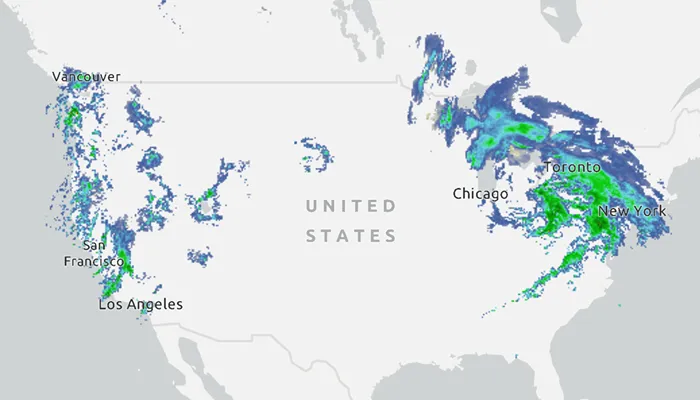
Use case
WMS is an OGC standard for displaying maps from images that are dynamically-generated on a web server. WMS is particularly useful for data that changes frequently, contains cartographically complex detail, or requires an open source data standard.
How to use the sample
The map will load automatically when the sample starts.
How it works
- Create a
WmsLayerspecifying the URL of the service and the names of layers you want to display.- Note: The name comes from the
Nameproperty, not theTitleproperty. On many services, the title is human-readable while the name is a numeric identifier.
- Note: The name comes from the
- Add the layer to the map as an operational layer with
map.operationalLayers.add(wmsLayer).
Relevant API
- ArcGISMap
- MapView
- WmsLayer
About the data
This sample uses the WMS service behind the U.S. National Weather Service radar map. Because WMS services generate map images on-the-fly, this layer is always up-to-date with the latest NOAA nowCOAST real-time coastal observations, forecasts, and warnings.
Tags
OGC, web map service, WMS
Sample code
MainActivity.kt
/* * Copyright 2023 Esri * * Licensed under the Apache License, Version 2.0 (the "License"); * you may not use this file except in compliance with the License. * You may obtain a copy of the License at * *    http://www.apache.org/licenses/LICENSE-2.0 * * Unless required by applicable law or agreed to in writing, software * distributed under the License is distributed on an "AS IS" BASIS, * WITHOUT WARRANTIES OR CONDITIONS OF ANY KIND, either express or implied. * See the License for the specific language governing permissions and * limitations under the License. * */
package com.esri.arcgismaps.sample.addwmslayer
import android.os.Bundleimport android.util.Logimport com.esri.arcgismaps.sample.sampleslib.EdgeToEdgeCompatActivityimport androidx.databinding.DataBindingUtilimport androidx.lifecycle.lifecycleScopeimport com.arcgismaps.ApiKeyimport com.arcgismaps.ArcGISEnvironmentimport com.arcgismaps.mapping.ArcGISMapimport com.arcgismaps.mapping.BasemapStyleimport com.arcgismaps.mapping.Viewpointimport com.arcgismaps.mapping.layers.WmsLayerimport com.esri.arcgismaps.sample.addwmslayer.databinding.AddWmsLayerActivityMainBindingimport com.google.android.material.snackbar.Snackbarimport kotlinx.coroutines.launch
class MainActivity : EdgeToEdgeCompatActivity() {
    // set up data binding for the activity    private val activityMainBinding: AddWmsLayerActivityMainBinding by lazy {        DataBindingUtil.setContentView(this, R.layout.add_wms_layer_activity_main)    }
    private val mapView by lazy {        activityMainBinding.mapView    }
    override fun onCreate(savedInstanceState: Bundle?) {        super.onCreate(savedInstanceState)
        // authentication with an API key or named user is        // required to access basemaps and other location services        ArcGISEnvironment.apiKey = ApiKey.create(BuildConfig.ACCESS_TOKEN)        lifecycle.addObserver(mapView)
        // create and add a map with a light gray basemap style        val map = ArcGISMap(BasemapStyle.ArcGISLightGray)
        // apply mapView assignments        mapView.apply {            this.map = map            // set an initial viewpoint to a zoomed out view of North America            setViewpoint(Viewpoint(39.8, -98.6, 10e7))        }
        lifecycleScope.launch {            // if the map load fails, show an error and return            map.load().onFailure {                return@launch showError("Error loading map")            }            // create a list representing names of layers to load from the WMS service            val wmsLayerNames = listOf("conus_base_reflectivity_mosaic")            // create a new WmsLayer with the WMS service url and the layers name list            val wmsLayer = WmsLayer(getString(R.string.wms_layer_url), wmsLayerNames)            // add the wmsLayer to the map as an operational layer            map.operationalLayers.add(wmsLayer)            // if loading the layer fails show an error            wmsLayer.load().onFailure {                showError("Error loading WmsLayer")            }        }    }
    private fun showError(message: String) {        Log.e(localClassName, message)        Snackbar.make(mapView, message, Snackbar.LENGTH_SHORT).show()    }}