Set the map view to a new viewpoint.
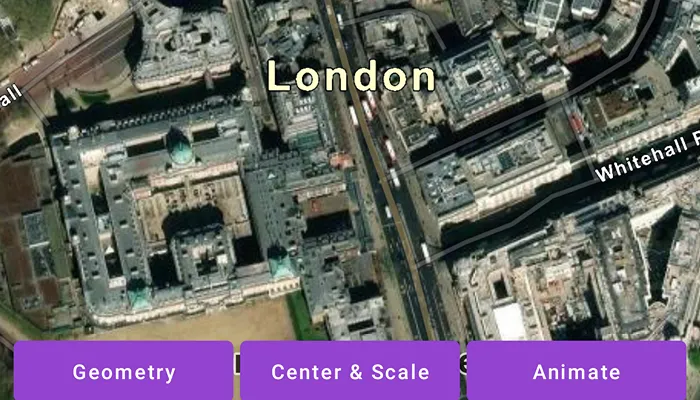
Use case
Programmatically navigate to a specified location in the map or scene. Use this to focus on a particular point or area of interest.
How to use the sample
Select a viewpoint option to see the map view move to that location.
How it works
- Create a new
ArcGISMapobject and set it to theMapViewobject. - Change the map’s
Viewpointusing one of the available methods:- Use
MapView.setViewpointAnimated(...)to pan to a viewpoint over the specified length of time. - Use
MapView.setViewpointCenter(...)to center the viewpoint on aPointand set a distance from the ground using a scale. - Use
MapView.setViewpointGeometry(...)to set the viewpoint to a givenGeometry.
- Use
Relevant API
- ArcGISMap
- Geometry
- MapView
- Point
- Viewpoint
Additional information
Below are multiple ways to set a viewpoint:
mapView.setViewpoint(...)mapView.setViewpointCenter(...)mapView.setViewpointGeometry(...)mapView.setViewpointRotation(...)mapView.setViewpointScale(...)mapView.setViewpointAnimated(...)Tags
animate, extent, pan, rotate, scale, view, zoom
Sample code
MainActivity.kt
/* Copyright 2022 Esri * * Licensed under the Apache License, Version 2.0 (the "License"); * you may not use this file except in compliance with the License. * You may obtain a copy of the License at * *    http://www.apache.org/licenses/LICENSE-2.0 * * Unless required by applicable law or agreed to in writing, software * distributed under the License is distributed on an "AS IS" BASIS, * WITHOUT WARRANTIES OR CONDITIONS OF ANY KIND, either express or implied. * See the License for the specific language governing permissions and * limitations under the License. * */
package com.esri.arcgismaps.sample.changeviewpoint
import android.os.Bundleimport android.view.Viewimport com.esri.arcgismaps.sample.sampleslib.EdgeToEdgeCompatActivityimport androidx.databinding.DataBindingUtilimport androidx.lifecycle.lifecycleScopeimport com.arcgismaps.ApiKeyimport com.arcgismaps.ArcGISEnvironmentimport com.arcgismaps.geometry.Pointimport com.arcgismaps.geometry.PolylineBuilderimport com.arcgismaps.geometry.SpatialReferenceimport com.arcgismaps.mapping.ArcGISMapimport com.arcgismaps.mapping.BasemapStyleimport com.arcgismaps.mapping.Viewpointimport com.esri.arcgismaps.sample.changeviewpoint.databinding.ChangeViewpointActivityMainBindingimport kotlinx.coroutines.launch
class MainActivity : EdgeToEdgeCompatActivity() {
    private val viewpointScale = 5000.0
    // set up data binding for the activity    private val activityMainBinding: ChangeViewpointActivityMainBinding by lazy {        DataBindingUtil.setContentView(this, R.layout.change_viewpoint_activity_main)    }
    private val mapView by lazy {        activityMainBinding.mapView    }
    override fun onCreate(savedInstanceState: Bundle?) {        super.onCreate(savedInstanceState)
        // authentication with an API key or named user is        // required to access basemaps and other location services        ArcGISEnvironment.apiKey = ApiKey.create(BuildConfig.ACCESS_TOKEN)        // add the MapView to the lifecycle        lifecycle.addObserver(mapView)        // create and add a map with a imagery basemap style        mapView.map = ArcGISMap(BasemapStyle.ArcGISImagery)        // set the start point of the ViewPoint        val startPoint = Point(-14093.0, 6711377.0, SpatialReference.webMercator())        lifecycleScope.launch {            // set viewpoint of map view to starting point and scale            mapView.setViewpointCenter(startPoint, viewpointScale)        }    }
    fun onGeometryClicked(view: View) {        // create a collection of points around Westminster        val westminsterPolylineBuilder = PolylineBuilder(SpatialReference.webMercator()) {            addPoint(Point(-13823.0, 6710390.0))            addPoint(Point(-13823.0, 6710150.0))            addPoint(Point(-14680.0, 6710390.0))            addPoint(Point(-14680.0, 6710150.0))        }        val geometry = westminsterPolylineBuilder.toGeometry()        // set the map view's viewpoint to Westminster        lifecycleScope.launch {            mapView.setViewpointGeometry(geometry)        }    }
    fun onCenterClicked(view: View) {        // create the Waterloo location point        val waterlooPoint = Point(-12153.0, 6710527.0, SpatialReference.webMercator())        // set the map view's viewpoint centered on Waterloo and scaled        lifecycleScope.launch {            mapView.setViewpointCenter(waterlooPoint, viewpointScale)        }    }
    fun onAnimateClicked(view: View) {        // create the London location point        val londonPoint = Point(-14093.0, 6711377.0, SpatialReference.webMercator())        // create the viewpoint with the London point and scale        val viewpoint = Viewpoint(londonPoint, viewpointScale)        // set the map view's viewpoint to London with a seven second animation duration        lifecycleScope.launch {            mapView.setViewpointAnimated(viewpoint, 7f)        }    }}