Include an overview or inset map as an additional map view to show the wider context of the primary view.
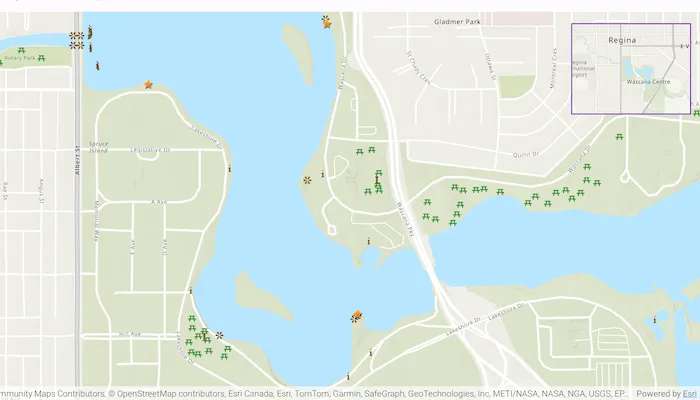
Use case
An overview map provides a useful, smaller-scale overview of the current map view’s location. For example, when you need to inspect a layer with many features while remaining aware of the wider context of the view, use an overview map to help show the extent of the main map view.
How to use the sample
Pan or zoom across the map view to browse through the tourist attractions feature layer and notice the viewpoint and scale of the linked overview map update automatically.
How it works
- Create States to hold the current viewpoint and current visible area of the map.
- Instantiate a
FeatureLayerto display the tourist attraction features. - Create an
ArcGISMapobject, set itsinitialViewpointto the initial value of the viewpoint State, and add theFeatureLayerinto itsoperationalLayers. - In the user-interface, declare a
MapViewto display theArcGISMap. UseonViewpointChangedForCenterAndScaleandonVisibleAreaChangedto keep the viewpoint and visible area States up to date. - In the user-interface, declare an
OverviewMapobject from the ArcGIS Maps SDK Toolkit. Set itsviewpointandvisibleAreato the previously created States.
Relevant API
- ArcGISMap
- MapView
- OverviewMap
About the data
The data used in this sample is the OpenStreetMap Tourist Attractions for North America feature layer, which is scale-dependent and displays at scales larger than 1:160,000.
Additional information
This sample uses the overview map toolkit component. For information about setting up the toolkit visit the developer guide doc.
Tags
context, inset, map, minimap, overview, preview, small scale, toolkit, view
Sample code
/* Copyright 2025 Esri * * Licensed under the Apache License, Version 2.0 (the "License"); * you may not use this file except in compliance with the License. * You may obtain a copy of the License at * *    http://www.apache.org/licenses/LICENSE-2.0 * * Unless required by applicable law or agreed to in writing, software * distributed under the License is distributed on an "AS IS" BASIS, * WITHOUT WARRANTIES OR CONDITIONS OF ANY KIND, either express or implied. * See the License for the specific language governing permissions and * limitations under the License. * */
package com.esri.arcgismaps.sample.displayoverviewmap.components
import android.app.Applicationimport androidx.compose.runtime.getValueimport androidx.compose.runtime.mutableStateOfimport androidx.compose.runtime.setValueimport androidx.lifecycle.AndroidViewModelimport androidx.lifecycle.viewModelScopeimport com.arcgismaps.data.ServiceFeatureTableimport com.arcgismaps.geometry.Polygonimport com.arcgismaps.mapping.ArcGISMapimport com.arcgismaps.mapping.BasemapStyleimport com.arcgismaps.mapping.Viewpointimport com.arcgismaps.mapping.layers.FeatureLayerimport com.esri.arcgismaps.sample.sampleslib.components.MessageDialogViewModelimport kotlinx.coroutines.launch
class DisplayOverviewMapViewModel(app: Application) : AndroidViewModel(app) {
    private val initialViewpoint = Viewpoint(latitude = 50.431999, longitude = -104.607293, scale = 10e3)
    // the current viewpoint of the map    var viewpoint by mutableStateOf(initialViewpoint)    // the current visible area of the map    var visibleArea: Polygon? by mutableStateOf(null)
    // set up feature layer    private val touristAttractionsUrl =        "https://services6.arcgis.com/Do88DoK2xjTUCXd1/arcgis/rest/services/OSM_NA_Tourism/FeatureServer/0"    private val touristAttractionsTable = ServiceFeatureTable(touristAttractionsUrl)    private val featureLayerTouristAttractions = FeatureLayer.createWithFeatureTable(touristAttractionsTable)
    // the map used by MapView    val arcGISMap = ArcGISMap(BasemapStyle.ArcGISTopographic).apply {        initialViewpoint = viewpoint        // add tourist attractions feature layer to the map        operationalLayers.add(featureLayerTouristAttractions)    }
    // Create a message dialog view model for handling error messages    val messageDialogVM = MessageDialogViewModel()
    init {        viewModelScope.launch {            arcGISMap.load().onFailure { messageDialogVM.showMessageDialog(it) }        }    }}
/* Copyright 2025 Esri * * Licensed under the Apache License, Version 2.0 (the "License"); * you may not use this file except in compliance with the License. * You may obtain a copy of the License at * * http://www.apache.org/licenses/LICENSE-2.0 * * Unless required by applicable law or agreed to in writing, software * distributed under the License is distributed on an "AS IS" BASIS, * WITHOUT WARRANTIES OR CONDITIONS OF ANY KIND, either express or implied. * See the License for the specific language governing permissions and * limitations under the License. * */
package com.esri.arcgismaps.sample.displayoverviewmap
import android.os.Bundleimport androidx.activity.ComponentActivityimport androidx.activity.compose.setContentimport androidx.activity.enableEdgeToEdgeimport androidx.compose.material3.MaterialThemeimport androidx.compose.material3.Surfaceimport androidx.compose.runtime.Composableimport com.arcgismaps.ApiKeyimport com.arcgismaps.ArcGISEnvironmentimport com.esri.arcgismaps.sample.sampleslib.theme.SampleAppThemeimport com.esri.arcgismaps.sample.displayoverviewmap.screens.DisplayOverviewMapScreen
class MainActivity : ComponentActivity() {
override fun onCreate(savedInstanceState: Bundle?) { super.onCreate(savedInstanceState) // authentication with an API key or named user is // required to access basemaps and other location services ArcGISEnvironment.apiKey = ApiKey.create(BuildConfig.ACCESS_TOKEN)
enableEdgeToEdge() setContent { SampleAppTheme { DisplayOverviewMapApp() } } }
@Composable private fun DisplayOverviewMapApp() { Surface(color = MaterialTheme.colorScheme.background) { DisplayOverviewMapScreen( sampleName = getString(R.string.display_overview_map_app_name) ) } }}/* Copyright 2025 Esri * * Licensed under the Apache License, Version 2.0 (the "License"); * you may not use this file except in compliance with the License. * You may obtain a copy of the License at * * http://www.apache.org/licenses/LICENSE-2.0 * * Unless required by applicable law or agreed to in writing, software * distributed under the License is distributed on an "AS IS" BASIS, * WITHOUT WARRANTIES OR CONDITIONS OF ANY KIND, either express or implied. * See the License for the specific language governing permissions and * limitations under the License. * */
package com.esri.arcgismaps.sample.displayoverviewmap.screens
import androidx.compose.foundation.borderimport androidx.compose.foundation.layout.Boximport androidx.compose.foundation.layout.fillMaxSizeimport androidx.compose.foundation.layout.paddingimport androidx.compose.foundation.layout.sizeimport androidx.compose.material3.MaterialThemeimport androidx.compose.material3.Scaffoldimport androidx.compose.runtime.Composableimport androidx.compose.ui.Alignmentimport androidx.compose.ui.Modifierimport androidx.compose.ui.unit.dpimport androidx.lifecycle.viewmodel.compose.viewModelimport com.arcgismaps.toolkit.geoviewcompose.MapViewimport com.arcgismaps.toolkit.geoviewcompose.OverviewMapimport com.esri.arcgismaps.sample.displayoverviewmap.components.DisplayOverviewMapViewModelimport com.esri.arcgismaps.sample.sampleslib.components.MessageDialogimport com.esri.arcgismaps.sample.sampleslib.components.SampleTopAppBar
/** * Main screen layout for the sample app */@Composablefun DisplayOverviewMapScreen(sampleName: String) { val mapViewModel: DisplayOverviewMapViewModel = viewModel()
Scaffold( topBar = { SampleTopAppBar(title = sampleName) }, content = { Box ( modifier = Modifier .fillMaxSize() .padding(it), ) { MapView( modifier = Modifier.fillMaxSize(), arcGISMap = mapViewModel.arcGISMap, onViewpointChangedForCenterAndScale = { mapViewModel.viewpoint = it }, onVisibleAreaChanged = { mapViewModel.visibleArea = it } ) OverviewMap( viewpoint = mapViewModel.viewpoint, visibleArea = mapViewModel.visibleArea, modifier = Modifier .size(250.dp, 200.dp) .padding(20.dp) .border(width = 2.dp, color = MaterialTheme.colorScheme.primary) .align(Alignment.TopEnd) ) }
mapViewModel.messageDialogVM.apply { if (dialogStatus) { MessageDialog( title = messageTitle, description = messageDescription, onDismissRequest = ::dismissDialog ) } } } )}