Find features in a feature table which match an SQL query.
Use case
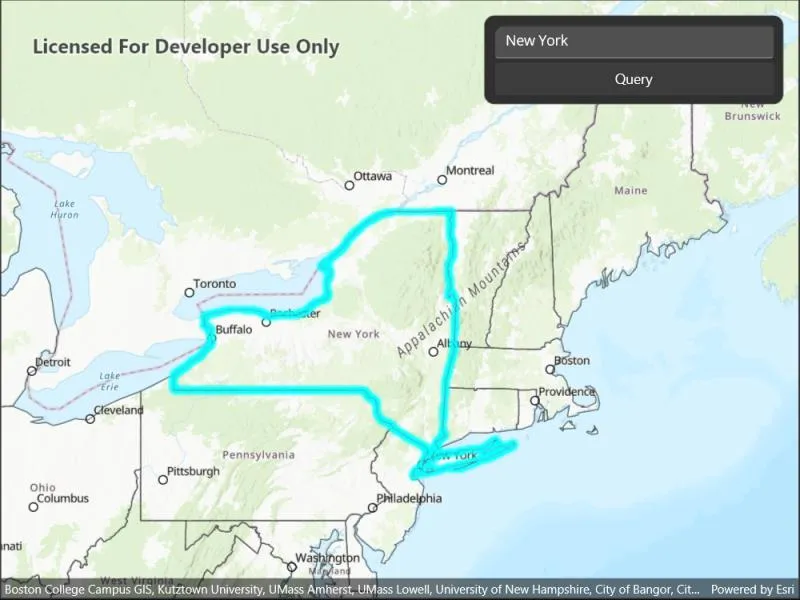
Query expressions can be used in ArcGIS to select a subset of features from a feature table. This is most useful in large or complicated data sets. A possible use case might be on a feature table marking the location of street furniture through a city. A user may wish to query by a TYPE column to return “benches”. In this sample, we query a U.S. state by STATE_NAME from a feature table containing all U.S. states.
How to use the sample
Input the name of a U.S. state into the text field. When you tap the button, a query is performed and the matching features are highlighted or an error is returned.
How it works
- Create a
ServiceFeatureTableusing the URL of a feature service. - Create a
QueryParameterswith a where clause specified using theWhereClauseproperty. - Perform the query using
QueryFeaturesAsync(query)on the service feature table. - When complete, the query will return a
FeatureQueryResultwhich can be iterated over to get the matching features.
Relevant API
- FeatureLayer
- FeatureQueryResult
- QueryParameters
- ServiceFeatureTable
About the data
This sample uses U.S. State polygon features from the USA 2016 Daytime Population feature service.
Tags
query, search
Sample code
// Copyright 2022 Esri.//// Licensed under the Apache License, Version 2.0 (the "License"); you may not use this file except in compliance with the License.// You may obtain a copy of the License at: http://www.apache.org/licenses/LICENSE-2.0//// Unless required by applicable law or agreed to in writing, software distributed under the License is distributed on an// "AS IS" BASIS, WITHOUT WARRANTIES OR CONDITIONS OF ANY KIND, either express or implied. See the License for the specific// language governing permissions and limitations under the License.
using Esri.ArcGISRuntime.Data;using Esri.ArcGISRuntime.Geometry;using Esri.ArcGISRuntime.Mapping;using Esri.ArcGISRuntime.Symbology;
using Color = System.Drawing.Color;
namespace ArcGIS.Samples.FeatureLayerQuery{    [ArcGIS.Samples.Shared.Attributes.Sample(        name: "Feature layer query",        category: "Data",        description: "Find features in a feature table which match an SQL query.",        instructions: "Input the name of a U.S. state into the text field. When you tap the button, a query is performed and the matching features are highlighted or an error is returned.",        tags: new[] { "query", "search" })]    public partial class FeatureLayerQuery : ContentPage    {        // Create reference to service of US States        private string _statesUrl = "https://sampleserver6.arcgisonline.com/arcgis/rest/services/USA/MapServer/2";
        // Create globally available feature table for easy referencing        private ServiceFeatureTable _featureTable;
        // Create globally available feature layer for easy referencing        private FeatureLayer _featureLayer;
        public FeatureLayerQuery()        {            InitializeComponent();
            // Create the UI, setup the control references and execute initialization            Initialize();        }
        private void Initialize()        {            // Create new Map with basemap            Map myMap = new Map(BasemapStyle.ArcGISTopographic);
            // Create and set initial map location            MapPoint initialLocation = new MapPoint(                -11000000, 5000000, SpatialReferences.WebMercator);            myMap.InitialViewpoint = new Viewpoint(initialLocation, 100000000);
            // Create feature table using a url            _featureTable = new ServiceFeatureTable(new Uri(_statesUrl));
            // Create feature layer using this feature table            _featureLayer = new FeatureLayer(_featureTable)            {                // Set the Opacity of the Feature Layer                Opacity = 0.6,                // Work around service setting                MaxScale = 10            };
            // Create a new renderer for the States Feature Layer.            SimpleLineSymbol lineSymbol = new SimpleLineSymbol(SimpleLineSymbolStyle.Solid, Color.Black, 1);            SimpleFillSymbol fillSymbol = new SimpleFillSymbol(SimpleFillSymbolStyle.Solid, Color.Transparent, lineSymbol);
            // Set States feature layer renderer            _featureLayer.Renderer = new SimpleRenderer(fillSymbol);
            // Add feature layer to the map            myMap.OperationalLayers.Add(_featureLayer);
            // Set the selection color            MyMapView.SelectionProperties.Color = Color.Cyan;
            // Assign the map to the MapView            MyMapView.Map = myMap;        }
        private void OnQueryClicked(object sender, EventArgs e)        {            // Remove any previous feature selections that may have been made            _featureLayer.ClearSelection();
            // Begin query process            _ = QueryStateFeature(queryEntry.Text);        }
        private async Task QueryStateFeature(string stateName)        {            try            {                // Create a query parameters that will be used to Query the feature table                QueryParameters queryParams = new QueryParameters();
                // Trim whitespace on the state name to prevent broken queries                string formattedStateName = stateName.Trim().ToUpper();
                // Construct and assign the where clause that will be used to query the feature table                queryParams.WhereClause = "upper(STATE_NAME) LIKE '%" + formattedStateName + "%'";
                // Query the feature table                FeatureQueryResult queryResult = await _featureTable.QueryFeaturesAsync(queryParams);
                // Cast the QueryResult to a List so the results can be interrogated.                List<Feature> features = queryResult.ToList();
                if (features.Any())                {                    // Create an envelope.                    EnvelopeBuilder envBuilder = new EnvelopeBuilder(SpatialReferences.WebMercator);
                    // Loop over each feature from the query result.                    foreach (Feature feature in features)                    {                        // Add the extent of each matching feature to the envelope.                        envBuilder.UnionOf(feature.Geometry.Extent);
                        // Select each feature.                        _featureLayer.SelectFeature(feature);                    }
// Zoom to the extent of the selected feature(s). await MyMapView.SetViewpointGeometryAsync(envBuilder.ToGeometry(), 50); } else { await Application.Current.Windows[0].Page.DisplayAlertAsync("State Not Found!", "Add a valid state name.", "OK"); } } catch (Exception) { await Application.Current.Windows[0].Page.DisplayAlertAsync("Sample error", "An error occurred", "OK"); } } }}<?xml version="1.0" encoding="utf-8" ?><ContentPage x:Class="ArcGIS.Samples.FeatureLayerQuery.FeatureLayerQuery" xmlns="http://schemas.microsoft.com/dotnet/2021/maui" xmlns:x="http://schemas.microsoft.com/winfx/2009/xaml" xmlns:esriUI="clr-namespace:Esri.ArcGISRuntime.Maui;assembly=Esri.ArcGISRuntime.Maui"> <Grid Style="{DynamicResource EsriSampleContainer}"> <esriUI:MapView x:Name="MyMapView" Style="{DynamicResource EsriSampleGeoView}" /> <Border Style="{DynamicResource EsriSampleControlPanel}"> <Grid RowSpacing="5"> <Grid.RowDefinitions> <RowDefinition Height="auto" /> <RowDefinition Height="auto" /> </Grid.RowDefinitions> <Entry x:Name="queryEntry" Grid.Row="0" Text="New York" /> <Button Grid.Row="1" Clicked="OnQueryClicked" Text="Query" /> </Grid> </Border> </Grid></ContentPage>