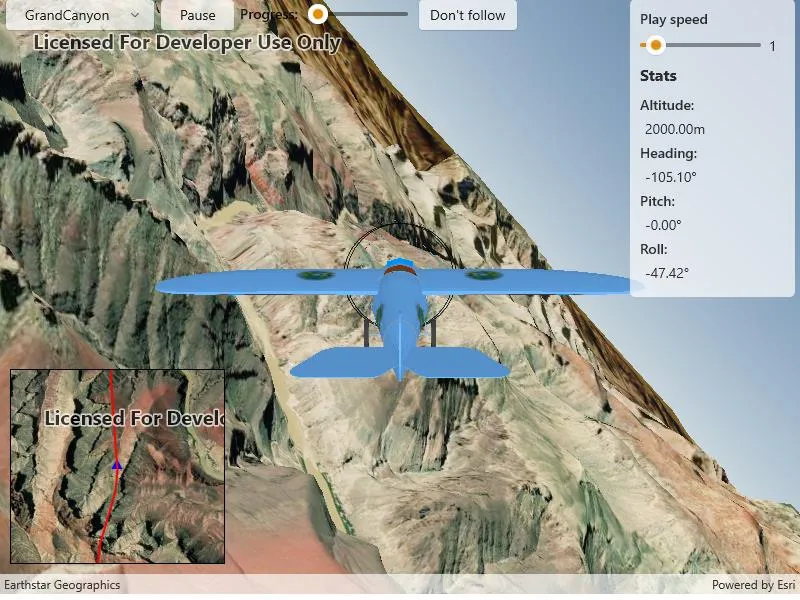
An OrbitGeoElementCameraController follows a graphic while the graphic’s position and rotation are animated.
Use case
Visualize movement through a 3D landscape.
How to use the sample
Animation Controls:
- Select a mission — select a flight path
- Play/Pause — toggles playing and stopping the animation
- Follow/Don’t follow — toggles the camera’s free cam mode and follow
- Mission progress — shows how far along the route the plane is. Slide to change keyframe in animation
- Flight speed — controls speed of animation
How it works
- Create a
GraphicsOverlayand add it to theSceneView. - Create a
ModelSceneSymbolobject. - Create a
Graphicobject and set its geometry to aPoint. - Set the
ModelSceneSymbolobject to the graphic. - Add heading, pitch, and roll attributes to the graphic. Get the attributes from the graphic with
Graphic.attributes. - Create a
SimpleRendererobject and set its expression properties. - Add graphic and a renderer to the graphics overlay.
- Create a
OrbitGeoElementCameraControllerwhich is set to target the graphic. - Assign the camera controller to the
SceneView. - Update the graphic’s location, heading, pitch, and roll.
Relevant API
- Camera
- GlobeCameraController
- Graphic
- GraphicsOverlay
- ModelSceneSymbol
- OrbitGeoElementCameraController
- Renderer
- Scene
- SceneProperties
- SceneView
- SurfacePlacement
Offline data
This sample downloads the following items from ArcGIS Online automatically:
- Bristol.zip - A 3D model for use within a Model Scene Symbol
- GrandCanyon.csv - CSV data for a route through the Grand Canyon
- Hawaii.csv - CSV data for a route in Hawaii
- Pyrenees.csv - CSV data for a route through the Pyrenees
- Snowdon.csv - CSV data for a route near Mount Snowdon
Tags
animation, camera, heading, pitch, roll, rotation, visualize
Sample code
// Copyright 2018 Esri.//// Licensed under the Apache License, Version 2.0 (the "License"); you may not use this file except in compliance with the License.// You may obtain a copy of the License at: http://www.apache.org/licenses/LICENSE-2.0//// Unless required by applicable law or agreed to in writing, software distributed under the License is distributed on an// "AS IS" BASIS, WITHOUT WARRANTIES OR CONDITIONS OF ANY KIND, either express or implied. See the License for the specific// language governing permissions and limitations under the License.
using ArcGIS.Samples.Managers;using Esri.ArcGISRuntime.Geometry;using Esri.ArcGISRuntime.Mapping;using Esri.ArcGISRuntime.Symbology;using Esri.ArcGISRuntime.UI;using Microsoft.UI.Xaml;using Microsoft.UI.Xaml.Controls;using System;using System.Collections.Generic;using System.Diagnostics;using System.IO;using System.Linq;using System.Threading.Tasks;
namespace ArcGIS.WinUI.Samples.Animate3DGraphic{    [ArcGIS.Samples.Shared.Attributes.Sample(        name: "Animate 3D graphic",        category: "GraphicsOverlay",        description: "An `OrbitGeoElementCameraController` follows a graphic while the graphic's position and rotation are animated.",        instructions: "Animation Controls:",        tags: new[] { "animation", "camera", "heading", "pitch", "roll", "rotation", "visualize" })]    [ArcGIS.Samples.Shared.Attributes.OfflineData("290f0c571c394461a8b58b6775d0bd63", "e87c154fb9c2487f999143df5b08e9b1", "5a9b60cee9ba41e79640a06bcdf8084d", "12509ffdc684437f8f2656b0129d2c13", "681d6f7694644709a7c830ec57a2d72b")]    public partial class Animate3DGraphic    {        // URL to the elevation service - provides terrain elevation        private readonly Uri _elevationServiceUrl = new Uri("https://elevation3d.arcgis.com/arcgis/rest/services/WorldElevation3D/Terrain3D/ImageServer");
        // Graphic for highlighting the route in the inset map        private Graphic _routeGraphic;
        // Graphic for highlighting the airplane in the inset map        private Graphic _plane2D;
        // Graphic for showing the 3D plane model in the scene        private Graphic _plane3D;
        // Camera controller for centering the camera on the airplane        private OrbitGeoElementCameraController _orbitCameraController;
        // Timer enables frame-by-frame animation        private DispatcherTimer _animationTimer;
        // Number of frames in the mission animation        private int _frameCount;
        // Index of current frame in the animation        private int _keyframe;
        // Dictionary of mission file names and the corresponding portal item IDs        private readonly Dictionary<string, string> _missionToItemId = new Dictionary<string, string>        {            {"GrandCanyon","290f0c571c394461a8b58b6775d0bd63"},            {"Hawaii", "e87c154fb9c2487f999143df5b08e9b1"},            {"Pyrenees", "5a9b60cee9ba41e79640a06bcdf8084d"},            {"Snowdon", "12509ffdc684437f8f2656b0129d2c13"}        };
        // Array of animation frames for the current mission        //    A MissionFrame describes the position of the plane for a single moment in the animation        private MissionFrame[] _missionData;
        public Animate3DGraphic()        {            InitializeComponent();
            // Create the UI, setup the control references and execute initialization            _ = Initialize();        }
        private async Task Initialize()        {            // Apply appropriate maps to the scene and the inset map view            InsetMapView.Map = new Map(BasemapStyle.ArcGISImageryStandard);            MySceneView.Scene = new Scene(BasemapStyle.ArcGISImageryStandard);
            // Update the mission selection UI            MissionSelectionBox.ItemsSource = _missionToItemId.Keys;            MissionSelectionBox.SelectedIndex = 0;
            // Wire up the selection change event to call the ChangeMission method; this method resets the animation and starts a new mission            MissionSelectionBox.SelectionChanged += async (sender, args) => { await ChangeMission(args.AddedItems[0].ToString()); };
            // Apply the elevation source            Surface surface = new Surface();            ElevationSource elevationSource = new ArcGISTiledElevationSource(_elevationServiceUrl);            surface.ElevationSources.Add(elevationSource);            MySceneView.Scene.BaseSurface = surface;
            // Create and add the graphics overlay            GraphicsOverlay sceneOverlay = new GraphicsOverlay            {                SceneProperties = { SurfacePlacement = SurfacePlacement.Absolute }            };            MySceneView.GraphicsOverlays.Add(sceneOverlay);
            // Create a renderer to handle updating plane's orientation            SimpleRenderer renderer3D = new SimpleRenderer();            RendererSceneProperties renderProperties = renderer3D.SceneProperties;            // Use expressions to keep the renderer properties updated as parameters of the rendered object            renderProperties.HeadingExpression = "[HEADING]";            renderProperties.PitchExpression = "[PITCH]";            renderProperties.RollExpression = "[ROLL]";            // Apply the renderer to the scene view's overlay            sceneOverlay.Renderer = renderer3D;
            // Create renderer to symbolize plane and update plane orientation in the inset map            SimpleRenderer renderer2D = new SimpleRenderer();            // Create the symbol that will be used for the plane            SimpleMarkerSymbol plane2DSymbol = new SimpleMarkerSymbol(SimpleMarkerSymbolStyle.Triangle, System.Drawing.Color.Blue, 10);            // Apply the symbol to the renderer            renderer2D.Symbol = plane2DSymbol;            // Apply a rotation expression to the renderer            renderer2D.RotationExpression = "[ANGLE]";            // Update the inset map with a new GraphicsOverlay based on the renderer            GraphicsOverlay insetMapOverlay = new GraphicsOverlay            {                Renderer = renderer2D            };            InsetMapView.GraphicsOverlays.Add(insetMapOverlay);
            // Create placeholder graphic for showing the mission route in the inset map            SimpleLineSymbol routeSymbol = new SimpleLineSymbol(SimpleLineSymbolStyle.Solid, System.Drawing.Color.Red, 2);            _routeGraphic = new Graphic { Symbol = routeSymbol };            insetMapOverlay.Graphics.Add(_routeGraphic);
            // Create the plane graphic; this is symbolized as a blue triangle because of renderer implemented above            // Create the attribute dictionary            Dictionary<string, object> plane2DAttributes = new Dictionary<string, object>();            // Set the angle for the plane graphic            plane2DAttributes["ANGLE"] = 0f;            // Create the graphic from the attributes and the initial point            _plane2D = new Graphic(new MapPoint(0, 0, SpatialReferences.Wgs84), plane2DAttributes);            // Add the plane graphic to the inset map via the overlay            insetMapOverlay.Graphics.Add(_plane2D);
            try            {                // Create the model graphic for the plane                // Get the path to the 3D model                string modelPath = GetModelPath();                // Create the scene symbol from the path to the model                ModelSceneSymbol plane3DSymbol = await ModelSceneSymbol.CreateAsync(new Uri(modelPath), 1.0);                // Create the graphic with an initial location and the plane symbol                _plane3D = new Graphic(new MapPoint(0, 0, 0, SpatialReferences.Wgs84), plane3DSymbol);                // Add the plane to the overlay                sceneOverlay.Graphics.Add(_plane3D);
                // Create the orbit camera controller to follow the plane                _orbitCameraController = new OrbitGeoElementCameraController(_plane3D, 20.0)                {                    CameraPitchOffset = 75.0                };                MySceneView.CameraController = _orbitCameraController;
                // Create a timer; this will enable animating the plane                _animationTimer = new DispatcherTimer()                {                    // This is the duration of the timer in milliseconds. This controls the animation speed (fps)                    Interval = new TimeSpan(0, 0, 0, 0, 60)                };
                _animationTimer.Tick += AnimatePlane;
                // Set the initial mission for when the sample loads                await ChangeMission(_missionToItemId.Keys.First());            }            catch (Exception e)            {                await new MessageDialog2(e.ToString(), "Error").ShowAsync();            }        }
        private async Task ChangeMission(string mission)        {            // Stop animating the current mission            _animationTimer.Stop();
            // Get mission data            _missionData = GetMissionData(mission);
            // Draw mission route on the inset            // Create a collection of points to hold the mission            PointCollection points = new PointCollection(SpatialReferences.Wgs84);            // Add all of the points from the mission to the point collection            points.AddPoints(_missionData.Select(m => m.ToMapPoint()));            // Create a polyline to symbolize the route from the point collection            Polyline route = new Polyline(points);            // Update the route graphic's geometry with the newly created route polyline            _routeGraphic.Geometry = route;            // Update the inset map's scale            await InsetMapView.SetViewpointScaleAsync(100000);
            // Update animation parameters            _frameCount = _missionData.Length;            _keyframe = 0;
            // Set the MissionPlayPause button back to the currently 'playing' state            MissionPlayPause.Content = "Pause";
            // At the start of a new mission, follow the animated plane            FollowPlane(true);            _animationTimer.Start();        }
        private MissionFrame[] GetMissionData(string mission)        {            // Get the path to the file            string filePath = GetMissionFilePath(mission);
            // Read the file text            string fileContents = File.ReadAllText(filePath);
            // Split the file contents into a list of lines            return fileContents.Split('\n')                // Then for each line, create a MissionFrame object                .Select(MissionFrame.Create)                // Then remove any null MissionFrames                .Where(missionPart => missionPart != null)                // Finally return that list of MissionFrames as an array                .ToArray();        }
        private string GetMissionFilePath(string mission)        {            string itemId = _missionToItemId[mission];            string filename = mission + ".csv";
            return DataManager.GetDataFolder(itemId, filename);        }
        private void AnimatePlane(object sender, object elapsedEventArgs)        {            // Get the next position; % prevents going out of bounds even if the keyframe value is            //     changed unexpectedly (e.g. due to user interaction with the progress slider).            MissionFrame currentFrame = _missionData[_keyframe % _frameCount];
            // Update the UI            double missionProgress = _keyframe / (double)_frameCount;
            // This is needed because the event could be running on a non-UI thread            DispatcherQueue.TryEnqueue(Microsoft.UI.Dispatching.DispatcherQueuePriority.Normal, () =>            {                // Update the progress slider                MissionProgressBar.Value = missionProgress;
                // Update stats display                AltitudeTextBlock.Text = $"{currentFrame.Elevation:F}m";                HeadingTextBlock.Text = $"{currentFrame.Heading:F}\u00b0";                PitchTextBlock.Text = $"{currentFrame.Pitch:F}\u00b0";                RollTextBlock.Text = $"{currentFrame.Roll:F}\u00b0";            });
            // Update plane's position            _plane3D.Geometry = currentFrame.ToMapPoint();            _plane3D.Attributes["HEADING"] = currentFrame.Heading;            _plane3D.Attributes["PITCH"] = currentFrame.Pitch;            _plane3D.Attributes["ROLL"] = currentFrame.Roll;
            // Update the inset map; plane symbol position            _plane2D.Geometry = currentFrame.ToMapPoint();            // Update inset's viewpoint and heading            Viewpoint vp = new Viewpoint(currentFrame.ToMapPoint(), InsetMapView.MapScale,                360 + (float)currentFrame.Heading);            InsetMapView.SetViewpoint(vp);
            // Update the keyframe. This advances the animation            _keyframe++;
            // Restart the animation if it has finished            if (_keyframe >= _frameCount)            {                _keyframe = 0;            }        }
        private static string GetModelPath()        {            return DataManager.GetDataFolder("681d6f7694644709a7c830ec57a2d72b", "Bristol.dae");        }
        private void MissionPlayPause_Click(object sender, RoutedEventArgs e)        {            // Get a reference to the button that sent the event            Button playButton = (Button)sender;
            // Get the text of the button            string playtext = playButton.Content?.ToString();
            switch (playtext)            {                // Resume the animation                case "Play":                    playButton.Content = "Pause";                    _animationTimer.Start();                    break;                // Stop the animation                case "Pause":                    playButton.Content = "Play";                    _animationTimer.Stop();                    break;            }        }
        private void MissionProgressOnSeek(object sender, Microsoft.UI.Xaml.Controls.Primitives.RangeBaseValueChangedEventArgs e)        {            // Get a reference to the slider that sent the event            Slider sliderControl = (Slider)sender;
            // Return if the user didn't change the progress            //    (this event is also fired when the value is changed programmatically)            if (sliderControl.FocusState == FocusState.Unfocused)            {                return;            }
            // Stop the animation            _animationTimer.Stop();
            // Get the new mission progress            double missionProgress = sliderControl.Value;
            // Update the keyframe based on the progress            _keyframe = (int)(missionProgress * _frameCount);
            // Set the MissionPlayPause button back to the currently 'playing' state            MissionPlayPause.Content = "Pause";
            // Restart the animation            _animationTimer.Start();        }
        private void ToggleFollowPlane(object sender, RoutedEventArgs e)        {            // Get the current text of the button            FollowPlane(CameraControlButton.Content.ToString() == "Follow");        }
        private void FollowPlane(bool follow)        {            if (follow)            {                CameraControlButton.Content = "Don't follow";                MySceneView.CameraController = _orbitCameraController;            }            else            {                // Stop following                CameraControlButton.Content = "Follow";
                // Setting the scene view's camera controller to null has the effect of resetting the value to the default                MySceneView.CameraController = null;            }        }
        private void MissionPlaySpeedChanged(object sender, Microsoft.UI.Xaml.Controls.Primitives.RangeBaseValueChangedEventArgs e)        {            Slider sliderControl = (Slider)sender;
            // Return if timer not initialized yet            if (_animationTimer == null)            {                return;            }
            // Get the speed multiplier from the slider value            double speedMultiplier = sliderControl.Value;
            // Stop the animation            _animationTimer.Stop();
            // Update the animation speed            _animationTimer.Interval = new TimeSpan(0, 0, 0, 0, (int)(60 / speedMultiplier));
            // Set the MissionPlayPause button back to the currently 'playing' state            MissionPlayPause.Content = "Pause";
            // Restart the animation            _animationTimer.Start();        }
        /// <summary>        /// Private helper class represents a single frame in the animation        /// </summary>        private class MissionFrame        {            private double Longitude { get; }            private double Latitude { get; }            public double Elevation { get; }            public double Heading { get; }            public double Pitch { get; }            public double Roll { get; }
            /// <summary>            /// Private constructor ensures that only the factory method (Create) can be called.            /// </summary>            /// <param name="missionLine">A string describing a single frame in the mission animation.</param>            private MissionFrame(string missionLine)            {                // Split the string into a list of entries (columns)                // Example line: -156.3666517,20.6255059,999.999908,83.77659,0.0000105,-47.766567                string[] missionFrameParameters = missionLine.Split(',');
                // Throw if the line isn't valid                if (missionFrameParameters.Length != 6)                {                    throw new Exception("Invalid mission part definition");                }
                // Populate the object's properties from the array of parameters                Longitude = Convert.ToDouble(missionFrameParameters[0]);                Latitude = Convert.ToDouble(missionFrameParameters[1]);                Elevation = Convert.ToDouble(missionFrameParameters[2]);                Heading = Convert.ToDouble(missionFrameParameters[3]);                Pitch = Convert.ToDouble(missionFrameParameters[4]);                Roll = Convert.ToDouble(missionFrameParameters[5]);            }
            /// <summary>            /// Creates a new MissionFrame.            /// The private constructor + static construction method allows            ///     for keeping the exception-handling logic for the constructor            ///     internal to the class.            /// </summary>            /// <param name="missionLine">A string describing a single frame in the mission animation</param>            /// <returns>Constructed MissionFrame or null if the line is invalid</returns>            public static MissionFrame Create(string missionLine)            {                try                {                    return new MissionFrame(missionLine);                }                catch (Exception ex)                {                    Debug.WriteLine(ex.Message);                    return null;                }            }
public MapPoint ToMapPoint() { return new MapPoint(Longitude, Latitude, Elevation, SpatialReferences.Wgs84); } } }}<UserControl x:Class="ArcGIS.WinUI.Samples.Animate3DGraphic.Animate3DGraphic" xmlns="http://schemas.microsoft.com/winfx/2006/xaml/presentation" xmlns:x="http://schemas.microsoft.com/winfx/2006/xaml" xmlns:esriUI="using:Esri.ArcGISRuntime.UI.Controls"> <UserControl.Resources> <Style x:Key="LabelStyle" TargetType="TextBlock"> <Setter Property="FontWeight" Value="SemiBold" /> </Style> </UserControl.Resources> <Grid> <Grid.RowDefinitions> <RowDefinition Height="Auto" /> <RowDefinition Height="*" /> <RowDefinition Height="225" /> </Grid.RowDefinitions> <Grid.ColumnDefinitions> <ColumnDefinition Width="225" /> <ColumnDefinition Width="*" /> <ColumnDefinition Width="175" /> </Grid.ColumnDefinitions> <esriUI:SceneView x:Name="MySceneView" Grid.Row="0" Grid.RowSpan="3" Grid.Column="0" Grid.ColumnSpan="3" AtmosphereEffect="Realistic" /> <StackPanel Grid.Row="0" Grid.Column="0" Grid.ColumnSpan="2" Margin="5" Orientation="Horizontal"> <ComboBox x:Name="MissionSelectionBox" MinWidth="150" VerticalAlignment="Top" HorizontalContentAlignment="Center" /> <Button x:Name="MissionPlayPause" MinWidth="75" Margin="5,0,0,0" VerticalAlignment="Top" Click="MissionPlayPause_Click" Content="Pause" /> <TextBlock Margin="5" VerticalAlignment="Top" Style="{StaticResource LabelStyle}" Text="Progress:" /> <Slider x:Name="MissionProgressBar" Width="100" Margin="5,-2,5,0" VerticalAlignment="Top" Maximum="1" Minimum="0" StepFrequency=".01" ValueChanged="MissionProgressOnSeek" /> <Button x:Name="CameraControlButton" MinWidth="100" Margin="5,0,0,0" VerticalAlignment="Top" Click="ToggleFollowPlane" Content="Don't follow" /> </StackPanel> <Border Grid.Row="0" Grid.Column="2" Margin="5" Padding="5" CornerRadius="5"> <Border.Background> <SolidColorBrush Opacity="0.7" Color="White" /> </Border.Background> <StackPanel Margin="5" Opacity=".9"> <TextBlock Style="{StaticResource LabelStyle}" Text="Play speed" /> <Grid> <Grid.ColumnDefinitions> <ColumnDefinition Width="*" /> <ColumnDefinition Width="Auto" /> </Grid.ColumnDefinitions> <Slider x:Name="MissionPlaySpeedSlider" Grid.Column="0" Maximum="8" Minimum="0.5" ValueChanged="MissionPlaySpeedChanged" Value="1" /> <TextBlock Grid.Column="1" Margin="8" Text="{Binding ElementName=MissionPlaySpeedSlider, Path=Value}" /> </Grid> <TextBlock Margin="0,0,0,10" FontSize="16" FontWeight="Bold" Text="Stats" /> <TextBlock Style="{StaticResource LabelStyle}" Text="Altitude:" /> <TextBlock x:Name="AltitudeTextBlock" Margin="5" /> <TextBlock Style="{StaticResource LabelStyle}" Text="Heading:" /> <TextBlock x:Name="HeadingTextBlock" Margin="5" /> <TextBlock Style="{StaticResource LabelStyle}" Text="Pitch:" /> <TextBlock x:Name="PitchTextBlock" Margin="5" /> <TextBlock Style="{StaticResource LabelStyle}" Text="Roll:" /> <TextBlock x:Name="RollTextBlock" Margin="5" FontWeight="Normal" /> </StackPanel> </Border> <esriUI:MapView x:Name="InsetMapView" Grid.Row="2" Grid.Column="0" Margin="10,0,0,30" BorderBrush="Black" BorderThickness="1" IsAttributionTextVisible="False" /> </Grid></UserControl>