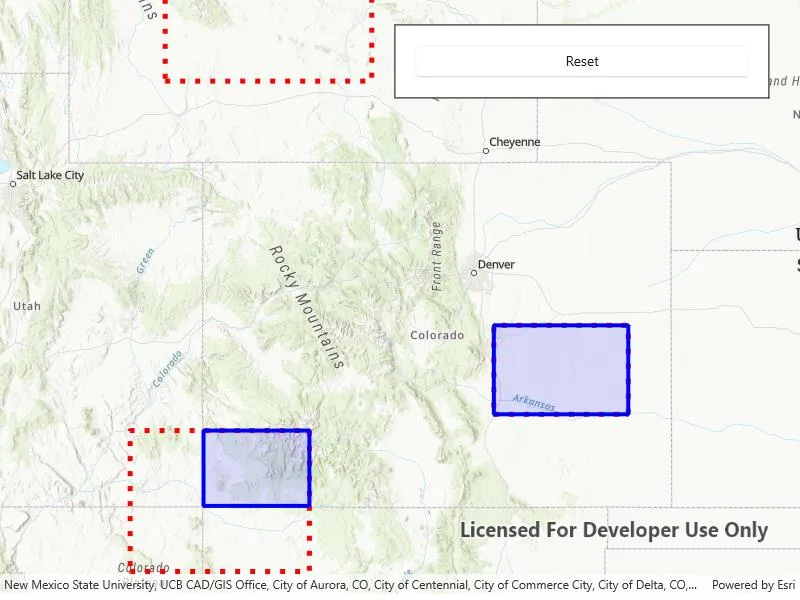
Clip a geometry with another geometry.
Use case
Create a new set of geometries for analysis (e.g. displaying buffer zones around abandoned coal mine shafts in an area of planned urban development) by clipping intersecting geometries.
How to use the sample
Click the “Clip” button to clip the blue graphic with the red dashed envelopes.
How it works
- Use the static extension method
GeometryEngine.Clip()to generate a clippedGeometry, passing in an existingGeometryand anEnvelopeas parameters. The existing geometry will be clipped where it intersects an envelope. - Create a new
Graphicfrom the clipped geometry and add it to aGraphicsOverlayon theMapView.
Relevant API
- Envelope
- Geometry
- GeometryEngine.Clip
- Graphic
- GraphicsOverlay
Additional information
Note: the resulting geometry may be null if the envelope does not intersect the geometry being clipped.
Tags
analysis, clip, geometry
Sample code
// Copyright 2018 Esri.//// Licensed under the Apache License, Version 2.0 (the "License"); you may not use this file except in compliance with the License.// You may obtain a copy of the License at: http://www.apache.org/licenses/LICENSE-2.0//// Unless required by applicable law or agreed to in writing, software distributed under the License is distributed on an// "AS IS" BASIS, WITHOUT WARRANTIES OR CONDITIONS OF ANY KIND, either express or implied. See the License for the specific// language governing permissions and limitations under the License.
using Esri.ArcGISRuntime.Geometry;using Esri.ArcGISRuntime.Mapping;using Esri.ArcGISRuntime.Symbology;using Esri.ArcGISRuntime.UI;using Microsoft.UI.Xaml;using System.Linq;
namespace ArcGIS.WinUI.Samples.ClipGeometry{    [ArcGIS.Samples.Shared.Attributes.Sample(        name: "Clip geometry",        category: "Geometry",        description: "Clip a geometry with another geometry.",        instructions: "Click the \"Clip\" button to clip the blue graphic with the red dashed envelopes.",        tags: new[] { "analysis", "clip", "geometry" })]    public partial class ClipGeometry    {        // Graphics overlay to display input geometries for the clip operation.        private GraphicsOverlay _inputGeometriesGraphicsOverlay;
        // Graphics overlay to display the resulting geometries from the three GeometryEngine.Clip operations.        private GraphicsOverlay _clipAreasGraphicsOverlay;
        // Graphics to represent geometry involved in the clip operation.        private Graphic _coloradoGraphic;        private Graphic _outsideGraphic;        private Graphic _containedGraphic;        private Graphic _intersectingGraphic;
        private bool _clipped;
        public ClipGeometry()        {            InitializeComponent();            Initialize();        }
        private void Initialize()        {            // Create a graphics overlay to hold the input geometries for the clip operation.            _inputGeometriesGraphicsOverlay = new GraphicsOverlay();
            // Add the input geometries graphics overlay to the MapView.            MyMapView.GraphicsOverlays.Add(_inputGeometriesGraphicsOverlay);
            // Create a graphics overlay to hold the resulting geometries from the three GeometryEngine.Clip operations.            _clipAreasGraphicsOverlay = new GraphicsOverlay();
            // Add the resulting geometries graphics overlay to the MapView.            MyMapView.GraphicsOverlays.Add(_clipAreasGraphicsOverlay);
            // Create a simple line symbol for the 1st parameter of the GeometryEngine.Clip operation - it follows the            // boundary of Colorado.            SimpleLineSymbol coloradoSimpleLineSymbol = new SimpleLineSymbol(                SimpleLineSymbolStyle.Solid, System.Drawing.Color.Blue, 4);
            // Create the color that will be used as the fill for the Colorado graphic. It will be a semi-transparent, blue color.            System.Drawing.Color coloradoFillColor = System.Drawing.Color.FromArgb(34, 0, 0, 255);
            // Create the simple fill symbol for the Colorado graphic - comprised of a fill style, fill color and outline.            SimpleFillSymbol coloradoSimpleFillSymbol = new SimpleFillSymbol(                SimpleFillSymbolStyle.Solid, coloradoFillColor, coloradoSimpleLineSymbol);
            // Create the geometry of the Colorado graphic.            Envelope colorado = new Envelope(                new MapPoint(-11362327.128340, 5012861.290274, SpatialReferences.WebMercator),                new MapPoint(-12138232.018408, 4441198.773776, SpatialReferences.WebMercator));
            // Create the graphic for Colorado - comprised of a polygon shape and fill symbol.            _coloradoGraphic = new Graphic(colorado, coloradoSimpleFillSymbol);
            // Add the Colorado graphic to the input geometries graphics overlay collection.            _inputGeometriesGraphicsOverlay.Graphics.Add(_coloradoGraphic);
            // Create a simple line symbol for the three different clip geometries.            SimpleLineSymbol clipGeomtriesSimpleLineSymbol = new SimpleLineSymbol(                SimpleLineSymbolStyle.Dot, System.Drawing.Color.Red, 5);
            // Create an envelope outside Colorado.            Envelope outsideEnvelope = new Envelope(                new MapPoint(-11858344.321294, 5147942.225174, SpatialReferences.WebMercator),                new MapPoint(-12201990.219681, 5297071.577304, SpatialReferences.WebMercator));
            // Create the graphic for an envelope outside Colorado - comprised of a polyline shape and line symbol.            _outsideGraphic = new Graphic(outsideEnvelope, clipGeomtriesSimpleLineSymbol);
            // Add the envelope outside Colorado graphic to the graphics overlay collection.            _inputGeometriesGraphicsOverlay.Graphics.Add(_outsideGraphic);
            // Create an envelope intersecting Colorado.            Envelope intersectingEnvelope = new Envelope(                new MapPoint(-11962086.479298, 4566553.881363, SpatialReferences.WebMercator),                new MapPoint(-12260345.183558, 4332053.378376, SpatialReferences.WebMercator));
            // Create the graphic for an envelope intersecting Colorado - comprised of a polyline shape and line symbol.            _intersectingGraphic = new Graphic(intersectingEnvelope, clipGeomtriesSimpleLineSymbol);
            // Add the envelope intersecting Colorado graphic to the graphics overlay collection.            _inputGeometriesGraphicsOverlay.Graphics.Add(_intersectingGraphic);
            // Create a envelope inside Colorado.            Envelope containedEnvelope = new Envelope(                new MapPoint(-11655182.595204, 4741618.772994, SpatialReferences.WebMercator),                new MapPoint(-11431488.567009, 4593570.068343, SpatialReferences.WebMercator));
            // Create the graphic for an envelope inside Colorado - comprised of a polyline shape and line symbol.            _containedGraphic = new Graphic(containedEnvelope, clipGeomtriesSimpleLineSymbol);
            // Add the envelope inside Colorado graphic to the graphics overlay collection.            _inputGeometriesGraphicsOverlay.Graphics.Add(_containedGraphic);
            // Get the extent of all of the graphics in the graphics overlay.            Geometry visibleExtent = GeometryEngine.CombineExtents(_inputGeometriesGraphicsOverlay.Graphics.Select(graphic => graphic.Geometry));
            // Create the map for the MapView.            MyMapView.Map = new Map(BasemapStyle.ArcGISTopographic) { InitialViewpoint = new Viewpoint(visibleExtent) };        }
        private void ClipButton_Click(object sender, RoutedEventArgs e)        {            if (!_clipped)            {                ClipGraphics();                _clipped = true;            }            else            {                Reset();                _clipped = false;            }
            ClipButton.Content = _clipped ? "Reset" : "Clip";        }
        private void ClipGraphics()        {            // Remove the Colorado graphic from the input geometries graphics overlay collection. That way it will be easier            // to see the clip versions of the GeometryEngine.Clip operation.            _inputGeometriesGraphicsOverlay.Graphics.Remove(_coloradoGraphic);
            // Loop through each graphic in the input geometries for the clip operation.            foreach (Graphic graphic in _inputGeometriesGraphicsOverlay.Graphics)            {                // Perform the clip operation. The first parameter of the clip operation will always be the Colorado graphic.                // The second parameter of the clip operation will be one of the 3 different clip geometries (_outsideGraphic,                // _containedGraphic, or _intersectingGraphic).                Geometry myGeometry = _coloradoGraphic.Geometry.Clip((Envelope)graphic.Geometry);
                // Only work on returned geometries that are not null.                if (myGeometry != null)                {                    // Create the graphic as a result of the clip operation using the same symbology that was defined for                    // the _coloradoGraphic defined in the Initialize() method previously.                    Graphic clippedGraphic = new Graphic(myGeometry, _coloradoGraphic.Symbol);
                    // Add the clipped graphic to the clip areas graphics overlay collection.                    _clipAreasGraphicsOverlay.Graphics.Add(clippedGraphic);                }            }        }
        private void Reset()        {            // Add the colorado graphic.            _inputGeometriesGraphicsOverlay.Graphics.Add(_coloradoGraphic);
// Remove the clip graphics. _clipAreasGraphicsOverlay.Graphics.Clear(); } }}<UserControl x:Class="ArcGIS.WinUI.Samples.ClipGeometry.ClipGeometry" xmlns="http://schemas.microsoft.com/winfx/2006/xaml/presentation" xmlns:x="http://schemas.microsoft.com/winfx/2006/xaml" xmlns:esriUI="using:Esri.ArcGISRuntime.UI.Controls"> <Grid> <esriUI:MapView x:Name="MyMapView" /> <Border Style="{StaticResource BorderStyle}"> <Button x:Name="ClipButton" HorizontalAlignment="Stretch" Click="ClipButton_Click" Content="Clip" /> </Border> </Grid></UserControl>