Find dynamic entities from a data source that match a query.
Use case
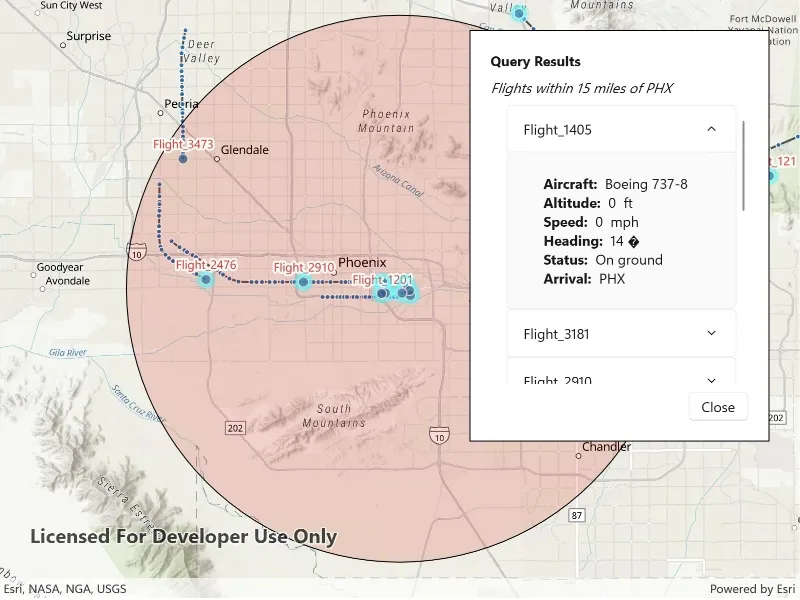
Developers can query a DynamicEntityDataSource to find dynamic entities that meet spatial and/or attribute criteria. The query returns a collection of dynamic entities matching the DynamicEntityQueryParameters or Track IDs at the moment the query is executed. An example of this is a flight tracking app that monitors airspace near a particular airport, allowing the user to monitor flights based on different criteria such as arrival airport or flight number.
How to use the sample
Tap the “Query Flights” button and select a query to perform from the menu. Once the query is complete, a list of the resulting flights will be displayed. Tap on a flight to see its latest attributes in real-time.
How it works
- Create a
DynamicEntityDataSourceto stream dynamic entity events. - Create a
DynamicEntityLayerusing the data source and add it to the map’s operational layers. - Create
DynamicEntityQueryParametersand set its properties to specify the parameters for the query:- To spatially filter results, set the
geometryandspatialRelationship. The spatial relationship isintersectsby default. - To query entities with certain attribute values, set the
whereClause. - To get entities with specific track IDs, modify the
trackIDscollection.
- To spatially filter results, set the
- To perform a dynamic entities query, use
DynamicEntityDataSource.QueryDynamicEntitiesAsync()to query with multiple criteria (such as track IDs, spatial, and/or attribute filters), or useDynamicEntityDataSource.QueryDynamicEntitiesAsync(trackIDs)if you want to query only by track IDs. - When complete, iterate through the returned collection of
DynamicEntityobjects from the result. - Use the
DynamicEntity.DynamicEntityChangedevent to get real-time updates when entity attributes change. - Get the new observation from the resulting
DynamicEntityChangedEventArgsusing theReceivedObservationproperty to update the UI with current information.
Relevant API
- DynamicEntity
- DynamicEntityChangedInfo
- DynamicEntityDataSource
- DynamicEntityDataSourceInfo
- DynamicEntityLayer
- DynamicEntityObservation
- DynamicEntityQueryParameters
- DynamicEntityQueryResult
About the data
This sample uses the PHX Air Traffic JSON portal item, which is hosted on ArcGIS Online and downloaded automatically. The file contains JSON data for mock air traffic around the Phoenix Sky Harbor International Airport in Phoenix, AZ, USA. The decoded data is used to simulate dynamic entity events through a CustomDynamicEntityDataSource, which is displayed on the map with a DynamicEntityLayer.
Additional information
A dynamic entities query is performed on the most recent observation of each dynamic entity in the data source at the time the query is executed. As the dynamic entities change, they may no longer match the query parameters.
Tags
data, dynamic, entity, live, query, real-time, search, stream, track
Sample code
// Copyright 2025 Esri.//// Licensed under the Apache License, Version 2.0 (the "License"); you may not use this file except in compliance with the License.// You may obtain a copy of the License at: http://www.apache.org/licenses/LICENSE-2.0//// Unless required by applicable law or agreed to in writing, software distributed under the License is distributed on an// "AS IS" BASIS, WITHOUT WARRANTIES OR CONDITIONS OF ANY KIND, either express or implied. See the License for the specific// language governing permissions and limitations under the License.
using ArcGIS.Samples.Managers;using Esri.ArcGISRuntime.ArcGISServices;using Esri.ArcGISRuntime.Data;using Esri.ArcGISRuntime.Geometry;using Esri.ArcGISRuntime.Mapping;using Esri.ArcGISRuntime.Mapping.Labeling;using Esri.ArcGISRuntime.RealTime;using Esri.ArcGISRuntime.Symbology;using Esri.ArcGISRuntime.UI;using Microsoft.UI.Xaml;using Microsoft.UI.Xaml.Controls;using System;using System.Collections.Generic;using System.Collections.ObjectModel;using System.Linq;using System.Threading.Tasks;
namespace ArcGIS.WinUI.Samples.QueryDynamicEntities{    [ArcGIS.Samples.Shared.Attributes.Sample(        name: "Query dynamic entities",        category: "Search",        description: "Find dynamic entities from a data source that match a query.",        instructions: "Tap the \"Query Flights\" button and select a query to perform from the menu. Once the query is complete, a list of the resulting flights will be displayed. Tap on a flight to see its latest attributes in real-time.",        tags: new[] { "data", "dynamic", "entity", "live", "query", "real-time", "search", "stream", "track" })]    [ArcGIS.Samples.Shared.Attributes.OfflineData("c78e297e99ad4572a48cdcd0b54bed30")]    public partial class QueryDynamicEntities    {        private CustomStreamService _dynamicEntityDataSource;        private DynamicEntityLayer _dynamicEntityLayer;        private GraphicsOverlay _bufferGraphicsOverlay;        private Esri.ArcGISRuntime.Geometry.Geometry _phoenixAirportBuffer;        private ObservableCollection<FlightInfo> _queryResults;        private readonly MapPoint _phoenixAirport = new MapPoint(-112.0101, 33.4352, SpatialReferences.Wgs84);        private Microsoft.UI.Dispatching.DispatcherQueue _dispatcherQueue;
        public QueryDynamicEntities()        {            InitializeComponent();            _ = Initialize();        }
        // Sets up the map, graphics overlays, UI controls, dispatcher queue, and data source for flight tracking.        private async Task Initialize()        {            try            {                // Get the dispatcher queue for the current thread to enable UI updates from other threads.                _dispatcherQueue = Microsoft.UI.Dispatching.DispatcherQueue.GetForCurrentThread();
                // Create the map with a basemap and initial viewpoint.                MyMapView.Map = new Map(BasemapStyle.ArcGISTopographic);                MyMapView.SetViewpoint(new Viewpoint(_phoenixAirport, 400000));
                // Create a graphics overlay for the airport buffer and add it to the map view.                _bufferGraphicsOverlay = new GraphicsOverlay();                MyMapView.GraphicsOverlays.Add(_bufferGraphicsOverlay);
                // Create a 15-mile geodetic buffer around Phoenix Airport (PHX).                _phoenixAirportBuffer = GeometryEngine.BufferGeodetic(                    _phoenixAirport, 15, LinearUnits.Miles, double.NaN, GeodeticCurveType.Geodesic);
                // Create a semi-transparent fill symbol for the buffer and add it as a graphic to the overlay.                var bufferSymbol = new SimpleFillSymbol(                    SimpleFillSymbolStyle.Solid,                    System.Drawing.Color.FromArgb(40, 255, 0, 0),                    new SimpleLineSymbol(SimpleLineSymbolStyle.Solid, System.Drawing.Color.Black, 1));
                // Add the buffer graphic to the overlay and set it to be initially invisible.                _bufferGraphicsOverlay.Graphics.Add(new Graphic(_phoenixAirportBuffer, bufferSymbol));                _bufferGraphicsOverlay.IsVisible = false;
                // Initialize the collection to hold query results and bind it to the results list UI control.                _queryResults = new ObservableCollection<FlightInfo>();                ResultsList.ItemsSource = _queryResults;
                // Set up the dynamic entity data source and layer for real-time flight tracking.                await SetupDynamicEntityDataSource();            }            catch (Exception ex)            {                await ShowMessageAsync($"Error initializing sample: {ex.Message}", "Error");            }        }
        // Creates and configures the dynamic entity data source and layer for real-time flight tracking.        private async Task SetupDynamicEntityDataSource()        {            try            {                // Define the fields present in the flight data source.                var fields = new List<Field>                {                    new Field(FieldType.Text, "flight_number", "", 50),                    new Field(FieldType.Text, "aircraft", "", 50),                    new Field(FieldType.Float64, "altitude_feet", "", 0),                    new Field(FieldType.Text, "arrival_airport", "", 10),                    new Field(FieldType.Float64, "heading", "", 0),                    new Field(FieldType.Float64, "speed", "", 0),                    new Field(FieldType.Text, "status", "", 50)                };
                // Create the data source info with the unique track ID field and spatial reference.                var dataSourceInfo = new DynamicEntityDataSourceInfo("flight_number", fields)                {                    SpatialReference = SpatialReferences.Wgs84                };
                // Get the path to the local JSON data file containing flight data.                string dataPath = DataManager.GetDataFolder("c78e297e99ad4572a48cdcd0b54bed30", "phx_air_traffic.json");                _dynamicEntityDataSource = new CustomStreamService(dataSourceInfo, dataPath, TimeSpan.FromMilliseconds(100));
                _dynamicEntityLayer = new DynamicEntityLayer(_dynamicEntityDataSource)                {                    TrackDisplayProperties =                    {                        ShowPreviousObservations = true,                        ShowTrackLine = true,                        MaximumObservations = 20                    }                };
                // Label each dynamic entity with its flight number above the point.                var labelDefinition = new LabelDefinition(                    new SimpleLabelExpression("[flight_number]"),                    new TextSymbol                    {                        Color = System.Drawing.Color.Red,                        Size = 12,                        HaloColor = System.Drawing.Color.White,                        HaloWidth = 2                    })                {                    Placement = LabelingPlacement.PointAboveCenter                };
                _dynamicEntityLayer.LabelDefinitions.Add(labelDefinition);                _dynamicEntityLayer.LabelsEnabled = true;                MyMapView.Map.OperationalLayers.Add(_dynamicEntityLayer);                await _dynamicEntityDataSource.ConnectAsync();            }            catch (Exception ex)            {                await ShowMessageAsync($"Error setting up data source: {ex.Message}", "Error");            }        }
        // Handles query selection from dropdown and initiates appropriate query type.        private async void OnQuerySelectionChanged(object sender, SelectionChangedEventArgs e)        {            var selectedItem = QueryDropdown.SelectedItem as ComboBoxItem;            if (selectedItem == null)                return;
            var queryType = selectedItem.Tag as string;            if (string.IsNullOrEmpty(queryType))                return;
            // If the query requires a flight number, show the input dialog; otherwise, perform the query directly.            if (queryType == "QueryTrackId")            {                FlightNumberDialog.Visibility = Visibility.Visible;                FlightNumberInput.SelectAll();            }            else            {                await PerformQuery(queryType);            }        }
        // Processes flight number input and executes track ID query.        private async void OnFlightNumberQuery(object sender, RoutedEventArgs e)        {            var flightNumber = FlightNumberInput.Text?.Trim();            if (string.IsNullOrWhiteSpace(flightNumber))            {                await ShowMessageAsync("Please enter a flight number.", "Input Required");                return;            }
            FlightNumberDialog.Visibility = Visibility.Collapsed;            await PerformQuery("QueryTrackId", flightNumber);            FlightNumberInput.Text = string.Empty;        }
        // Cancels flight number input and returns to query selection.        private void OnFlightNumberCancel(object sender, RoutedEventArgs e)        {            FlightNumberDialog.Visibility = Visibility.Collapsed;            FlightNumberInput.Text = string.Empty;            QueryDropdown.SelectedIndex = -1;        }
        // Queries dynamic entities that intersect with the specified geometry and returns the results of the query.        private async Task<IReadOnlyList<DynamicEntity>> QueryDynamicEntitiesAsync(Geometry geometry)        {            // Sets the parameters' geometry and spatial relationship to query within the buffer.            var parameters = new DynamicEntityQueryParameters            {                Geometry = geometry,                SpatialRelationship = SpatialRelationship.Intersects            };
            // Performs a dynamic entities query on the data source.            var queryResult = await _dynamicEntityDataSource.QueryDynamicEntitiesAsync(parameters);
            // Gets the dynamic entities from the query result.            return queryResult?.ToList();        }
        // Queries dynamic entities that match the specified attribute where clause and returns the results of the query.        private async Task<IReadOnlyList<DynamicEntity>> QueryDynamicEntitiesAsync(string whereClause)        {            // Sets the parameters' where clause to query the entities' attributes.            var parameters = new DynamicEntityQueryParameters            {                WhereClause = whereClause            };
            // Performs a dynamic entities query on the data source.            var queryResult = await _dynamicEntityDataSource.QueryDynamicEntitiesAsync(parameters);
            // Gets the dynamic entities from the query result.            return queryResult?.ToList();        }
        // Queries dynamic entities with the specified track IDs and returns the results of the query.        private async Task<IReadOnlyList<DynamicEntity>> QueryDynamicEntitiesAsync(IEnumerable<string> trackIds)        {            // Performs a dynamic entities query on the data source.            // Use this method when querying only by track IDs.            var queryResult = await _dynamicEntityDataSource.QueryDynamicEntitiesAsync(trackIds);
            // Gets the dynamic entities from the query result.            return queryResult?.ToList();        }
        // Executes the specified query type on the data source        private async Task PerformQuery(string queryType, string flightNumber = null)        {            _queryResults.Clear();            _dynamicEntityLayer?.ClearSelection();            _bufferGraphicsOverlay.IsVisible = false;
            // Holds the dynamic entities returned from the query.            IReadOnlyList<DynamicEntity> results = Array.Empty<DynamicEntity>();
            switch (queryType)            {                case "QueryGeometry":                    results = await QueryDynamicEntitiesAsync(_phoenixAirportBuffer);                    // Shows the buffer graphic when querying by geometry.                    _bufferGraphicsOverlay.IsVisible = true;                    ResultsDescription.Text = "Flights within 15 miles of PHX";                    break;
                case "QueryAttributes":                    results = await QueryDynamicEntitiesAsync("status = 'In flight' AND arrival_airport = 'PHX'");                    ResultsDescription.Text = "Flights arriving in PHX";                    break;
                case "QueryTrackId":                    if (!string.IsNullOrWhiteSpace(flightNumber))                    {                        results = await QueryDynamicEntitiesAsync(new[] { flightNumber });                        ResultsDescription.Text = $"Flight {flightNumber}";                    }
                    ResultsPanel.Visibility = Visibility.Visible;                    break;            }
            foreach (var result in results)            {                _dynamicEntityLayer.SelectDynamicEntity(result);                _queryResults.Add(new FlightInfo(result, _dispatcherQueue));            }
            ResultsPanel.Visibility = Visibility.Visible;        }
        // Centers the map view on the selected flight's current position.        private void OnResultSelectionChanged(object sender, SelectionChangedEventArgs e)        {            if (ResultsList.SelectedItem is FlightInfo flight && flight.Entity != null)            {                var latestObs = flight.Entity.GetLatestObservation();                if (latestObs?.Geometry is MapPoint point)                {                    _ = MyMapView.SetViewpointCenterAsync(point, 50000);                }            }        }
        // Closes the results panel and resets the UI to the initial state.        private void OnCloseResults(object sender, RoutedEventArgs e)        {            ResultsPanel.Visibility = Visibility.Collapsed;            _queryResults.Clear();
            if (_dynamicEntityLayer != null)            {                _dynamicEntityLayer.ClearSelection();            }
            _bufferGraphicsOverlay.IsVisible = false;            QueryDropdown.SelectedIndex = -1;        }
// Displays a WinUI ContentDialog with the specified message and title. private async Task ShowMessageAsync(string message, string title) { var dialog = new ContentDialog { Title = title, Content = message, CloseButtonText = "OK", XamlRoot = this.XamlRoot }; await dialog.ShowAsync(); } }}<UserControl x:Class="ArcGIS.WinUI.Samples.QueryDynamicEntities.QueryDynamicEntities" xmlns="http://schemas.microsoft.com/winfx/2006/xaml/presentation" xmlns:x="http://schemas.microsoft.com/winfx/2006/xaml" xmlns:esri="using:Esri.ArcGISRuntime" xmlns:esriUI="using:Esri.ArcGISRuntime.UI.Controls"> <Grid> <esriUI:MapView x:Name="MyMapView" />
<!-- Query Controls --> <Border Width="300" Style="{StaticResource BorderStyle}"> <Grid> <Grid.ColumnDefinitions> <ColumnDefinition Width="Auto" /> <ColumnDefinition Width="*" /> </Grid.ColumnDefinitions>
<TextBlock Margin="0,0,8,0" VerticalAlignment="Center" FontWeight="Bold" Text="Query flights" />
<ComboBox x:Name="QueryDropdown" Grid.Column="1" HorizontalAlignment="Stretch" SelectionChanged="OnQuerySelectionChanged"> <ComboBoxItem Content="Within 15 Miles of PHX" Tag="QueryGeometry" /> <ComboBoxItem Content="Arriving in PHX" Tag="QueryAttributes" /> <ComboBoxItem Content="With Flight Number" Tag="QueryTrackId" /> </ComboBox> </Grid> </Border>
<!-- Query Results Panel --> <Border x:Name="ResultsPanel" Width="300" Style="{StaticResource BorderStyle}" Visibility="Collapsed"> <Grid> <Grid.RowDefinitions> <RowDefinition Height="Auto" /> <RowDefinition Height="Auto" /> <RowDefinition Height="*" /> <RowDefinition Height="Auto" /> </Grid.RowDefinitions>
<TextBlock Grid.Row="0" Margin="0,0,0,8" FontSize="14" FontWeight="Bold" Text="Query Results" />
<TextBlock x:Name="ResultsDescription" Grid.Row="1" Margin="0,0,0,8" FontStyle="Italic" TextWrapping="Wrap" />
<ScrollViewer Grid.Row="2" MaxHeight="280" VerticalScrollBarVisibility="Auto"> <ListView x:Name="ResultsList" SelectionChanged="OnResultSelectionChanged" SelectionMode="Single"> <ListView.ItemTemplate> <DataTemplate> <Expander HorizontalAlignment="Stretch" HorizontalContentAlignment="Stretch" Header="{Binding FlightNumber}"> <StackPanel Margin="20,5,0,5"> <TextBlock> <Run FontWeight="Bold" Text="Aircraft: " /> <Run Text="{Binding Aircraft}" /> </TextBlock> <TextBlock> <Run FontWeight="Bold" Text="Altitude: " /> <Run Text="{Binding Altitude}" /> <Run Text=" ft" /> </TextBlock> <TextBlock> <Run FontWeight="Bold" Text="Speed: " /> <Run Text="{Binding Speed}" /> <Run Text=" mph" /> </TextBlock> <TextBlock> <Run FontWeight="Bold" Text="Heading: " /> <Run Text="{Binding Heading}" /> <Run FontFamily="Segoe UI" Text="°" /> </TextBlock> <TextBlock> <Run FontWeight="Bold" Text="Status: " /> <Run Text="{Binding Status}" /> </TextBlock> <TextBlock> <Run FontWeight="Bold" Text="Arrival: " /> <Run Text="{Binding ArrivalAirport}" /> </TextBlock> </StackPanel> </Expander> </DataTemplate> </ListView.ItemTemplate> </ListView> </ScrollViewer>
<Button Grid.Row="3" Margin="0,8,0,0" Padding="12,4" HorizontalAlignment="Right" Click="OnCloseResults" Content="Close" /> </Grid> </Border>
<!-- Flight Number Input Dialog --> <Border x:Name="FlightNumberDialog" Style="{StaticResource BorderStyle}" Visibility="Collapsed"> <StackPanel Width="250"> <TextBlock Margin="0,0,0,12" FontSize="14" FontWeight="Bold" Text="Enter Flight Number" /> <TextBox x:Name="FlightNumberInput" PlaceholderText="Flight_1107" /> <TextBlock Margin="0,8,0,0" FontSize="11" FontStyle="Italic" Foreground="Gray" Text="Example: Flight_1107" /> <StackPanel Margin="0,12,0,0" HorizontalAlignment="Right" Orientation="Horizontal"> <Button Margin="0,0,8,0" Padding="12,4" Click="OnFlightNumberQuery" Content="Query" /> <Button Padding="12,4" Click="OnFlightNumberCancel" Content="Cancel" /> </StackPanel> </StackPanel> </Border> </Grid></UserControl>// Copyright 2025 Esri.//// Licensed under the Apache License, Version 2.0 (the "License"); you may not use this file except in compliance with the License.// You may obtain a copy of the License at: http://www.apache.org/licenses/LICENSE-2.0//// Unless required by applicable law or agreed to in writing, software distributed under the License is distributed on an// "AS IS" BASIS, WITHOUT WARRANTIES OR CONDITIONS OF ANY KIND, either express or implied. See the License for the specific// language governing permissions and limitations under the License.
using Esri.ArcGISRuntime.RealTime;using Microsoft.UI.Dispatching;using System;using System.Collections.Generic;using System.ComponentModel;using System.Runtime.CompilerServices;
namespace ArcGIS.WinUI.Samples.QueryDynamicEntities{ public class FlightInfo : INotifyPropertyChanged { // The dynamic entity representing the flight. public DynamicEntity Entity { get; }
// Dispatcher queue for thread-safe UI updates. private readonly DispatcherQueue _dispatcherQueue;
// Backing fields for flight attributes. private string _flightNumber; private string _aircraft; private string _altitude; private string _speed; private string _heading; private string _status; private string _arrivalAirport;
// Initializes flight info with entity and dispatcher queue for thread-safe property updates. public FlightInfo(DynamicEntity entity, DispatcherQueue dispatcherQueue) { Entity = entity; _dispatcherQueue = dispatcherQueue; UpdateAttributes(); Entity.DynamicEntityChanged += OnEntityChanged; }
// Updates field value and raises property changed event if value differs. private bool SetField<T>(ref T field, T value, [CallerMemberName] string name = null) { if (EqualityComparer<T>.Default.Equals(field, value)) return false; field = value; OnPropertyChanged(name); return true; }
public string FlightNumber { get => _flightNumber; private set => SetField(ref _flightNumber, value); } public string Aircraft { get => _aircraft; private set => SetField(ref _aircraft, value); } public string Altitude { get => _altitude; private set => SetField(ref _altitude, value); } public string Speed { get => _speed; private set => SetField(ref _speed, value); } public string Heading { get => _heading; private set => SetField(ref _heading, value); } public string Status { get => _status; private set => SetField(ref _status, value); } public string ArrivalAirport { get => _arrivalAirport; private set => SetField(ref _arrivalAirport, value); }
// Retrieves attribute value from entity or returns default if not found. private string GetAttribute(string key, string defaultValue) { if (Entity?.Attributes != null && Entity.Attributes.TryGetValue(key, out var value)) return value?.ToString() ?? defaultValue; return defaultValue; }
// Formats numeric string to zero decimal places or returns original if not numeric. private string FormatNumber(string value) { if (double.TryParse(value, out double number)) return number.ToString("F0"); return value; }
// Refreshes all flight attribute properties from the entity. private void UpdateAttributes() { FlightNumber = GetAttribute("flight_number", "N/A"); Aircraft = GetAttribute("aircraft", "Unknown"); Altitude = FormatNumber(GetAttribute("altitude_feet", "0")); Speed = FormatNumber(GetAttribute("speed", "0")); Heading = FormatNumber(GetAttribute("heading", "0")); Status = GetAttribute("status", "Unknown"); ArrivalAirport = GetAttribute("arrival_airport", "N/A"); }
// Updates attributes when entity receives new observation data. private void OnEntityChanged(object sender, DynamicEntityChangedEventArgs e) { if (e.ReceivedObservation != null) { UpdateAttributes(); } }
// INotifyPropertyChanged implementation. public event PropertyChangedEventHandler PropertyChanged;
// Raises property changed event using dispatcher queue for thread-safe UI updates. protected virtual void OnPropertyChanged([CallerMemberName] string propertyName = null) { if (_dispatcherQueue != null && !_dispatcherQueue.HasThreadAccess) { _dispatcherQueue.TryEnqueue(() => { PropertyChanged?.Invoke(this, new PropertyChangedEventArgs(propertyName)); }); } else { PropertyChanged?.Invoke(this, new PropertyChangedEventArgs(propertyName)); } } }}// Copyright 2025 Esri.//// Licensed under the Apache License, Version 2.0 (the "License"); you may not use this file except in compliance with the License.// You may obtain a copy of the License at: http://www.apache.org/licenses/LICENSE-2.0//// Unless required by applicable law or agreed to in writing, software distributed under the License is distributed on an// "AS IS" BASIS, WITHOUT WARRANTIES OR CONDITIONS OF ANY KIND, either express or implied. See the License for the specific// language governing permissions and limitations under the License.
using Esri.ArcGISRuntime.Geometry;using Esri.ArcGISRuntime.RealTime;using System;using System.Collections.Generic;using System.IO;using System.Text.Json;using System.Threading;using System.Threading.Tasks;
namespace ArcGIS.WinUI.Samples.QueryDynamicEntities{ public class CustomStreamService : DynamicEntityDataSource { private readonly DynamicEntityDataSourceInfo _info; private readonly string _dataPath; private readonly TimeSpan _delay; private CancellationTokenSource _cancellationTokenSource; private Task _dataFeedTask;
// Initializes the custom stream service with data source info and file path. public CustomStreamService(DynamicEntityDataSourceInfo info, string dataPath, TimeSpan delay) { _info = info; _dataPath = dataPath; _delay = delay; }
// Returns the data source information when loading the service. protected override Task<DynamicEntityDataSourceInfo> OnLoadAsync() => Task.FromResult(_info);
// Starts the data feed processing task when connecting to the service. protected override Task OnConnectAsync(CancellationToken cancellationToken) { _cancellationTokenSource = new CancellationTokenSource(); _dataFeedTask = ProcessDataFeedAsync(_cancellationTokenSource.Token); return Task.CompletedTask; }
// Cancels the data feed task and cleans up resources when disconnecting. protected override async Task OnDisconnectAsync() { _cancellationTokenSource?.Cancel();
if (_dataFeedTask != null) { try { await _dataFeedTask; } catch (OperationCanceledException) { } }
_cancellationTokenSource?.Dispose(); _cancellationTokenSource = null; }
// Reads and processes the flight data feed from the specified file asynchronously. private async Task ProcessDataFeedAsync(CancellationToken cancellationToken) { try { if (!File.Exists(_dataPath)) throw new FileNotFoundException("Flight data file not found.", _dataPath);
// Read all lines off the UI thread. Each line should contain one JSON object. var lines = await File.ReadAllLinesAsync(_dataPath, cancellationToken);
foreach (var line in lines) { if (cancellationToken.IsCancellationRequested) break;
try { // Parse a single JSON line (newline-delimited JSON format). using (JsonDocument document = JsonDocument.Parse(line)) { var root = document.RootElement;
// Geometry section (expected: { "geometry": { "x": <double>, "y": <double> } }) if (root.TryGetProperty("geometry", out JsonElement geometryElement)) { double x = 0, y = 0;
// Extract X coordinate (defaults remain 0 if missing or invalid). if (geometryElement.TryGetProperty("x", out JsonElement xElement)) x = xElement.GetDouble();
// Extract Y coordinate. if (geometryElement.TryGetProperty("y", out JsonElement yElement)) y = yElement.GetDouble();
// Create geometry in WGS84. var point = new MapPoint(x, y, SpatialReferences.Wgs84);
// Collect attribute key/value pairs. var attributes = new Dictionary<string, object>();
if (root.TryGetProperty("attributes", out JsonElement attributesElement)) { foreach (var property in attributesElement.EnumerateObject()) { object value = null;
if (property.Value.ValueKind == JsonValueKind.String) { value = property.Value.GetString(); } else if (property.Value.ValueKind == JsonValueKind.Number) { if (property.Value.TryGetInt32(out int intValue)) value = intValue; else value = property.Value.GetDouble(); } else if (property.Value.ValueKind == JsonValueKind.True) { value = true; } else if (property.Value.ValueKind == JsonValueKind.False) { value = false; } else if (property.Value.ValueKind == JsonValueKind.Null) { value = null; } else { value = property.Value.ToString(); }
attributes[property.Name] = value; } } // Add the observation to the data source. AddObservation(point, attributes); } } // Await a delay to throttle the feed rate. await Task.Delay(_delay, cancellationToken); } catch (JsonException ex) { System.Diagnostics.Debug.WriteLine($"Error parsing JSON line: {ex.Message}"); continue; } } } catch (Exception ex) { System.Diagnostics.Debug.WriteLine($"Data feed error: {ex.Message}"); } } }}