Display a route layer and its directions using a feature collection.
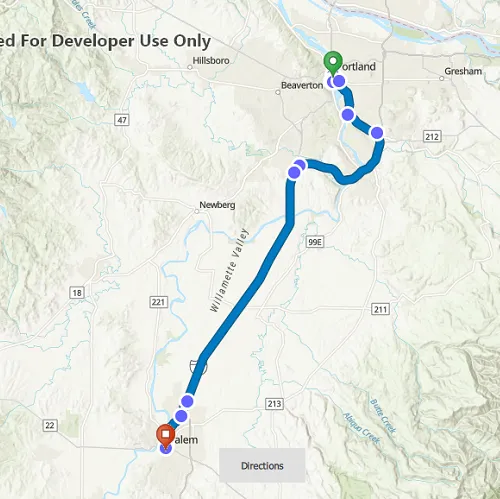
Use case
Routes can be stored as feature collection layers. These layers can store useful information such as directions, estimated trip time, and more.
You can create a route layer in ArcGIS Pro and store a route layer as a portal item, making it easy to access, share, or display.
How to use the sample
Pan and zoom to view the route displayed by the feature collection layer. Press the Directions button to view the list of directions.
How it works
- Create a
PortalItemwith the item ID. - Create and load a
FeatureCollectionwith the item. - After loading, get the specified
FeatureCollectionTableby name. - Get all of the
ArcGISFeatures usingFeatureTable::queryFeaturesAsync. - Get the direction text from the attributes of each feature.
- Create a
FeatureCollectionLayerwith the feature collection and set it to the map’soperationalLayers.
Relevant API
- FeatureCollection
- FeatureCollectionLayer
- FeatureCollectionTableListModel
- FeatureQueryResult
- Portal
- PortalItem
Tags
directions, feature collection, feature collection layer, portal, portal item, route layer, routing
Sample code
// [WriteFile Name=DisplayRouteLayer, Category=Routing]// [Legal]// Copyright 2022 Esri.//// Licensed under the Apache License, Version 2.0 (the "License");// you may not use this file except in compliance with the License.// You may obtain a copy of the License at// http://www.apache.org/licenses/LICENSE-2.0//// Unless required by applicable law or agreed to in writing, software// distributed under the License is distributed on an "AS IS" BASIS,// WITHOUT WARRANTIES OR CONDITIONS OF ANY KIND, either express or implied.// See the License for the specific language governing permissions and// limitations under the License.// [Legal]
#ifdef PCH_BUILD#include "pch.hpp"#endif // PCH_BUILD
// sample headers#include "DisplayRouteLayer.h"
// ArcGIS Maps SDK headers#include "ArcGISFeature.h"#include "AttributeListModel.h"#include "Error.h"#include "Feature.h"#include "FeatureCollection.h"#include "FeatureCollectionLayer.h"#include "FeatureCollectionTable.h"#include "FeatureCollectionTableListModel.h"#include "FeatureIterator.h"#include "FeatureQueryResult.h"#include "FeatureTable.h"#include "LayerListModel.h"#include "Map.h"#include "MapQuickView.h"#include "MapTypes.h"#include "Point.h"#include "Portal.h"#include "PortalItem.h"#include "PortalTypes.h"#include "QueryParameters.h"#include "SpatialReference.h"
// Qt headers#include <QFuture>#include <QJsonValue>
using namespace Esri::ArcGISRuntime;namespace{static const QString featureCollectionItemId("0e3c8e86b4544274b45ecb61c9f41336");}
DisplayRouteLayer::DisplayRouteLayer(QObject* parent /* = nullptr */):  QObject(parent),  m_map(new Map(BasemapStyle::ArcGISTopographic, this)){  Portal* portal = new Portal(this);  m_portalItem = new PortalItem(portal, featureCollectionItemId, this);
  connect(m_portalItem, &PortalItem::doneLoading, this, [this](const Error& loadError)  {    if (!loadError.isEmpty())    {      qWarning() << loadError.message() << loadError.additionalMessage();      return;    }
    // if the portal item is a feature collection, add the feature collection to the map's operational layers    if (m_portalItem->type() == PortalItemType::FeatureCollection)    {      m_featureCollection = new FeatureCollection(m_portalItem, this);      m_featureCollectionLayer = new FeatureCollectionLayer(m_featureCollection, this);
      connect(m_featureCollectionLayer, &FeatureCollectionLayer::doneLoading, this, [this](const Error& e)      {        if (!e.isEmpty())          return;
        getDirections();        emit enableDirectionsButton();      });
      m_map->operationalLayers()->append(m_featureCollectionLayer);    }    else    {      qWarning() << "Portal item with ID " << featureCollectionItemId << " is not a feature collection.";    }  });
  m_portalItem->load();}
DisplayRouteLayer::~DisplayRouteLayer() = default;
void DisplayRouteLayer::init(){  // Register the map view for QML  qmlRegisterType<MapQuickView>("Esri.Samples", 1, 0, "MapView");  qmlRegisterType<DisplayRouteLayer>("Esri.Samples", 1, 0, "DisplayRouteLayerSample");}
MapQuickView* DisplayRouteLayer::mapView() const{  return m_mapView;}
// Set the view (created in QML)void DisplayRouteLayer::setMapView(MapQuickView* mapView){  if (!mapView || mapView == m_mapView)    return;
  m_mapView = mapView;  m_mapView->setMap(m_map);  const Point vpCenter(-122.8309, 45.2281, SpatialReference(4326));  m_mapView->setViewpointCenterAsync(vpCenter, 800000);
  emit mapViewChanged();}
void DisplayRouteLayer::getDirections(){  if (!m_featureCollectionLayer)    return;
  FeatureCollectionTableListModel* tables = m_featureCollection->tables();  for (FeatureTable* table : *tables)  {    if (table->loadStatus() == LoadStatus::Loaded)    {      if (table->tableName() == "DirectionPoints")      {        QueryParameters queryParams;        queryParams.setWhereClause("1=1");        table->queryFeaturesAsync(queryParams).then(this, [this](const FeatureQueryResult* featureQueryResult)        {          if (!featureQueryResult)            return;          // Clear the directions list before repopulating it          m_featureDirection.clear();
          while (featureQueryResult && featureQueryResult->iterator().hasNext())          {            m_feature = static_cast<ArcGISFeature*>(featureQueryResult->iterator().next(this));            m_featureDirection = m_featureDirection + "\n - " + m_feature->attributes()->attributeValue(QStringLiteral("DisplayText")).toString();            emit directionsChanged();          }        });      }    }  }}
QString DisplayRouteLayer::directions() const{  return m_featureDirection;}
// [WriteFile Name=DisplayRouteLayer, Category=Routing]// [Legal]// Copyright 2022 Esri.//// Licensed under the Apache License, Version 2.0 (the "License");// you may not use this file except in compliance with the License.// You may obtain a copy of the License at// http://www.apache.org/licenses/LICENSE-2.0//// Unless required by applicable law or agreed to in writing, software// distributed under the License is distributed on an "AS IS" BASIS,// WITHOUT WARRANTIES OR CONDITIONS OF ANY KIND, either express or implied.// See the License for the specific language governing permissions and// limitations under the License.// [Legal]
#ifndef DISPLAYROUTELAYER_H#define DISPLAYROUTELAYER_H
// Qt headers#include <QObject>
// STL headers#include <FeatureCollectionTableListModel.h>
namespace Esri{namespace ArcGISRuntime{class Feature;class FeatureCollection;class FeatureCollectionLayer;class FeatureCollectionTableListModel;class FeatureTable;class Map;class MapQuickView;class PortalItem;}}
Q_MOC_INCLUDE("MapQuickView.h")
class DisplayRouteLayer : public QObject{ Q_OBJECT
Q_PROPERTY(Esri::ArcGISRuntime::MapQuickView* mapView READ mapView WRITE setMapView NOTIFY mapViewChanged) Q_PROPERTY(QString directions READ directions NOTIFY directionsChanged)
public: explicit DisplayRouteLayer(QObject* parent = nullptr); ~DisplayRouteLayer();
static void init(); Q_INVOKABLE void getDirections();
signals: void mapViewChanged(); void directionsChanged(); void enableDirectionsButton();
private: Esri::ArcGISRuntime::MapQuickView* mapView() const; void setMapView(Esri::ArcGISRuntime::MapQuickView* mapView); QString directions() const;
Esri::ArcGISRuntime::Map* m_map = nullptr; Esri::ArcGISRuntime::MapQuickView* m_mapView = nullptr; Esri::ArcGISRuntime::PortalItem* m_portalItem = nullptr; Esri::ArcGISRuntime::FeatureCollection* m_featureCollection = nullptr; Esri::ArcGISRuntime::FeatureCollectionLayer* m_featureCollectionLayer = nullptr; Esri::ArcGISRuntime::Feature* m_feature = nullptr; QString m_featureDirection = "";};
#endif // DISPLAYROUTELAYER_H// [WriteFile Name=DisplayRouteLayer, Category=Routing]// [Legal]// Copyright 2022 Esri.//// Licensed under the Apache License, Version 2.0 (the "License");// you may not use this file except in compliance with the License.// You may obtain a copy of the License at// http://www.apache.org/licenses/LICENSE-2.0//// Unless required by applicable law or agreed to in writing, software// distributed under the License is distributed on an "AS IS" BASIS,// WITHOUT WARRANTIES OR CONDITIONS OF ANY KIND, either express or implied.// See the License for the specific language governing permissions and// limitations under the License.// [Legal]
import QtQuickimport QtQuick.Controls as Controlsimport Esri.Samplesimport QtQuick.Layouts
Item {
// add a mapView component MapView { id: view anchors.fill: parent
Component.onCompleted: { // Set and keep the focus on MapView to enable keyboard navigation forceActiveFocus(); }
Controls.Button { id: directionsButton anchors { bottom: parent.bottom horizontalCenter: parent.horizontalCenter margins: 40 } text: "Directions" enabled: false onClicked: popup.open(); }
Controls.Popup { id: popup anchors.centerIn: Controls.Overlay.overlay width: 300 height: 320 focus: true contentItem: Controls.ScrollView { contentWidth: parent.width - 30 Text { width: parent.width text: model.directions wrapMode: Text.WordWrap } clip: true } opacity: .9 } }
// Declare the C++ instance which creates the map etc. and supply the view DisplayRouteLayerSample { id: model mapView: view
onEnableDirectionsButton: { directionsButton.enabled = true; } }}