Apply map algebra to an elevation raster to floor, mask, and categorize the elevation values into discrete integer-based categories.
Use case
Categorizing raster data, such as elevation values, into distinct categories is a common spatial analysis workflow. This often involves applying threshold‑based logic or algebraic expressions to transform continuous numeric fields into discrete, integer‑based categories suitable for downstream analytical or computational operations. These operations can be specified and applied using map algebra.
How to use the sample
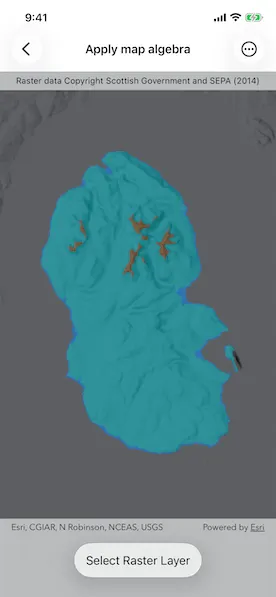
When the sample opens, it displays the source elevation raster. Tap the Categorize button to generate a raster with three distinct ice age related geomorphological categories (raised shore line areas in blue, ice free high ground in brown and areas covered by ice in teal). After processing completes, switch between the map algebra results raster and the original elevation raster.
How it works
- Create a
ContinuousFieldfrom a raster file. - Create a
ContinuousFieldFunctionfrom the continuous field and mask values below sea level. - Round elevation values down to the lowest 10-meter interval with map algebra operators
((continuousFieldFunction / 10).floor() * 10), and then convert the result to aDiscreteFieldFunctionwith.toDiscreteFieldFunction. - Create
BooleanFieldFunctions for each category by defining a range with map algebra operators such asisGreaterThanOrEqualTo,logicalAnd, andisLessThan. - Create a new
DiscreteFieldby chainingreplaceIfoperations into discrete category values and evaluating result withevaluate. - Export the discrete field to files with
exportToFilesand create aRasterwith the result. Use it to create aRasterLayer. - Apply a
ColormapRendererto the raster and display it in the map view.
Relevant API
- BooleanFieldFunction
- Colormap
- ColormapRenderer
- ColorRamp
- ContinuousField
- ContinuousFieldFunction
- DiscreteField
- DiscreteFieldFunction
- Raster
- RasterLayer
- StretchRenderer
About the data
The sample uses a 10m resolution digital terrain elevation raster of the Isle of Arran, Scotland (Data Copyright Scottish Government and SEPA (2014)).
Additional information
This sample requires an ArcGIS Maps SDK Analysis extension license key. Without this license, the map algebra analysis will fail at runtime.
Tags
elevation, map algebra, raster, spatial analysis, terrain
Sample code
// Copyright 2026 Esri//// Licensed under the Apache License, Version 2.0 (the "License");// you may not use this file except in compliance with the License.// You may obtain a copy of the License at////   https://www.apache.org/licenses/LICENSE-2.0//// Unless required by applicable law or agreed to in writing, software// distributed under the License is distributed on an "AS IS" BASIS,// WITHOUT WARRANTIES OR CONDITIONS OF ANY KIND, either express or implied.// See the License for the specific language governing permissions and// limitations under the License.
import ArcGISimport SwiftUI
struct ApplyMapAlgebraView: View {    /// The model for the sample.    @State private var model = Model()    /// The error shown in the error alert.    @State private var error: (any Error)?    /// A Boolean value indicating whether the categorize button is tapped to    /// perform the map algebra analysis.    @State private var categorizeButtonIsTapped = false    /// A Boolean value indicating whether the map algebra analysis is    /// successful with a result raster layer.    @State private var resultsLayerIsAvailable = false
    var body: some View {        MapView(map: model.map)            .overlay(alignment: .top) {                Text("Raster data copyright Scottish Government and SEPA (2014)")                    .font(.caption)                    .frame(maxWidth: .infinity)                    .padding(.vertical, 6)                    .background(.thinMaterial, ignoresSafeAreaEdges: .horizontal)            }            .task(id: categorizeButtonIsTapped) {                guard categorizeButtonIsTapped else { return }                defer { categorizeButtonIsTapped = false }                do {                    // Performs the map algebra analysis to categorize                    // geomorphic areas based on elevation, and creates a                    // raster layer with the results.                    if let raster = try await model.performAnalysis(fromFilesAt: [.arranElevation]) {                        let resultsLayer = model.makeGeomorphicCategorizationRasterLayer(raster: raster)                        model.map.addOperationalLayer(resultsLayer)                        model.selectRasterLayer(resultsLayer)                        withAnimation {                            resultsLayerIsAvailable = true                        }                    }                } catch {                    self.error = error                }            }            .toolbar {                ToolbarItem(placement: .bottomBar) {                    if resultsLayerIsAvailable {                        Menu("Select Raster Layer") {                            ForEach(model.map.operationalLayers.filter { $0 is RasterLayer }, id: \.id) { layer in                                Button(layer.name) {                                    model.selectRasterLayer(layer as! RasterLayer)                                }                            }                        }                    } else {                        Button {                            categorizeButtonIsTapped = true                        } label: {                            if model.isPerformingAnalysis {                                ProgressView()                            }                            Text("Categorize")                        }                        .disabled(model.isPerformingAnalysis)                    }                }            }            .errorAlert(presentingError: $error)    }}
private extension ApplyMapAlgebraView {    @Observable    class Model {        /// A map with a hillshade dark basemap style and an elevation raster layer.        let map: Map = {            let map = Map(basemapStyle: .arcGISHillshadeDark)            // Sets an initial viewpoint over the Isle of Arran, Scotland.            map.initialViewpoint = Viewpoint(                center: Point(latitude: 55.584612, longitude: -5.234218),                scale: 500_000            )
            // Creates a raster layer from a raster elevation file.            let rasterLayer = RasterLayer(                raster: Raster(fileURL: .arranElevation)            )            // Creates a stretch renderer to visualize the elevation raster layer            // using the surface preset color ramp.            let stretchParams = MinMaxStretchParameters(                minValues: [0],                maxValues: [874.0]            )            let colorRamp = ColorRamp(preset: .surface, size: 256)            let stretchRenderer = StretchRenderer(                parameters: stretchParams,                gammas: [1.0],                estimatesStatistics: false,                colorRamp: colorRamp            )            rasterLayer.renderer = stretchRenderer            rasterLayer.opacity = 0.5            map.addOperationalLayer(rasterLayer)
            return map        }()
        /// A Boolean value indicating whether the map algebra analysis is        /// being performed.        private(set) var isPerformingAnalysis = false
        /// Applies the map algebra to the elevation raster and creates a new        /// raster layer with the results.        /// - Parameter urls: One or more raster file paths.        /// - Returns: A new raster containing the results of the analysis.        @MainActor        func performAnalysis(fromFilesAt urls: [URL]) async throws -> Raster? {            isPerformingAnalysis = true            defer { isPerformingAnalysis = false }
            // Creates a continuous field from the elevation raster file.            let elevationField = try await ContinuousField.field(                fromFilesAt: urls,                bandIndex: 0            )            // Creates a continuous field function from the elevation field.            let continuousFieldFunction = ContinuousFieldFunction.function(withResult: elevationField)            // Masks out values below sea level to categorize only land.            let elevationFieldFunction = continuousFieldFunction.mask(                selection: continuousFieldFunction.isGreaterThanOrEqualTo(0)            )            // Rounds elevation values down to the lower 10m interval, then            // convert to a discrete field function.            let tenMeterBinField = ((elevationFieldFunction / 10).floor() * 10)                .toDiscreteFieldFunction()
            // Creates boolean fields for each geomorphic category based on            // the nearest 10m interval field.
            // Category: Raised shore line areas.            let isRaisedShoreline = tenMeterBinField                .isGreaterThanOrEqualTo(0)                .logicalAnd(                    with: tenMeterBinField.isLess(than: 10)                )
            // Category: Ice covered areas.            // Note: Operator overloads are available on some operators            // (e.g. /, *, +, -) to allow for more concise syntax when            // chaining operations. Instead of using logicalAnd, the            // operator overloads can also be used to combine boolean fields,            // as shown below.            let isIceCovered = (tenMeterBinField .>= 10) .& (tenMeterBinField .< 600)
            // Category: Ice free high ground.            let isIceFreeHighGround = tenMeterBinField .>= 600
            // Assigns values to the geomorphic categories and evaluate.            // Raised shoreline=1, ice covered=2, ice-free high ground=3.            let geomorphicCategoryFieldFunction = tenMeterBinField                .replaceIf(isRaisedShoreline, with: 1)                .replaceIf(isIceCovered, with: 2)                .replaceIf(isIceFreeHighGround, with: 3)            let geomorphicCategoryField = try await geomorphicCategoryFieldFunction.evaluate()
            // Creates a temporary directory.            let temporaryDirectoryURL = try FileManager.default                .url(                    for: .itemReplacementDirectory,                    in: .userDomainMask,                    appropriateFor: .arranElevation,                    create: true                )                .appendingPathComponent(                    "geomorphic",                    isDirectory: true                )            if FileManager.default.fileExists(atPath: temporaryDirectoryURL.path) {                try FileManager.default.removeItem(at: temporaryDirectoryURL)            }            try FileManager.default.createDirectory(                at: temporaryDirectoryURL,                withIntermediateDirectories: true            )
            // Exports the discrete field to files in GeoTIFF format.            let exportedFiles = try await geomorphicCategoryField.export(                toFilesInDirectory: temporaryDirectoryURL,                filenamePrefix: "geomorphicCategorization"            )
            guard let fileURL = exportedFiles.first else { return nil }            let geomorphicRaster = Raster(fileURL: fileURL)            return geomorphicRaster        }
        /// Creates a raster layer with a colormap renderer to visualize the        /// different geomorphic categories.        /// - Parameter raster: The raster containing the geomorphic        /// categorization results.        /// - Returns: A raster layer with a colormap renderer to visualize the        /// different geomorphic categories.        func makeGeomorphicCategorizationRasterLayer(raster: Raster) -> RasterLayer {            let layer = RasterLayer(raster: raster)            // Creates a renderer for the different geomorphic categories.            let colormap = Colormap(colorMappings: [                1: .systemBlue,     // raised shoreline                2: .systemTeal,     // ice covered                3: .brown           // ice-free high ground            ])            let colormapRenderer = ColormapRenderer(colormap: colormap)            layer.renderer = colormapRenderer            layer.opacity = 0.5            return layer        }
        /// Makes a raster layer visible in the map's operational layers and        /// hide all other raster layers.        /// - Parameter rasterLayer: The raster layer to make visible.        func selectRasterLayer(_ rasterLayer: RasterLayer) {            for case let layer as RasterLayer in map.operationalLayers {                layer.isVisible = layer === rasterLayer            }        }    }}
private extension URL {    /// Arran elevation GeoTIFF raster.    static var arranElevation: URL {        Bundle.main.url(forResource: "arran", withExtension: "tif", subdirectory: "arran")!    }}