Perform an exploratory viewshed analysis from a defined vantage point.
Use case
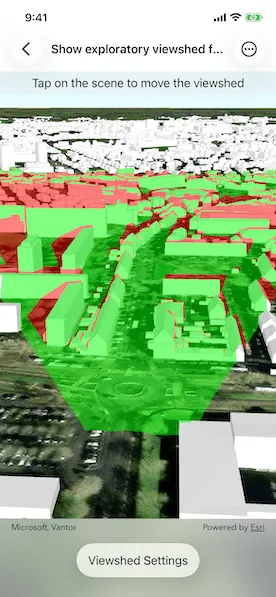
An exploratory viewshed analysis is a type of visual analysis you can perform at the current rendered resolution of a scene. The exploratory viewshed shows what can be seen from a given location. The output is an overlay with two different colors - one representing the visible areas (green) and the other representing the obstructed areas (red).
Note: This analysis is a form of “exploratory analysis”, which means the results are calculated on the current scale of the data, and the results are generated very quickly but not persisted. If persisted analysis performed at the full resolution of the data is required, consider using a ViewshedFunction to perform a viewshed calculation instead.
How to use the sample
Tap on the map to add an observer location. Use the sliders to change the properties (heading, pitch, etc.), of the exploratory viewshed and see them updated in real time. To move the exploratory viewshed, tap anywhere on the screen.
How it works
- Create an
ExploratoryLocationViewshedpassing in the observer location, heading, pitch, horizontal/vertical angles, and min/max distances. - Set the property values on the exploratory viewshed instance for location, direction, range, and visibility properties.
Relevant API
- AnalysisOverlay
- ArcGISSceneLayer
- ArcGISTiledElevationSource
- ExploratoryLocationViewshed
- ExploratoryViewshed
About the data
The scene shows a buildings layer in Brest, France hosted on ArcGIS Online.
Tags
3D, exploratory viewshed, frustum, scene, visibility analysis
Sample code
// Copyright 2022 Esri//// Licensed under the Apache License, Version 2.0 (the "License");// you may not use this file except in compliance with the License.// You may obtain a copy of the License at////   https://www.apache.org/licenses/LICENSE-2.0//// Unless required by applicable law or agreed to in writing, software// distributed under the License is distributed on an "AS IS" BASIS,// WITHOUT WARRANTIES OR CONDITIONS OF ANY KIND, either express or implied.// See the License for the specific language governing permissions and// limitations under the License.
import ArcGISimport SwiftUI
struct ShowExploratoryViewshedFromPointInSceneView: View {    /// The view model for the sample.    @StateObject private var model = Model()
    /// A Boolean value indicating whether the settings sheet is being shown or not.    @State private var isShowingSettings = false
    var body: some View {        SceneView(scene: model.scene, analysisOverlays: [model.analysisOverlay])            .onSingleTapGesture { _, scenePoint in                if let scenePoint {                    model.viewshed.location = scenePoint                    model.locationZ = scenePoint.z!                }            }            .overlay(alignment: .top) {                Text("Tap on the scene to move the viewshed")                    .frame(maxWidth: .infinity)                    .padding(.vertical, 6)                    .background(.thinMaterial, ignoresSafeAreaEdges: .horizontal)            }            .toolbar {                ToolbarItem(placement: .bottomBar) {                    Button("Viewshed Settings") {                        isShowingSettings = true                    }                    .popover(isPresented: $isShowingSettings) {                        NavigationStack {                            ViewshedSettingsView(model: model)                        }                        .presentationDetents([.fraction(0.5)])                        .frame(idealWidth: 320, idealHeight: 380)                    }                }            }    }}
#Preview {    NavigationStack {        ShowExploratoryViewshedFromPointInSceneView()    }}
// Copyright 2022 Esri//// Licensed under the Apache License, Version 2.0 (the "License");// you may not use this file except in compliance with the License.// You may obtain a copy of the License at//// https://www.apache.org/licenses/LICENSE-2.0//// Unless required by applicable law or agreed to in writing, software// distributed under the License is distributed on an "AS IS" BASIS,// WITHOUT WARRANTIES OR CONDITIONS OF ANY KIND, either express or implied.// See the License for the specific language governing permissions and// limitations under the License.
import ArcGISimport SwiftUI
extension ShowExploratoryViewshedFromPointInSceneView { /// The model used to store the geo model and other expensive objects /// used in this view. class Model: ObservableObject { /// The location viewshed used in the sample. let viewshed: ExploratoryLocationViewshed
/// An analysis overlay that contains a location viewshed analysis. let analysisOverlay: AnalysisOverlay
/// A scene with imagery basemap style. let scene = makeScene()
/// The color used to display non-visible areas of a viewshed. @Published var obstructedAreaColor = Color(uiColor: ExploratoryViewshed.obstructedColor) { didSet { ExploratoryViewshed.obstructedColor = UIColor(obstructedAreaColor) } }
/// The color used to display visible areas of a viewshed. @Published var visibleColor = Color(uiColor: ExploratoryViewshed.visibleColor) { didSet { ExploratoryViewshed.visibleColor = UIColor(visibleColor) } }
/// The color used to render the frustum outline. @Published var frustumOutlineColor = Color(uiColor: ExploratoryViewshed.frustumOutlineColor) { didSet { ExploratoryViewshed.frustumOutlineColor = UIColor(frustumOutlineColor) } }
/// The z value of viewshed's location. @Published var locationZ: Double { didSet { viewshed.location = GeometryEngine.makeGeometry(from: viewshed.location, z: locationZ) } }
/// A Boolean value indicating whether the frustum outline is visible or not. @Published var frustumOutlineIsVisible: Bool { didSet { viewshed.frustumOutlineIsVisible = frustumOutlineIsVisible } }
/// A Boolean value indicating whether the analysis overlay is visible or not. @Published var isAnalysisOverlayVisible: Bool { didSet { analysisOverlay.isVisible = isAnalysisOverlayVisible } }
// MARK: Published viewshed properties
@Published var heading: Double { didSet { viewshed.heading = heading } }
@Published var pitch: Double { didSet { viewshed.pitch = pitch } }
@Published var horizontalAngle: Double { didSet { viewshed.horizontalAngle = horizontalAngle } }
@Published var verticalAngle: Double { didSet { viewshed.verticalAngle = verticalAngle } }
@Published var minDistance: Double { didSet { viewshed.minDistance = minDistance } }
@Published var maxDistance: Double { didSet { viewshed.maxDistance = maxDistance } }
init() { self.viewshed = ExploratoryLocationViewshed( location: Point(x: -4.50, y: 48.4, z: 100, spatialReference: .wgs84), heading: 20, pitch: 70, horizontalAngle: 45, verticalAngle: 90, minDistance: 50, maxDistance: 1000 )
analysisOverlay = AnalysisOverlay(analyses: [viewshed]) isAnalysisOverlayVisible = analysisOverlay.isVisible
// Initialize published properties from viewshed's properties. locationZ = viewshed.location.z! frustumOutlineIsVisible = viewshed.frustumOutlineIsVisible heading = viewshed.heading pitch = viewshed.pitch horizontalAngle = viewshed.horizontalAngle verticalAngle = viewshed.verticalAngle minDistance = viewshed.minDistance! maxDistance = viewshed.maxDistance! }
/// Makes a scene. private static func makeScene() -> ArcGIS.Scene { // Creates a scene. let scene = Scene(basemapStyle: .arcGISImageryStandard)
// Sets the initial viewpoint of the scene. let camera = Camera( lookingAt: Point(x: -4.50, y: 48.4, z: 100.0, spatialReference: .wgs84), distance: 200, heading: 20, pitch: 70, roll: 0 ) scene.initialViewpoint = Viewpoint(boundingGeometry: camera.location, camera: camera)
// Creates a surface. let surface = Surface()
// Creates and adds a tiled elevation source. let elevationSource = ArcGISTiledElevationSource(url: .worldElevationService) surface.addElevationSource(elevationSource)
// Sets the surface to the scene's base surface. scene.baseSurface = surface
// Creates and adds a scene layer for buildings in Brest, France. let buildingsLayer = ArcGISSceneLayer(url: .brestBuildingsLayer) scene.addOperationalLayer(buildingsLayer)
return scene } }}
private extension URL { /// The URL for the world elevation service. static var worldElevationService: URL { URL(string: "https://elevation3d.arcgis.com/arcgis/rest/services/WorldElevation3D/Terrain3D/ImageServer")! }
/// The URL for the 3D buildings layer in Brest, France. static var brestBuildingsLayer: URL { URL(string: "https://tiles.arcgis.com/tiles/P3ePLMYs2RVChkJx/arcgis/rest/services/Buildings_Brest/SceneServer/layers/0")! }}// Copyright 2022 Esri//// Licensed under the Apache License, Version 2.0 (the "License");// you may not use this file except in compliance with the License.// You may obtain a copy of the License at//// https://www.apache.org/licenses/LICENSE-2.0//// Unless required by applicable law or agreed to in writing, software// distributed under the License is distributed on an "AS IS" BASIS,// WITHOUT WARRANTIES OR CONDITIONS OF ANY KIND, either express or implied.// See the License for the specific language governing permissions and// limitations under the License.
import SwiftUI
extension ShowExploratoryViewshedFromPointInSceneView { struct ViewshedSettingsView: View { /// The view model for the sample. @ObservedObject var model: Model
/// The action to dismiss the view. @Environment(\.dismiss) private var dismiss
var body: some View { List { Section("Visibility") { Toggle("Analysis Overlay", isOn: $model.isAnalysisOverlayVisible) Toggle("Frustum Outline", isOn: $model.frustumOutlineIsVisible) }
Section("Colors") { ColorPicker("Obstructed Area", selection: $model.obstructedAreaColor) ColorPicker("Visible Area", selection: $model.visibleColor) ColorPicker("Frustum Outline", selection: $model.frustumOutlineColor) }
Section("Perspective") { PerspectiveRow(label: "Height", measurementValue: $model.locationZ, range: 10...300, unit: UnitLength.meters) PerspectiveRow(label: "Heading", measurementValue: $model.heading, range: 0...360, unit: UnitAngle.degrees) PerspectiveRow(label: "Pitch", measurementValue: $model.pitch, range: 0...180, unit: UnitAngle.degrees) PerspectiveRow(label: "Horizontal Angle", measurementValue: $model.horizontalAngle, range: 0...120, unit: UnitAngle.degrees) PerspectiveRow(label: "Vertical Angle", measurementValue: $model.verticalAngle, range: 0...120, unit: UnitAngle.degrees) PerspectiveRow(label: "Min Distance", measurementValue: $model.minDistance, range: 1...1000, unit: UnitLength.meters) PerspectiveRow(label: "Max Distance", measurementValue: $model.maxDistance, range: 1000...2000, unit: UnitLength.meters) } } .navigationTitle("Viewshed Settings") .navigationBarTitleDisplayMode(.inline) .toolbar { ToolbarItem(placement: .confirmationAction) { Button("Done") { dismiss() } } } } }
/// A slider to adjust various dimensional unit of measures. private struct PerspectiveRow: View { let label: String @Binding var measurementValue: Double let range: ClosedRange<Double> let unit: Dimension
var body: some View { VStack { LabeledContent( label, value: Measurement(value: measurementValue, unit: unit), format: .measurement( width: .narrow, numberFormatStyle: .number.precision(.fractionLength(0)) ) ) Slider(value: $measurementValue, in: range) } } }}