Authenticate with ArcGIS Online (or your own portal) using OAuth2 to access secured resources (such as private web maps or layers).

Use case
Your app may need to access items that are only shared with authorized users. For example, your organization may host private data layers or feature services that are only accessible by verified users. You may also need to take advantage of premium ArcGIS Online services, such as geocoding or routing, that require a named user login.
How to use the sample
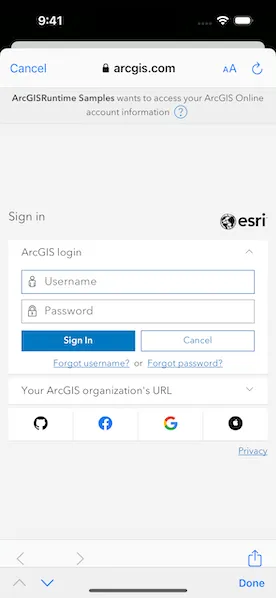
Upon launch, a web map containing premium content will load. You will be prompted by an ArcGIS Online login to view the private layers. Enter a user name and password for an ArcGIS Online named user account (such as your ArcGIS Developer account). If you authenticate successfully, the traffic layer will display; otherwise, the map will contain only the public basemap layer.
How it works
- Create an
OAuthUserConfigurationobject specifying the portal URL, client ID, and redirect URL. - Create a toolkit component
Authenticatorobject with OAuth user configuration. - Set authenticator object as ArcGIS and Network challenge handlers on authentication manager to handle authentication challenges.
- Load a map with premium content requiring authentication.
Relevant API
- AuthenticationManager
- Authenticator
- OAuthUserConfiguration
- Portal
- PortalItem
Additional information
The workflow presented in this sample works for all SAML based enterprise (IWA, PKI, Okta, etc.) & social (Facebook, Google, etc.) identity providers for ArcGIS Online or Portal. For more information, see the topic Set up enterprise logins.
For additional information on using OAuth in your app, see the topic OAuth credentials (for user authentication) and Serverless native and mobile app workflow.
Tags
authentication, cloud, credential, OAuth, portal, security
Sample code
// Copyright 2023 Esri//// Licensed under the Apache License, Version 2.0 (the "License");// you may not use this file except in compliance with the License.// You may obtain a copy of the License at////   https://www.apache.org/licenses/LICENSE-2.0//// Unless required by applicable law or agreed to in writing, software// distributed under the License is distributed on an "AS IS" BASIS,// WITHOUT WARRANTIES OR CONDITIONS OF ANY KIND, either express or implied.// See the License for the specific language governing permissions and// limitations under the License.
import ArcGISimport ArcGISToolkitimport SwiftUI
struct AuthenticateWithOAuthView: View {    /// The authenticator to handle authentication challenges.    @StateObject private var authenticator = Authenticator(        oAuthUserConfigurations: [.arcgisDotCom]    )
    /// The map to be displayed on the map view.    @State private var map: Map = {        // The portal to authenticate with named user.        let portal = Portal(url: .portal, connection: .authenticated)
        // The portal item to be displayed on the map.        let portalItem = PortalItem(            portal: portal,            id: .trafficMap        )
        // Creates map with portal item.        return Map(item: portalItem)    }()
    var body: some View {        MapView(map: map)            .authenticator(authenticator)            .onAppear {                // Setting the challenge handlers here in `onAppear` so user is prompted to enter                // credentials every time trying the sample. In real world applications, set challenge                // handlers at the start of the application.
                // Sets authenticator as ArcGIS and Network challenge handlers to handle authentication                // challenges.                ArcGISEnvironment.authenticationManager.handleChallenges(using: authenticator)
                // In your application, you may want to persist the credentials in                // the keychain:                //                // try await ArcGISEnvironment.authenticationManager.setupPersistentCredentialStorage(                //     access: .whenUnlockedThisDeviceOnly,                //     synchronizesWithiCloud: false                // )            }            .onTeardown {                // Resetting the challenge handlers and clearing credentials here in `onDisappear`                // so user is prompted to enter credentials every time trying the sample. In real                // world applications, do these from sign out functionality of the application.
                // Resets challenge handlers.                ArcGISEnvironment.authenticationManager.handleChallenges(using: nil)
                // Signs out from the portal by revoking OAuth tokens and clearing credential stores.                await ArcGISEnvironment.authenticationManager.signOut()            }    }}
private extension OAuthUserConfiguration {    /// The configuration of the application registered on ArcGIS Online.    static let arcgisDotCom = OAuthUserConfiguration(        portalURL: .portal,        clientID: .clientID,        redirectURL: .redirectURL    )}
private extension URL {    /// The URL of the portal to authenticate.    /// - Note: If you want to use your own portal, provide URL here.    static let portal = URL(string: "https://www.arcgis.com")!
    /// The URL for redirecting after a successful authorization.    /// - Note: You must have the same redirect URL used here registered with your client ID.    /// The scheme of the redirect URL is also specified in the Info.plist file.    static let redirectURL = URL(string: "my-ags-app://auth")!}
private extension String {    /// A unique identifier associated with an application registered with the portal.    /// - Note: This identifier is for a public application created by the ArcGIS Maps SDK team.    static let clientID = "lgAdHkYZYlwwfAhC"}
private extension PortalItem.ID {    /// The portal item ID of a web map to be displayed on the map.    static var trafficMap: Self { Self("e5039444ef3c48b8a8fdc9227f9be7c1")! }}