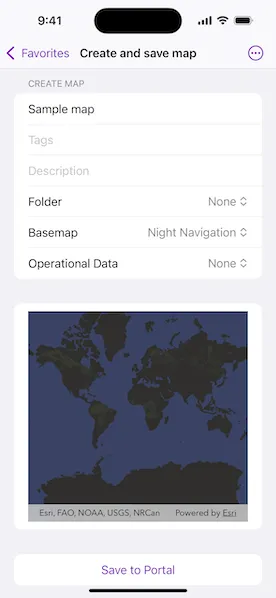
Create and save a map as a web map item to an ArcGIS portal.
Use case
Maps can be created programmatically in code and then serialized and saved as an ArcGIS portal item. In this case, the portal item is a web map which can be shared with others and opened in various applications and APIs throughout the platform, such as ArcGIS Pro, ArcGIS Online, the JavaScript API, and Field Maps.
How to use the sample
When you run the sample, you will be challenged for an ArcGIS Online login. Enter a username and password for an ArcGIS Online named user account (such as your ArcGIS for Developers account). Then, choose the basemap and layers for your new map. To save the map, add a title, tags, and description (optional), and a folder on your portal (you will need to create one in your portal’s My Content section if you don’t already have one). Click the Save button to save the map to the chosen folder.
How it works
- Set up the authenticator the manage authentication challenges.
- Create a new
Portalwith an authenticated connection and load it. - Log in to the portal.
- Access the
PortalUser.Contentwithportal.user.content, to get the user’s list of portal folders. - Create a
Mapwith the specifiedBasemapStyleand operational data. - Call
Map.save(to:title:forceSaveToSupportedVersion:folder:description:thumbnail:tags:extent:)to save the configuredMapwith the specified title, tags, description, and folder to the portal.
Relevant API
- ArcGISMapImageLayer
- BasemapStyle
- Map
- Portal
Tags
ArcGIS Online, ArcGIS Pro, portal, publish, share, web map
Sample code
// Copyright 2025 Esri//// Licensed under the Apache License, Version 2.0 (the "License");// you may not use this file except in compliance with the License.// You may obtain a copy of the License at////   https://www.apache.org/licenses/LICENSE-2.0//// Unless required by applicable law or agreed to in writing, software// distributed under the License is distributed on an "AS IS" BASIS,// WITHOUT WARRANTIES OR CONDITIONS OF ANY KIND, either express or implied.// See the License for the specific language governing permissions and// limitations under the License.
import ArcGISimport ArcGISToolkitimport SwiftUI
/// A view that allows a user to create a map and save it to a portal.struct CreateAndSaveMapView: View {    /// The authenticator to handle authentication challenges.    @StateObject private var authenticator = Authenticator()
    /// The portal to save the map to.    @State private var portal = Portal(        url: URL(string: "https://www.arcgis.com")!,        connection: .authenticated    )
    /// The map that we will save to the portal.    @State private var map: Map?
    /// The error that occurred, if any, when trying to save the map to the portal.    @State private var error: (any Error)?
    /// The status of the sample workflow.    @State private var status: Status = .loadingPortal
    /// The API key to use temporarily while using OAuth.    @State private var apiKey: APIKey?
    /// The portal user's folders that you can save the map to.    @State private var folders: [PortalFolder] = []
    var body: some View {        VStack {            if let map {                MapView(map: map)            } else {                switch status {                case .loadingPortal:                    ProgressView("Loading portal")                case .failedToLoadPortal:                    ContentUnavailableView(                        "Error",                        systemImage: "exclamationmark.triangle",                        description: Text("Portal could not be loaded.")                    )                case .creatingMap, .savingMapToPortal:                    SaveMapForm(portal: portal, folders: folders, status: $status)                case .failedToSaveMap:                    ContentUnavailableView(                        "Error",                        systemImage: "exclamationmark.triangle",                        description: Text("Failed to save map to portal.")                    )                case .mapSavedSuccessfully:                    ContentUnavailableView {                        Label("Success", systemImage: "checkmark.circle")                    } description: {                        Text("Map saved successfully to the portal.")                    } actions: {                        Button("Delete Map From Portal") {                            Task { await deleteFromPortal() }                        }                        .buttonStyle(.borderedProminent)                    }                case .deletingMap:                    ProgressView("Deleting map")                case .deletedSuccessfully:                    ContentUnavailableView(                        "Success",                        systemImage: "checkmark.circle",                        description: Text("Map successfully deleted from the portal.")                    )                case .failedToDelete:                    ContentUnavailableView(                        "Error",                        systemImage: "exclamationmark.triangle",                        description: Text("Failed to delete map from portal.")                    )                }            }        }        .task {            // Load the portal and get the folders.            do {                try await portal.load()                let content = try await portal.user?.content                if let folders = content?.folders {                    self.folders = Array(folders.prefix(10))                }                status = .creatingMap            } catch {                status = .failedToLoadPortal            }        }        .errorAlert(presentingError: $error)        .authenticator(authenticator)        .onAppear {            // Temporarily unsets the API key for this sample to use OAuth.            apiKey = ArcGISEnvironment.apiKey            ArcGISEnvironment.apiKey = nil
            // Setup the authenticator.            setupAuthenticator()        }        .onTeardown {            // Reset the challenge handlers and clear credentials            // when the view disappears so that user is prompted to enter            // credentials every time the sample is run, and to clean            // the environment for other samples.            await teardownAuthenticator()
            // Sets the API key back to the original value.            ArcGISEnvironment.apiKey = apiKey        }    }
    /// Deletes the saved map from the portal.    private func deleteFromPortal() async {        guard case .mapSavedSuccessfully(let map) = status else {            return        }        do {            status = .deletingMap            try await portal.user?.delete(map.item! as! PortalItem)            status = .deletedSuccessfully        } catch {            status = .failedToDelete        }    }}
private extension CreateAndSaveMapView {    /// A form that allows the user fill out properties for a map that they    /// want to create and save to a portal.    struct SaveMapForm: View {        /// The portal to save the map to.        let portal: Portal
        /// The folders that the user can save the map to.        let folders: [PortalFolder]
        /// The status of the workflow of creating and saving a map.        @Binding var status: Status
        /// The title of the new map.        @State private var title: String = ""
        /// The tags for the map.        @State private var tags: String = ""
        /// A description of the map.        @State private var description: String = ""
        /// The basemap that the user chose for the new map.        @State private var basemap: BasemapOption = .topographic
        /// The operational data that the user chooses to display on the map.        @State private var operationalData: OperationalDataOption = .none
        /// The folder that the user chose to save the map to.        @State private var folder: PortalFolder?
        /// The map to save to the portal.        @State private var map = Map(basemapStyle: BasemapOption.topographic.style)
        /// The viewpoint of the map view, this will be set as the initial viewpoint        /// of the map saved to the portal.        @State private var viewpoint: Viewpoint?
        var body: some View {            MapViewReader { mapViewProxy in                Form {                    Section("Create Map") {                        TextField("Title", text: $title)                        TextField("Tags", text: $tags)                            .autocorrectionDisabled()                        TextField("Description", text: $description)                        Picker("Folder", selection: $folder) {                            ForEach(folders, id: \.self) { folder in                                Text(folder.title)                                    .tag(folder)                            }                            Text("None")                                .tag(Optional<PortalFolder>.none)                        }                        Picker("Basemap", selection: $basemap) {                            ForEach(BasemapOption.allCases, id: \.self) { value in                                Text(value.label)                            }                        }                        Picker("Operational Data", selection: $operationalData) {                            ForEach(OperationalDataOption.allCases, id: \.self) { value in                                Text(value.label)                            }                        }                    }                    Section {                        MapView(map: map)                            .onViewpointChanged(kind: .centerAndScale) { viewpoint = $0 }                            .highPriorityGesture(DragGesture())                            .frame(height: 300)                    }                    Section {                        Button {                            Task { await save(mapViewProxy: mapViewProxy) }                        } label: {                            if status == .savingMapToPortal {                                HStack {                                    Text("Saving")                                    ProgressView()                                }                            } else {                                Text("Save to Portal")                            }                        }                        .disabled(title.isEmpty)                        .frame(maxWidth: .infinity)                    }                }                .disabled(status == .savingMapToPortal)                .onChange(of: basemap) { map.basemap = Basemap(style: basemap.style) }                .onChange(of: operationalData) {                    map.removeAllOperationalLayers()                    if let layer = operationalData.layer {                        map.addOperationalLayer(layer)                    }                }            }        }
        /// Saves the map to the portal.        private func save(mapViewProxy: MapViewProxy) async {            do {                // Set the status appropriately.                status = .savingMapToPortal                // Set the initial viewpoint of the map.                map.initialViewpoint = viewpoint                // Try to save the map.                try await map                    .save(                        to: portal,                        title: title,                        forceSaveToSupportedVersion: false,                        folder: folder,                        description: description,                        thumbnail: try? await mapViewProxy.exportImage(),                        tags: tags.components(separatedBy: ",")                    )                // Set the status if successful.                status = .mapSavedSuccessfully(map)            } catch {                // Set the status if failed.                status = .failedToSaveMap            }        }    }}
private extension CreateAndSaveMapView.SaveMapForm {    /// The basemap options for our new map.    /// These were arbitrarily chosen for the purpose of the sample.    enum BasemapOption: CaseIterable {        /// A topographic map.        case topographic        /// A streets map.        case streets        /// A night-themed map.        case night
        /// The corresponding basemap style.        var style: Basemap.Style {            switch self {            case .topographic:                .arcGISTopographic            case .streets:                .arcGISStreets            case .night:                .arcGISNavigationNight            }        }
        /// The label for user interface purposes.        var label: String {            switch self {            case .topographic:                "Topographic"            case .streets:                "Streets"            case .night:                "Night Navigation"            }        }    }
    /// The operational data options for our new map.    /// These were arbitrarily chosen for the purpose of the sample.    enum OperationalDataOption: CaseIterable {        /// No operational data.        case none        /// Operational data for time zones.        case timeZones        /// U.S. census tracts.        case census
        /// The url of the layer.        private var url: URL? {            switch self {            case .none:                nil            case .timeZones:                URL(string: "https://sampleserver6.arcgisonline.com/arcgis/rest/services/WorldTimeZones/MapServer")!            case .census:                URL(string: "https://sampleserver6.arcgisonline.com/arcgis/rest/services/Census/MapServer")!            }        }
        /// The map image layer that corresponds to the option.        var layer: ArcGISMapImageLayer? {            url.map(ArcGISMapImageLayer.init(url:))        }
        /// The label for user interface purposes.        var label: String {            switch self {            case .none:                "None"            case .timeZones:                "Time Zone"            case .census:                "Census"            }        }    }}
private extension CreateAndSaveMapView {    /// The status of the create and save workflow.    enum Status: Equatable {        /// The portal is loading.        case loadingPortal        /// The portal failed to load.        case failedToLoadPortal        /// The map is being created.        case creatingMap        /// The map is being saved to the portal.        case savingMapToPortal        /// The map failed to save to the portal.        case failedToSaveMap        /// The map was saved successfully to the portal.        case mapSavedSuccessfully(Map)        /// The map is being deleted from the portal.        case deletingMap        /// The map was successfully deleted from the portal.        case deletedSuccessfully        /// The map failed to delete from the portal.        case failedToDelete    }}
private extension CreateAndSaveMapView {    /// Sets up the authenticator to handle challenges.    func setupAuthenticator() {        // Setting the challenge handlers here when the model is created so user is prompted to enter        // credentials every time trying the sample. In real world applications, set challenge        // handlers at the start of the application.
        // Sets authenticator as ArcGIS and Network challenge handlers to handle authentication        // challenges.        ArcGISEnvironment.authenticationManager.handleChallenges(using: authenticator)
        // In your application you may want to uncomment this code to persist        // credentials in the keychain.        // setupPersistentCredentialStorage()    }
    /// Stops the authenticator from handling the challenges and clears credentials.    func teardownAuthenticator() async {        // Resets challenge handlers.        ArcGISEnvironment.authenticationManager.handleChallenges(using: nil)
        // In your application, code may need to run at a different        // point in time based on the workflow desired. For example, it        // might make sense to remove credentials when the user taps        // a "sign out" button.        await ArcGISEnvironment.authenticationManager.signOut()    }
    /// Sets up new ArcGIS and Network credential stores that will be persisted in the keychain.    private func setupPersistentCredentialStorage() {        Task {            do {                try await ArcGISEnvironment.authenticationManager.setupPersistentCredentialStorage(                    access: .whenUnlockedThisDeviceOnly                )            } catch {                self.error = error            }        }    }}
#Preview {    CreateAndSaveMapView()}