Find web map portal items by using a search term.
Use case
Portals can contain many portal items and, at times, you may wish to query the portal to find what you’re looking for. In this example, we search for web map portal items using a text search.
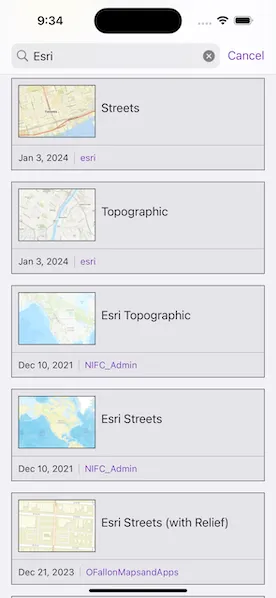
How to use the sample
Enter search terms into the search bar. Once the search is complete, a list is populated with the resultant web maps. Tap on a web map to set it to the map view. Scrolling to the bottom of the web map list view will get more results.
How it works
- Create a new
Portaland load it. - Create new
PortalItemQueryParameters. Set the type to web map by addingtype:"Web Map"and add the text you want to search for. Note that web maps authored prior to July 2nd, 2014, are not supported. You can also limit the query to only return maps published after that date. - Use
findItems(queryParameters:)to get the first set of matching items (10 by default). - Get more results using the
nextQueryParametersfrom thePortalQueryResultSet.
Relevant API
- Portal
- PortalItem
- PortalQueryParameters
- PortalQueryResultSet
Tags
keyword, query, search, web map
Sample code
// Copyright 2024 Esri//// Licensed under the Apache License, Version 2.0 (the "License");// you may not use this file except in compliance with the License.// You may obtain a copy of the License at////   https://www.apache.org/licenses/LICENSE-2.0//// Unless required by applicable law or agreed to in writing, software// distributed under the License is distributed on an "AS IS" BASIS,// WITHOUT WARRANTIES OR CONDITIONS OF ANY KIND, either express or implied.// See the License for the specific language governing permissions and// limitations under the License.
import ArcGISimport SwiftUI
struct SearchForWebMapView: View {    /// The view model for the sample.    @StateObject private var model = Model()
    /// The text query in the search bar.    @State private var query = ""
    /// A Boolean value indicating whether new results are being loaded.    @State private var resultsAreLoading = false
    /// The error shown in the error alert.    @State private var error: (any Error)?
    var body: some View {        ScrollView {            LazyVStack {                ForEach(model.portalItems, id: \.id) { item in                    NavigationLink {                        SafeMapView(map: Map(item: item))                            .navigationTitle(item.title)                    } label: {                        PortalItemRowView(item: item)                    }                    .buttonStyle(.plain)                    .task {                        // Load the next results when the last item is reached.                        guard item.id == model.portalItems.last?.id else { return }
                        resultsAreLoading = true                        defer { resultsAreLoading = false }
                        do {                            try await model.findNextItems()                        } catch {                            self.error = error                        }                    }                }
                if resultsAreLoading {                    ProgressView()                        .padding()                } else if !query.isEmpty && model.portalItems.isEmpty {                    VStack {                        Text("No Results")                            .font(.headline)                        Text("Check spelling or try a new search.")                            .font(.footnote)                    }                    .padding()                }            }        }        .background(Color(.secondarySystemBackground))        .searchable(            text: $query,            placement: .navigationBarDrawer(displayMode: .always),            prompt: "Web Maps"        )        .autocorrectionDisabled()        .task(id: query) {            // Load new results when the query changes.            resultsAreLoading = true            defer { resultsAreLoading = false }
            do {                try await model.findItems(for: query)            } catch {                self.error = error            }        }        .errorAlert(presentingError: $error)    }}
#Preview {    NavigationStack {        SearchForWebMapView()    }}
// Copyright 2024 Esri//// Licensed under the Apache License, Version 2.0 (the "License");// you may not use this file except in compliance with the License.// You may obtain a copy of the License at//// https://www.apache.org/licenses/LICENSE-2.0//// Unless required by applicable law or agreed to in writing, software// distributed under the License is distributed on an "AS IS" BASIS,// WITHOUT WARRANTIES OR CONDITIONS OF ANY KIND, either express or implied.// See the License for the specific language governing permissions and// limitations under the License.
import ArcGISimport Combineimport Foundation
extension SearchForWebMapView { /// The view model for the sample. @MainActor class Model: ObservableObject { /// A portal to ArcGIS Online to get the portal items from. private let portal = Portal.arcGISOnline(connection: .anonymous)
/// The query parameters for the next set of results based on the last results. private var nextQueryParameters: PortalQueryParameters?
/// The text query from the last search. private var lastQuery = ""
/// The portal items resulting from a search. @Published private(set) var portalItems: [PortalItem] = []
/// Finds the portal items that match the given query. /// - Parameter query: The text query used to find the portal items. func findItems(for query: String) async throws { // Ensure that a new search is necessary. guard query != lastQuery else { return }
if query.isEmpty { portalItems.removeAll() return }
// Find the new results using parameters made with the query. let parameters = queryParameters(for: query) let results = try await portalItems(using: parameters) portalItems = results lastQuery = query }
/// Finds the next portal item based on the last results. func findNextItems() async throws { guard let nextQueryParameters else { return }
// Find the next results using the next query parameters from the last search. let nextResults = try await portalItems(using: nextQueryParameters) portalItems.append(contentsOf: nextResults) }
/// The portal items from the portal that match the given query parameters. /// - Parameter queryParameters: The portal query parameters to find the portal items. /// - Returns: The portal items that were found. private func portalItems(using queryParameters: PortalQueryParameters) async throws -> [PortalItem] { // Get the results from the portal using the parameters. let resultsSet = try await portal.findItems(queryParameters: queryParameters) nextQueryParameters = resultsSet.nextQueryParameters return resultsSet.results }
/// The portal query parameters for a given query. /// - Parameter query: The text query used to create the parameters. /// - Returns: A new `PortalQueryParameters` object. private func queryParameters(for query: String) -> PortalQueryParameters { // Create a date string for a date range to search within. // Note: Web maps authored prior to July 2nd, 2014 are not supported. let startDate = Date.webMapSupportedDate
// Convert the dates to UNIX time to be able to use with the ArcGIS REST API. let dateRange = startDate.unixTime...Date.now.unixTime let dateString = "uploaded:[\(dateRange.lowerBound) TO \(dateRange.upperBound)]"
// Create a string to filter for web maps. let typeString = #"type:"Web Map""#
// Create the portal query parameters with the strings. let fullQuery = [query, typeString, dateString].joined(separator: " AND ") return PortalQueryParameters(query: fullQuery) } }}
private extension Date { /// The date after which web maps are supported, July 2, 2014. static var webMapSupportedDate: Date { try! Date( "July 2, 2014", strategy: Date.FormatStyle().day().month().year().parseStrategy ) }
/// The milliseconds between the date value and 00:00:00 UTC on 1 January 1970. var unixTime: Int64 { Int64(timeIntervalSince1970 * 1_000) }}// Copyright 2024 Esri//// Licensed under the Apache License, Version 2.0 (the "License");// you may not use this file except in compliance with the License.// You may obtain a copy of the License at//// https://www.apache.org/licenses/LICENSE-2.0//// Unless required by applicable law or agreed to in writing, software// distributed under the License is distributed on an "AS IS" BASIS,// WITHOUT WARRANTIES OR CONDITIONS OF ANY KIND, either express or implied.// See the License for the specific language governing permissions and// limitations under the License.
import ArcGISimport SwiftUI
extension SearchForWebMapView { /// A map view that shows an alert when there is an error loading the map. struct SafeMapView: View { /// The map shown in the map view. let map: Map
/// A Boolean value indicating whether the map is being loaded. @State private var mapIsLoading = false
/// The error shown in the error alert. @State private var error: (any Error)?
var body: some View { ZStack { MapView(map: map) .onLayerViewStateChanged { _, state in // Show an alert for an error loading any of the layers. guard let error = state.error else { return } self.error = error } .task { mapIsLoading = true defer { mapIsLoading = false }
// Show an alert for an error loading the map. do { try await map.load() } catch { self.error = error } }
if mapIsLoading { ProgressView() } } .errorAlert(presentingError: $error) } }
/// A view that shows a given portal item's info in a row. struct PortalItemRowView: View { /// The portal item to display in the row. let item: PortalItem
var body: some View { VStack { HStack { AsyncImage(url: item.thumbnail?.url) { image in image .resizable() } placeholder: { Color(.lightGray) } .frame(width: 110, height: 75) .border(.primary) .padding([.leading, .top], 10)
Text(item.title)
Spacer() }
Divider() .overlay(.black)
HStack { if let modificationDate = item.modificationDate { Text(modificationDate, format: Date.FormatStyle(date: .abbreviated, time: .omitted)) } else { Text("Date: Unknown") }
Divider() .overlay(.black)
Text(item.owner) .foregroundStyle(Color.accentColor)
Spacer() } .font(.footnote) .padding(.top, 2) .padding([.horizontal, .bottom], 10) } .background(Color(.systemGray5)) .border(Color(.darkGray)) .padding(.top, 8) .padding(.horizontal) } }}