Find features in a feature table which match an SQL query.
Use case
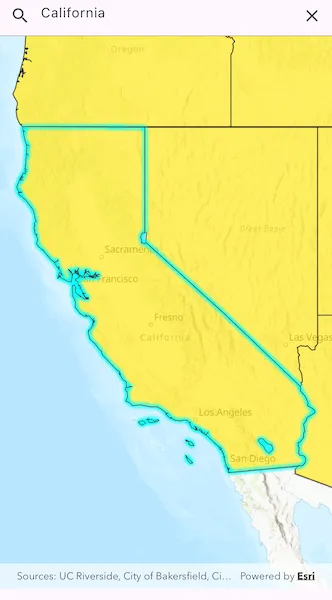
Query expressions can be used in ArcGIS to select a subset of features from a feature table. This is most useful in large or complicated data sets. A possible use case might be on a feature table marking the location of street furniture throughout a city. A user may wish to query by a TYPE column to return “benches”. In this sample, we query a U.S. state by STATE_NAME from a feature table containing all U.S. states.
How to use the sample
Input the name of a U.S. state into the text field. When you tap “search”, a query is performed and the matching features are highlighted or an error is returned.
How it works
- Create a
ServiceFeatureTableusing the URL of a feature service. - Create a
QueryParameterswith a where clause specified usingqueryParameters.whereClause. - Perform the query using
queryFeatures(queryParameters)on the service feature table. - When complete, the query will return a
FeatureQueryResultwhich can be iterated over to get the matching features.
Relevant API
- FeatureLayer
- FeatureQueryResult
- QueryParameters
- ServiceFeatureTable
About the data
This sample uses U.S. State polygon features from the USA 2016 Daytime Population feature service.
Tags
query, search
Sample code
//// Copyright 2024 Esri//// Licensed under the Apache License, Version 2.0 (the "License");// you may not use this file except in compliance with the License.// You may obtain a copy of the License at////   https://www.apache.org/licenses/LICENSE-2.0//// Unless required by applicable law or agreed to in writing, software// distributed under the License is distributed on an "AS IS" BASIS,// WITHOUT WARRANTIES OR CONDITIONS OF ANY KIND, either express or implied.// See the License for the specific language governing permissions and// limitations under the License.//
import 'package:arcgis_maps/arcgis_maps.dart';import 'package:arcgis_maps_sdk_flutter_samples/common/common.dart';import 'package:flutter/material.dart';
class QueryFeatureTable extends StatefulWidget {  const QueryFeatureTable({super.key});
  @override  State<QueryFeatureTable> createState() => _QueryFeatureTableState();}
class _QueryFeatureTableState extends State<QueryFeatureTable>    with SampleStateSupport {  // Create a controller for the map view.  final _mapViewController = ArcGISMapView.createController();  // Create a text editing controller.  final _textEditingController = TextEditingController();  // Create a focus node for the search text field.  final _searchFocusNode = FocusNode();  // Create an initial viewpoint.  final _initialViewpoint = Viewpoint.fromCenter(    ArcGISPoint(      x: -11000000,      y: 5000000,      spatialReference: SpatialReference.webMercator,    ),    scale: 100000000,  );  // Create a feature table and a feature layer.  final _featureTable = ServiceFeatureTable.withUri(    Uri.parse(      'https://services.arcgis.com/jIL9msH9OI208GCb/arcgis/rest/services/USA_Daytime_Population_2016/FeatureServer/0',    ),  );  late FeatureLayer _featureLayer;
  @override  void dispose() {    _textEditingController.dispose();    super.dispose();  }
  @override  Widget build(BuildContext context) {    return Scaffold(      resizeToAvoidBottomInset: false,      // Create a column with a text field and a map view.      body: SafeArea(        child: Column(          children: [            // Create a text field for searching states.            TextField(              focusNode: _searchFocusNode,              controller: _textEditingController,              decoration: InputDecoration(                hintText: 'Enter a State...',                prefixIcon: const Icon(Icons.search),                suffixIcon: IconButton(                  onPressed: dismissSearch,                  icon: const Icon(Icons.clear),                ),              ),              onSubmitted: onSearchSubmitted,            ),            // Add a map view to the widget tree and set a controller.            Expanded(              child: ArcGISMapView(                controllerProvider: () => _mapViewController,                onMapViewReady: onMapViewReady,              ),            ),          ],        ),      ),    );  }
  Future<void> onMapViewReady() async {    // Create a map with the topographic basemap style and set to the map view.    final map = ArcGISMap.withBasemapStyle(BasemapStyle.arcGISTopographic);
    // Create a feature layer and amend the opacity and max scale properties.    _featureLayer = FeatureLayer.withFeatureTable(_featureTable)      ..opacity = 0.8      ..maxScale = 10000;
    // Create a renderer with a fill symbol and apply to the feature layer.    final lineSymbol = SimpleLineSymbol(color: Colors.black);    final fillSymbol = SimpleFillSymbol(      color: Colors.yellow,      outline: lineSymbol,    );    final renderer = SimpleRenderer(symbol: fillSymbol);    _featureLayer.renderer = renderer;
    // Add the feature layer to the map and define an initial viewpoint.    map.operationalLayers.add(_featureLayer);    map.initialViewpoint = _initialViewpoint;    // Set the map to the map view.    _mapViewController.arcGISMap = map;  }
  Future<void> onSearchSubmitted(String value) async {    // Clear the selection.    _featureLayer.clearSelection();
    // Create query parameters and set the where clause.    final queryParameters = QueryParameters();    final stateName = value.trim();    queryParameters.whereClause =        "upper(STATE_NAME) LIKE '${stateName.toUpperCase().sqlEscape()}%'";
    // Query the feature table with the query parameters.    final queryResult = await _featureTable.queryFeatures(queryParameters);
    // Get the first feature from the query result.    final iterator = queryResult.features().iterator;    if (iterator.moveNext()) {      final feature = iterator.current;      if (feature.geometry != null) {        // Set the viewpoint to the feature's extent.        await _mapViewController.setViewpointGeometry(          feature.geometry!.extent,          paddingInDiPs: 20,        );      }      _featureLayer.selectFeature(feature);    } else {      // Show an alert dialog if no matching state is found.      if (mounted) {        // Set the viewpoint to the initial viewpoint.        _mapViewController.setViewpoint(_initialViewpoint);
        showMessageDialog('No matching State found.');      }    }  }
  void dismissSearch() {    // Clear the text field and dismiss the keyboard.    _textEditingController.clear();    FocusManager.instance.primaryFocus?.unfocus();  }}
extension on String {  // Prepare a string so that it can be used as input in a whereClause, which must  // be valid SQL.  String sqlEscape() => replaceAll("'", "''");}