Display custom labels on a feature layer.
Use case
Labeling features is useful to visually display a key piece of information or attribute of a feature on a map. For example, you may want to label rivers or streets with their names.
How to use the sample
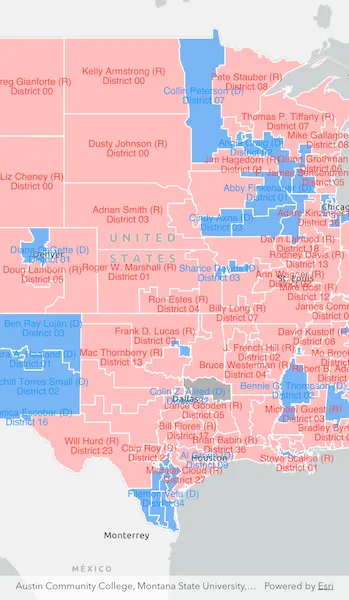
Pan and zoom around the United States. Labels for congressional districts will be shown in red for Republican districts and blue for Democrat districts. Notice how labels pop into view as you zoom in.
How it works
- Create a
ServiceFeatureTableusing a feature service URL. - Create a
FeatureLayerfrom the service feature table. - Create a
TextSymbolto use for displaying the label text. - Create an
ArcadeLabelExpressionfor the label definition.- You can use fields of the feature by using
$feature.field_namein the expression.
- You can use fields of the feature by using
- Create a new
LabelDefinitionfrom the arcade label expression and text symbol. - Add the definitions to the feature layer with
featureLayer.labelDefinitions.addAll([labelDefinitions]). - Lastly, enable labels on the layer using
featureLayer.labelsEnabled = true.
Relevant API
- ArcadeLabelExpression
- FeatureLayer
- LabelDefinition
- TextSymbol
About the data
This sample uses the USA 116th Congressional Districts feature layer hosted on ArcGIS Online.
Additional information
Help regarding the Arcade label expression script for defining a label definition can be found on the ArcGIS Developers site.
Tags
arcade, attribute, deconfliction, label, labeling, string, symbol, text, visualization
Sample code
show_labels_on_layer.dart
// Copyright 2025 Esri//// Licensed under the Apache License, Version 2.0 (the "License");// you may not use this file except in compliance with the License.// You may obtain a copy of the License at////   https://www.apache.org/licenses/LICENSE-2.0//// Unless required by applicable law or agreed to in writing, software// distributed under the License is distributed on an "AS IS" BASIS,// WITHOUT WARRANTIES OR CONDITIONS OF ANY KIND, either express or implied.// See the License for the specific language governing permissions and// limitations under the License.//
import 'package:arcgis_maps/arcgis_maps.dart';import 'package:arcgis_maps_sdk_flutter_samples/common/common.dart';import 'package:flutter/material.dart';
class ShowLabelsOnLayer extends StatefulWidget {  const ShowLabelsOnLayer({super.key});
  @override  State<ShowLabelsOnLayer> createState() => _ShowLabelsOnLayerState();}
class _ShowLabelsOnLayerState extends State<ShowLabelsOnLayer>    with SampleStateSupport {  // Create a controller for the map view.  final _mapViewController = ArcGISMapView.createController();  // A flag for when the map view is ready and controls can be used.  var _ready = false;
  @override  Widget build(BuildContext context) {    return Scaffold(      body: Stack(        children: [          // Add a map view to the widget tree and set a controller.          ArcGISMapView(            controllerProvider: () => _mapViewController,            onMapViewReady: onMapViewReady,          ),          // Display a progress indicator and prevent interaction until state is ready.          LoadingIndicator(visible: !_ready),        ],      ),    );  }
  Future<void> onMapViewReady() async {    // Create a map with a light gray basemap style.    final map = ArcGISMap.withBasemapStyle(BasemapStyle.arcGISLightGray);    // Set the initial viewpoint near the center of the US.    map.initialViewpoint = Viewpoint.fromCenter(      ArcGISPoint(        x: -10846309.950860,        y: 4683272.219411,        spatialReference: SpatialReference.webMercator,      ),      scale: 20000000,    );
    // Set the map to the map view.    _mapViewController.arcGISMap = map;
    // Create a feature layer from an online feature service of US Congressional Districts.    const serviceUrl =        'https://services.arcgis.com/P3ePLMYs2RVChkJx/arcgis/rest/services/USA_116th_Congressional_Districts/FeatureServer/0';    final serviceFeatureTable = ServiceFeatureTable.withUri(      Uri.parse(serviceUrl),    );    final featureLayer = FeatureLayer.withFeatureTable(serviceFeatureTable);
    // Add the feature layer to the map.    map.operationalLayers.add(featureLayer);
    // Load the feature layer.    await featureLayer.load();
    // Create label definitions for each party.    final republicanLabelDefinition = makeLabelDefinition(      'Republican',      Colors.red,    );    final democratLabelDefinition = makeLabelDefinition(      'Democrat',      Colors.blue,    );
    // Add the label definitions to the feature layer.    featureLayer.labelDefinitions.addAll([      republicanLabelDefinition,      democratLabelDefinition,    ]);
    // Enable labels on the feature layer.    featureLayer.labelsEnabled = true;
    // Set the ready state variable to true to enable the sample UI.    setState(() => _ready = true);  }
  LabelDefinition makeLabelDefinition(String party, Color color) {    // Create a text symbol for the label definition.    final textSymbol = TextSymbol(color: color, size: 12);
    // Create a label definition with an Arcade expression script.    final arcadeLabelExpression = ArcadeLabelExpression(      arcadeString:          r'$feature.NAME + " (" + left($feature.PARTY,1) + ")\nDistrict " + $feature.CDFIPS',    );
    // Create the label definition.    final labelDefinition = LabelDefinition(      labelExpression: arcadeLabelExpression,      textSymbol: textSymbol,    );
    // Set the placement for the label definition.    labelDefinition.placement = LabelingPlacement.polygonAlwaysHorizontal;    // Create a where clause for the label definition.    labelDefinition.whereClause = "PARTY = '$party'";
    // Return the label definition.    return labelDefinition;  }}