Set the map view to a new viewpoint.
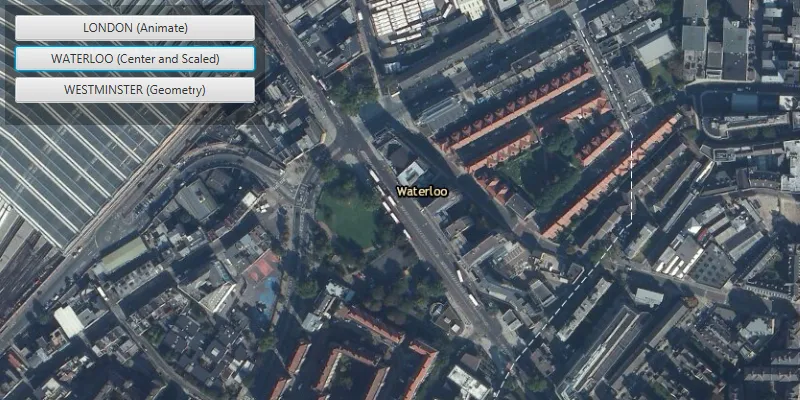
Use case
Programmatically navigate to a specified location in the map or scene. Use this to focus on a particular point or area of interest.
How to use the sample
The map view has several methods for setting its current viewpoint. Click one of the buttons to see the viewpoint changed to that location using the method noted in parentheses.
How it works
- Create a new
ArcGISMapand set it to theMapView. - Change the map’s
Viewpointusing one of the available methods:
- Use
mapView.setViewpointAsync()to pan to a viewpoint over the specified length of time. - Use
MapView.setViewpointCenterAsync()to center the viewpoint on aPointand set a distance from the ground using a scale. - Use
MapView.setViewpointGeometryAsync()to set the viewpoint to a givenGeometry.
Relevant API
- ArcGISMap
- Geometry
- MapView
- Point
- Viewpoint
Additional information
Below are some other ways to set a viewpoint on the MapView:
- setViewpoint
- setViewpointAsync
- setViewpointCenterAsync
- setViewpointGeometryAsync
- setViewpointRotationAsync
- setViewpointScaleAsync
Tags
animate, extent, pan, rotate, scale, view, zoom
Sample code
ChangeViewpointSample.java
/* * Copyright 2017 Esri. * * Licensed under the Apache License, Version 2.0 (the "License"); you may not * use this file except in compliance with the License. You may obtain a copy of * the License at * * http://www.apache.org/licenses/LICENSE-2.0 * * Unless required by applicable law or agreed to in writing, software * distributed under the License is distributed on an "AS IS" BASIS, WITHOUT * WARRANTIES OR CONDITIONS OF ANY KIND, either express or implied. See the * License for the specific language governing permissions and limitations under * the License. */
package com.esri.samples.change_viewpoint;
import javafx.application.Application;import javafx.geometry.Insets;import javafx.geometry.Pos;import javafx.scene.Scene;import javafx.scene.control.Button;import javafx.scene.layout.Background;import javafx.scene.layout.BackgroundFill;import javafx.scene.layout.CornerRadii;import javafx.scene.layout.StackPane;import javafx.scene.layout.VBox;import javafx.scene.paint.Paint;import javafx.stage.Stage;
import com.esri.arcgisruntime.ArcGISRuntimeEnvironment;import com.esri.arcgisruntime.geometry.Point;import com.esri.arcgisruntime.geometry.PointCollection;import com.esri.arcgisruntime.geometry.Polyline;import com.esri.arcgisruntime.geometry.SpatialReference;import com.esri.arcgisruntime.geometry.SpatialReferences;import com.esri.arcgisruntime.mapping.ArcGISMap;import com.esri.arcgisruntime.mapping.BasemapStyle;import com.esri.arcgisruntime.mapping.Viewpoint;import com.esri.arcgisruntime.mapping.view.MapView;
public class ChangeViewpointSample extends Application {
  private MapView mapView;  private SpatialReference spatialReference;
  private static final int SCALE = 5000;
  @Override  public void start(Stage stage) {
    try {      // create stack pane and application scene      StackPane stackPane = new StackPane();      Scene scene = new Scene(stackPane);      scene.getStylesheets().add(getClass().getResource("/change_viewpoint/style.css").toExternalForm());
      // set title, size, and add scene to stage      stage.setTitle("Change Viewpoint Sample");      stage.setWidth(800);      stage.setHeight(700);      stage.setScene(scene);      stage.show();
      // authentication with an API key or named user is required to access basemaps and other location services      String yourAPIKey = System.getProperty("apiKey");      ArcGISRuntimeEnvironment.setApiKey(yourAPIKey);
      // create a control panel      VBox controlsVBox = new VBox(6);      controlsVBox.setBackground(new Background(new BackgroundFill(Paint.valueOf("rgba(0,0,0,0.3)"), CornerRadii.EMPTY,          Insets.EMPTY)));      controlsVBox.setPadding(new Insets(10.0));      controlsVBox.setMaxSize(260, 120);      controlsVBox.getStyleClass().add("panel-region");
      // create buttons for interaction      Button animateButton = new Button("LONDON (Animate)");      Button centerButton = new Button("WATERLOO (Center and Scaled)");      Button geometryButton = new Button("WESTMINSTER (Geometry)");      animateButton.setMaxWidth(Double.MAX_VALUE);      centerButton.setMaxWidth(Double.MAX_VALUE);      geometryButton.setMaxWidth(Double.MAX_VALUE);
      animateButton.setOnAction(e -> {        // create the London location point        Point londonPoint = new Point(-14093, 6711377, spatialReference);        // create the viewpoint with the London point and scale        Viewpoint viewpoint = new Viewpoint(londonPoint, SCALE);        // set the map views's viewpoint to London with a seven second duration        mapView.setViewpointAsync(viewpoint, 7);      });
      centerButton.setOnAction(e -> {        // create the Waterloo location point        Point waterlooPoint = new Point(-12153, 6710527, spatialReference);        // set the map views's viewpoint centered on Waterloo and scaled        mapView.setViewpointCenterAsync(waterlooPoint, SCALE);      });
      geometryButton.setOnAction(e -> {        // create a collection of points around Westminster        PointCollection westminsterPoints = new PointCollection(spatialReference);        westminsterPoints.add(new Point(-13823, 6710390));        westminsterPoints.add(new Point(-13823, 6710150));        westminsterPoints.add(new Point(-14680, 6710390));        westminsterPoints.add(new Point(-14680, 6710150));
        Polyline geometry = new Polyline(westminsterPoints);
        // set the map views's viewpoint to Westminster        mapView.setViewpointGeometryAsync(geometry);      });
      // add controls to the user interface panel      controlsVBox.getChildren().addAll(animateButton, centerButton, geometryButton);
      // create a map with the imagery basemap style      ArcGISMap map = new ArcGISMap(BasemapStyle.ARCGIS_IMAGERY);
      // create a map view and set the map to it      mapView = new MapView();      mapView.setMap(map);
      // create spatial reference for all points      spatialReference = SpatialReferences.getWebMercator();      // create point for starting location      Point startPoint = new Point(-14093, 6711377, spatialReference);
      // set viewpoint of map view to starting point and scaled      mapView.setViewpointCenterAsync(startPoint, SCALE);
      // add map view and control panel to stack pane      stackPane.getChildren().addAll(mapView, controlsVBox);      StackPane.setAlignment(controlsVBox, Pos.TOP_LEFT);      StackPane.setMargin(controlsVBox, new Insets(10, 0, 0, 10));    } catch (Exception e) {      // on any error, print the stack trace      e.printStackTrace();    }  }
  /**   * Stops and releases all resources used in application.   */  @Override  public void stop() {
    // release resources when the application closes    if (mapView != null) {      mapView.dispose();    }  }
  /**   * Opens and runs application.   *   * @param args arguments passed to this application   */  public static void main(String[] args) {
    Application.launch(args);  }
}