Identify features in all layers in a map.
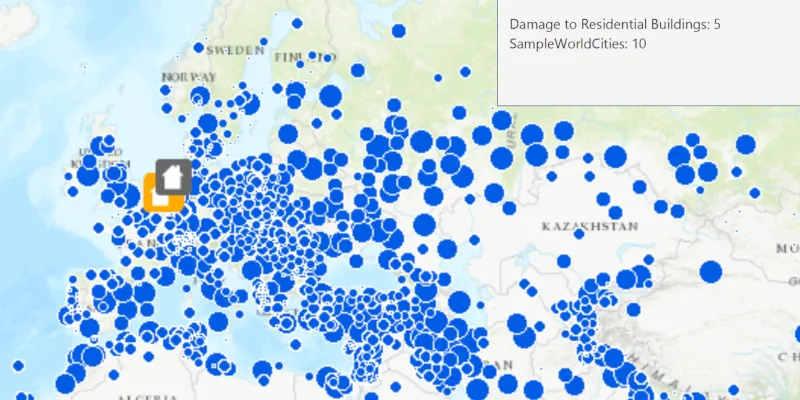
Use case
Identify layers allows users to return features on a map at a specified location across multiple layers. Because some layer types have sublayers, the sample recursively counts results for sublayers within each layer.
How to use the sample
Click to identify features. An alert will show all layers with features under the clicked location, as well as the number of features.
How it works
- The clicked map point is passed to
MapView.identifyLayersAsync - For each
IdentifyLayerResultin the results, features are counted.- Note: there is one identify result per layer with matching features; if the feature count is 0, that means a sublayer contains the matching features.
Relevant API
- IdentifyLayerResult
- MapView
Additional information
The GeoView supports two methods of identify: identifyLayerAsync(), which identifies features within a specific layer and identifyLayersAsync(), which identifies features for all layers in the current view.
Tags
identify, recursion, recursive, sublayers
Sample code
IdentifyLayersSample.java
/* * Copyright 2018 Esri. * * Licensed under the Apache License, Version 2.0 (the "License"); you may not * use this file except in compliance with the License. You may obtain a copy of * the License at * * http://www.apache.org/licenses/LICENSE-2.0 * * Unless required by applicable law or agreed to in writing, software * distributed under the License is distributed on an "AS IS" BASIS, WITHOUT * WARRANTIES OR CONDITIONS OF ANY KIND, either express or implied. See the * License for the specific language governing permissions and limitations under * the License. */
package com.esri.samples.identify_layers;
import java.util.List;import java.util.concurrent.ExecutionException;
import com.esri.arcgisruntime.ArcGISRuntimeEnvironment;import com.esri.arcgisruntime.concurrent.ListenableFuture;import com.esri.arcgisruntime.data.FeatureTable;import com.esri.arcgisruntime.data.ServiceFeatureTable;import com.esri.arcgisruntime.layers.ArcGISMapImageLayer;import com.esri.arcgisruntime.layers.FeatureLayer;import com.esri.arcgisruntime.loadable.LoadStatus;import com.esri.arcgisruntime.mapping.ArcGISMap;import com.esri.arcgisruntime.mapping.BasemapStyle;import com.esri.arcgisruntime.mapping.Viewpoint;import com.esri.arcgisruntime.mapping.view.IdentifyLayerResult;import com.esri.arcgisruntime.mapping.view.MapView;import javafx.application.Application;import javafx.geometry.Point2D;import javafx.scene.Scene;import javafx.scene.control.Alert;import javafx.scene.input.MouseButton;import javafx.scene.layout.StackPane;import javafx.stage.Stage;
public class IdentifyLayersSample extends Application {
  private MapView mapView;  // keep loadables in scope to avoid garbage collection  private ArcGISMapImageLayer mapImageLayer;  private FeatureLayer featureLayer;
  /**   * Opens and runs application.   *   * @param args arguments passed to this application   */  public static void main(String[] args) {
    Application.launch(args);  }
  @Override  public void start(Stage stage) {
    try {      // create stack pane and application scene      StackPane stackPane = new StackPane();      Scene scene = new Scene(stackPane);
      // set title, size, and add scene to stage      stage.setTitle("Identify Layers Sample");      stage.setWidth(800);      stage.setHeight(700);      stage.setScene(scene);      stage.show();
      // authentication with an API key or named user is required to access basemaps and other location services      String yourAPIKey = System.getProperty("apiKey");      ArcGISRuntimeEnvironment.setApiKey(yourAPIKey);
      // create a map with the topographic basemap style      ArcGISMap map = new ArcGISMap(BasemapStyle.ARCGIS_TOPOGRAPHIC);
      // create a map view and set the map to it      mapView = new MapView();      mapView.setMap(map);
      // set a viewpoint on the map view      mapView.setViewpoint(new Viewpoint(40.26684, -100.98579, 68015210));
      // add a map image layer with one sublayer visible      mapImageLayer = new ArcGISMapImageLayer("https://sampleserver6.arcgisonline.com/arcgis/rest/services/SampleWorldCities/MapServer");      mapImageLayer.addDoneLoadingListener(() -> {        if (mapImageLayer.getLoadStatus() == LoadStatus.LOADED) {          // hide Continent and World layers          mapImageLayer.getSubLayerContents().get(1).setVisible(false);          mapImageLayer.getSubLayerContents().get(2).setVisible(false);        } else {          new Alert(Alert.AlertType.ERROR, "Failed to load the map image layer").show();        }      });      map.getOperationalLayers().add(mapImageLayer);
      // add a feature layer to the map's operational layers      FeatureTable featureTable = new ServiceFeatureTable("https://sampleserver6.arcgisonline.com/arcgis/rest/services/DamageAssessment/FeatureServer/0");      featureLayer = new FeatureLayer(featureTable);      featureLayer.addDoneLoadingListener(() -> {        if (mapImageLayer.getLoadStatus() != LoadStatus.LOADED) {          new Alert(Alert.AlertType.ERROR, "Failed to load the feature layer").show();        }      });      map.getOperationalLayers().add(featureLayer);
      // create map view click listener      mapView.setOnMouseClicked(e -> {        if (e.isStillSincePress() && e.getButton() == MouseButton.PRIMARY) {
          // identify layers with GeoElements where the user clicked          Point2D point2D = new Point2D(e.getX(), e.getY());          ListenableFuture<List<IdentifyLayerResult>> identifyResults = mapView.identifyLayersAsync(point2D, 12, false, 10);          identifyResults.addDoneListener(() -> {            try {              // build a string with the total count of identified GeoElements for each layer              StringBuilder resultsList = new StringBuilder();              List<IdentifyLayerResult> results = identifyResults.get();              // for each result layer, recursively search its sublayers to get the total count of GeoElements              for (IdentifyLayerResult result : results) {                int recursiveGeoElementCount = searchGeoElements(result);                resultsList.append(result.getLayerContent().getName()).append(": ").append(recursiveGeoElementCount).append("\n");              }              // show the result counts string in a dialog              String resultString = resultsList.toString();              Alert alert = new Alert(Alert.AlertType.INFORMATION, resultString.equals("") ? "No Results" : resultString);              alert.initOwner(mapView.getScene().getWindow());              alert.show();            } catch (InterruptedException | ExecutionException ex) {              new Alert(Alert.AlertType.ERROR, "Failed to identify layers").show();            }          });        }      });
      // add the map view to stack pane      stackPane.getChildren().add(mapView);    } catch (Exception e) {      // on any error, display the stack trace.      e.printStackTrace();    }  }
  /**   * Searches an identify layer result recursively to find the identified GeoElements for all identified sublayers.   *   * @param layerResult identify layer result   * @return recursive identified GeoElements count   */  private int searchGeoElements(IdentifyLayerResult layerResult) {    int identifiedSubLayerGeoElements = 0;    for (IdentifyLayerResult subLayerResult : layerResult.getSublayerResults()) {      identifiedSubLayerGeoElements += searchGeoElements(subLayerResult);    }    return layerResult.getElements().size() + identifiedSubLayerGeoElements;  }
  /**   * Stops and releases all resources used in application.   */  @Override  public void stop() {
    if (mapView != null) {      mapView.dispose();    }  }
}