Create a notification every time a given location data source has entered and/or exited a set of features or graphics.
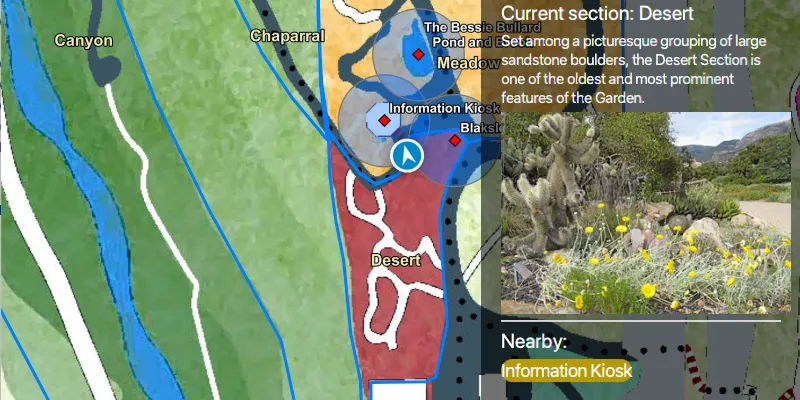
Use case
Geotriggers can be used to notify users when they have entered or exited a geofence by monitoring a given set of features or graphics. They could be used to display contextual information to museum visitors about nearby exhibits, notify hikers when they have wandered off their desired trail, notify dispatchers when service workers arrive at a scene, or more.
How to use the sample
Observe a virtual walking tour of the Santa Barbara Botanic Garden. Information about the user’s current Garden Section, as well as information about nearby points of interest within 10 meters will display or be removed from the UI when the user enters or exits the buffer of each feature.
How it works
- Create a
LocationGeotriggerFeedwith aSimulatedLocationDataSource. - Create
FeatureFenceParametersfrom aServiceFeatureTable, and an optional buffer distance at which to monitor each feature. - Create a
FenceGeotriggerwith the location geotrigger feed, aFenceRuleType.ENTER_OR_EXIT, the feature fence parameters, an Arcade Expression, and a name for the specific geotrigger. - Create a
GeotriggerMonitorwith the fence geotrigger and call.startAsync()on it to begin listening for events that meet theFenceRuleType. - When a
GeotriggerMonitorNotificationEventemits, capture theGeotriggerNotificationInfo. - For more information about the feature that triggered the notification, cast the
GeotriggerNotificationInfoto aFenceGeotriggerNotificationInfoand callfenceGeotriggerNotificationInfo.getFenceGeoElement()to get the fence feature, casting the geoelement as anArcGISFeature. - Depending on the geotrigger notification info’s
FenceNotificationType()display (on notification typeENTERED) or hide (on notification typeEXITED) information about the feature on the UI.
Relevant API
- ArcadeExpression
- FeatureFenceParameters
- FenceGeotrigger
- FenceGeotriggerNotificationInfo
- FenceNotificationType
- FenceRuleType
- Geotrigger
- GeotriggerFeed
- GeotriggerMonitor
- GeotriggerNotificationInfo
- SimulatedLocationDataSource
About the data
This sample uses the Santa Barbara Botanic Garden Geotriggers Sample ArcGIS Online Web Map which includes a georeferenced map of the garden as well as select polygon and point features to denote garden sections and points of interest. Description text and attachment images in the feature layers were provided by the Santa Barbara Botanic Garden and more information can be found on the Garden Sections & Displays portion of their website. All assets are used with permission from the Santa Barbara Botanic Garden. For more information, visit the Santa Barbara Botanic Garden website.
Tags
alert, arcade, fence, geofence, geotrigger, location, navigation, notification, notify, routing, trigger
Sample code
/* * Copyright 2021 Esri * * Licensed under the Apache License, Version 2.0 (the "License"); * you may not use this file except in compliance with the License. * You may obtain a copy of the License at * *    http://www.apache.org/licenses/LICENSE-2.0 * * Unless required by applicable law or agreed to in writing, software * distributed under the License is distributed on an "AS IS" BASIS, * WITHOUT WARRANTIES OR CONDITIONS OF ANY KIND, either express or implied. * See the License for the specific language governing permissions and * limitations under the License. * */
package com.esri.samples.set_up_location_driven_geotriggers;
import java.io.IOException;import java.io.InputStream;import java.nio.charset.StandardCharsets;import java.util.ArrayList;import java.util.Arrays;import java.util.Calendar;import java.util.HashSet;import java.util.List;import java.util.concurrent.ExecutionException;
import javafx.fxml.FXML;import javafx.geometry.Insets;import javafx.scene.control.Alert;import javafx.scene.control.Label;import javafx.scene.image.Image;import javafx.scene.image.ImageView;import javafx.scene.layout.VBox;
import com.esri.arcgisruntime.arcade.ArcadeExpression;import com.esri.arcgisruntime.concurrent.ListenableFuture;import com.esri.arcgisruntime.data.ArcGISFeature;import com.esri.arcgisruntime.data.Attachment;import com.esri.arcgisruntime.data.ServiceFeatureTable;import com.esri.arcgisruntime.geometry.Geometry;import com.esri.arcgisruntime.geometry.Polyline;import com.esri.arcgisruntime.geometry.SpatialReferences;import com.esri.arcgisruntime.geotriggers.FeatureFenceParameters;import com.esri.arcgisruntime.geotriggers.FenceGeotrigger;import com.esri.arcgisruntime.geotriggers.FenceGeotriggerNotificationInfo;import com.esri.arcgisruntime.geotriggers.FenceNotificationType;import com.esri.arcgisruntime.geotriggers.FenceRuleType;import com.esri.arcgisruntime.geotriggers.GeotriggerMonitor;import com.esri.arcgisruntime.geotriggers.LocationGeotriggerFeed;import com.esri.arcgisruntime.layers.FeatureLayer;import com.esri.arcgisruntime.location.LocationDataSource;import com.esri.arcgisruntime.location.SimulatedLocationDataSource;import com.esri.arcgisruntime.location.SimulationParameters;import com.esri.arcgisruntime.mapping.ArcGISMap;import com.esri.arcgisruntime.mapping.view.LocationDisplay;import com.esri.arcgisruntime.mapping.view.MapView;import com.esri.arcgisruntime.portal.Portal;import com.esri.arcgisruntime.portal.PortalItem;
import org.apache.commons.io.IOUtils;
public class SetUpLocationDrivenGeotriggersController {
  @FXML private MapView mapView;  @FXML private ImageView gardenSectionImageView;  @FXML private Label currentGardenSectionTitle;  @FXML private Label currentGardenSectionDescription;  @FXML private Label pointsOfInterestTitle;  @FXML private VBox vBox;
  private GeotriggerMonitor gardenSectionGeotriggerMonitor;  private GeotriggerMonitor gardenPOIGeotriggerMonitor;  private HashSet<String> names;  private SimulatedLocationDataSource simulatedLocationDataSource;
  public void initialize() throws IOException {
    // instantiate a new hashset to store unique names of nearby features visited    names = new HashSet<>();
    // create a map with a predefined tile basemap, feature styles and labels in the Santa Barbara Botanic Garden and set it to the map view    Portal portal = new Portal("https://www.arcgis.com/");    ArcGISMap map = new ArcGISMap(new PortalItem(portal, "6ab0e91dc39e478cae4f408e1a36a308"));    mapView.setMap(map);
    // initialize the simulated location display    initializeSimulatedLocationDisplay();
    // once the map has loaded, obtain service feature tables from its list of operational layers    map.addDoneLoadingListener(() -> {
      // get the garden section feature table from the map's list of feature layers      FeatureLayer gardenSectionFeatureLayer = (FeatureLayer) map.getOperationalLayers().get(0);      ServiceFeatureTable gardenSectionFeatureTable = (ServiceFeatureTable) gardenSectionFeatureLayer.getFeatureTable();      // get the points of interest feature table from the map's list of feature layers      FeatureLayer gardenPOISectionFeatureLayer = (FeatureLayer) map.getOperationalLayers().get(2);      ServiceFeatureTable gardenPOIFeatureTable = (ServiceFeatureTable) gardenPOISectionFeatureLayer.getFeatureTable();      // set view insets to the map view when the map has loaded      mapView.setViewInsets(new Insets(0, vBox.getWidth(), 0, 0));
      // once the simulated location data source has started, set up and start the location display and handle geotriggers      simulatedLocationDataSource.addStatusChangedListener( statusChangedEvent -> {        System.out.println(statusChangedEvent.getStatus());        if (statusChangedEvent.getStatus() == LocationDataSource.Status.STARTED) {
          // create, configure and start a location display that follows the simulated location data source          setUpAndStartLocationDisplay();
          // create feature fence parameters for the garden section, and for the garden points of interest with a buffer of 10m          FeatureFenceParameters featureFenceParametersGardenSection = new FeatureFenceParameters(gardenSectionFeatureTable);          FeatureFenceParameters featureFenceParametersPOI = new FeatureFenceParameters(gardenPOIFeatureTable, 10);
          // define an arcade expression that returns the value for the "name" field of the feature that triggered the monitor          ArcadeExpression arcadeExpression = new ArcadeExpression("$fenceFeature.name");          // create a location geotrigger feed from the simulated location data source          LocationGeotriggerFeed locationGeotriggerFeed = new LocationGeotriggerFeed(simulatedLocationDataSource);
          // create fence geotriggers for each of the service feature tables          FenceGeotrigger fenceGeotriggerGardenSection = new FenceGeotrigger(locationGeotriggerFeed, FenceRuleType.ENTER_OR_EXIT,            featureFenceParametersGardenSection, arcadeExpression, "Section Geotrigger");          FenceGeotrigger fenceGeotriggerPOI = new FenceGeotrigger(locationGeotriggerFeed, FenceRuleType.ENTER_OR_EXIT,            featureFenceParametersPOI, arcadeExpression, "POI Geotrigger");
          // create geotrigger monitors from the fence geotriggers          gardenSectionGeotriggerMonitor = new GeotriggerMonitor(fenceGeotriggerGardenSection);          gardenPOIGeotriggerMonitor = new GeotriggerMonitor(fenceGeotriggerPOI);          List<GeotriggerMonitor> geotriggerMonitors = new ArrayList<>(Arrays.asList(            gardenSectionGeotriggerMonitor, gardenPOIGeotriggerMonitor));
          // for each geotrigger monitor, add a notification event listener, and start the monitor          geotriggerMonitors.forEach(monitor -> {
            monitor.addGeotriggerMonitorNotificationEventListener(notificationEvent -> {              // fence geotrigger notification info provides access to the feature that triggered the notification              var fenceGeotriggerNotificationInfo = (FenceGeotriggerNotificationInfo) notificationEvent.getGeotriggerNotificationInfo();
              // get the name of the fence feature and geotrigger              String fenceFeatureName = fenceGeotriggerNotificationInfo.getMessage();              String geoTriggerName = fenceGeotriggerNotificationInfo.getGeotriggerMonitor().getGeotrigger().getName();
              // determine the notification type on the notification info (entered or exited)              FenceNotificationType fenceNotificationType = fenceGeotriggerNotificationInfo.getFenceNotificationType();              // get a reference to the fence feature that triggered the notification              ArcGISFeature fenceFeature = (ArcGISFeature) fenceGeotriggerNotificationInfo.getFenceGeoElement();
              // when entering a given geofence, add the feature's information to the UI              if (fenceNotificationType == FenceNotificationType.ENTERED) {
                // add the description from the feature's attributes to the UI                handleAddingFeatureInfoToUI(fenceFeature, fenceFeatureName, geoTriggerName);
              } else if (fenceNotificationType == FenceNotificationType.EXITED) {                // when exiting a given geofence, remove its information from the UI                handleRemovingFeatureInfoFromUI(fenceFeatureName, geoTriggerName);              }
            });
            // start the geotrigger monitor            monitor.startAsync();
          });        } else if (statusChangedEvent.getStatus() == LocationDataSource.Status.FAILED_TO_START) {          new Alert(Alert.AlertType.ERROR, "Simulated data location source failed to start").show();        }      });      simulatedLocationDataSource.startAsync();    });  }
  /**   * Creates and starts a simulated location data source based on a json file containing a set polyline data path.   */  private void initializeSimulatedLocationDisplay() throws IOException {
    // read a json string which contains a set of points collected along a walking route    String polylineData = IOUtils.toString(getClass().getResourceAsStream(      "/set_up_location_driven_geotriggers/polyline_data.json"), StandardCharsets.UTF_8);    // create a polyline representing a walking route from the json string    Polyline locations = (Polyline) Geometry.fromJson(polylineData, SpatialReferences.getWgs84());
    // create a new simulated location data source to replicate the path walked around the garden    simulatedLocationDataSource = new SimulatedLocationDataSource();    // set the location of the simulated location data source with simulation parameters with a velocity of 2m/s    simulatedLocationDataSource.setLocations(      locations, new SimulationParameters(Calendar.getInstance(), 2.0, 0.0, 0.0));
    // disable map view interaction, the location display will automatically center on the mock device location    mapView.setEnableMousePan(false);    mapView.setEnableKeyboardNavigation(false);
  }
  /**   * Gets information from the fence geotrigger notification information and the fence feature itself and adds the information   * to the UI either as a formatted string or as an image.   *   * @param fenceFeature                    the feature   */  private void handleAddingFeatureInfoToUI(ArcGISFeature fenceFeature, String fenceFeatureName, String geoTriggerName) {
    // fetch the fence feature's attachments    ListenableFuture<List<Attachment>> attachmentsFuture = fenceFeature.fetchAttachmentsAsync();    // listen for fetch attachments to complete    attachmentsFuture.addDoneListener(() -> {      // get the feature attachments      try {        List<Attachment> attachments = attachmentsFuture.get();        if (!attachments.isEmpty()) {          // get the first (and only) attachment for the feature, which is an image          Attachment imageAttachment = attachments.get(0);          // fetch the attachment's data          ListenableFuture<InputStream> attachmentDataFuture = imageAttachment.fetchDataAsync();          // listen for fetch data to complete          attachmentDataFuture.addDoneListener(() -> {            // get the attachments data as an input stream            try {              InputStream attachmentInputStream = attachmentDataFuture.get();              // save the input stream to a temporary directory and get a reference to its URI              Image imageFromStream = new Image(attachmentInputStream);              attachmentInputStream.close();
              // if the geotrigger notification was from entering a garden section, populate the garden section part of the UI              if (geoTriggerName.equals(gardenSectionGeotriggerMonitor.getGeotrigger().getName())) {                // add details to the UI                currentGardenSectionTitle.setText(fenceFeatureName);                // get the first sentence of the description to display in the UI                String firstSentenceOfDescription = fenceFeature.getAttributes().get("description").toString().split("\\.")[0];                currentGardenSectionDescription.setText(firstSentenceOfDescription + ".");                gardenSectionImageView.setImage(imageFromStream);
                // if the geotrigger notification was from entering a POI buffer, populate the POI part of the UI              } else if (geoTriggerName.equals(gardenPOIGeotriggerMonitor.getGeotrigger().getName())) {                // add details to the UI                names.add(fenceFeatureName);                String str = String.join(", ", names);                pointsOfInterestTitle.setText(str);              }
            } catch (Exception exception) {              exception.printStackTrace();              new Alert(Alert.AlertType.ERROR, "Error getting attachment").show();            }          });        } else new Alert(Alert.AlertType.ERROR, "No attachments to display").show();      } catch (InterruptedException | ExecutionException e) {        e.printStackTrace();        new Alert(Alert.AlertType.ERROR, "Error getting fence feature attachments").show();      }    });
  }
  /**   * Removes the name of the fence feature being exited from the collection of feature names, and updates the label on the UI.   */  private void handleRemovingFeatureInfoFromUI(String fenceFeatureName, String geoTriggerName) {
    // if exiting a garden section, reset the UI to inform the user they are walking on a path    if (geoTriggerName.equals(gardenSectionGeotriggerMonitor.getGeotrigger().getName())) {      currentGardenSectionTitle.setText("On the path");      currentGardenSectionDescription.setText("You are walking between sections");      gardenSectionImageView.setImage(null);
      // if exiting a POI buffer, remove the name of the buffer from the list displayed and handle UI for if no features are nearby    } else if (geoTriggerName.equals(gardenPOIGeotriggerMonitor.getGeotrigger().getName())) {      names.remove(fenceFeatureName);      String str = String.join(", ", names);      pointsOfInterestTitle.setText(str);      if (names.isEmpty()) {        pointsOfInterestTitle.setText("No features nearby");      }    }
  }
  /**   * Creates and sets up a location display from the simulated location data source, and starts it.   */  private void setUpAndStartLocationDisplay() {    // configure the map view's location display to follow the simulated location data source    LocationDisplay locationDisplay = mapView.getLocationDisplay();    locationDisplay.setLocationDataSource(simulatedLocationDataSource);    locationDisplay.setAutoPanMode(LocationDisplay.AutoPanMode.RECENTER);    locationDisplay.setInitialZoomScale(1000);    // start the location display    locationDisplay.startAsync();  }
  /**   * Disposes application resources.   */  void terminate() {    if (mapView != null) {      simulatedLocationDataSource.stopAsync();      gardenPOIGeotriggerMonitor.stop();      gardenSectionGeotriggerMonitor.stop();      mapView.dispose();    }  }
}
/* * Copyright 2021 Esri. * * Licensed under the Apache License, Version 2.0 (the "License"); you may not * use this file except in compliance with the License. You may obtain a copy of * the License at * * http://www.apache.org/licenses/LICENSE-2.0 * * Unless required by applicable law or agreed to in writing, software * distributed under the License is distributed on an "AS IS" BASIS, WITHOUT * WARRANTIES OR CONDITIONS OF ANY KIND, either express or implied. See the * License for the specific language governing permissions and limitations under * the License. */
package com.esri.samples.set_up_location_driven_geotriggers;
import java.io.IOException;
import javafx.application.Application;import javafx.fxml.FXMLLoader;import javafx.scene.Parent;import javafx.scene.Scene;import javafx.stage.Stage;
public class SetUpLocationDrivenGeotriggersSample extends Application {
private static SetUpLocationDrivenGeotriggersController controller; @Override public void start(Stage stage) throws IOException { // set up the scene FXMLLoader loader = new FXMLLoader(getClass().getResource("/set_up_location_driven_geotriggers/main.fxml")); Parent root = loader.load(); controller = loader.getController(); Scene scene = new Scene(root);
// set up the stage stage.setTitle("Set Up Location Driven Geotriggers"); stage.setWidth(800); stage.setHeight(700); stage.setScene(scene); stage.show(); }
/** * Stops and releases all resources used in application. */ @Override public void stop() { controller.terminate(); }
/** * Opens and runs application. * * @param args arguments passed to this application */ public static void main(String[] args) {
Application.launch(args); }}