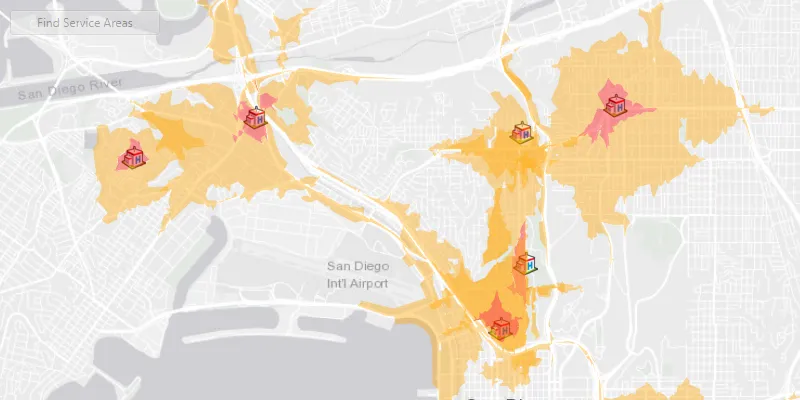
Find the service areas of several facilities from a feature service.
Use case
A city taxi company may calculate service areas around their vehicle lots to identify gaps in coverage. Alternatively, they may want to ensure overlaps where a high volume of passengers requires redundant facilities, such as near an airport.
How to use the sample
Click ‘find service areas’ to calculate and display the service area of each facility (hospital) on the map. The polygons displayed around each facility represents the facility’s service area: the red area is within 1 minute travel time from the hospital by car, whilst orange is within 3 minutes by car. All service areas are semi-transparent to show where they overlap.
How it works
- Create a new
ServiceAreaTaskfrom a network service. - Create default
ServiceAreaParametersfrom the service area task. - Set the parameters
ServiceAreaParameters.setReturnPolygons(true)to return polygons of all service areas. - Define
QueryParametersthat retrieve allFacilityitems from aFacilitiesFeatureTable. Add the facilities to the service area parameters using the query parameters,serviceAreaParameters.SetFacilities(facilitiesTable, queryParameters). - Get the
ServiceAreaResultby solving the service area task using the parameters. - For each facility, get any
ServiceAreaPolygonsthat were returned,serviceAreaResult.getResultPolygons(facilityIndex). - Display the service area polygons as
Graphicsin aGraphicsOverlayon theMapView.
About the data
This sample uses a street map of San Diego, in combination with a feature service with facilities (used here to represent hospitals). Additionally a street network is used on the server for calculating the service area.
Relevant API
- ServiceAreaParameters
- ServiceAreaPolygon
- ServiceAreaResult
- ServiceAreaTask
Tags
facilities, feature service, impedance, network analysis, service area, travel time
Sample code
/* * Copyright 2019 Esri. * * Licensed under the Apache License, Version 2.0 (the "License"); you may not * use this file except in compliance with the License. You may obtain a copy of * the License at * * http://www.apache.org/licenses/LICENSE-2.0 * * Unless required by applicable law or agreed to in writing, software * distributed under the License is distributed on an "AS IS" BASIS, WITHOUT * WARRANTIES OR CONDITIONS OF ANY KIND, either express or implied. See the * License for the specific language governing permissions and limitations under * the License. */
package com.esri.samples.find_service_areas_for_multiple_facilities;
import java.util.ArrayList;import java.util.Arrays;import java.util.List;import java.util.concurrent.ExecutionException;
import javafx.application.Application;import javafx.beans.binding.Bindings;import javafx.geometry.Insets;import javafx.geometry.Pos;import javafx.scene.Scene;import javafx.scene.control.Alert;import javafx.scene.control.Button;import javafx.scene.control.ProgressIndicator;import javafx.scene.layout.StackPane;import javafx.scene.paint.Color;import javafx.stage.Stage;
import com.esri.arcgisruntime.ArcGISRuntimeEnvironment;import com.esri.arcgisruntime.concurrent.ListenableFuture;import com.esri.arcgisruntime.data.ArcGISFeatureTable;import com.esri.arcgisruntime.data.QueryParameters;import com.esri.arcgisruntime.data.ServiceFeatureTable;import com.esri.arcgisruntime.layers.FeatureLayer;import com.esri.arcgisruntime.loadable.LoadStatus;import com.esri.arcgisruntime.mapping.ArcGISMap;import com.esri.arcgisruntime.mapping.BasemapStyle;import com.esri.arcgisruntime.mapping.view.Graphic;import com.esri.arcgisruntime.mapping.view.GraphicsOverlay;import com.esri.arcgisruntime.mapping.view.MapView;import com.esri.arcgisruntime.symbology.PictureMarkerSymbol;import com.esri.arcgisruntime.symbology.SimpleFillSymbol;import com.esri.arcgisruntime.symbology.SimpleRenderer;import com.esri.arcgisruntime.tasks.networkanalysis.ServiceAreaParameters;import com.esri.arcgisruntime.tasks.networkanalysis.ServiceAreaPolygon;import com.esri.arcgisruntime.tasks.networkanalysis.ServiceAreaPolygonDetail;import com.esri.arcgisruntime.tasks.networkanalysis.ServiceAreaResult;import com.esri.arcgisruntime.tasks.networkanalysis.ServiceAreaTask;
public class FindServiceAreasForMultipleFacilitiesSample extends Application {
  private MapView mapView;
  @Override  public void start(Stage stage) {
    // create stack pane and application scene    StackPane stackPane = new StackPane();    Scene scene = new Scene(stackPane);    scene.getStylesheets().add(getClass().getResource("/find_service_areas_for_multiple_facilities/style.css").toExternalForm());
    // set title, size, and add scene to stage    stage.setTitle("Find Service Areas for Multiple Facilities Sample");    stage.setWidth(800);    stage.setHeight(700);    stage.setScene(scene);    stage.show();
    // authentication with an API key or named user is required to access basemaps and other location services    String yourAPIKey = System.getProperty("apiKey");    ArcGISRuntimeEnvironment.setApiKey(yourAPIKey);
    // create button    Button findServiceAreasButton = new Button("Find Service Areas");    findServiceAreasButton.setMaxWidth(150);    findServiceAreasButton.setDisable(true);
    // create a progress indicator    ProgressIndicator progressIndicator = new ProgressIndicator();    progressIndicator.setVisible(false);
    // create a map with the light gray basemap style    ArcGISMap map = new ArcGISMap(BasemapStyle.ARCGIS_LIGHT_GRAY);
    // create a map view and set the map to it    mapView = new MapView();    mapView.setMap(map);
    // create a graphics overlay for displaying service areas    GraphicsOverlay serviceAreasGraphicsOverlay = new GraphicsOverlay();
    // add the graphics overlay to the map view    mapView.getGraphicsOverlays().add(serviceAreasGraphicsOverlay);
    // create fill symbols for rendering the result    ArrayList<SimpleFillSymbol> fillSymbols = new ArrayList<>();    fillSymbols.add(new SimpleFillSymbol(SimpleFillSymbol.Style.SOLID, Color.web("orange", 0.4), null));    fillSymbols.add(new SimpleFillSymbol(SimpleFillSymbol.Style.SOLID, Color.web("red", 0.4), null));
    // create a feature table of facilities using a FeatureServer    ArcGISFeatureTable facilitiesTable = new ServiceFeatureTable("https://services2.arcgis.com/ZQgQTuoyBrtmoGdP/ArcGIS/rest/services/San_Diego_Facilities/FeatureServer/0");    // create a feature layer from the table    FeatureLayer facilitiesFeatureLayer = new FeatureLayer(facilitiesTable);
    // create a symbol used to display the facilities    PictureMarkerSymbol facilitySymbol = new PictureMarkerSymbol("https://static.arcgis.com/images/Symbols/SafetyHealth/Hospital.png");    facilitySymbol.setHeight(25);    facilitySymbol.setWidth(25);    // set the renderer of the facilities feature layer to use the facilities symbol    facilitiesFeatureLayer.setRenderer(new SimpleRenderer(facilitySymbol));
    // add the facilities feature layer to the map's operational layers    map.getOperationalLayers().add(facilitiesFeatureLayer);
    // wait for the facilities feature layer to load    facilitiesFeatureLayer.addDoneLoadingListener(() -> {      if (facilitiesFeatureLayer.getLoadStatus() == LoadStatus.LOADED) {
        // zoom to the extent of the feature layer        mapView.setViewpointGeometryAsync(facilitiesFeatureLayer.getFullExtent(), 130);
        // enable the find service areas button when the feature layer has loaded        findServiceAreasButton.disableProperty().bind(Bindings.createBooleanBinding(()->          facilitiesFeatureLayer.getLoadStatus() != LoadStatus.LOADED));
        // determine the service areas and display them when the button is clicked        findServiceAreasButton.setOnAction(event -> {
          // show the progress indicator          progressIndicator.setVisible(true);
          // create a service area task from URL          ServiceAreaTask serviceAreaTask = new ServiceAreaTask("https://sampleserver6.arcgisonline.com/arcgis/rest/services/NetworkAnalysis/SanDiego/NAServer/ServiceArea");
          // create default service area task parameters          ListenableFuture<ServiceAreaParameters> serviceAreaTaskParametersFuture = serviceAreaTask.createDefaultParametersAsync();          serviceAreaTaskParametersFuture.addDoneListener(() -> {            try {              ServiceAreaParameters serviceAreaParameters = serviceAreaTaskParametersFuture.get();              // set the task parameters to have the task return polygons              serviceAreaParameters.setPolygonDetail(ServiceAreaPolygonDetail.HIGH);              serviceAreaParameters.setReturnPolygons(true);              // clear the default service area, and add service areas of 1 minute and 3 minutes travel time by car              serviceAreaParameters.getDefaultImpedanceCutoffs().clear();              serviceAreaParameters.getDefaultImpedanceCutoffs().addAll(Arrays.asList(1.0, 3.0));
              // create query parameters used to select all facilities from the feature table              QueryParameters queryParameters = new QueryParameters();              queryParameters.setWhereClause("1=1");
              // add all facilities to the service area parameters              serviceAreaParameters.setFacilities(facilitiesTable, queryParameters);
              // find the service areas around the facilities using the parameters              ListenableFuture<ServiceAreaResult> serviceAreaResultFuture = serviceAreaTask.solveServiceAreaAsync(serviceAreaParameters);              serviceAreaResultFuture.addDoneListener(() -> {                try {                  // get the task results                  ServiceAreaResult serviceAreaResult = serviceAreaResultFuture.get();
                  // create a list to hold the service area graphics                  List<Graphic> serviceAreaGraphics = serviceAreasGraphicsOverlay.getGraphics();
                  // iterate through all the facilities to get the service area polygons                  for (int i = 0; i < serviceAreaResult.getFacilities().size(); i++) {                    List<ServiceAreaPolygon> serviceAreaPolygonList = serviceAreaResult.getResultPolygons(i);                    // create a graphic for each available polygon, as there may be more than one for each service area                    for (int j = 0; j < serviceAreaPolygonList.size(); j++) {                      // create and show a graphics for the service area                      serviceAreaGraphics.add(new Graphic(serviceAreaPolygonList.get(j).getGeometry(), fillSymbols.get(j)));                    }                  }
                } catch (ExecutionException | InterruptedException e) {                  new Alert(Alert.AlertType.ERROR, "Error solving the service area task.").show();
                } finally {                  // hide the progress indicator after the task is complete                  progressIndicator.setVisible(false);                }              });
            } catch (ExecutionException | InterruptedException e) {              new Alert(Alert.AlertType.ERROR, "Error generating service area task parameters.").show();            }          });        });      }    });
    // add the map view, find service area button, and progress indicator to stack pane    stackPane.getChildren().addAll(mapView, findServiceAreasButton, progressIndicator);    StackPane.setAlignment(findServiceAreasButton, Pos.TOP_LEFT);    StackPane.setMargin(findServiceAreasButton, new Insets(10, 0, 0, 10));  }
  /**   * Stops and releases all resources used in application.   */  @Override  public void stop() {
    if (mapView != null) {      mapView.dispose();    }  }
  /**   * Opens and runs application.   *   * @param args arguments passed to this application   */  public static void main(String[] args) {
    Application.launch(args);  }}