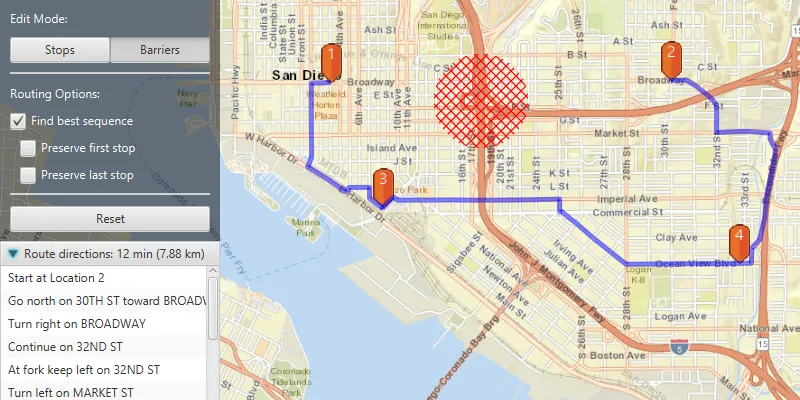
Find a route that reaches all stops without crossing any barriers.
Use case
You can define barriers to avoid unsafe areas, for example flooded roads, when planning the most efficient route to evacuate a hurricane zone. When solving a route, barriers allow you to define portions of the road network that cannot be traversed. You could also use this functionality to plan routes when you know an area will be inaccessible due to a community activity like an organized race or a market night.
In some situations, it is further beneficial to find the most efficient route that reaches all stops, reordering them to reduce travel time. For example, a delivery service may target a number of drop-off addresses, specifically looking to avoid congested areas or closed roads, arranging the stops in the most time-effective order.
How to use the sample
Use the “Edit Mode” toggle buttons to select whether to add Stops or Barriers to the route. The route will be solved automatically as you add stops and barriers, and information about the length of the route and directions will be shown in the controls area. Select “Find best sequence” to allow stops to be re-ordered in order to find an optimum route. Select “Preserve first stop” to preserve the first stop. Select “Preserve last stop” to preserve the last stop. You can use the “Reset” button to reset the sample.
How it works
- Create a
RouteTaskwith the URL to a Network Analysis route service. - Get the default
RouteParametersfor the service, and create the desiredStops andPolygonBarriers. - Add the stops and barriers to the route’s parameters,
routeParameters.setStops(routeStops)androuteParameters.setPolygonBarriers(routeBarriers). - Set the
ReturnStopsandReturnDirectionstotrue. - If the user will accept routes with the stops in any order, set
FindBestSequencetotrueto find the most optimal route. - If the user has a definite start point, set
PreserveFirstStoptotrue. - If the user has a definite final destination, set
PreserveLastStoptotrue. - Call
routeTask.solveRouteAsync(routeParameters)to get aRouteResult. - Get the first returned route by calling
routeResult.getRoutes().get(0). - Get the geometry from the route to display the route to the map.
Relevant API
- DirectionManeuver
- PolygonBarrier
- Route
- RouteParameters
- RouteResult
- RouteTask
- Stop
About the data
This sample uses an Esri-hosted sample street network for San Diego.
Tags
barriers, best sequence, directions, maneuver, network analysis, routing, sequence, stop order, stops
Sample code
/* * Copyright 2019 Esri. * * Licensed under the Apache License, Version 2.0 (the "License"); * you may not use this file except in compliance with the License. * You may obtain a copy of the License at * * http://www.apache.org/licenses/LICENSE-2.0 * * Unless required by applicable law or agreed to in writing, software * distributed under the License is distributed on an "AS IS" BASIS, * WITHOUT WARRANTIES OR CONDITIONS OF ANY KIND, either express or implied. * See the License for the specific language governing permissions and * limitations under the License. */
package com.esri.samples.routing_around_barriers;
import java.util.Arrays;import java.util.LinkedList;import java.util.concurrent.ExecutionException;
import javafx.fxml.FXML;import javafx.geometry.Point2D;import javafx.scene.control.Alert;import javafx.scene.control.Button;import javafx.scene.control.CheckBox;import javafx.scene.control.ListView;import javafx.scene.control.TitledPane;import javafx.scene.control.ToggleButton;import javafx.scene.image.Image;import javafx.scene.input.MouseButton;import javafx.scene.input.MouseEvent;
import com.esri.arcgisruntime.ArcGISRuntimeEnvironment;import com.esri.arcgisruntime.concurrent.ListenableFuture;import com.esri.arcgisruntime.geometry.Geometry;import com.esri.arcgisruntime.geometry.GeometryEngine;import com.esri.arcgisruntime.geometry.Point;import com.esri.arcgisruntime.geometry.Polygon;import com.esri.arcgisruntime.loadable.LoadStatus;import com.esri.arcgisruntime.mapping.ArcGISMap;import com.esri.arcgisruntime.mapping.BasemapStyle;import com.esri.arcgisruntime.mapping.Viewpoint;import com.esri.arcgisruntime.mapping.view.Graphic;import com.esri.arcgisruntime.mapping.view.GraphicsOverlay;import com.esri.arcgisruntime.mapping.view.MapView;import com.esri.arcgisruntime.symbology.CompositeSymbol;import com.esri.arcgisruntime.symbology.PictureMarkerSymbol;import com.esri.arcgisruntime.symbology.SimpleFillSymbol;import com.esri.arcgisruntime.symbology.SimpleLineSymbol;import com.esri.arcgisruntime.symbology.SimpleRenderer;import com.esri.arcgisruntime.symbology.TextSymbol;import com.esri.arcgisruntime.tasks.networkanalysis.DirectionManeuver;import com.esri.arcgisruntime.tasks.networkanalysis.PolygonBarrier;import com.esri.arcgisruntime.tasks.networkanalysis.Route;import com.esri.arcgisruntime.tasks.networkanalysis.RouteParameters;import com.esri.arcgisruntime.tasks.networkanalysis.RouteResult;import com.esri.arcgisruntime.tasks.networkanalysis.RouteTask;import com.esri.arcgisruntime.tasks.networkanalysis.Stop;import javafx.scene.paint.Color;
public class RoutingAroundBarriersController {
  @FXML private MapView mapView;  @FXML private ToggleButton btnAddStop;  @FXML private ToggleButton btnAddBarrier;  @FXML private Button btnReset;  @FXML private CheckBox findBestSequenceCheckBox;  @FXML private CheckBox preserveFirstStopCheckBox;  @FXML private CheckBox preserveLastStopCheckBox;  @FXML private ListView<String> directionsList;  @FXML private TitledPane routeInformationTitledPane;
  private GraphicsOverlay routeGraphicsOverlay = new GraphicsOverlay();  private GraphicsOverlay stopsGraphicsOverlay = new GraphicsOverlay();  private GraphicsOverlay barriersGraphicsOverlay = new GraphicsOverlay();  private Image pinImage;  private LinkedList<Stop> stopsList = new LinkedList<>();  private LinkedList<PolygonBarrier> barriersList = new LinkedList<>();  private PictureMarkerSymbol pinSymbol;  private RouteTask routeTask;  private RouteParameters routeParameters;  private SimpleFillSymbol barrierSymbol;
  @FXML  public void initialize() {    // authentication with an API key or named user is required to access basemaps and other location services    String yourAPIKey = System.getProperty("apiKey");    ArcGISRuntimeEnvironment.setApiKey(yourAPIKey);
    // create a map with the streets basemap style and set it to the map view    ArcGISMap map = new ArcGISMap(BasemapStyle.ARCGIS_STREETS);    mapView.setMap(map);
    // set a viewpoint on the map view    mapView.setViewpoint(new Viewpoint(32.727, -117.1750, 40000));
    // add the graphics overlays to the map view    mapView.getGraphicsOverlays().addAll(Arrays.asList(stopsGraphicsOverlay, barriersGraphicsOverlay, routeGraphicsOverlay));
    // initialize the TitlePane of the Accordion box    routeInformationTitledPane.setText("No route to display");
    // create symbols for displaying the barriers and the route line    barrierSymbol = new SimpleFillSymbol(SimpleFillSymbol.Style.DIAGONAL_CROSS, Color.RED, null);    SimpleLineSymbol routeLineSymbol = new SimpleLineSymbol(SimpleLineSymbol.Style.SOLID, Color.web("0000FF", 0.8), 5.0f);
    // create simple renderer for routes, and set it to use the line symbol    SimpleRenderer routeRenderer = new SimpleRenderer();    routeRenderer.setSymbol(routeLineSymbol);    routeGraphicsOverlay.setRenderer(routeRenderer);
    // create a marker with a pin image and position it    pinImage = new Image(getClass().getResourceAsStream("/routing_around_barriers/orange_symbol.png"), 0, 80, true, true);    pinSymbol = new PictureMarkerSymbol(pinImage);    pinSymbol.setOffsetY(20);    pinSymbol.loadAsync();
    // create route task from San Diego service    routeTask = new RouteTask("https://sampleserver6.arcgisonline.com/arcgis/rest/services/NetworkAnalysis/SanDiego/NAServer/Route");    routeTask.loadAsync();
    // wait for the route task to load    routeTask.addDoneLoadingListener(() -> {      if (routeTask.getLoadStatus() == LoadStatus.LOADED) {        // get default route parameters        final ListenableFuture<RouteParameters> routeParametersFuture = routeTask.createDefaultParametersAsync();        routeParametersFuture.addDoneListener(() -> {          try {            routeParameters = routeParametersFuture.get();
            // set flags to return stops and directions            routeParameters.setReturnStops(true);            routeParameters.setReturnDirections(true);
          } catch (InterruptedException | ExecutionException e) {            new Alert(Alert.AlertType.ERROR, "Cannot create RouteTask parameters " + e.getMessage()).show();          }        });
      } else {        new Alert(Alert.AlertType.ERROR, "Unable to load RouteTask " + routeTask.getLoadStatus().toString()).show();      }    });  }
  /**   * Handles clicks on the map view to add/remove stops and barriers.   *   * @param e mouse click event   */  @FXML  private void handleMapViewClicked(MouseEvent e) {    if (e.isStillSincePress()) {      // convert clicked point to a map point      Point mapPoint = mapView.screenToLocation(new Point2D(e.getX(), e.getY()));
      // normalize geometry - important for geometries that will be sent to a server for processing      mapPoint = (Point) GeometryEngine.normalizeCentralMeridian(mapPoint);
      // if the primary mouse button was clicked, add a stop or barrier to the clicked map point      if (e.getButton() == MouseButton.PRIMARY) {        // clear the displayed route, if it exists, since it might not be up to date any more        routeGraphicsOverlay.getGraphics().clear();
        if (btnAddStop.isSelected()) {          // use the clicked map point to construct a stop          Stop stopPoint = new Stop(new Point(mapPoint.getX(), mapPoint.getY(), mapPoint.getSpatialReference()));
          // add the new stop to the list of stops          stopsList.add(stopPoint);
          // create a marker symbol and graphics, and add the graphics to the graphics overlay          CompositeSymbol newStopSymbol = createCompositeStopSymbol(stopsList.size());          Graphic stopGraphic = new Graphic(mapPoint, newStopSymbol);          stopsGraphicsOverlay.getGraphics().add(stopGraphic);
        } else if (btnAddBarrier.isSelected()) {          // create a buffered polygon around the clicked point          Polygon bufferedBarrierPolygon = GeometryEngine.buffer(mapPoint, 500);
          // create a polygon barrier for the routing task, and add it to the list of barriers          PolygonBarrier barrier = new PolygonBarrier(bufferedBarrierPolygon);          barriersList.add(barrier);
          // build graphics for the barrier and add it to the graphics overlay          Graphic barrierGraphic = new Graphic(bufferedBarrierPolygon, barrierSymbol);          barriersGraphicsOverlay.getGraphics().add(barrierGraphic);        }
        // if the secondary mouse button was clicked, delete the last stop or barrier, respectively      } else if (e.getButton() == MouseButton.SECONDARY) {
        // check if we can remove stops        if (btnAddStop.isSelected() && !stopsList.isEmpty()) {          // clear the displayed route, if it exists, since it might not be up to date any more          routeGraphicsOverlay.getGraphics().clear();
          // remove the last stop from the stop list and the graphics overlay          stopsList.removeLast();          stopsGraphicsOverlay.getGraphics().remove(stopsGraphicsOverlay.getGraphics().size() - 1);
          // check if we can remove barriers        } else if (btnAddBarrier.isSelected() && !barriersList.isEmpty()) {          // clear the displayed route, if it exists, since it might not be up to date any more          routeGraphicsOverlay.getGraphics().clear();
          // remove the last barrier from the barrier list and the graphics overlay          barriersList.removeLast();          barriersGraphicsOverlay.getGraphics().remove(barriersGraphicsOverlay.getGraphics().size() - 1);        }      }
      createRouteAndDisplay();    }  }
  /**   * Uses the route task with the lists of stops and barriers to determine the route and display it.   */  @FXML  private void createRouteAndDisplay() {    if (stopsList.size() >= 2) {      // clear the previous route from the graphics overlay, if it exists      routeGraphicsOverlay.getGraphics().clear();      // clear the directions list from the directions list view, if they exist      directionsList.getItems().clear();
      // add the existing stops and barriers to the route parameters      routeParameters.setStops(stopsList);      routeParameters.setPolygonBarriers(barriersList);
      // apply the requested route finding parameters      routeParameters.setFindBestSequence(findBestSequenceCheckBox.isSelected());      routeParameters.setPreserveFirstStop(preserveFirstStopCheckBox.isSelected());      routeParameters.setPreserveLastStop(preserveLastStopCheckBox.isSelected());
      // solve the route task      final ListenableFuture<RouteResult> routeResultFuture = routeTask.solveRouteAsync(routeParameters);      routeResultFuture.addDoneListener(() -> {        try {          RouteResult routeResult = routeResultFuture.get();          if (!routeResult.getRoutes().isEmpty()) {            // get the first route result            Route firstRoute = routeResult.getRoutes().get(0);
            // create a geometry for this route            Geometry routeGeometry = firstRoute.getRouteGeometry();
            // create a graphic for the route and add it to the graphics overlay            Graphic routeGraphic = new Graphic(routeGeometry);            routeGraphicsOverlay.getGraphics().add(routeGraphic);
            // set the title of the TitledPane to display the information            String output = String.format("Route directions: %d min (%.2f km)", Math.round(firstRoute.getTravelTime()), firstRoute.getTotalLength() / 1000);            routeInformationTitledPane.setText(output);
            // get the direction text for each maneuver and add them to the list to display            for (DirectionManeuver maneuver : firstRoute.getDirectionManeuvers()) {              directionsList.getItems().add(maneuver.getDirectionText());            }
          } else {            new Alert(Alert.AlertType.ERROR, "No possible routes found").show();          }
        } catch (InterruptedException | ExecutionException e) {          new Alert(Alert.AlertType.ERROR, "Solve RouteTask failed").show();        }
        // enable the reset button        btnReset.setDisable(false);
      });    } else {      // reset the route information title pane since no route is displayed      routeInformationTitledPane.setText("No route to display");
      // clear the directions list since no route is displayed      directionsList.getItems().clear();    }  }
  /**   * Clears stops and barriers from the route parameters, clears direction list and graphics overlays.   */  @FXML  private void clearRouteAndGraphics() {    // clear stops from route parameters and stops list    routeParameters.clearStops();    stopsList.clear();
    // clear barriers from route parameters and barriers list    routeParameters.clearPointBarriers();    barriersList.clear();
    // reset the route information title pane    routeInformationTitledPane.setText("No route to display");
    // clear the directions list    directionsList.getItems().clear();
    // clear all graphics overlays    mapView.getGraphicsOverlays().forEach(graphicsOverlay -> graphicsOverlay.getGraphics().clear());
    // disable reset button    btnReset.setDisable(true);  }
  /**   * Builds a composite symbol out of a pin symbol and a text symbol marking the stop number.   *   * @param stopNumber The number of the current stop being added   * @return A composite symbol to mark the current stop   */  private CompositeSymbol createCompositeStopSymbol(Integer stopNumber) {    // determine the stop number and create a new label    TextSymbol stopTextSymbol = new TextSymbol(18, (stopNumber).toString(), Color.WHITE, TextSymbol.HorizontalAlignment.CENTER, TextSymbol.VerticalAlignment.TOP);    stopTextSymbol.setOffsetY((float) pinImage.getHeight() / 2);
    // construct a composite symbol out of the pin and text symbols, and return it    return new CompositeSymbol(Arrays.asList(pinSymbol, stopTextSymbol));  }
  /**   * Toggles and resets the preserve stops checkboxes.   */  @FXML  private void togglePreserveStopsCheckBoxes() {    // un-tick and disable the second-tier checkboxes    preserveFirstStopCheckBox.setSelected(false);    preserveFirstStopCheckBox.setDisable(!preserveFirstStopCheckBox.isDisabled());    preserveLastStopCheckBox.setSelected(false);    preserveLastStopCheckBox.setDisable(!preserveLastStopCheckBox.isDisabled());  }
  /**   * Stops and releases all resources used in application.   */  public void terminate() {
    if (mapView != null) {      mapView.dispose();    }  }}
/* * Copyright 2019 Esri. * * Licensed under the Apache License, Version 2.0 (the "License"); * you may not use this file except in compliance with the License. * You may obtain a copy of the License at * * http://www.apache.org/licenses/LICENSE-2.0 * * Unless required by applicable law or agreed to in writing, software * distributed under the License is distributed on an "AS IS" BASIS, * WITHOUT WARRANTIES OR CONDITIONS OF ANY KIND, either express or implied. * See the License for the specific language governing permissions and * limitations under the License. */
package com.esri.samples.routing_around_barriers;
import javafx.application.Application;import javafx.fxml.FXMLLoader;import javafx.scene.Parent;import javafx.scene.Scene;import javafx.stage.Stage;
public class RoutingAroundBarriersSample extends Application {
private static RoutingAroundBarriersController controller;
@Override public void start(Stage stage) throws Exception {
// set up the scene FXMLLoader loader = new FXMLLoader(getClass().getResource("/routing_around_barriers/main.fxml")); Parent root = loader.load(); controller = loader.getController(); Scene scene = new Scene(root);
// set title, size and add scene to stage stage.setTitle("Routing Around Barriers Sample"); stage.setWidth(800); stage.setHeight(700); stage.setScene(scene); stage.show(); }
/** * Stops and releases all resources used in application. */ @Override public void stop() { controller.terminate(); }
/** * Opens and runs application. * * @param args arguments passed to this application */ public static void main(String[] args) {
Application.launch(args); }}