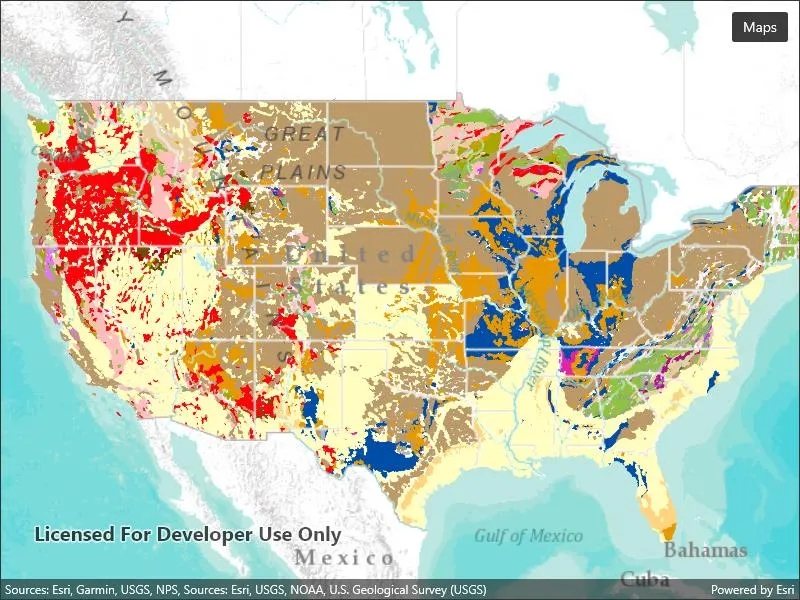
Display a web map.
Use case
For displaying web maps stored on ArcGIS Online.
How to use the sample
A web map can be selected from the drop-down list. On selection the web map displays in the map view.
How it works
- Create a
Portalfrom the ArcGIS URL http://www.arcgis.com. - Create a
PortalItemusing the Portal and the web map ID:new PortalItem(portal, ID). - Create a
Mapusing the portal item. - Set the map to the
MapView.
Relevant API
- Map
- MapView
- Portal
- PortalItem
About the data
The web maps accessed by this sample show Geology for United States and Recent Hurricanes, Cyclones and Typhoons.
Tags
portal item, web map
Sample code
// Copyright 2022 Esri.//// Licensed under the Apache License, Version 2.0 (the "License"); you may not use this file except in compliance with the License.// You may obtain a copy of the License at: http://www.apache.org/licenses/LICENSE-2.0//// Unless required by applicable law or agreed to in writing, software distributed under the License is distributed on an// "AS IS" BASIS, WITHOUT WARRANTIES OR CONDITIONS OF ANY KIND, either express or implied. See the License for the specific// language governing permissions and limitations under the License.
using Esri.ArcGISRuntime.Mapping;
namespace ArcGIS.Samples.OpenMapURL{    [ArcGIS.Samples.Shared.Attributes.Sample(        name: "Open map URL",        category: "Map",        description: "Display a web map.",        instructions: "A web map can be selected from the drop-down list. On selection the web map displays in the map view.",        tags: new[] { "portal item", "web map" })]    public partial class OpenMapURL : ContentPage    {        // String array to hold urls to publicly available web maps.        private string[] _itemURLs = {            "https://arcgis.com/home/item.html?id=92ad152b9da94dee89b9e387dfe21acd",            "https://arcgis.com/home/item.html?id=064f2e898b094a17b84e4a4cd5e5f549"        };
        // String array to store titles for the webmaps specified above.        private string[] _titles = {            "Geology for United States",            "Recent Hurricanes, Cyclones and Typhoons"        };
        public OpenMapURL()        {            InitializeComponent();            Initialize();        }
        private void Initialize()        {            // Create a new Map instance with url of the webmap that is displayed by default.            MyMapView.Map = new Map(new Uri(_itemURLs[0]));        }
        private async void OnMapsClicked(object sender, EventArgs e)        {            try            {                // Show sheet and get title from the selection                string selectedMapTitle = await Application.Current.Windows[0].Page.DisplayActionSheetAsync("Select map", "Cancel", null, _titles);
                // If selected cancel do nothing                if (selectedMapTitle == null || selectedMapTitle == "Cancel") return;
                // Get index that is used to get the selected url                int selectedIndex = _titles.ToList().IndexOf(selectedMapTitle);
// Create a new Map instance with url of the webmap that selected MyMapView.Map = new Map(new Uri(_itemURLs[selectedIndex])); } catch (Exception ex) { await Application.Current.Windows[0].Page.DisplayAlertAsync("Error", ex.Message, "OK"); } } }}<?xml version="1.0" encoding="utf-8" ?><ContentPage x:Class="ArcGIS.Samples.OpenMapURL.OpenMapURL" xmlns="http://schemas.microsoft.com/dotnet/2021/maui" xmlns:x="http://schemas.microsoft.com/winfx/2009/xaml" xmlns:esriUI="clr-namespace:Esri.ArcGISRuntime.Maui;assembly=Esri.ArcGISRuntime.Maui"> <Grid> <esriUI:MapView x:Name="MyMapView" /> <Button x:Name="MapsButton" Margin="10" Clicked="OnMapsClicked" HorizontalOptions="End" Text="Maps" VerticalOptions="Start" /> </Grid></ContentPage>