Use a symbol to display a geometry on a map.
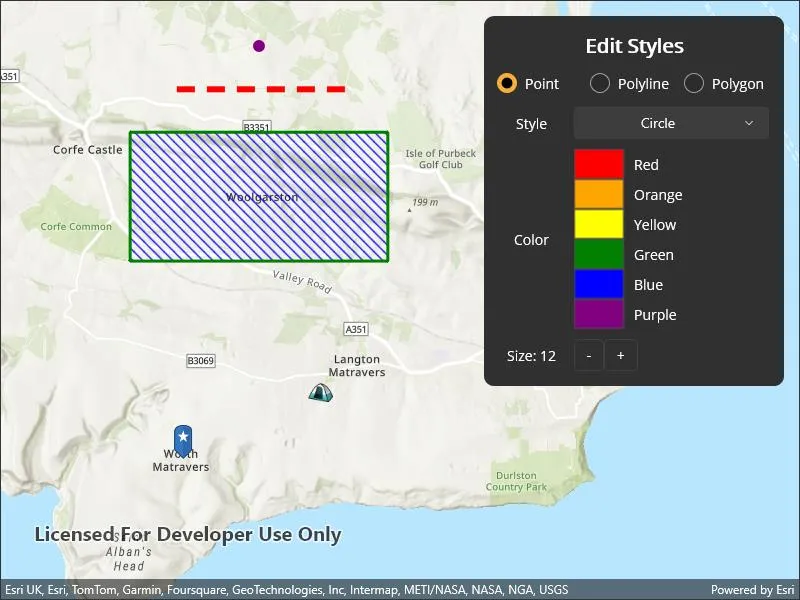
Use case
Customize the appearance of a geometry type with a symbol style suitable for the data. For example, a tourism office may use pictures of landmarks as symbols on an online map or app to help prospective visitors orient themselves more easily around a city. A point on the map styled with a circle could represent a drilled borehole location, whereas a cross could represent the location of an old coal mine shaft. A red line with a dashed style could represent a geological fault mapped on a geological map. A polygon with a brown ‘forward-diagonal’ fill style could represent an area of artificial ground mapped on a geological map.
How to use the sample
Tap “Edit Styles” and select a geometry to edit with the picker. Use the controls to change the symbol properties for the geometry.
How it works
- Create a
PictureMarkerSymbolorSimpleMarkerSymbolto style aPoint.- For the picture marker symbol, create it using a URL or image and set its height property.
- For the simple marker symbol, set the
Style,Color, andSizeproperties.
- Create a
SimpleLineSymbolto style aPolyline.- Set the
Style,Color, andSizeproperties.
- Set the
- Create a
SimpleFillSymbolto style aPolygon.- Set the
Style,Color, andOutlineproperties.
- Set the
- Create
Graphics using the geometries and symbols and add them to aGraphicsOverlay. - Add the graphics overlay to a
MapView.
Relevant API
- Geometry
- Graphic
- GraphicsOverlay
- PictureMarkerSymbol
- SimpleFillSymbol
- SimpleLineSymbol
- SimpleMarkerSymbol
Tags
display, fill, graphics, line, marker, overlay, picture, point, symbol, visualization
Sample code
// Copyright 2024 Esri.//// Licensed under the Apache License, Version 2.0 (the "License"); you may not use this file except in compliance with the License.// You may obtain a copy of the License at: http://www.apache.org/licenses/LICENSE-2.0//// Unless required by applicable law or agreed to in writing, software distributed under the License is distributed on an// "AS IS" BASIS, WITHOUT WARRANTIES OR CONDITIONS OF ANY KIND, either express or implied. See the License for the specific// language governing permissions and limitations under the License.
using Esri.ArcGISRuntime.Geometry;using Esri.ArcGISRuntime.Mapping;using Esri.ArcGISRuntime.Symbology;using Esri.ArcGISRuntime.UI;using System.Reflection;using Color = System.Drawing.Color;using Grid = Microsoft.Maui.Controls.Grid;
namespace ArcGIS.Samples.StyleGeometryTypesWithSymbols{    [ArcGIS.Samples.Shared.Attributes.Sample(        name: "Style geometry types with symbols",        category: "Symbology",        description: "Use a symbol to display a geometry on a map.",        instructions: "Tap \"Edit Styles\" and select a geometry to edit with the picker. Use the controls to change the symbol properties for the geometry.",        tags: new[] { "display", "fill", "graphics", "line", "marker", "overlay", "picture", "point", "symbol", "visualization" })]    [ArcGIS.Samples.Shared.Attributes.OfflineData()]    public partial class StyleGeometryTypesWithSymbols    {        // Item sources for the pickers.        public List<SimpleMarkerSymbolStyle> SimpleMarkerSymbolStyles => Enum.GetValues(typeof(SimpleMarkerSymbolStyle)).Cast<SimpleMarkerSymbolStyle>().ToList();        public List<SimpleLineSymbolStyle> SimpleLineSymbolStyles => Enum.GetValues(typeof(SimpleLineSymbolStyle)).Cast<SimpleLineSymbolStyle>().ToList();        public List<SimpleFillSymbolStyle> SimpleFillSymbolStyles => Enum.GetValues(typeof(SimpleFillSymbolStyle)).Cast<SimpleFillSymbolStyle>().ToList();
        // Hold the selected graphic.        private Graphic _selectedGraphic;
        // Flag indicating if styling should be applied to a polygon's fill or outline.        private bool _stylingPolygonFill = true;
        public StyleGeometryTypesWithSymbols()        {            InitializeComponent();            _ = Initialize();        }
        private async Task Initialize()        {            // Create a new map with a topographic basemap initially centered on Woolgarston, England.            MyMapView.Map = new Map(BasemapStyle.ArcGISTopographic)            {                InitialViewpoint = new Viewpoint(new MapPoint(-225e3, 6_553e3, SpatialReferences.WebMercator), 88e3)            };
            // A graphics overlay for displaying the geometry graphics on the map view.            var graphicsOverlay = new GraphicsOverlay();
            // Create the simple marker symbol for styling the point.            var pointSymbol = new SimpleMarkerSymbol(SimpleMarkerSymbolStyle.Circle, Color.Purple, 12);
            // Create simple line symbol for styling the polyline.            var polylineSymbol = new SimpleLineSymbol(SimpleLineSymbolStyle.Dash, Color.Red, 6);
            // Create the simple fill symbol for styling the polygon, including its outline.            var polygonSymbol = new SimpleFillSymbol(SimpleFillSymbolStyle.ForwardDiagonal, Color.Blue,                new SimpleLineSymbol(SimpleLineSymbolStyle.Solid, Color.Green, 3));
            // Create a point graphic and add it to the graphics overlay.            var point = new MapPoint(-225e3, 6_560e3, SpatialReferences.WebMercator);            var pointGraphic = new Graphic(point, pointSymbol);            graphicsOverlay.Graphics.Add(pointGraphic);
            // Create a polyline graphic and add it to the graphics overlay.            var points = new MapPoint[2]            {                new MapPoint(-223e3, 6_559e3, SpatialReferences.WebMercator),                new MapPoint(-227e3, 6_559e3, SpatialReferences.WebMercator)            };            var polyline = new Polyline(points, SpatialReferences.WebMercator);            var polylineGraphic = new Graphic(polyline, polylineSymbol);            graphicsOverlay.Graphics.Add(polylineGraphic);
            // Create a polygon graphic and add it to the graphics overlay.            points = new MapPoint[4]            {                new MapPoint(-222e3, 6_558e3, SpatialReferences.WebMercator),                new MapPoint(-228e3, 6_558e3, SpatialReferences.WebMercator),                new MapPoint(-228e3, 6_555e3, SpatialReferences.WebMercator),                new MapPoint(-222e3, 6_555e3, SpatialReferences.WebMercator)            };            var polygon = new Polygon(points, SpatialReferences.WebMercator);            var polygonGraphic = new Graphic(polygon, polygonSymbol);            graphicsOverlay.Graphics.Add(polygonGraphic);
            // Create a graphic with a picture marker symbol (image resource) and add it to the graphics overlay.            var pinGraphic = await MakePictureMarkerSymbolFromImage(new MapPoint(-226_770, 6_550_470, SpatialReferences.WebMercator));            graphicsOverlay.Graphics.Add(pinGraphic);
            // Create a graphic with a picture marker symbol (URL) and add it to the graphics overlay.            var imageUri = new Uri("https://static.arcgis.com/images/Symbols/OutdoorRecreation/Camping.png");            var campsiteSymbol = new PictureMarkerSymbol(imageUri)            {                Width = 25,                Height = 25            };            var campsitePoint = new MapPoint(-223_560, 6_552_020, SpatialReferences.WebMercator);            var campsiteGraphic = new Graphic(campsitePoint, campsiteSymbol);            graphicsOverlay.Graphics.Add(campsiteGraphic);
            // Add the graphics overlay to the map view.            MyMapView.GraphicsOverlays.Add(graphicsOverlay);
            // Setup bindings for the UI controls.            PointSizeStepper.BindingContext = PointGrid.BindingContext = graphicsOverlay.Graphics[0];            PolylineWidthStepper.BindingContext = PolylineGrid.BindingContext = graphicsOverlay.Graphics[1];            PolygonOutlineWidthStepper.BindingContext = PolygonGrid.BindingContext = graphicsOverlay.Graphics[2];
            // Populate the color collection views with colors.            var colors = new List<Color>()            {                Color.Red, Color.Orange, Color.Yellow, Color.Green, Color.Blue, Color.Purple            };            PointColorCollectionView.ItemsSource = PolylineColorCollectionView.ItemsSource =                PolygonFillColorCollectionView.ItemsSource = PolygonOutlineColorCollectionView.ItemsSource = colors;
            // Set the style picker item sources.            PointStylePicker.ItemsSource = SimpleMarkerSymbolStyles;            PolygonOutlineStylePicker.ItemsSource = PolylineStylePicker.ItemsSource = SimpleLineSymbolStyles;            PolygonFillStylePicker.ItemsSource = SimpleFillSymbolStyles;
            // Check the point radio button by default.            PointRadioButton.IsChecked = true;
            // Set the selected styles to reflect the initial symbology.            PointStylePicker.SelectedItem = SimpleMarkerSymbolStyle.Circle;            PolylineStylePicker.SelectedItem = SimpleLineSymbolStyle.Dash;            PolygonFillStylePicker.SelectedItem = SimpleFillSymbolStyle.ForwardDiagonal;            PolygonOutlineStylePicker.SelectedItem = SimpleLineSymbolStyle.Solid;
            // Set the selected colors to reflect the initial symbology.            PointColorCollectionView.SelectedItem = Color.Purple;            PolylineColorCollectionView.SelectedItem = Color.Red;            PolygonFillColorCollectionView.SelectedItem = Color.Blue;            PolygonOutlineColorCollectionView.SelectedItem = Color.Green;
            // Subscribe to events for updating the UI now that initialization is complete.            PointStylePicker.SelectedIndexChanged += StylePicker_SelectionChanged;            PolylineStylePicker.SelectedIndexChanged += StylePicker_SelectionChanged;            PolygonFillStylePicker.SelectedIndexChanged += PolygonFillStylePicker_SelectionChanged;            PolygonOutlineStylePicker.SelectedIndexChanged += PolygonOutlineStylePicker_SelectionChanged;            PointColorCollectionView.SelectionChanged += ColorCollectionView_SelectionChanged;            PolylineColorCollectionView.SelectionChanged += ColorCollectionView_SelectionChanged;            PolygonFillColorCollectionView.SelectionChanged += PolygonFillColorCollectionView_SelectionChanged;            PolygonOutlineColorCollectionView.SelectionChanged += PolygonOutlineColorCollectionView_SelectionChanged;        }
        private async Task<Graphic> MakePictureMarkerSymbolFromImage(MapPoint point)        {            // Hold a reference to the picture marker symbol.            PictureMarkerSymbol pinSymbol;
            // Get current assembly that contains the image.            Assembly currentAssembly = Assembly.GetExecutingAssembly();
            // Get the resource name of the blue pin star image            string resourceStreamName = this.GetType().Assembly.GetManifestResourceNames().Single(str => str.EndsWith("pin_star_blue.png"));
            // Load the resource stream            using (Stream resourceStream = this.GetType().Assembly.GetManifestResourceStream(resourceStreamName))            {                // Create new symbol using asynchronous factory method from stream.                pinSymbol = await PictureMarkerSymbol.CreateAsync(resourceStream);                pinSymbol.Width = 60;                pinSymbol.Height = 60;                // The image is a pin; offset the image so that the pinpoint is on the point rather than the image's true center.                pinSymbol.LeaderOffsetX = 30;                pinSymbol.OffsetY = 14;            }
            return new Graphic(point, pinSymbol);        }
        #region UI event handlers
        private void GeometryTypeRadioButton_CheckedChanged(object sender, CheckedChangedEventArgs e)        {            // Get the selected radio button.            var radioButton = sender as RadioButton;
            // Get the binding context of the radio button.            var grid = radioButton.BindingContext as Grid;
            // Collapse all grids.            PointGrid.IsVisible = PolylineGrid.IsVisible = PolygonGrid.IsVisible = false;
            // Show the selected grid.            grid.IsVisible = true;
            // Set the selected graphic based on the grid's binding context.            _selectedGraphic = grid.BindingContext as Graphic;        }
        private void StylePicker_SelectionChanged(object sender, EventArgs e)        {            // Get the selected picker item.            var picker = sender as Picker;
            // Update the symbol style based on the selected picker item.            switch (_selectedGraphic.Geometry.GeometryType)            {                case GeometryType.Point:                    ((SimpleMarkerSymbol)_selectedGraphic.Symbol).Style = (SimpleMarkerSymbolStyle)picker.SelectedItem;                    break;
                case GeometryType.Polyline:                    ((SimpleLineSymbol)_selectedGraphic.Symbol).Style = (SimpleLineSymbolStyle)picker.SelectedItem;                    break;
                case GeometryType.Polygon:                    var symbol = (SimpleFillSymbol)_selectedGraphic.Symbol;                    if (_stylingPolygonFill)                    {                        symbol.Style = (SimpleFillSymbolStyle)picker.SelectedItem;                    }                    else                    {                        symbol.Outline = new SimpleLineSymbol((SimpleLineSymbolStyle)picker.SelectedItem, symbol.Outline.Color, symbol.Outline.Width);                    }                    break;            }        }
        private void ColorCollectionView_SelectionChanged(object sender, SelectionChangedEventArgs e)        {            // Selected graphic will be null when initializing the UI.            if (_selectedGraphic == null) return;
            // Get the selected item.            var color = (Color)((CollectionView)sender).SelectedItem;
            // Update the symbol color based on the selected geometry type.            switch (_selectedGraphic.Geometry.GeometryType)            {                case GeometryType.Point:                    ((SimpleMarkerSymbol)_selectedGraphic.Symbol).Color = color;                    break;
                case GeometryType.Polyline:                    ((SimpleLineSymbol)_selectedGraphic.Symbol).Color = color;                    break;
                case GeometryType.Polygon:                    var symbol = (SimpleFillSymbol)_selectedGraphic.Symbol;                    if (_stylingPolygonFill)                    {                        symbol.Color = color;                    }                    else                    {                        symbol.Outline.Color = color;                    }                    break;            }        }
        private void SizeStepper_ValueChanged(object sender, ValueChangedEventArgs e)        {            // Selected graphic will be null when initializing the UI.            if (_selectedGraphic == null) return;
            // Update the symbol size based on the sender's binding context.            switch (_selectedGraphic.Geometry.GeometryType)            {                case GeometryType.Point:                    ((SimpleMarkerSymbol)_selectedGraphic.Symbol).Size = e.NewValue;                    PointSizeLabel.Text = $"Size: {e.NewValue}";                    break;
                case GeometryType.Polyline:                    ((SimpleLineSymbol)_selectedGraphic.Symbol).Width = e.NewValue;                    PolylineWidthLabel.Text = $"Width: {e.NewValue}";                    break;
                case GeometryType.Polygon:                    ((SimpleFillSymbol)_selectedGraphic.Symbol).Outline.Width = e.NewValue;                    PolygonOutlineWidthLabel.Text = $"Width: {e.NewValue}";                    break;            }        }
        #region Polygon styling
        private void PolygonFillStylePicker_SelectionChanged(object sender, EventArgs e)        {            _stylingPolygonFill = true;            StylePicker_SelectionChanged(sender, e);        }
        private void PolygonOutlineStylePicker_SelectionChanged(object sender, EventArgs e)        {            _stylingPolygonFill = false;            StylePicker_SelectionChanged(sender, e);        }
        private void PolygonFillColorCollectionView_SelectionChanged(object sender, SelectionChangedEventArgs e)        {            _stylingPolygonFill = true;            ColorCollectionView_SelectionChanged(sender, e);        }
        private void PolygonOutlineColorCollectionView_SelectionChanged(object sender, SelectionChangedEventArgs e)        {            _stylingPolygonFill = false;            ColorCollectionView_SelectionChanged(sender, e);        }
        #endregion Polygon styling
#endregion UI event handlers }}<?xml version="1.0" encoding="utf-8" ?><ContentPage x:Class="ArcGIS.Samples.StyleGeometryTypesWithSymbols.StyleGeometryTypesWithSymbols" xmlns="http://schemas.microsoft.com/dotnet/2021/maui" xmlns:x="http://schemas.microsoft.com/winfx/2009/xaml" xmlns:converters="clr-namespace:ArcGIS.Converters" xmlns:esriUI="clr-namespace:Esri.ArcGISRuntime.Maui;assembly=Esri.ArcGISRuntime.Maui" xmlns:drawing="clr-namespace:System.Drawing;assembly=System.Drawing.Common" xmlns:local="clr-namespace:ArcGIS.Samples.StyleGeometryTypesWithSymbols"> <ContentPage.Resources> <Style TargetType="Picker"> <Setter Property="Margin" Value="5" /> <Setter Property="VerticalOptions" Value="Center" /> <Setter Property="HorizontalTextAlignment" Value="Center" /> </Style> <Style TargetType="Stepper"> <Setter Property="Margin" Value="5" /> <Setter Property="VerticalOptions" Value="Center" /> </Style> <Style TargetType="Label"> <Setter Property="Margin" Value="5" /> <Setter Property="VerticalOptions" Value="Center" /> <Setter Property="HorizontalOptions" Value="Center" /> </Style> <Style TargetType="CollectionView"> <Setter Property="SelectionMode" Value="Single" /> <Setter Property="Margin" Value="5" /> <Setter Property="VerticalOptions" Value="Center" /> <Setter Property="ItemTemplate"> <Setter.Value> <DataTemplate x:DataType="drawing:Color"> <HorizontalStackLayout Spacing="5"> <Border x:Name="ColorPreview" BackgroundColor="{Binding ., Converter={StaticResource ColorConverter}}" WidthRequest="50" /> <Label x:Name="ColorLabel" Margin="5" HorizontalOptions="Center" Text="{Binding Name}" VerticalOptions="Center" /> </HorizontalStackLayout> </DataTemplate> </Setter.Value> </Setter> </Style> <converters:ColorConverter x:Key="ColorConverter" /> </ContentPage.Resources> <Grid Style="{DynamicResource EsriSampleContainer}"> <esriUI:MapView x:Name="MyMapView" Style="{DynamicResource EsriSampleGeoView}" /> <Border Style="{DynamicResource EsriSampleControlPanel}"> <ScrollView> <StackLayout> <Label Margin="5" FontAttributes="Bold" FontSize="20" HorizontalOptions="Center" Text="Edit Styles" VerticalOptions="Center" /> <Grid ColumnDefinitions="*,*,*"> <RadioButton x:Name="PointRadioButton" BindingContext="{x:Reference PointGrid}" CheckedChanged="GeometryTypeRadioButton_CheckedChanged" Content="Point" /> <RadioButton Grid.Column="1" BindingContext="{x:Reference PolylineGrid}" CheckedChanged="GeometryTypeRadioButton_CheckedChanged" Content="Polyline" /> <RadioButton Grid.Column="2" BindingContext="{x:Reference PolygonGrid}" CheckedChanged="GeometryTypeRadioButton_CheckedChanged" Content="Polygon" /> </Grid> <Grid x:Name="PointGrid" ColumnDefinitions="75,*" RowDefinitions="*,*,*"> <Label Margin="5" HorizontalOptions="Center" Text="Style" VerticalOptions="Center" /> <Picker x:Name="PointStylePicker" Grid.Column="1" /> <Label Grid.Row="1" Margin="5" HorizontalOptions="Center" Text="Color" VerticalOptions="Center" /> <CollectionView x:Name="PointColorCollectionView" Grid.Row="1" Grid.Column="1" SelectionChanged="ColorCollectionView_SelectionChanged" /> <Label x:Name="PointSizeLabel" Grid.Row="2" Margin="5" HorizontalOptions="Center" Text="Size: 12" VerticalOptions="Center" /> <Stepper x:Name="PointSizeStepper" Grid.Row="2" Grid.Column="1" Maximum="15" Minimum="5" ValueChanged="SizeStepper_ValueChanged" Value="12" /> </Grid> <Grid x:Name="PolylineGrid" ColumnDefinitions="75,*" IsVisible="False" RowDefinitions="*,*,*"> <Label Margin="5" HorizontalOptions="Center" Text="Style" VerticalOptions="Center" /> <Picker x:Name="PolylineStylePicker" Grid.Column="1" /> <Label Grid.Row="1" Margin="5" HorizontalOptions="Center" Text="Color" VerticalOptions="Center" /> <CollectionView x:Name="PolylineColorCollectionView" Grid.Row="1" Grid.Column="1" /> <Label x:Name="PolylineWidthLabel" Grid.Row="2" Margin="5" HorizontalOptions="Center" Text="Width: 6" VerticalOptions="Center" /> <Stepper x:Name="PolylineWidthStepper" Grid.Row="2" Grid.Column="1" Maximum="10" Minimum="1" ValueChanged="SizeStepper_ValueChanged" Value="6" /> </Grid> <Grid x:Name="PolygonGrid" ColumnDefinitions="75,*" IsVisible="False" RowDefinitions="*,*,*,*,*,*,*,*"> <Label Grid.ColumnSpan="2" Margin="5" FontAttributes="Bold" HorizontalOptions="Center" Text="Fill" VerticalOptions="Center" /> <Label Grid.Row="1" Margin="5" HorizontalOptions="Center" Text="Style" VerticalOptions="Center" /> <Picker x:Name="PolygonFillStylePicker" Grid.Row="1" Grid.Column="1" /> <Label Grid.Row="2" Margin="5" HorizontalOptions="Center" Text="Color" VerticalOptions="Center" /> <CollectionView x:Name="PolygonFillColorCollectionView" Grid.Row="2" Grid.Column="1" /> <Label Grid.Row="3" Grid.ColumnSpan="2" Margin="5" FontAttributes="Bold" HorizontalOptions="Center" Text="Outline" VerticalOptions="Center" /> <Label Grid.Row="4" Margin="5" HorizontalOptions="Center" Text="Style" VerticalOptions="Center" /> <Picker x:Name="PolygonOutlineStylePicker" Grid.Row="4" Grid.Column="2" /> <Label Grid.Row="5" Margin="5" HorizontalOptions="Center" Text="Color" VerticalOptions="Center" /> <CollectionView x:Name="PolygonOutlineColorCollectionView" Grid.Row="5" Grid.Column="1" /> <Label x:Name="PolygonOutlineWidthLabel" Grid.Row="6" Margin="5" HorizontalOptions="Center" Text="Width: 3" VerticalOptions="Center" /> <Stepper x:Name="PolygonOutlineWidthStepper" Grid.Row="6" Grid.Column="1" Maximum="10" Minimum="1" ValueChanged="SizeStepper_ValueChanged" Value="3" /> </Grid> </StackLayout> </ScrollView>
</Border> </Grid></ContentPage>