Create and save a map as an ArcGIS PortalItem (i.e. web map).
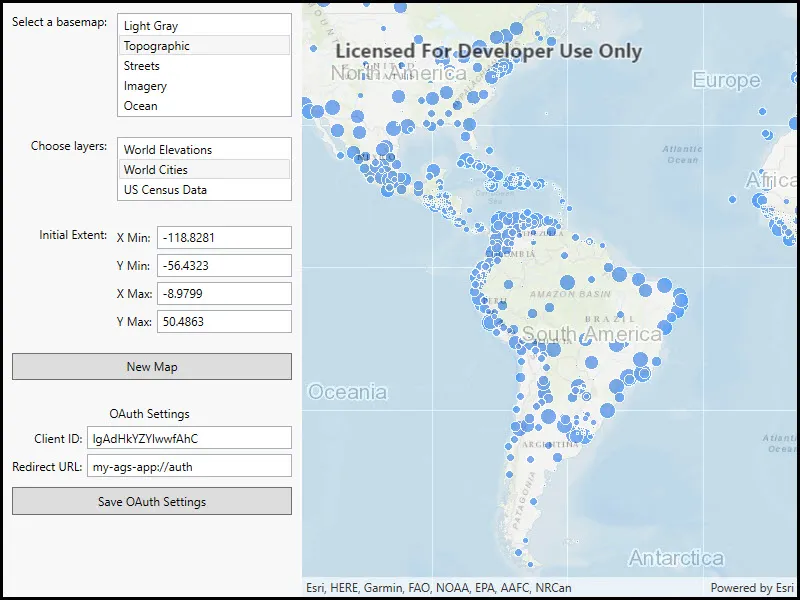
Use case
Maps can be created programmatically in code and then serialized and saved as an ArcGIS web map. A web map can be shared with others and opened in various applications and APIs throughout the platform, such as ArcGIS Pro, ArcGIS Online, the JavaScript API, Collector, and Explorer.
How to use the sample
- Select the basemap and layers you’d like to add to your map.
- Press the Save button.
- Sign into an ArcGIS Online account.
- Provide a title, tags, and description.
- Save the map.
How it works
- A
Mapis created with aBasemapand a few operational layers. - A
Portalobject is created and loaded. This will issue an authentication challenge, prompting the user to provide credentials. - Once the user is authenticated,
map.SaveAsAsyncis called and a newMapis saved with the specified title, tags, and folder.
Relevant API
- AuthenticationManager
- ChallengeHandler
- GenerateCredentialAsync
- IOAuthAuthorizeHandler
- Map
- Map.SaveAsAsync
- Portal
Tags
ArcGIS Online, OAuth, portal, publish, share, web map
Sample code
// Copyright 2021 Esri.//// Licensed under the Apache License, Version 2.0 (the "License"); you may not use this file except in compliance with the License.// You may obtain a copy of the License at: http://www.apache.org/licenses/LICENSE-2.0//// Unless required by applicable law or agreed to in writing, software distributed under the License is distributed on an// "AS IS" BASIS, WITHOUT WARRANTIES OR CONDITIONS OF ANY KIND, either express or implied. See the License for the specific// language governing permissions and limitations under the License.
using ArcGIS.Helpers;using Esri.ArcGISRuntime.Geometry;using Esri.ArcGISRuntime.Mapping;using Esri.ArcGISRuntime.Portal;using Esri.ArcGISRuntime.UI;using System;using System.Collections.Generic;using System.IO;using System.Threading.Tasks;using System.Windows;using System.Windows.Controls;
namespace ArcGIS.WPF.Samples.AuthorMap{    [ArcGIS.Samples.Shared.Attributes.Sample(        name: "Create and save map",        category: "Map",        description: "Create and save a map as an ArcGIS `PortalItem` (i.e. web map).",        instructions: "1. Select the basemap and layers you'd like to add to your map.",        tags: new[] { "ArcGIS Online", "OAuth", "portal", "publish", "share", "web map" })]    [ArcGIS.Samples.Shared.Attributes.ClassFile("Helpers\\ArcGISLoginPrompt.cs")]    public partial class AuthorMap    {        // String array to store names of the available basemaps        private readonly string[] _basemapNames =        {            "Light Gray",            "Topographic",            "Streets",            "Imagery",            "Ocean"        };
        // Dictionary of operational layer names and URLs        private Dictionary<string, string> _operationalLayerUrls = new Dictionary<string, string>        {            {"World Elevations", "https://sampleserver6.arcgisonline.com/arcgis/rest/services/Elevation/WorldElevations/MapServer"},            {"World Cities", "https://sampleserver6.arcgisonline.com/arcgis/rest/services/SampleWorldCities/MapServer/" },            {"US Census Data", "https://sampleserver6.arcgisonline.com/arcgis/rest/services/Census/MapServer"}        };
        public AuthorMap()        {            this.Loaded += (s, e) => { _ = Initialize(); };            InitializeComponent();        }
        private async Task Initialize()        {            ArcGISLoginPrompt.SetChallengeHandler();
            bool loggedIn = await ArcGISLoginPrompt.EnsureAGOLCredentialAsync();
            // Show a plain gray map in the map view.            if (loggedIn)            {                MyMapView.Map = new Map(BasemapStyle.ArcGISLightGray);            }            else MyMapView.Map = new Map();
            // Fill the basemap combo box with basemap names            BasemapListBox.ItemsSource = _basemapNames;
            // Add a listener for changes in the selected basemap.            BasemapListBox.SelectionChanged += BasemapSelectionChanged;
            // Fill the operational layers list box with layer names            OperationalLayerListBox.ItemsSource = _operationalLayerUrls;
            // Update the extent labels whenever the view point (extent) changes            MyMapView.ViewpointChanged += (s, evt) => UpdateViewExtentLabels();        }
        #region UI event handlers
        private void BasemapSelectionChanged(object sender, SelectionChangedEventArgs e)        {            // Call a function to set the basemap to the one selected            ApplyBasemap(e.AddedItems[0].ToString());        }
        private void OperationalLayerSelectionChanged(object sender, SelectionChangedEventArgs e)        {            // Call a function to add the chosen layers to the map            AddOperationalLayers();        }
        private void NewMapClicked(object sender, RoutedEventArgs e)        {            // Create a new map (will not have an associated PortalItem)            MyMapView.Map = new Map(BasemapStyle.ArcGISLightGray);            MyMapView.Map.Basemap.LoadAsync();
            // Reset UI to be consistent with map            BasemapListBox.SelectedIndex = 0;            OperationalLayerListBox.SelectedIndex = -1;        }
        private async void SaveMapClicked(object sender, RoutedEventArgs e)        {            try            {                // Show the progress bar so the user knows work is happening                SaveProgressBar.Visibility = Visibility.Visible;
                // Get the current map                Map myMap = MyMapView.Map;
                // Load the current map before saving to portal.                await myMap.LoadAsync();
                // Apply the current extent as the map's initial extent                myMap.InitialViewpoint = MyMapView.GetCurrentViewpoint(ViewpointType.BoundingGeometry);
                // Get the current map view for the item thumbnail                RuntimeImage thumbnailImg = await MyMapView.ExportImageAsync();
                // See if the map has already been saved (has an associated portal item)                if (myMap.Item == null)                {                    // Get information for the new portal item                    string title = TitleTextBox.Text;                    string description = DescriptionTextBox.Text;                    string[] tags = TagsTextBox.Text.Split(',');
                    // Make sure all required info was entered                    if (string.IsNullOrEmpty(title) || string.IsNullOrEmpty(description) || tags.Length == 0)                    {                        throw new Exception("Please enter a title, description, and some tags to describe the map.");                    }
                    // Call a function to save the map as a new portal item                    await SaveNewMapAsync(MyMapView.Map, title, description, tags, thumbnailImg);
                    // Report a successful save                    MessageBox.Show("Saved '" + title + "' to ArcGIS Online!", "Map Saved");                }                else                {                    // This is not the initial save, call SaveAsync to save changes to the existing portal item                    await myMap.SaveAsync();
                    // Get the file stream from the new thumbnail image                    Stream imageStream = await thumbnailImg.GetEncodedBufferAsync();
                    // Update the item thumbnail                    ((PortalItem)myMap.Item).SetThumbnail(imageStream);                    await myMap.SaveAsync();
                    // Report update was successful                    MessageBox.Show("Saved changes to '" + myMap.Item.Title + "'", "Updates Saved");                }            }            catch (Exception ex)            {                // Report error message                MessageBox.Show("Error saving map to ArcGIS Online: " + ex.Message);            }            finally            {                // Hide the progress bar                SaveProgressBar.Visibility = Visibility.Hidden;            }        }
        #endregion UI event handlers
        private void ApplyBasemap(string basemapName)        {            // Set the basemap for the map according to the user's choice in the list box.            switch (basemapName)            {                case "Light Gray":                    MyMapView.Map.Basemap = new Basemap(BasemapStyle.ArcGISLightGray);                    break;
                case "Topographic":                    MyMapView.Map.Basemap = new Basemap(BasemapStyle.ArcGISTopographic);                    break;
                case "Streets":                    MyMapView.Map.Basemap = new Basemap(BasemapStyle.ArcGISStreets);                    break;
                case "Imagery":                    MyMapView.Map.Basemap = new Basemap(BasemapStyle.ArcGISImagery);                    break;
                case "Ocean":                    MyMapView.Map.Basemap = new Basemap(BasemapStyle.ArcGISOceans);                    break;            }
            MyMapView.Map.Basemap.LoadAsync();        }
        private void AddOperationalLayers()        {            // Clear all operational layers from the map            Map myMap = MyMapView.Map;            myMap.OperationalLayers.Clear();
            // Loop through the selected items in the operational layers list box            foreach (KeyValuePair<string, string> item in OperationalLayerListBox.SelectedItems)            {                // Get the service uri for each selected item                KeyValuePair<string, string> layerInfo = item;                Uri layerUri = new Uri(layerInfo.Value);
                // Create a new map image layer, set it 50% opaque, and add it to the map                ArcGISMapImageLayer layer = new ArcGISMapImageLayer(layerUri)                {                    Opacity = 0.5                };                myMap.OperationalLayers.Add(layer);            }        }
        private async Task SaveNewMapAsync(Map myMap, string title, string description, string[] tags, RuntimeImage thumb)        {            await ArcGISLoginPrompt.EnsureAGOLCredentialAsync();
            // Get the ArcGIS Online portal (will use credential from login above)            ArcGISPortal agsOnline = await ArcGISPortal.CreateAsync();
            // Save the current state of the map as a portal item in the user's default folder            await myMap.SaveAsAsync(agsOnline, null, title, description, tags, thumb);        }
        private void UpdateViewExtentLabels()        {            // Get the current view point for the map view            Viewpoint currentViewpoint = MyMapView.GetCurrentViewpoint(ViewpointType.BoundingGeometry);            if (currentViewpoint == null) { return; }
            // Get the current map extent (envelope) from the view point            Envelope currentExtent = currentViewpoint.TargetGeometry as Envelope;
            // Project the current extent to geographic coordinates (longitude / latitude)            Envelope currentGeoExtent = (Envelope)currentExtent.Project(SpatialReferences.Wgs84);
// Fill the app text boxes with min / max longitude (x) and latitude (y) to four decimal places XMinTextBox.Text = currentGeoExtent.XMin.ToString("0.####"); YMinTextBox.Text = currentGeoExtent.YMin.ToString("0.####"); XMaxTextBox.Text = currentGeoExtent.XMax.ToString("0.####"); YMaxTextBox.Text = currentGeoExtent.YMax.ToString("0.####"); } }}<UserControl x:Class="ArcGIS.WPF.Samples.AuthorMap.AuthorMap" xmlns="http://schemas.microsoft.com/winfx/2006/xaml/presentation" xmlns:x="http://schemas.microsoft.com/winfx/2006/xaml" xmlns:esri="http://schemas.esri.com/arcgis/runtime/2013"> <UserControl.Resources> <Style TargetType="ListBox" BasedOn="{StaticResource CalciteListBoxStyle}"> <Setter Property="Margin" Value="10" /> </Style> <Style TargetType="TextBlock"> <Setter Property="Margin" Value="0,5,5,0" /> <Setter Property="VerticalAlignment" Value="Top" /> </Style> <Style TargetType="TextBox"> <Setter Property="Margin" Value="0,5,0,0" /> <Setter Property="Padding" Value="2.5" /> </Style> </UserControl.Resources> <Grid> <Grid.ColumnDefinitions> <ColumnDefinition Width="300" /> <ColumnDefinition /> </Grid.ColumnDefinitions> <ScrollViewer> <Grid Grid.Column="0"> <Grid.RowDefinitions> <RowDefinition Height="Auto" /> <RowDefinition Height="Auto" /> <RowDefinition Height="Auto" /> <RowDefinition Height="Auto" /> <RowDefinition Height="Auto" /> </Grid.RowDefinitions> <Grid.ColumnDefinitions> <ColumnDefinition Width="Auto" /> <ColumnDefinition /> </Grid.ColumnDefinitions> <TextBlock Grid.Row="0" Margin="10,10,0,0" HorizontalAlignment="Right" Text="Select a basemap:" /> <ListBox x:Name="BasemapListBox" Grid.Row="0" Grid.Column="1" HorizontalAlignment="Stretch" /> <TextBlock Grid.Row="1" Grid.Column="0" Margin="10,10,0,0" HorizontalAlignment="Right" Text="Choose layers:" /> <ListBox x:Name="OperationalLayerListBox" Grid.Row="1" Grid.Column="1" HorizontalAlignment="Stretch" SelectionChanged="OperationalLayerSelectionChanged" SelectionMode="Multiple"> <ListBox.ItemTemplate> <DataTemplate> <TextBlock Text="{Binding Key}" /> </DataTemplate> </ListBox.ItemTemplate> </ListBox> <TextBlock Grid.Row="2" Grid.Column="0" Margin="10,15,0,0" HorizontalAlignment="Right" Text="Initial Extent:" /> <Grid Grid.Row="2" Grid.Column="1" Margin="10"> <Grid.RowDefinitions> <RowDefinition Height="Auto" /> <RowDefinition Height="Auto" /> <RowDefinition Height="Auto" /> <RowDefinition Height="Auto" /> </Grid.RowDefinitions> <Grid.ColumnDefinitions> <ColumnDefinition Width="Auto" /> <ColumnDefinition Width="*" /> </Grid.ColumnDefinitions> <TextBlock Grid.Row="0" Grid.Column="0" VerticalAlignment="Center" Text="X Min:" /> <TextBox x:Name="XMinTextBox" Grid.Row="0" Grid.Column="1" HorizontalAlignment="Stretch" IsReadOnly="True" /> <TextBlock Grid.Row="1" Grid.Column="0" VerticalAlignment="Center" Text="Y Min:" /> <TextBox x:Name="YMinTextBox" Grid.Row="1" Grid.Column="1" IsReadOnly="True" Text="" /> <TextBlock Grid.Row="2" Grid.Column="0" VerticalAlignment="Center" Text="X Max:" /> <TextBox x:Name="XMaxTextBox" Grid.Row="2" Grid.Column="1" IsReadOnly="True" Text="" /> <TextBlock Grid.Row="3" Grid.Column="0" VerticalAlignment="Center" Text="Y Max:" /> <TextBox x:Name="YMaxTextBox" Grid.Row="3" Grid.Column="1" IsReadOnly="True" Text="" /> </Grid> <Button Grid.Row="3" Grid.Column="0" Grid.ColumnSpan="2" Margin="10" Padding="5" HorizontalAlignment="Stretch" VerticalAlignment="Top" Click="NewMapClicked" Content="New Map" /> <Grid x:Name="SaveMapGrid" Grid.Row="4" Grid.Column="0" Grid.ColumnSpan="2" Margin="10" Visibility="Visible"> <Grid.RowDefinitions> <RowDefinition Height="Auto" /> <RowDefinition Height="Auto" /> <RowDefinition Height="Auto" /> <RowDefinition Height="Auto" /> <RowDefinition Height="Auto" /> </Grid.RowDefinitions> <Grid.ColumnDefinitions> <ColumnDefinition Width="Auto" /> <ColumnDefinition Width="*" /> </Grid.ColumnDefinitions> <TextBlock HorizontalAlignment="Right" VerticalAlignment="Center" Text="Title:" /> <TextBox x:Name="TitleTextBox" Grid.Row="0" Grid.Column="1" HorizontalAlignment="Stretch" Text="My Map" /> <TextBlock Grid.Row="1" Grid.Column="0" HorizontalAlignment="Right" Text="Description:" /> <TextBox x:Name="DescriptionTextBox" Grid.Row="1" Grid.Column="1" HorizontalAlignment="Stretch" Text="Authored and saved using ArcGIS Maps SDK for .NET." TextWrapping="Wrap" /> <TextBlock Grid.Row="2" Grid.Column="0" HorizontalAlignment="Right" VerticalAlignment="Center" Text="Tags:" /> <TextBox x:Name="TagsTextBox" Grid.Row="2" Grid.Column="1" HorizontalAlignment="Stretch" Text="ArcGIS, Sample" /> <Button Grid.Row="3" Grid.Column="0" Grid.ColumnSpan="2" Margin="0,10,0,0" Padding="5" HorizontalAlignment="Stretch" Click="SaveMapClicked" Content="Save Map to Portal" IsEnabled="{Binding ElementName=MyMapView}" /> <ProgressBar x:Name="SaveProgressBar" Grid.Row="4" Grid.Column="0" Grid.ColumnSpan="2" Height="15" Margin="10,0,10,0" HorizontalAlignment="Stretch" IsIndeterminate="True" Visibility="Hidden" /> </Grid> </Grid> </ScrollViewer> <esri:MapView x:Name="MyMapView" Grid.Column="1" /> </Grid></UserControl>// Copyright 2021 Esri.//// Licensed under the Apache License, Version 2.0 (the "License"); you may not use this file except in compliance with the License.// You may obtain a copy of the License at: http://www.apache.org/licenses/LICENSE-2.0//// Unless required by applicable law or agreed to in writing, software distributed under the License is distributed on an// "AS IS" BASIS, WITHOUT WARRANTIES OR CONDITIONS OF ANY KIND, either express or implied. See the License for the specific// language governing permissions and limitations under the License.
using Esri.ArcGISRuntime.Security;using Microsoft.Web.WebView2.Core;using Microsoft.Web.WebView2.Wpf;using System;using System.Collections.Generic;using System.Threading.Tasks;using System.Windows;using System.Windows.Threading;
namespace ArcGIS.Helpers{ internal static class ArcGISLoginPrompt { private const string ArcGISOnlineUrl = "https://www.arcgis.com/sharing/rest";
// - The Client ID for an app registered with the server (the ID below is for a public app created by the ArcGIS Maps SDK for Native Apps team). private const string AppClientId = "lgAdHkYZYlwwfAhC";
// - An optional client secret for the app (only needed for the OAuthClientCredentials authorization type). private const string ClientSecret = "";
// - A URL for redirecting after a successful authorization (this must be a URL configured with the app). private const string OAuthRedirectUrl = "my-ags-app://auth";
public static async Task<bool> EnsureAGOLCredentialAsync() { Credential currentCredential = AuthenticationManager.Current.FindCredential(new Uri(ArcGISOnlineUrl), AuthenticationType.Token); if (currentCredential != null) { return true; // already logged in }
try { var userConfig = new OAuthUserConfiguration(new Uri(ArcGISOnlineUrl), AppClientId, new Uri(OAuthRedirectUrl)); Credential cred = await OAuthUserCredential.CreateAsync(userConfig); AuthenticationManager.Current.AddCredential(cred); } catch (OperationCanceledException) { // OAuth login was canceled, no need to display error to user. } catch (Exception ex) { // Login failure MessageBox.Show("Login failed: " + ex.Message); } return false; }
public static void SetChallengeHandler() { var userConfig = new OAuthUserConfiguration(new Uri(ArcGISOnlineUrl), AppClientId, new Uri(OAuthRedirectUrl)); AuthenticationManager.Current.OAuthUserConfigurations.Add(userConfig); AuthenticationManager.Current.OAuthAuthorizeHandler = new OAuthAuthorize(); }
#region OAuth handler
// In a desktop (WPF) app, an IOAuthAuthorizeHandler component is used to handle some of the OAuth details. Specifically, it // implements AuthorizeAsync to show the login UI (generated by the server that hosts secure content) in a web control. // When the user logs in successfully, cancels the login, or closes the window without continuing, the IOAuthAuthorizeHandler // is responsible for obtaining the authorization from the server or raising an OperationCanceledException. public class OAuthAuthorize : IOAuthAuthorizeHandler { // Window to contain the OAuth UI. private Window _authWindow;
// Use a TaskCompletionSource to track the completion of the authorization. private TaskCompletionSource<IDictionary<string, string>> _tcs;
// URL for the authorization callback result (the redirect URI configured for your application). private string _callbackUrl;
// URL that handles the OAuth request. private string _authorizeUrl;
// Function to handle authorization requests, takes the URIs for the secured service, the authorization endpoint, and the redirect URI. public Task<IDictionary<string, string>> AuthorizeAsync(Uri serviceUri, Uri authorizeUri, Uri callbackUri) { if (_tcs != null && !_tcs.Task.IsCompleted) throw new Exception("Task in progress");
_tcs = new TaskCompletionSource<IDictionary<string, string>>();
// Store the authorization and redirect URLs. _authorizeUrl = authorizeUri.AbsoluteUri; _callbackUrl = callbackUri.AbsoluteUri;
// Call a function to show the login controls, make sure it runs on the UI thread for this app. Dispatcher dispatcher = Application.Current.Dispatcher; if (dispatcher == null || dispatcher.CheckAccess()) { AuthorizeOnUIThread(_authorizeUrl); } else { Action authorizeOnUIAction = () => AuthorizeOnUIThread(_authorizeUrl); dispatcher.BeginInvoke(authorizeOnUIAction); }
// Return the task associated with the TaskCompletionSource. return _tcs.Task; }
// Challenge for OAuth credentials on the UI thread. private void AuthorizeOnUIThread(string authorizeUri) { // Initialize a WebView2 control to display the authorize page. WebView2 webBrowser = new WebView2() { MinWidth = 500, MinHeight = 500 };
// Handle the navigation event for the browser to check for a response to the redirect URL. webBrowser.NavigationStarting += WebBrowserOnNavigationStarting;
// Display the web browser in a new window. _authWindow = new Window { Content = webBrowser, SizeToContent = SizeToContent.WidthAndHeight, WindowStartupLocation = WindowStartupLocation.CenterOwner };
// Set the app's window as the owner of the browser window (if main window closes, so will the browser). if (Application.Current != null && Application.Current.MainWindow != null) { _authWindow.Owner = Application.Current.MainWindow; }
// Handle window loaded event as the WebView2 control can only be initialized after it is visible in the UI _authWindow.Loaded += async (s, e) => { await webBrowser.EnsureCoreWebView2Async(); webBrowser.CoreWebView2.Navigate(authorizeUri); };
// Handle the window closed event _authWindow.Closed += OnWindowClosed;
// Display the window. _authWindow.ShowDialog(); }
// Handle the browser window closing. private void OnWindowClosed(object sender, EventArgs e) { // If the browser window closes, return the focus to the main window. if (_authWindow != null && _authWindow.Owner != null) { _authWindow.Owner.Focus(); }
// If the task wasn't completed, the user must have closed the window without logging in. if (!_tcs.Task.IsCompleted) { // Set the task completion source exception to indicate a canceled operation. _tcs.SetCanceled(); }
_authWindow = null; }
// Handle browser navigation private void WebBrowserOnNavigationStarting(object sender, CoreWebView2NavigationStartingEventArgs e) { // Check for a response to the callback url. const string portalApprovalMarker = "/oauth2/approval";
Uri uri = new Uri(e.Uri);
// If no browser, uri, or an empty url, return. if (sender == null || uri == null || string.IsNullOrEmpty(uri.AbsoluteUri)) return;
// Check for redirect. bool isRedirected = uri.AbsoluteUri.StartsWith(_callbackUrl) || _callbackUrl.Contains(portalApprovalMarker) && uri.AbsoluteUri.Contains(portalApprovalMarker);
// Check if browser was redirected to the callback URL. (This indicates succesful authentication.) if (isRedirected) { e.Cancel = true;
// Call a helper function to decode the response parameters. IDictionary<string, string> authResponse = DecodeParameters(uri);
// Set the result for the task completion source. _tcs.SetResult(authResponse);
// Close the window. if (_authWindow != null) { _authWindow.Close(); } } }
private static IDictionary<string, string> DecodeParameters(Uri uri) { // Create a dictionary of key value pairs returned in an OAuth authorization response URI query string. string answer = "";
// Get the values from the URI fragment or query string. if (!string.IsNullOrEmpty(uri.Fragment)) { answer = uri.Fragment.Substring(1); } else { if (!string.IsNullOrEmpty(uri.Query)) { answer = uri.Query.Substring(1); } }
// Parse parameters into key / value pairs. Dictionary<string, string> keyValueDictionary = new Dictionary<string, string>(); string[] keysAndValues = answer.Split(new[] { '&' }, StringSplitOptions.RemoveEmptyEntries); foreach (string kvString in keysAndValues) { string[] pair = kvString.Split('='); string key = pair[0]; string value = string.Empty; if (key.Length > 1) { value = Uri.UnescapeDataString(pair[1]); }
keyValueDictionary.Add(key, value); }
// Return the dictionary of string keys/values. return keyValueDictionary; } }
#endregion OAuth handler }}