Display maps and use locators to enable search and routing offline using a Mobile Map Package.
Use case
Mobile map packages make it easy to transmit and store the necessary components for an offline map experience including: transportation networks (for routing/navigation), locators (address search, forward and reverse geocoding), and maps.
A field worker might download a mobile map package to support their operations while working offline.
How to use the sample
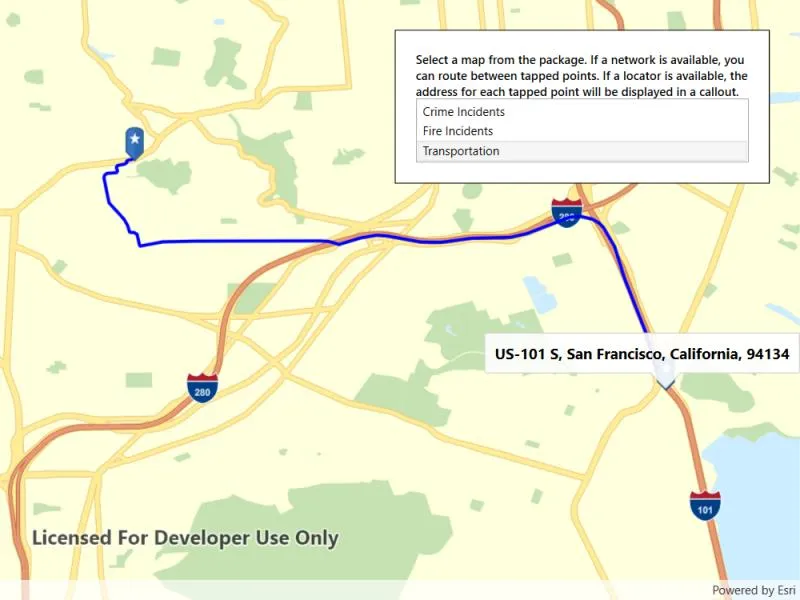
A list of maps from a mobile map package will be displayed. If the map contains transportation networks, the list item will have a navigation icon. Click on a map in the list to open it. If a locator task is available, click on the map to reverse geocode the location’s address. If transportation networks are available, a route will be calculated between geocode locations.
How it works
- Create a
MobileMapPackageusingMobileMapPackage.OpenAsync(path). - Get a list of maps using the
Mapsproperty. - If the package has a locator, access it using the
LocatorTaskproperty. - To see if a map contains transportation networks, check each map’s
TransportationNetworksproperty.
Relevant API
- GeocodeResult
- MobileMapPackage
- ReverseGeocodeParameters
- Route
- RouteParameters
- RouteResult
- RouteTask
- TransportationNetworkDataset
Offline data
This sample uses the San Francisco mobile map package.
Tags
disconnected, field mobility, geocode, network, network analysis, offline, routing, search, transportation
Sample code
// Copyright 2019 Esri.//// Licensed under the Apache License, Version 2.0 (the "License"); you may not use this file except in compliance with the License.// You may obtain a copy of the License at: http://www.apache.org/licenses/LICENSE-2.0//// Unless required by applicable law or agreed to in writing, software distributed under the License is distributed on an// "AS IS" BASIS, WITHOUT WARRANTIES OR CONDITIONS OF ANY KIND, either express or implied. See the License for the specific// language governing permissions and limitations under the License.
using ArcGIS.Samples.Managers;using Esri.ArcGISRuntime.Geometry;using Esri.ArcGISRuntime.Mapping;using Esri.ArcGISRuntime.Symbology;using Esri.ArcGISRuntime.Tasks.Geocoding;using Esri.ArcGISRuntime.Tasks.NetworkAnalysis;using Esri.ArcGISRuntime.UI;using Esri.ArcGISRuntime.UI.Controls;using System;using System.Collections.Generic;using System.Collections.ObjectModel;using System.IO;using System.Linq;using System.Reflection;using System.Threading.Tasks;using System.Windows;using System.Windows.Controls;
namespace ArcGIS.WPF.Samples.MobileMapSearchAndRoute{    [ArcGIS.Samples.Shared.Attributes.Sample(        name: "Mobile map (search and route)",        category: "Map",        description: "Display maps and use locators to enable search and routing offline using a Mobile Map Package.",        instructions: "A list of maps from a mobile map package will be displayed. If the map contains transportation networks, the list item will have a navigation icon. Click on a map in the list to open it. If a locator task is available, click on the map to reverse geocode the location's address. If transportation networks are available, a route will be calculated between geocode locations.",        tags: new[] { "disconnected", "field mobility", "geocode", "network", "network analysis", "offline", "routing", "search", "transportation" })]    [ArcGIS.Samples.Shared.Attributes.OfflineData("260eb6535c824209964cf281766ebe43")]    public partial class MobileMapSearchAndRoute    {        // Hold references to map resources for easy access.        public ObservableCollection<Map> Maps { get; set; }
        private LocatorTask _packageLocator;        private TransportationNetworkDataset _networkDataset;
        // Overlays for use in visualizing routes.        private GraphicsOverlay _routeOverlay;        private GraphicsOverlay _waypointOverlay;
        // Track the start and end point for route calculation.        private MapPoint _startPoint;        private MapPoint _endPoint;
        public MobileMapSearchAndRoute()        {            Maps = new ObservableCollection<Map>();            InitializeComponent();            DataContext = this;            _ = Initialize();        }
        private async Task Initialize()        {            // Get the path to the package on disk.            string filePath = DataManager.GetDataFolder("260eb6535c824209964cf281766ebe43", "SanFrancisco.mmpk");
            // Open the map package.            MobileMapPackage package = await OpenMobileMapPackage(filePath);
            // Populate the list of maps.            foreach (Map map in package.Maps)            {                await map.LoadAsync();                Maps.Add(map);            }
            // Get the locator task from the package.            _packageLocator = package.LocatorTask;
            // Create and add an overlay for showing a route.            _routeOverlay = new GraphicsOverlay();            _routeOverlay.Renderer = new SimpleRenderer            {                Symbol = new SimpleLineSymbol(SimpleLineSymbolStyle.Solid, System.Drawing.Color.Blue, 3)            };            MyMapView.GraphicsOverlays.Add(_routeOverlay);
            // Create and add an overlay for showing waypoints/stops.            _waypointOverlay = new GraphicsOverlay();            MyMapView.GraphicsOverlays.Add(_waypointOverlay);
            // Enable tap-to-reverse geocode and tap-to-route.            MyMapView.GeoViewTapped += MapView_Tapped;        }
        private async Task<MobileMapPackage> OpenMobileMapPackage(string path)        {            // Open the package.            MobileMapPackage package = await MobileMapPackage.OpenAsync(path);
            // Load the package.            await package.LoadAsync();
            // Return the opened package.            return package;        }
        private async void MapView_Tapped(object sender, GeoViewInputEventArgs e)        {            // Handle routing.            try            {                await ProcessRouteRequest(e.Location);            }            catch (Exception exception)            {                Console.WriteLine(exception);                MessageBox.Show("Couldn't geocode or route.", "Error");            }        }
        private async Task ShowGeocodeResult(MapPoint tappedPoint)        {            // Reverse geocode to get an address.            IReadOnlyList<GeocodeResult> results = await _packageLocator.ReverseGeocodeAsync(tappedPoint);
            // Process the address into usable strings.            string address = results.First().Label;
            // Show the address in a callout.            MyMapView.ShowCalloutAt(tappedPoint, new CalloutDefinition(address));        }
        private async Task ProcessRouteRequest(MapPoint tappedPoint)        {            // Clear any existing overlays.            _routeOverlay.Graphics.Clear();            MyMapView.DismissCallout();
            // Return if there is no network available for routing.            if (_networkDataset == null)            {                await ShowGeocodeResult(tappedPoint);                return;            }
            // Set the start point if it hasn't been set.            if (_startPoint == null)            {                _startPoint = tappedPoint;
                await ShowGeocodeResult(tappedPoint);
                // Show the start point.                _waypointOverlay.Graphics.Add(await GraphicForPoint(_startPoint));
                return;            }
            if (_endPoint == null)            {                await ShowGeocodeResult(tappedPoint);
                // Show the end point.                _endPoint = tappedPoint;                _waypointOverlay.Graphics.Add(await GraphicForPoint(_endPoint));
                // Create the route task from the local network dataset.                RouteTask routingTask = await RouteTask.CreateAsync(_networkDataset);
                // Configure route parameters for the route between the two tapped points.                RouteParameters routingParameters = await routingTask.CreateDefaultParametersAsync();                List<Stop> stops = new List<Stop> { new Stop(_startPoint), new Stop(_endPoint) };                routingParameters.SetStops(stops);
                // Get the first route result.                RouteResult result = await routingTask.SolveRouteAsync(routingParameters);                Route firstRoute = result.Routes.First();
                // Show the route on the map. Note that symbology for the graphics overlay is defined in Initialize().                Polyline routeLine = firstRoute.RouteGeometry;                _routeOverlay.Graphics.Add(new Graphic(routeLine));
                return;            }
            // Reset graphics and route.            _routeOverlay.Graphics.Clear();            _waypointOverlay.Graphics.Clear();            _startPoint = null;            _endPoint = null;        }
        private void Map_Selected(object sender, SelectionChangedEventArgs e)        {            // Clear existing overlays.            MyMapView.DismissCallout();            _waypointOverlay.Graphics.Clear();            _routeOverlay.Graphics.Clear();
            try            {                // Get the selected map.                Map selectedMap = e.AddedItems[0] as Map;
                // Show the map in the view.                MyMapView.Map = selectedMap;
                // Get the transportation network if there is one. Will be set to null otherwise.                _networkDataset = selectedMap.TransportationNetworks.FirstOrDefault();            }            catch (Exception exception)            {                Console.WriteLine(exception);                MessageBox.Show(exception.ToString());            }        }
        private async Task<Graphic> GraphicForPoint(MapPoint point)        {            // Hold a reference to the picture marker symbol.            PictureMarkerSymbol pinSymbol;
            // Get current assembly that contains the image.            Assembly currentAssembly = Assembly.GetExecutingAssembly();
            // Get the resource name of the blue pin star image            string resourceStreamName = this.GetType().Assembly.GetManifestResourceNames().Single(str => str.EndsWith("pin_star_blue.png"));
            // Load the resource stream            using (Stream resourceStream = this.GetType().Assembly.                       GetManifestResourceStream(resourceStreamName))            {
                // Create new symbol using asynchronous factory method from stream.                pinSymbol = await PictureMarkerSymbol.CreateAsync(resourceStream);                pinSymbol.Width = 60;                pinSymbol.Height = 60;                // The image is a pin; offset the image so that the pinpoint                //     is on the point rather than the image's true center.                pinSymbol.LeaderOffsetX = 30;                pinSymbol.OffsetY = 14;            }
return new Graphic(point, pinSymbol); } }}<UserControl x:Class="ArcGIS.WPF.Samples.MobileMapSearchAndRoute.MobileMapSearchAndRoute" xmlns="http://schemas.microsoft.com/winfx/2006/xaml/presentation" xmlns:x="http://schemas.microsoft.com/winfx/2006/xaml" xmlns:esri="http://schemas.esri.com/arcgis/runtime/2013"> <Grid> <esri:MapView x:Name="MyMapView" /> <Border Style="{StaticResource BorderStyle}"> <StackPanel> <TextBlock FontWeight="SemiBold" Text="Select a map from the package. If a network is available, you can route between tapped points. If a locator is available, the address for each tapped point will be displayed in a callout." TextWrapping="Wrap" /> <ListBox ItemsSource="{Binding Maps}" SelectionChanged="Map_Selected"> <ListBox.ItemContainerStyle> <Style TargetType="ListBoxItem" BasedOn="{StaticResource CalciteListBoxItemStyle}"> <Setter Property="HorizontalContentAlignment" Value="Stretch" /> </Style> </ListBox.ItemContainerStyle> <ListBox.ItemTemplate> <DataTemplate DataType="esri:Map"> <StackPanel> <TextBlock VerticalAlignment="Center" Text="{Binding Item.Name}" TextAlignment="Left" /> </StackPanel> </DataTemplate> </ListBox.ItemTemplate> </ListBox> </StackPanel> </Border> </Grid></UserControl>