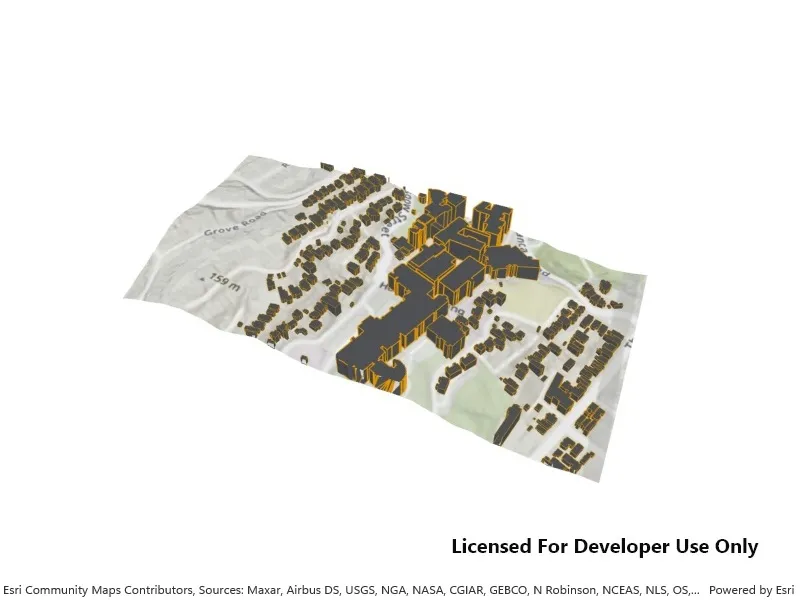
Display a local scene with a topographic surface and 3D scene layer clipped to a local area.
Use case
A LocalSceneView is a user interface that displays 3D basemaps and layer content described in a Scene with a local SceneViewingMode.
Unlike a global scene which is drawn on a globe using a geographic coordinate system, a local scene is drawn on a flat surface and supports projected coordinate systems. They are generally used to view local data and are often clipped to a specific area of interest. Currently, LocalSceneView cannot display data provided by a global scene and SceneView cannot display data provided by a local scene.
The LocalSceneView displays the clipped area of the local scene, supports user interactions such as pan and zoom, and provides access to the underlying scene data.
How to use the sample
This sample displays a local scene clipped to an extent. Pan and zoom to explore the scene.
How it works
- Create a local scene object with the
Scene(BasemapStyle, SceneViewingMode)constructor and ‘Local’ viewing mode. - Create an
ArcGISTiledElevationSourceobject and add it to the local scene’s base surface. - Create an
ArcGISSceneLayerand add it to the local scene’s operational layers. - Create an
Envelopeand set it to thescene.ClippingArea, then enable clipping by settingscene.IsClippingEnabledtotrue. - Create a
LocalSceneViewobject to display the scene. - Set the initial viewpoint for the local scene.
- Set the local scene to the local scene view.
Relevant API
- ArcGISSceneLayer
- ArcGISTiledElevationSource
- LocalSceneView
- Scene
About the data
The scene layer in this sample shows 3D extruded rooftop outlines of buildings on the Victoria University campus and surrounding vicinity in Wellington, New Zealand.
Tags
3D, basemap, elevation, scene, surface
Sample code
// Copyright 2025 Esri.//// Licensed under the Apache License, Version 2.0 (the "License"); you may not use this file except in compliance with the License.// You may obtain a copy of the License at: http://www.apache.org/licenses/LICENSE-2.0//// Unless required by applicable law or agreed to in writing, software distributed under the License is distributed on an// "AS IS" BASIS, WITHOUT WARRANTIES OR CONDITIONS OF ANY KIND, either express or implied. See the License for the specific// language governing permissions and limitations under the License.
using Esri.ArcGISRuntime.Geometry;using Esri.ArcGISRuntime.Mapping;using System;using System.Threading.Tasks;
namespace ArcGIS.WPF.Samples.DisplayLocalScene{    [ArcGIS.Samples.Shared.Attributes.Sample(        name: "Display local scene",        category: "Scene",        description: "Display a local scene with a topographic surface and 3D scene layer clipped to a local area.",        instructions: "This sample displays a local scene clipped to an extent. Pan and zoom to explore the scene.",        tags: new[] { "3D", "basemap", "elevation", "scene", "surface" })]    public partial class DisplayLocalScene    {        public DisplayLocalScene()        {            InitializeComponent();            Initialize();        }
        private void Initialize()        {            // Create a scene with a topographic basemap and a local scene viewing mode.            var scene = new Scene(SceneViewingMode.Local, BasemapStyle.ArcGISTopographic);
            // Create the 3d scene layer.            var sceneLayer = new ArcGISSceneLayer(new Uri("https://www.arcgis.com/home/item.html?id=7a63e9808a054d39964a8b4712c85657"));
            // Add world elevation source to the scene's surface.            var elevationSource = new ArcGISTiledElevationSource(new Uri("https://elevation3d.arcgis.com/arcgis/rest/services/WorldElevation3D/Terrain3D/ImageServer"));            scene.BaseSurface.ElevationSources.Add(elevationSource);
            // Add the scene layer to the scene's operational layers.            scene.OperationalLayers.Add(sceneLayer);
            // Set the clipping area for the local scene.            scene.ClippingArea = new Envelope(19454578.8235, -5055381.4798, 19455518.8814, -5054888.4150, SpatialReferences.WebMercator);
            // Enable the clipping area so only the scene elements within the clipping area are rendered.            scene.IsClippingEnabled = true;
            // Set the scene's initial viewpoint.            var camera = new Camera(                new MapPoint(19455578.6821, -5056336.2227, 1699.3366, SpatialReferences.WebMercator),                338.7410,                40.3763,                0            );            scene.InitialViewpoint = new Viewpoint(                new MapPoint(19455026.8116, -5054995.7415, SpatialReferences.WebMercator),                8314.6991,                camera            );
// Apply the scene to the local scene view. MySceneView.Scene = scene; } }}<UserControl x:Class="ArcGIS.WPF.Samples.DisplayLocalScene.DisplayLocalScene" xmlns="http://schemas.microsoft.com/winfx/2006/xaml/presentation" xmlns:x="http://schemas.microsoft.com/winfx/2006/xaml" xmlns:esri="http://schemas.esri.com/arcgis/runtime/2013"> <Grid> <esri:LocalSceneView x:Name="MySceneView" /> </Grid></UserControl>