Analyze the exploratory viewshed for an object (GeoElement) in a scene.
Use case
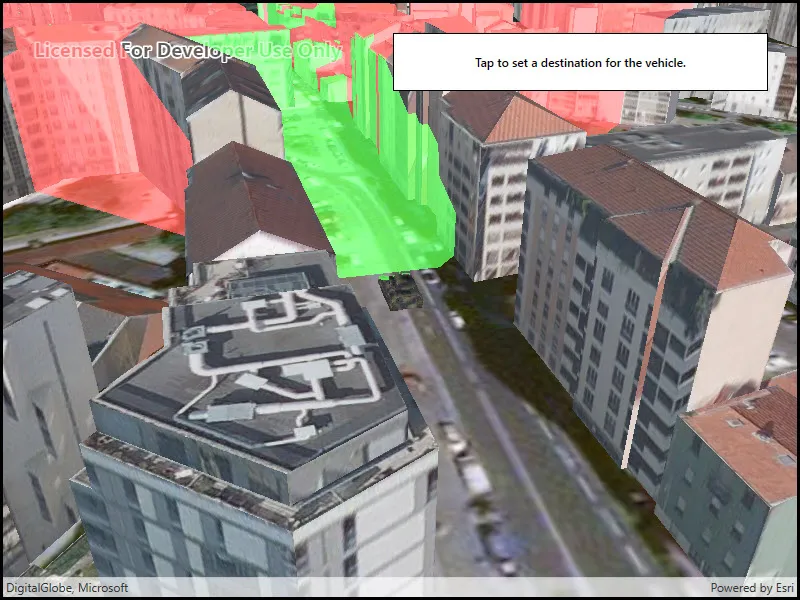
An exploratory viewshed analysis is a type of visual analysis you can perform at the current rendered resolution of a scene. The exploratory viewshed aims to answer the question ‘What can I see from a given location?’. The output is an overlay with two different colors - one representing the visible areas (green) and the other representing the obstructed areas (red).
Note: This analysis is a form of “exploratory analysis”, which means the results are calculated on the current scale of the data, and the results are generated very quickly but not persisted. If persisted analysis performed at the full resolution of the data is required, consider using a ViewshedFunction to perform a viewshed calculation instead.
How to use the sample
Tap to set a destination for the vehicle (a GeoElement). The vehicle will ‘drive’ towards the tapped location. The exploratory viewshed analysis will update as the vehicle moves.
How it works
- Create and show the scene, with an elevation source and a buildings layer.
- Add a model (the
GeoElement) to represent the observer (in this case, a tank).- Use a
SimpleRendererwhich has a heading expression set in theGraphicsOverlay. This way you can relate the viewshed’s heading to theGeoElementobject’s heading.
- Use a
- Create an
ExploratoryGeoElementViewshedwith configuration for the viewshed analysis. - Add the viewshed to an
AnalysisOverlayand add the overlay to the scene. - Configure the SceneView
CameraControllerto orbit the vehicle.
Relevant API
- AnalysisOverlay
- ExploratoryGeoElementViewshed
- GeodeticDistanceResult
- GeometryEngine.DistanceGeodetic (used to animate the vehicle)
- ModelSceneSymbol
- OrbitGeoElementCameraController
Offline data
This sample downloads the following items from ArcGIS Online automatically:
- bradley_low_3ds.zip - Model Scene Symbol for use in ArcGIS Maps SDK for Native Apps samples
About the data
This sample shows a Johannesburg, South Africa Scene from ArcGIS Online. The sample uses a Tank model scene symbol hosted as an item on ArcGIS Online.
Tags
3D, analysis, buildings, exploratory viewshed, model, scene, visibility analysis
Sample code
// Copyright 2018 Esri.//// Licensed under the Apache License, Version 2.0 (the "License"); you may not use this file except in compliance with the License.// You may obtain a copy of the License at: http://www.apache.org/licenses/LICENSE-2.0//// Unless required by applicable law or agreed to in writing, software distributed under the License is distributed on an// "AS IS" BASIS, WITHOUT WARRANTIES OR CONDITIONS OF ANY KIND, either express or implied. See the License for the specific// language governing permissions and limitations under the License.
using ArcGIS.Samples.Managers;using Esri.ArcGISRuntime.Geometry;using Esri.ArcGISRuntime.Mapping;using Esri.ArcGISRuntime.Symbology;using Esri.ArcGISRuntime.UI;using Esri.ArcGISRuntime.UI.GeoAnalysis;using System;using System.Collections.Generic;using System.Linq;using System.Threading.Tasks;using System.Timers;using System.Windows;
namespace ArcGIS.WPF.Samples.ShowExploratoryViewshedFromGeoelementInScene{    [ArcGIS.Samples.Shared.Attributes.Sample(        name: "Show exploratory viewshed from geoelement in scene",        category: "Analysis",        description: "Analyze the exploratory viewshed for an object (GeoElement) in a scene.",        instructions: "Tap to set a destination for the vehicle (a GeoElement). The vehicle will 'drive' towards the tapped location. The exploratory viewshed analysis will update as the vehicle moves.",        tags: new[] { "3D", "analysis", "buildings", "exploratory viewshed", "model", "scene", "visibility analysis" })]    [ArcGIS.Samples.Shared.Attributes.OfflineData("07d62a792ab6496d9b772a24efea45d0")]    public partial class ShowExploratoryViewshedFromGeoelementInScene    {        // URLs to the scene layer with buildings and the elevation source        private readonly Uri _elevationUri = new Uri("https://elevation3d.arcgis.com/arcgis/rest/services/WorldElevation3D/Terrain3D/ImageServer");        private readonly Uri _buildingsUri = new Uri("https://tiles.arcgis.com/tiles/P3ePLMYs2RVChkJx/arcgis/rest/services/Building_Johannesburg/SceneServer");
        // Graphic and overlay for showing the tank        private readonly GraphicsOverlay _tankOverlay = new GraphicsOverlay();        private Graphic _tank;
        // Animation properties        private MapPoint _tankEndPoint;
        // Units for geodetic calculation (used in animating tank)        private readonly LinearUnit _metersUnit = (LinearUnit)Unit.FromWkid(9001);        private readonly AngularUnit _degreesUnit = (AngularUnit)Unit.FromWkid(9102);
        public ShowExploratoryViewshedFromGeoelementInScene()        {            InitializeComponent();            _ = Initialize();        }
        private async Task Initialize()        {            // Create the scene with an imagery basemap.            MySceneView.Scene = new Scene(BasemapStyle.ArcGISImageryStandard);
            // Add the elevation surface.            ArcGISTiledElevationSource tiledElevationSource = new ArcGISTiledElevationSource(_elevationUri);            Surface baseSurface = new Surface            {                ElevationSources = { tiledElevationSource }            };            MySceneView.Scene.BaseSurface = baseSurface;
            // Add buildings.            ArcGISSceneLayer sceneLayer = new ArcGISSceneLayer(_buildingsUri);            MySceneView.Scene.OperationalLayers.Add(sceneLayer);
            // Configure the graphics overlay for the tank and add the overlay to the SceneView.            _tankOverlay.SceneProperties.SurfacePlacement = SurfacePlacement.Relative;            MySceneView.GraphicsOverlays.Add(_tankOverlay);
            // Configure the heading expression for the tank; this will allow the            //     viewshed to update automatically based on the tank's position.            SimpleRenderer renderer3D = new SimpleRenderer();            renderer3D.SceneProperties.HeadingExpression = "[HEADING]";            _tankOverlay.Renderer = renderer3D;
            try            {                // Create the tank graphic - get the model path.                string modelPath = GetModelPath();                // - Create the symbol and make it 10x larger (to be the right size relative to the scene).                ModelSceneSymbol tankSymbol = await ModelSceneSymbol.CreateAsync(new Uri(modelPath), 10);                // - Adjust the position.                tankSymbol.Heading = 90;                // - The tank will be positioned relative to the scene surface by its bottom.                //       This ensures that the tank is on the ground rather than partially under it.                tankSymbol.AnchorPosition = SceneSymbolAnchorPosition.Bottom;                // - Create the graphic.                _tank = new Graphic(new MapPoint(28.047199, -26.189105, SpatialReferences.Wgs84), tankSymbol);                // - Update the heading.                _tank.Attributes["HEADING"] = 0.0;                // - Add the graphic to the overlay.                _tankOverlay.Graphics.Add(_tank);
                // Create a viewshed for the tank.                ExploratoryGeoElementViewshed geoViewshed = new ExploratoryGeoElementViewshed(                    geoElement: _tank,                    horizontalAngle: 90.0,                    verticalAngle: 40.0,                    minDistance: 0.1,                    maxDistance: 250.0,                    headingOffset: 0.0,                    pitchOffset: 0.0)                {                    // Offset viewshed observer location to top of tank.                    OffsetZ = 3.0                };
                // Create the analysis overlay and add to the scene.                AnalysisOverlay overlay = new AnalysisOverlay();                overlay.Analyses.Add(geoViewshed);                MySceneView.AnalysisOverlays.Add(overlay);
                // Create a camera controller to orbit the tank.                OrbitGeoElementCameraController cameraController = new OrbitGeoElementCameraController(_tank, 200.0)                {                    CameraPitchOffset = 45.0                };                // - Apply the camera controller to the SceneView.                MySceneView.CameraController = cameraController;
                // Create a timer; this will enable animating the tank.                Timer animationTimer = new Timer(60)                {                    Enabled = true,                    AutoReset = true                };                // - Move the tank every time the timer expires.                animationTimer.Elapsed += (o, e) =>                {                    AnimateTank();                };                // - Start the timer.                animationTimer.Start();
                // Allow the user to click to define a new destination.                MySceneView.GeoViewTapped += (sender, args) => { _tankEndPoint = args.Location; };            }            catch (Exception e)            {                MessageBox.Show(e.ToString(), "Error");            }        }
        private void AnimateTank()        {            // Return if the tank already arrived.            if (_tankEndPoint == null)            {                return;            }
            // Get the current location and distance from the destination.            MapPoint location = (MapPoint)_tank.Geometry;            GeodeticDistanceResult distance = location.DistanceGeodetic(_tankEndPoint, _metersUnit, _degreesUnit,                GeodeticCurveType.Geodesic);
            // Move the tank a short distance.            location = GeometryEngine.MoveGeodetic(new List<MapPoint>() { location }, 1.0, _metersUnit, distance.Azimuth1, _degreesUnit,                GeodeticCurveType.Geodesic).First();            _tank.Geometry = location;
            // Rotate to face the destination.            double heading = (double)_tank.Attributes["HEADING"];            heading = heading + (distance.Azimuth1 - heading) / 10;            _tank.Attributes["HEADING"] = heading;
            // Clear the destination if the tank already arrived.            if (distance.Distance < 5)            {                _tankEndPoint = null;            }        }
        private static string GetModelPath()        {            // Returns the tank model.
return DataManager.GetDataFolder("07d62a792ab6496d9b772a24efea45d0", "bradle.3ds"); } }}<UserControl x:Class="ArcGIS.WPF.Samples.ShowExploratoryViewshedFromGeoelementInScene.ShowExploratoryViewshedFromGeoelementInScene" xmlns="http://schemas.microsoft.com/winfx/2006/xaml/presentation" xmlns:x="http://schemas.microsoft.com/winfx/2006/xaml" xmlns:esri="http://schemas.esri.com/arcgis/runtime/2013"> <Grid> <esri:SceneView x:Name="MySceneView" /> <Border Style="{StaticResource BorderStyle}"> <TextBlock FontWeight="SemiBold" Text="Tap to set a destination for the vehicle." TextAlignment="Center" /> </Border> </Grid></UserControl>