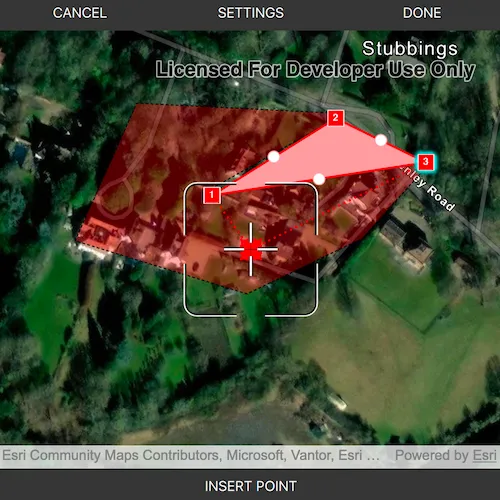
Use the Programmatic Reticle Tool to edit and create geometries with programmatic operations to facilitate customized workflows such as those using buttons rather than tap interactions.
Use case
A field worker can use a button driven workflow to mark important features on a map. They can digitize features like sample or observation locations, fences, pipelines, and building footprints using point, multipoint, polyline, and polygon geometries. To create and edit geometries, workers can use a vertex-based reticle tool to specify vertex locations by panning the map to position the reticle over a feature of interest. Using a button-driven workflow they can then place new vertices or pick up, move and drop existing vertices.
How to use the sample
To create a new geometry, select the geometry type you want to create (i.e. points, multipoints, polyline, or polygon) in the settings view. Press the button to start the geometry editor, pan the map to position the reticle then press the button to place a vertex. To edit an existing geometry, tap the geometry to be edited in the map and perform edits by positioning the reticle over a vertex and pressing the button to pick it up. The vertex can be moved by panning the map and dropped in a new position by pressing the button again.
Vertices can be selected and the viewpoint can be updated to their position by tapping them.
Vertex creation can be disabled using the switch in the settings view. When this switch is toggled off new vertex creation is prevented, existing vertices can be picked up and moved, but mid-vertices cannot be selected or picked up and will not grow when hovered. The feedback vertex and feedback lines under the reticle will also no longer be visible.
Use the buttons in the settings view to undo or redo changes made to the geometry and the cancel and done buttons to discard and save changes, respectively.
How it works
- Create a
GeometryEditorand set it to theMapQuickViewusingMapQuickView::setGeometryEditor(). - Start the geometry editor using
GeometryEditor::start(GeometryType)to create a new geometry orGeometryEditor::start(Geometry)to edit an existing geometry.- If using the geometry editor to edit an existing geometry, the geometry must be retrieved from the graphics overlay being used to visualize the geometry prior to calling the start method. To do this:
- Use
MapQuickView::identifyGraphicsOverlayAsync(...)to identify graphics at the location of a tap. - Find the desired graphic in the result list.
- Access the geometry associated with the
GraphicusingGraphic::geometry()- this will be used in theGeometryEditor::start(Geometry)method.
- Use
- If using the geometry editor to edit an existing geometry, the geometry must be retrieved from the graphics overlay being used to visualize the geometry prior to calling the start method. To do this:
- Create a
ProgrammaticReticleTooland set theGeometryEditor.setTool. - Add event handlers to listen to
GeometryEditor::hoveredElementChangedandGeometryEditor::pickedUpElementChangedsignals.- These signals can be used to determine the effect a button press will have and set the button text accordingly.
- Listen to tap events when the geometry editor is active to select and navigate to tapped vertices and mid-vertices.
- To retrieve the tapped element and update the viewpoint:
- Use
MapQuickView::identifyGeometryEditorResultAsync(...)to identify geometry editor elements at the location of the tap. - Find the desired element in the result list.
- Depending on whether the element is a
GeometryEditorVertexorGeometryEditorMidVertex, useGeometryEditor::selectVertex(...)orGeometryEditor::selectMidVertex(...)to select it. - Update the viewpoint using
MapQuickView::setViewpointCenterAsync(...).
- Use
- To retrieve the tapped element and update the viewpoint:
- Enable and disable the vertex creation preview using
ProgrammaticReticleTool::setVertexCreationPreviewEnabled().- To prevent mid-vertex growth when hovered use
ProgrammaticReticleTool::style()->growEffect()->setApplyToMidVertices().
- To prevent mid-vertex growth when hovered use
- Check to see if undo and redo are possible during an editing session using
GeometryEditor::canUndo()andGeometryEditor::canRedo(). If possible, useGeometryEditor::undo()andGeometryEditor::redo().- A picked up element can be returned to its previous position using
GeometryEditor::cancelCurrentAction(). This can be useful to undo a pick up without undoing any change to the geometry. Use theGeometryEditor::pickedUpElement()property to check for a picked up element.
- A picked up element can be returned to its previous position using
- Check whether the currently selected
GeometryEditorElementcan be deleted (GeometryEditor::selectedElement()->canDelete()). If the element can be deleted, delete usingGeometryEditor::deleteSelectedElement(). - Call
GeometryEditor::stop()to finish the editing session and store theGraphic. The geometry editor does not automatically handle the visualization of a geometry output from an editing session. This must be done manually by propagating the geometry returned into aGraphicadded to aGraphicsOverlay.- To create a new
Graphicin theGraphicsOverlay:- Using
Graphic(Geometry), create a new graphic with the geometry returned by theGeometryEditor::stop()method. - Append the
Graphicto theGraphicsOverlayusingGraphicsOverlay::graphics()->append(graphic).
- Using
- To update the geometry underlying an existing
Graphicin theGraphicsOverlay:- Replace the existing
Graphic’s geometry usingGraphic::setGeometry()with the geometry returned by theGeometryEditor::stop()method.
- Replace the existing
- To create a new
Relevant API
- Geometry
- GeometryEditor
- Graphic
- GraphicsOverlay
- MapView
- ProgrammaticReticleTool
Additional information
The sample demonstrates a number of workflows which can be altered depending on desired app functionality:
-
picking up a hovered element combines selection and pick up, this can be separated into two steps to require selection before pick up.
-
tapping a vertex or mid-vertex selects it and updates the viewpoint to its position. This could be changed to not update the viewpoint or also pick up the element.
With the hovered and picked up element changed events and the programmatic APIs on the ProgrammaticReticleTool a broad range of editing experiences can be implemented.
Tags
draw, edit, freehand, geometry editor, programmatic, reticle, sketch, vertex
Sample code
// [WriteFile Name=EditGeometriesWithProgrammaticReticleTool, Category=EditData]// [Legal]// Copyright 2025 Esri.//// Licensed under the Apache License, Version 2.0 (the "License");// you may not use this file except in compliance with the License.// You may obtain a copy of the License at// http://www.apache.org/licenses/LICENSE-2.0//// Unless required by applicable law or agreed to in writing, software// distributed under the License is distributed on an "AS IS" BASIS,// WITHOUT WARRANTIES OR CONDITIONS OF ANY KIND, either express or implied.// See the License for the specific language governing permissions and// limitations under the License.// [Legal]
#ifdef PCH_BUILD#include "pch.hpp"#endif // PCH_BUILD
// sample headers#include "EditGeometriesWithProgrammaticReticleTool.h"
// ArcGIS Maps SDK headers#include "Envelope.h"#include "ErrorException.h"#include "GeometryEditor.h"#include "GeometryEditorElement.h"#include "GeometryEditorGrowEffect.h"#include "GeometryEditorMidVertex.h"#include "GeometryEditorStyle.h"#include "GeometryEditorTypes.h"#include "GeometryEditorVertex.h"#include "GeometryTypes.h"#include "Graphic.h"#include "GraphicListModel.h"#include "GraphicsOverlay.h"#include "GraphicsOverlayListModel.h"#include "IdentifyGeometryEditorResult.h"#include "IdentifyGraphicsOverlayResult.h"#include "ImmutablePart.h"#include "ImmutablePartCollection.h"#include "ImmutablePointCollection.h"#include "Map.h"#include "MapQuickView.h"#include "MapTypes.h"#include "Multipoint.h"#include "MultipointBuilder.h"#include "Point.h"#include "PointCollection.h"#include "Polygon.h"#include "PolygonBuilder.h"#include "Polyline.h"#include "PolylineBuilder.h"#include "ProgrammaticReticleTool.h"#include "SimpleFillSymbol.h"#include "SimpleLineSymbol.h"#include "SimpleMarkerSymbol.h"#include "SpatialReference.h"#include "SymbolTypes.h"#include "Viewpoint.h"
// Qt headers#include <QFuture>#include <QString>
namespace{  const QString startGeometryEditorText{"Start geometry editor"};  const QString dropPointText{"Drop point"};  const QString pickUpPointText{"Pick up point"};  const QString insertPointText{"Insert point"};} // namespace
using namespace Esri::ArcGISRuntime;
EditGeometriesWithProgrammaticReticleTool::EditGeometriesWithProgrammaticReticleTool(QObject* parent /* = nullptr */) :  QObject(parent),  m_map(new Map(BasemapStyle::ArcGISImagery, this)),  m_graphicsOverlay(new GraphicsOverlay(this)),  m_pointSymbol(new SimpleMarkerSymbol(SimpleMarkerSymbolStyle::Square, QColor(255, 45, 0), 10, this)),  m_multiPointSymbol(new SimpleMarkerSymbol(SimpleMarkerSymbolStyle::Circle, QColor(255, 255, 0), 5, this)),  m_lineSymbol(new SimpleLineSymbol(SimpleLineSymbolStyle::Solid, QColor(0, 0, 255), 2, this)),  m_polygonSymbol(new SimpleFillSymbol(SimpleFillSymbolStyle::Solid,                                       QColor(255, 0, 0, 75),                                       new SimpleLineSymbol(SimpleLineSymbolStyle::Dash, QColor(0, 0, 0), 1.0, this),                                       this)),  m_geometryEditor(new GeometryEditor(this)),  m_reticleTool(new ProgrammaticReticleTool(this)){}
EditGeometriesWithProgrammaticReticleTool::~EditGeometriesWithProgrammaticReticleTool() = default;
void EditGeometriesWithProgrammaticReticleTool::init(){  // Register the map view for QML  qmlRegisterType<MapQuickView>("Esri.Samples", 1, 0, "MapView");  qmlRegisterType<EditGeometriesWithProgrammaticReticleTool>("Esri.Samples", 1, 0, "EditGeometriesWithProgrammaticReticleToolSample");}
// Set the view (created in QML)void EditGeometriesWithProgrammaticReticleTool::setMapView(MapQuickView* mapView){  if (!mapView || mapView == m_mapView)  {    return;  }
  m_mapView = mapView;  m_mapView->setMap(m_map);
  m_mapView->setViewpointCenterAsync(Point(-0.775395, 51.523806, SpatialReference::wgs84()), 20000);
  m_mapView->graphicsOverlays()->append(m_graphicsOverlay);
  // Set the geometry editor on the map view  m_mapView->setGeometryEditor(m_geometryEditor);
  m_geometryEditor->setTool(m_reticleTool);
  emit mapViewChanged();
  createInitialGraphics();  createConnections();}
MapQuickView* EditGeometriesWithProgrammaticReticleTool::mapView() const{  return m_mapView;}
void EditGeometriesWithProgrammaticReticleTool::createInitialGraphics(){  const QString pinkneysGreenJson =    R"({"rings":[[[-84843.262719916485,6713749.9329888355],[-85833.376589175183,6714679.7122141244], [-85406.822347959576,6715063.9827222107],[-85184.329997390232,6715219.6195847588], [-85092.653857582554,6715119.5391713539],[-85090.446872787768,6714792.7656492386], [-84915.369168906298,6714297.8798246197],[-84854.295522911285,6714080.907587287], [-84843.262719916485,6713749.9329888355]]],"spatialReference":{"wkid":102100,"latestWkid":3857}})";  const QString beechLodgeBoundaryJson =    R"({"paths":[[[-87090.652708065536,6714158.9244240439],[-87247.362370337316,6714232.880689906], [-87226.314032974493,6714605.4697726099],[-86910.499335316243,6714488.006312645], [-86750.82198052686,6714401.1768307304],[-86749.846825938366,6714305.8450344801]]],"spatialReference":{"wkid":102100,"latestWkid":3857}})";  const QString treeMarkersJson =    R"({"points":[[-86750.751150056443,6713749.4529355941],[-86879.381793060631,6713437.3335486846], [-87596.503104619667,6714381.7342108283],[-87553.257569537804,6714402.0910389507], [-86831.019903597829,6714398.4128562529],[-86854.105933315877,6714396.1957954112], [-86800.624094892439,6713992.3374453448]],"spatialReference":{"wkid":102100,"latestWkid":3857}})";
  const Polygon pinkneysGreen = geometry_cast<Polygon>(Polygon::fromJson(pinkneysGreenJson));  const Polyline beechLodgeBoundary = geometry_cast<Polyline>(Polyline::fromJson(beechLodgeBoundaryJson));  const Multipoint treeMarkers = geometry_cast<Multipoint>(Multipoint::fromJson(treeMarkersJson));
  // Add graphics  m_graphicsOverlay->graphics()->append({    new Graphic(pinkneysGreen, m_polygonSymbol, this),    new Graphic(beechLodgeBoundary, m_lineSymbol, this),    new Graphic(treeMarkers, m_multiPointSymbol, this),  });}
void EditGeometriesWithProgrammaticReticleTool::createConnections(){  // Allow user to edit existing graphics by clicking on them  connect(m_mapView, &MapQuickView::mouseClicked, this, &EditGeometriesWithProgrammaticReticleTool::handleMapTap);
  // Enable or disable buttons when mouse is released (ie after a drag operation)  connect(m_mapView, &MapQuickView::mouseReleased, this, &EditGeometriesWithProgrammaticReticleTool::setMultifunctionButtonState);
  connect(m_geometryEditor, &GeometryEditor::hoveredElementChanged, this, &EditGeometriesWithProgrammaticReticleTool::setMultifunctionButtonState);  connect(m_geometryEditor, &GeometryEditor::pickedUpElementChanged, this, &EditGeometriesWithProgrammaticReticleTool::setMultifunctionButtonState);}
void EditGeometriesWithProgrammaticReticleTool::handleMapTap(const QMouseEvent& mouseEvent){  if (m_geometryEditor->isStarted())  {    // If the geometry editor is started, identify the geometry editor result at the tapped position.    handleMapTapGeNotStarted(mouseEvent);  }  else  {    // If the geometry editor is not started, identify the graphics in the graphics overlay at the tapped position.    handleMapTapGeStarted(mouseEvent);  }}
void EditGeometriesWithProgrammaticReticleTool::handleMapTapGeNotStarted(const QMouseEvent& mouseEvent){  // Identify the geometry editor result at the tapped position.  m_mapView->identifyGeometryEditorAsync(mouseEvent.position(), 10, this)    .then(this,          [this](IdentifyGeometryEditorResult* result)  {    std::unique_ptr<IdentifyGeometryEditorResult> identifyResult(result);    if (!identifyResult || identifyResult->elements().isEmpty())    {      return;    }    // Get the first element from the result.    GeometryEditorElement* element = identifyResult->elements().first();    element->setParent(this);
    // If the element is a vertex or mid-vertex, set the viewpoint to its position and select it.    if (GeometryEditorVertex* vertex = dynamic_cast<GeometryEditorVertex*>(element); vertex)    {      m_mapView->setViewpointAsync(Viewpoint(Point(vertex->point().x(), vertex->point().y(), vertex->point().spatialReference())));      m_geometryEditor->selectVertex(vertex->partIndex(), vertex->vertexIndex());    }    else if (GeometryEditorMidVertex* midVertex = dynamic_cast<GeometryEditorMidVertex*>(element); midVertex && m_vertexCreationAllowed)    {      m_mapView->setViewpointAsync(Viewpoint(Point(midVertex->point().x(), midVertex->point().y(), midVertex->point().spatialReference())));      m_geometryEditor->selectMidVertex(midVertex->partIndex(), midVertex->segmentIndex());    }  })    .onFailed(this, [this](const ErrorException& error)  {    qDebug() << "Error editing! Identify geometry editor failed with error " << error.error().message();    resetFromEditingSession();  });}
void EditGeometriesWithProgrammaticReticleTool::handleMapTapGeStarted(const QMouseEvent& mouseEvent){  // Identify graphics in the graphics overlay using the tapped position.  m_mapView->identifyGraphicsOverlayAsync(m_graphicsOverlay, mouseEvent.position(), 10, false, this)    .then(this,          [this](IdentifyGraphicsOverlayResult* rawResult)  {    const std::unique_ptr<IdentifyGraphicsOverlayResult> identifyResult = std::unique_ptr<IdentifyGraphicsOverlayResult>(rawResult);    if (!identifyResult || identifyResult->graphics().isEmpty())    {      m_editingGraphic = nullptr;      return;    }
    // Try to get the first graphic from the first result.    m_editingGraphic = identifyResult->graphics().first();
    // Return if no graphic was selected.    if (m_editingGraphic == nullptr)    {      return;    }
    m_editingGraphic->setParent(this);    m_editingGraphic->setSelected(true);
    // Hide the selected graphic and start an editing session with a copy of it.    m_geometryEditor->start(m_editingGraphic->geometry());    emit geometryEditorStartedChanged();
    // Set the button text to indicate that the editor is active.    setMultifunctionButtonState();
    // If vertex creation is allowed, set the viewpoint to the center of the selected graphic's geometry.    // Otherwise, set the viewpoint to the end point of the first part of the geometry.    if (m_vertexCreationAllowed)    {      m_mapView->setViewpointCenterAsync(m_editingGraphic->geometry().extent().center(), m_mapView->mapScale());    }    else    {      const Geometry geometry = m_editingGraphic->geometry();      Point targetPoint;      switch (geometry.geometryType())      {        case GeometryType::Polygon:        {          if (const Polygon polygon = geometry_cast<Polygon>(geometry); !polygon.parts().isEmpty())          {            targetPoint = polygon.parts().part(0).endPoint();          }          break;        }        case GeometryType::Polyline:        {          if (const Polyline polyline = geometry_cast<Polyline>(geometry); !polyline.parts().isEmpty())          {            targetPoint = polyline.parts().part(0).endPoint();          }          break;        }        case GeometryType::Multipoint:        {          if (const Multipoint multiPoint = geometry_cast<Multipoint>(geometry); !multiPoint.points().isEmpty())          {            targetPoint = multiPoint.points().point(multiPoint.points().size() - 1);          }          break;        }        case GeometryType::Point:        {          targetPoint = geometry_cast<Point>(geometry);          break;        }        default:          break;      }      m_mapView->setViewpointAsync(Viewpoint(!targetPoint.isEmpty() ? targetPoint : geometry.extent().center(), m_mapView->mapScale()));
      // Hide the selected graphic while editing.      m_editingGraphic->setVisible(false);    }  })    .onFailed(this, [this](const ErrorException& error)  {    qDebug() << "Error editing! Identify failed with error " << error.error().message();    resetFromEditingSession();  });}
void EditGeometriesWithProgrammaticReticleTool::handleMultifunctionButton(){  // If the geometry editor is not started, start it with the selected geometry type  if (!m_geometryEditor->isStarted())  {    switch (m_selectedGeometryEditorType)    {      case GeometryEditorMode::PointMode:        m_geometryEditor->start(GeometryType::Point);        break;      case GeometryEditorMode::MultipointMode:        m_geometryEditor->start(GeometryType::Multipoint);        break;      case GeometryEditorMode::PolylineMode:        m_geometryEditor->start(GeometryType::Polyline);        break;      case GeometryEditorMode::PolygonMode:        m_geometryEditor->start(GeometryType::Polygon);        break;      default:        break;    }    emit geometryEditorStartedChanged();    // Set the button text to indicate that the editor is active.    setMultifunctionButtonState();    return;  }
  if (m_vertexCreationAllowed)  {    // When vertex creation is allowed vertices and mid-vertices can be picked up, new vertices can be inserted.    switch (m_reticleState)    {      case ReticleState::Default:        [[fallthrough]];      case ReticleState::PickedUp:        m_reticleTool->placeElementAtReticle();        break;      case ReticleState::HoveringVertex:        [[fallthrough]];      case ReticleState::HoveringMidVertex:        m_reticleTool->selectElementAtReticle();        m_reticleTool->pickUpSelectedElement();        break;    }  }  else  {    // When vertex creation is not allowed functionality is limited to picking up and moving existing vertices, mid-vertices cannot be picked up.    switch (m_reticleState)    {      case ReticleState::PickedUp:        m_reticleTool->placeElementAtReticle();        break;      case ReticleState::HoveringVertex:        m_reticleTool->selectElementAtReticle();        m_reticleTool->pickUpSelectedElement();        break;      default:        // In edit mode, only picked up vertices can be placed and only vertices can be picked up.        break;    }  }  setMultifunctionButtonState();}
void EditGeometriesWithProgrammaticReticleTool::saveEdits(){  // Stop the geometry editor and get the resulting geometry  const Geometry geometry = m_geometryEditor->stop();  emit geometryEditorStartedChanged();
  if (!geometry.isEmpty())  {    if (m_editingGraphic)    {      // Update the geometry of the graphic being edited and make it visible again      m_editingGraphic->setGeometry(geometry);      m_editingGraphic->setVisible(true);    }    else if (Symbol* geometrySymbol = getSymbol(geometry.geometryType()); geometrySymbol)    {      // Create a new graphic based on the geometry and add it to the graphics overlay.      m_graphicsOverlay->graphics()->append(new Graphic(geometry, geometrySymbol, this));    }  }  resetFromEditingSession();}
Symbol* EditGeometriesWithProgrammaticReticleTool::getSymbol(GeometryType type) const{  switch (type)  {    case GeometryType::Point:      return m_pointSymbol;    case GeometryType::Multipoint:      return m_multiPointSymbol;    case GeometryType::Polyline:      return m_lineSymbol;    case GeometryType::Polygon:      return m_polygonSymbol;    default:      return nullptr;  }}
void EditGeometriesWithProgrammaticReticleTool::discardEdits(){  // Stop the geometry editor and discard the geometry.  m_geometryEditor->stop();  resetFromEditingSession();}
void EditGeometriesWithProgrammaticReticleTool::resetFromEditingSession(){  // Reset the selected graphic  if (m_editingGraphic)  {    m_editingGraphic->setSelected(false);    m_editingGraphic->setVisible(true);    delete m_editingGraphic;    m_editingGraphic = nullptr;  }
  // Update the multifunction button text and enable it  m_multifunctionButtonText = startGeometryEditorText;  m_multifunctionButtonEnabled = true;
  emit multifunctionButtonTextChanged();  emit multifunctionButtonEnabledChanged();  emit canUndoOrRedoChanged();  emit selectedElementCanDeleteChanged();  emit geometryEditorStartedChanged();}
bool EditGeometriesWithProgrammaticReticleTool::vertexCreationAllowed() const{  return m_vertexCreationAllowed;}
void EditGeometriesWithProgrammaticReticleTool::setVertexCreationAllowed(bool allowed){  if (m_vertexCreationAllowed == allowed)  {    return;  }
  m_vertexCreationAllowed = allowed;  emit vertexCreationAllowedChanged();
  // Toggle the reticle tool's vertex creation preview and grow effect for mid-vertices  if (m_reticleTool)  {    // Update the programmatic reticle tool and geometry editor settings based on the switch state.    m_reticleTool->setVertexCreationPreviewEnabled(allowed);    if (GeometryEditorStyle* style = m_reticleTool->style(); style)    {      if (GeometryEditorGrowEffect* growEffect = style->growEffect(); growEffect)      {        growEffect->setApplyToMidVertices(allowed);      }    }  }
  // If the geometry editor is started, update the button text to reflect the new state.  if (geometryEditorStarted())  {    setMultifunctionButtonState();  }}
void EditGeometriesWithProgrammaticReticleTool::setSelectedGeometryType(GeometryEditorMode mode){  if (m_selectedGeometryEditorType != mode)  {    m_selectedGeometryEditorType = mode;    emit selectedGeometryTypeChanged();  }}
bool EditGeometriesWithProgrammaticReticleTool::selectedElementCanDelete() const{  return m_geometryEditor->selectedElement() && m_geometryEditor->selectedElement()->canDelete();}
void EditGeometriesWithProgrammaticReticleTool::deleteSelectedElement(){  m_geometryEditor->deleteSelectedElement();  emit selectedElementCanDeleteChanged();  emit canUndoOrRedoChanged();}
EditGeometriesWithProgrammaticReticleTool::GeometryEditorMode EditGeometriesWithProgrammaticReticleTool::selectedGeometryType() const{  return m_selectedGeometryEditorType;}
// State checks to control when buttons are enabledbool EditGeometriesWithProgrammaticReticleTool::geometryEditorStarted() const{  return m_geometryEditor->isStarted();}
bool EditGeometriesWithProgrammaticReticleTool::canUndo() const{  return (m_geometryEditor->canUndo() || m_geometryEditor->pickedUpElement());}
bool EditGeometriesWithProgrammaticReticleTool::canRedo() const{  return m_geometryEditor->canRedo();}
void EditGeometriesWithProgrammaticReticleTool::undoOrCancel(){  if (m_geometryEditor->pickedUpElement())  {    m_geometryEditor->cancelCurrentAction();  }  else if (m_geometryEditor->canUndo())  {    m_geometryEditor->undo();  }  emit canUndoOrRedoChanged();  emit selectedElementCanDeleteChanged();}
void EditGeometriesWithProgrammaticReticleTool::redo(){  if (m_geometryEditor->canRedo())  {    m_geometryEditor->redo();    emit canUndoOrRedoChanged();    emit selectedElementCanDeleteChanged();  }}
QString EditGeometriesWithProgrammaticReticleTool::multifunctionButtonText() const{  return m_multifunctionButtonText;}
bool EditGeometriesWithProgrammaticReticleTool::multifunctionButtonEnabled() const{  return m_multifunctionButtonEnabled;}
void EditGeometriesWithProgrammaticReticleTool::setMultifunctionButtonState(){  // Update the multifunction button text and state based on the geometry editor state and hovered/picked up elements.  QString newText;  bool newEnabled = true;  ReticleState newReticleState = ReticleState::Default;
  // Picked up elements can be dropped, so the button text indicates that a point can be dropped.  if (m_geometryEditor->pickedUpElement())  {    newText = dropPointText;    newReticleState = ReticleState::PickedUp;  }  // When vertex creation is allowed, the button text changes based on the hovered or picked up element. Vertices and mid-vertices can be picked up.  else if (m_vertexCreationAllowed)  {    if (m_geometryEditor->pickedUpElement())    {      newText = dropPointText;      newReticleState = ReticleState::PickedUp;    }    else if (GeometryEditorElement* hoveredElement = dynamic_cast<GeometryEditorElement*>(m_geometryEditor->hoveredElement());             hoveredElement && (hoveredElement->geometryEditorElementType() == GeometryEditorElementType::GeometryEditorVertex ||                                hoveredElement->geometryEditorElementType() == GeometryEditorElementType::GeometryEditorMidVertex))    {      newText = pickUpPointText;      newReticleState = (hoveredElement->geometryEditorElementType() == GeometryEditorElementType::GeometryEditorVertex) ?                          ReticleState::HoveringVertex :                          ReticleState::HoveringMidVertex;    }    else    {      newText = insertPointText;      newReticleState = ReticleState::Default;    }  }  // When vertex creation is not allowed, the button text changes based on the hovered element only.  else  {    GeometryEditorElement* hoveredElement = dynamic_cast<GeometryEditorElement*>(m_geometryEditor->hoveredElement());    if (hoveredElement && hoveredElement->geometryEditorElementType() == GeometryEditorElementType::GeometryEditorVertex)    {      newText = pickUpPointText;      newReticleState = ReticleState::HoveringVertex;    }    else    {      newText = pickUpPointText;      newEnabled = false;      newReticleState = ReticleState::HoveringMidVertex;    }  }
  // If the geometry editor is not started, override with "Start geometry editor"  if (!m_geometryEditor->isStarted())  {    newText = startGeometryEditorText;    newEnabled = true;    newReticleState = ReticleState::Default;  }
  if (m_multifunctionButtonText != newText)  {    m_multifunctionButtonText = newText;    emit multifunctionButtonTextChanged();  }
  if (m_multifunctionButtonEnabled != newEnabled)  {    m_multifunctionButtonEnabled = newEnabled;    emit multifunctionButtonEnabledChanged();  }
  m_reticleState = newReticleState;  emit selectedElementCanDeleteChanged();  emit canUndoOrRedoChanged();}
// [WriteFile Name=EditGeometriesWithProgrammaticReticleTool, Category=EditData]// [Legal]// Copyright 2025 Esri.//// Licensed under the Apache License, Version 2.0 (the "License");// you may not use this file except in compliance with the License.// You may obtain a copy of the License at// http://www.apache.org/licenses/LICENSE-2.0//// Unless required by applicable law or agreed to in writing, software// distributed under the License is distributed on an "AS IS" BASIS,// WITHOUT WARRANTIES OR CONDITIONS OF ANY KIND, either express or implied.// See the License for the specific language governing permissions and// limitations under the License.// [Legal]
#ifndef EDITGEOMETRIESWITHPROGRAMMATICRETICLETOOL_H#define EDITGEOMETRIESWITHPROGRAMMATICRETICLETOOL_H
// Qt headers#include <QObject>
class QMouseEvent;
namespace Esri::ArcGISRuntime{ class GeometryEditor; class Graphic; class GraphicsOverlay; class Map; class MapQuickView; class ProgrammaticReticleTool; class SimpleMarkerSymbol; class SimpleLineSymbol; class SimpleFillSymbol; class Symbol; enum class GeometryType;} // namespace Esri::ArcGISRuntime
Q_MOC_INCLUDE("MapQuickView.h");
class EditGeometriesWithProgrammaticReticleTool : public QObject{ Q_OBJECT
Q_PROPERTY(Esri::ArcGISRuntime::MapQuickView* mapView READ mapView WRITE setMapView NOTIFY mapViewChanged) Q_PROPERTY(bool geometryEditorStarted READ geometryEditorStarted NOTIFY geometryEditorStartedChanged) Q_PROPERTY(bool canUndo READ canUndo NOTIFY canUndoOrRedoChanged) Q_PROPERTY(bool canRedo READ canRedo NOTIFY canUndoOrRedoChanged) Q_PROPERTY(bool vertexCreationAllowed READ vertexCreationAllowed WRITE setVertexCreationAllowed NOTIFY vertexCreationAllowedChanged) Q_PROPERTY(GeometryEditorMode selectedGeometryType READ selectedGeometryType WRITE setSelectedGeometryType NOTIFY selectedGeometryTypeChanged) Q_PROPERTY(QString multifunctionButtonText READ multifunctionButtonText NOTIFY multifunctionButtonTextChanged) Q_PROPERTY(bool multifunctionButtonEnabled READ multifunctionButtonEnabled NOTIFY multifunctionButtonEnabledChanged) Q_PROPERTY(bool selectedElementCanDelete READ selectedElementCanDelete NOTIFY selectedElementCanDeleteChanged)
public: explicit EditGeometriesWithProgrammaticReticleTool(QObject* parent = nullptr); ~EditGeometriesWithProgrammaticReticleTool() override;
enum class GeometryEditorMode { PointMode, MultipointMode, PolygonMode, PolylineMode };
Q_ENUM(GeometryEditorMode)
enum class ReticleState { Default, PickedUp, HoveringVertex, HoveringMidVertex };
static void init();
Q_INVOKABLE void handleMultifunctionButton(); Q_INVOKABLE void undoOrCancel(); Q_INVOKABLE void redo(); Q_INVOKABLE void saveEdits(); Q_INVOKABLE void discardEdits(); Q_INVOKABLE void deleteSelectedElement();
signals: void mapViewChanged(); void geometryEditorStartedChanged(); void canUndoOrRedoChanged(); void vertexCreationAllowedChanged(); void selectedGeometryTypeChanged(); void multifunctionButtonTextChanged(); void multifunctionButtonEnabledChanged(); void selectedElementCanDeleteChanged();
private: Esri::ArcGISRuntime::MapQuickView* mapView() const; void setMapView(Esri::ArcGISRuntime::MapQuickView* mapView);
bool geometryEditorStarted() const;
bool canUndo() const; bool canRedo() const;
bool vertexCreationAllowed() const; void setVertexCreationAllowed(bool allowed);
GeometryEditorMode selectedGeometryType() const; void setSelectedGeometryType(GeometryEditorMode mode);
QString multifunctionButtonText() const; bool multifunctionButtonEnabled() const;
bool selectedElementCanDelete() const; void createInitialGraphics(); void createConnections(); void setMultifunctionButtonState(); void resetFromEditingSession(); void handleMapTap(const QMouseEvent& mouseEvent); Esri::ArcGISRuntime::Symbol* getSymbol(Esri::ArcGISRuntime::GeometryType type) const;
void handleMapTapGeNotStarted(const QMouseEvent& mouseEvent); void handleMapTapGeStarted(const QMouseEvent& mouseEvent);
bool m_vertexCreationAllowed = true; bool m_multifunctionButtonEnabled = true; bool m_selectedElementCanDelete = false; QString m_multifunctionButtonText = "Start geometry editor"; ReticleState m_reticleState = ReticleState::Default; GeometryEditorMode m_selectedGeometryEditorType = GeometryEditorMode::PointMode;
Esri::ArcGISRuntime::Map* m_map = nullptr; Esri::ArcGISRuntime::MapQuickView* m_mapView = nullptr;
Esri::ArcGISRuntime::GraphicsOverlay* m_graphicsOverlay = nullptr; Esri::ArcGISRuntime::Graphic* m_editingGraphic = nullptr;
Esri::ArcGISRuntime::SimpleMarkerSymbol* m_pointSymbol = nullptr; Esri::ArcGISRuntime::SimpleMarkerSymbol* m_multiPointSymbol = nullptr; Esri::ArcGISRuntime::SimpleLineSymbol* m_lineSymbol = nullptr; Esri::ArcGISRuntime::SimpleFillSymbol* m_polygonSymbol = nullptr;
Esri::ArcGISRuntime::GeometryEditor* m_geometryEditor = nullptr; Esri::ArcGISRuntime::ProgrammaticReticleTool* m_reticleTool = nullptr;};
#endif // EDITGEOMETRIESWITHPROGRAMMATICRETICLETOOL_H// [WriteFile Name=EditGeometriesWithProgrammaticReticleTool, Category=EditData]// [Legal]// Copyright 2025 Esri.//// Licensed under the Apache License, Version 2.0 (the "License");// you may not use this file except in compliance with the License.// You may obtain a copy of the License at// http://www.apache.org/licenses/LICENSE-2.0//// Unless required by applicable law or agreed to in writing, software// distributed under the License is distributed on an "AS IS" BASIS,// WITHOUT WARRANTIES OR CONDITIONS OF ANY KIND, either express or implied.// See the License for the specific language governing permissions and// limitations under the License.// [Legal]
import QtQuick 2.15import QtQuick.Controls 2.15import QtQuick.Layouts 1.15
Popup { id: settingsPopup property var reticleModel x: (parent.width - width) / 2 y: (parent.height - height) / 2 width: 200 height: 280 modal: true focus: true background: Rectangle { color: palette.base; radius: 10 } contentItem: ColumnLayout { spacing: 10 anchors.fill: parent
// Spacer Item { height: 3 }
ColumnLayout { Layout.alignment: Qt.AlignCenter enabled: !reticleModel.geometryEditorStarted
Label { text: qsTr("Geometry Type:") font.pixelSize: 14 Layout.alignment: Qt.AlignCenter }
ComboBox { id: geometryTypePicker Layout.preferredWidth: 140 model: [qsTr("Point"), qsTr("Multipoint"), qsTr("Polygon"), qsTr("Polyline")] onCurrentIndexChanged: reticleModel.selectedGeometryType = currentIndex background: Rectangle { color: palette.mid border.color: "#888" border.width: 1 } contentItem: Label { text: qsTr(geometryTypePicker.currentText) horizontalAlignment: Text.AlignHCenter verticalAlignment: Text.AlignVCenter } Layout.alignment: Qt.AlignCenter } }
Rectangle { height: 1 Layout.fillWidth: true color: palette.mid }
RowLayout { Layout.alignment: Qt.AlignCenter
Label { text: qsTr("Allow Vertex\n Creation:") font.pixelSize: 14 }
Switch { width: 40 height: 20 checked: reticleModel.vertexCreationAllowed onCheckedChanged: reticleModel.vertexCreationAllowed = checked } }
Rectangle { height: 1 Layout.fillWidth: true color: palette.mid }
Item { opacity: reticleModel.canUndo ? 1.0 : 0.5 Layout.fillWidth: true Layout.fillHeight: true
Label { anchors.centerIn: parent text: qsTr("UNDO") }
MouseArea { anchors.fill: parent onClicked: reticleModel.undoOrCancel() enabled: reticleModel.canUndo } }
Rectangle { height: 1 Layout.fillWidth: true color: palette.mid }
Item { Layout.fillWidth: true Layout.fillHeight: true opacity: reticleModel.canRedo ? 1.0 : 0.5
Label { anchors.centerIn: parent text: qsTr("REDO") }
MouseArea { anchors.fill: parent enabled: reticleModel.canRedo onClicked: reticleModel.redo() } }
Rectangle { height: 1 Layout.fillWidth: true color: palette.mid }
Item { Layout.fillWidth: true Layout.fillHeight: true opacity: reticleModel.selectedElementCanDelete ? 1.0 : 0.5 Label { anchors.centerIn: parent text: qsTr("DELETE") }
MouseArea { anchors.fill: parent enabled: reticleModel.selectedElementCanDelete onClicked: reticleModel.deleteSelectedElement() } }
Rectangle { height: 1 Layout.fillWidth: true color: palette.mid }
Item { Layout.fillWidth: true Layout.fillHeight: true Label { anchors.centerIn: parent text: qsTr("CLOSE") }
MouseArea { anchors.fill: parent onClicked: settingsPopup.visible = false } }
// Spacer Item { height: 3 } }}// [WriteFile Name=EditGeometriesWithProgrammaticReticleTool, Category=EditData]// [Legal]// Copyright 2025 Esri.//// Licensed under the Apache License, Version 2.0 (the "License");// you may not use this file except in compliance with the License.// You may obtain a copy of the License at// http://www.apache.org/licenses/LICENSE-2.0//// Unless required by applicable law or agreed to in writing, software// distributed under the License is distributed on an "AS IS" BASIS,// WITHOUT WARRANTIES OR CONDITIONS OF ANY KIND, either express or implied.// See the License for the specific language governing permissions and// limitations under the License.// [Legal]
import QtQuick 2.15import QtQuick.Controlsimport QtQuick.Layoutsimport Esri.Samples
Item { Rectangle { id: settings width: parent.width height: parent.height * 0.07 color: palette.base RowLayout { anchors.fill: parent Item { Layout.fillWidth: true Layout.fillHeight: true opacity: reticleModel.geometryEditorStarted ? 1.0 : 0.5 Label { anchors.centerIn: parent text: qsTr("CANCEL") }
MouseArea { anchors.fill: parent enabled: reticleModel.geometryEditorStarted onClicked: reticleModel.discardEdits() } }
Item { Layout.fillWidth: true Layout.fillHeight: true Label { anchors.centerIn: parent text: qsTr("SETTINGS") }
MouseArea { anchors.fill: parent onClicked: settingsPopup.visible = true } }
Item { Layout.fillWidth: true Layout.fillHeight: true opacity: reticleModel.canUndo ? 1.0 : 0.5 Label { anchors.centerIn: parent text: qsTr("DONE") }
MouseArea { anchors.fill: parent enabled: reticleModel.canUndo onClicked: reticleModel.saveEdits() } } } }
MapView { id: mapView anchors.top: settings.bottom width: parent.width height: parent.height * 0.86 Component.onCompleted: { // Set the focus on MapView to initially enable keyboard navigation forceActiveFocus(); } }
Rectangle { width: parent.width height: parent.height * 0.07 color: palette.base opacity: reticleModel.multifunctionButtonEnabled ? 1.0 : 0.5 anchors { top: mapView.bottom horizontalCenter: parent.horizontalCenter }
Label { anchors.centerIn: parent text: qsTr(reticleModel.multifunctionButtonText) font.capitalization: Font.AllUppercase horizontalAlignment: Text.AlignHCenter verticalAlignment: Text.AlignVCenter }
MouseArea { anchors.fill: parent enabled: reticleModel.multifunctionButtonEnabled onClicked: reticleModel.handleMultifunctionButton() } }
GeometryEditorPopup { id: settingsPopup reticleModel: reticleModel }
// Declare the C++ instance which creates the map etc. and supply the view EditGeometriesWithProgrammaticReticleToolSample { id: reticleModel mapView: mapView }}