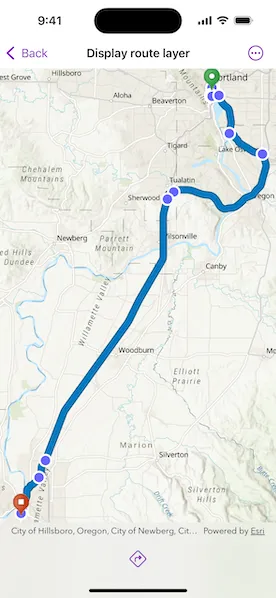
Display a route layer and its directions using feature collection.

Use case
Routes can be stored as feature collection layers. These layers can store useful information such as directions, estimated trip time, and more.
You can create a route layer in ArcGIS Pro and store a route layer as a portal item, making it easy to access, share, or display.
How to use the sample
Pan and zoom to view the route displayed by the feature collection layer. Tap the toolbar button to view the list of directions.
How it works
- Create a
PortalItemwith the item ID. - Create and load a
FeatureCollectionwith the item. - After loading, get the specified
FeatureCollectionTableby name. - Create an array of
Features. - Get the direction text from the attributes of each feature in the array.
- Create a
FeatureCollectionLayerwith the feature collection and set it to the map’soperationalLayers.
Relevant API
- Feature
- FeatureCollection
- FeatureCollectionLayer
- FeatureCollectionTable
- PortalItem
Tags
directions, feature collection, route layer
Sample code
DisplayRouteLayerView.swift
// Copyright 2025 Esri//// Licensed under the Apache License, Version 2.0 (the "License");// you may not use this file except in compliance with the License.// You may obtain a copy of the License at////   https://www.apache.org/licenses/LICENSE-2.0//// Unless required by applicable law or agreed to in writing, software// distributed under the License is distributed on an "AS IS" BASIS,// WITHOUT WARRANTIES OR CONDITIONS OF ANY KIND, either express or implied.// See the License for the specific language governing permissions and// limitations under the License.
import ArcGISimport SwiftUI
struct DisplayRouteLayerView: View {    /// A map with a topographic basemap style.    @State private var map: Map = {        // Set the basemap.        let map = Map(basemapStyle: .arcGISTopographic)
        // Center the map on the United States.        map.initialViewpoint = Viewpoint(            latitude: 45.2281, longitude: -122.8309, scale: 57e4        )
        return map    }()
    /// The directions for the route.    @State private var directions = [String]()
    /// A Boolean value indicating whether to show the directions.    @State private var isShowingDirections = false
    /// The error shown in the error alert.    @State private var error: (any Error)?
    var body: some View {        MapView(map: map)            .task {                do {                    // Create a portal item with a portal using the item ID for route data in Portland, OR.                    let portalItem = PortalItem(                        portal: .arcGISOnline(connection: .anonymous),                        id: .portlandRoute                    )
                    // Create a collection of features using the item.                    let featureCollection = FeatureCollection(item: portalItem)
                    // Set route directions using the feature collection.                    try await setRouteDirections(using: featureCollection)
                    // Create a feature collection layer using the feature collection.                    let featureCollectionLayer = FeatureCollectionLayer(featureCollection: featureCollection)
                    // Add the feature collection layer to the map's operational layers.                    map.addOperationalLayer(featureCollectionLayer)                } catch {                    self.error = error                }            }            .toolbar {                ToolbarItem(placement: .bottomBar) {                    Button {                        isShowingDirections = true                    } label: {                        Image(systemName: "arrow.triangle.turn.up.right.diamond")                    }                    .disabled(directions.isEmpty)                    .popover(isPresented: $isShowingDirections) {                        NavigationStack {                            List(directions, id: \.self) { direction in                                Text(direction)                            }                            .navigationTitle("Directions")                            .navigationBarTitleDisplayMode(.inline)                            .toolbar {                                ToolbarItem(placement: .confirmationAction) {                                    Button("Done") {                                        isShowingDirections = false                                    }                                }                            }                        }                        .frame(idealWidth: 320, idealHeight: 528)                    }                }            }            .errorAlert(presentingError: $error)    }
    /// Sets the directions for the route using the feature collection's feature table that contains turn by turn directions.    /// - Parameter featureCollection: The feature collection.    func setRouteDirections(using featureCollection: FeatureCollection) async throws {        // Load the feature collection.        try await featureCollection.load()        // Make an array of all the feature collection tables.        let tables = featureCollection.tables        // Get the table that contains the turn by turn directions.        let directionsTable = tables.first(where: { $0.tableName == "DirectionPoints" })        // Create an array of all the features in the table.        let features = directionsTable?.features()        // Set the array of directions.        directions = features?.compactMap { $0.attributes["DisplayText"] } as! [String]    }}
private extension PortalItem.ID {    /// The ID for the route and directions "Portland, OR, USA — Salem, OR, USA" portal item on ArcGIS Online.    static var portlandRoute: Self { Self("0e3c8e86b4544274b45ecb61c9f41336")! }}
#Preview {    DisplayRouteLayerView()}