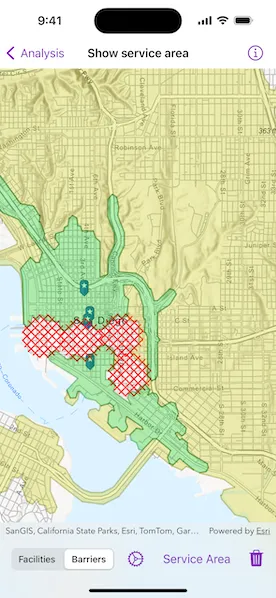
Find the service area within a network from a given point.
Use case
A service area shows locations that can be reached from a facility based off a certain impedance, such as travel time or distance. Barriers can increase impedance by either adding to the time it takes to pass through the barrier or by altogether preventing passage.
You might calculate the region around a hospital in which ambulances can service in 30 minutes or less.
How to use the sample
In order to find any service areas at least one facility needs to be added to the map view.
- To add a facility, tap or click the facility button and then anywhere on the map.
- To add a barrier, tap or click the barrier button and then multiple locations on map. Tap or click the barrier button again to finish drawing barrier. Tapping or clicking any other button will also stop the barrier from drawing.
- To show service areas around facilities that were added, tap or click the Service Areas button.
- The reset button clears all graphics and resets the service area task.
How it works
- Create a new
ServiceAreaTaskfrom a network service. - Create default
ServiceAreaParametersfrom the service area task. - Set the parameters to return polygons (true) to return all service areas.
- Add a
ServiceAreaFacilityto the parameters. - Get the
ServiceAreaResultby solving the service area task using the parameters. - Get any
ServiceAreaPolygonsthat were returned usingServiceAreaResult.resultPolygons(forFacilityAtIndex:). - Display the service area polygons as graphics in a
GraphicsOverlayon theMapView.
Relevant API
- PolylineBarrier
- ServiceAreaFacility
- ServiceAreaParameters
- ServiceAreaPolygon
- ServiceAreaResult
- ServiceAreaTask
Tags
barriers, facilities, impedance, logistics, routing
Sample code
ShowServiceAreaView.swift
// Copyright 2024 Esri//// Licensed under the Apache License, Version 2.0 (the "License");// you may not use this file except in compliance with the License.// You may obtain a copy of the License at////   https://www.apache.org/licenses/LICENSE-2.0//// Unless required by applicable law or agreed to in writing, software// distributed under the License is distributed on an "AS IS" BASIS,// WITHOUT WARRANTIES OR CONDITIONS OF ANY KIND, either express or implied.// See the License for the specific language governing permissions and// limitations under the License.
import ArcGISimport SwiftUI
struct ShowServiceAreaView: View {    // MARK: - View
    /// The currently selected graphic type.    ///    /// Used to track whether to add facilities or barriers to the map.    @State private var selectedGraphicType: GraphicType = .facility    /// The error shown in the error alert.    @State private var error: (any Error)?    /// First time break property set in first stepper.    @State private var firstTimeBreak: Int = 3    /// Second time break property set in second stepper.    @State private var secondTimeBreak: Int = 8    /// A Boolean value indicating whether the service area is being solved.    @State private var isSolvingServiceArea = false    /// A Boolean value indicating whether the service area is set.    @State private var serviceAreaIsSet = false    /// A Boolean value indicating whether the settings view is showing.    @State private var settingsAreVisible = false
    /// The data model for the sample.    @StateObject private var model = Model()
    var body: some View {        MapView(map: model.map, graphicsOverlays: model.graphicsOverlays)            .onSingleTapGesture { _, point in                if !serviceAreaIsSet {                    serviceAreaIsSet = true                }                switch selectedGraphicType {                case .facility:                    model.addFacilityGraphic(at: point)                case .barrier:                    model.addBarrierGraphic(at: point)                }            }            .toolbar {                ToolbarItemGroup(placement: .bottomBar) {                    Button("Settings", systemImage: "gear") {                        settingsAreVisible = true                    }                    .popover(isPresented: $settingsAreVisible) {                        settingsPopover                            .frame(idealWidth: 400, idealHeight: 500)                            .presentationCompactAdaptation(.popover)                    }
                    Spacer()                    Button("Show Service Area") {                        Task {                            isSolvingServiceArea = true                            do {                                try await model.showServiceArea(                                    timeBreaks: [                                        Double(firstTimeBreak),                                        Double(secondTimeBreak)                                    ]                                )                            } catch {                                self.error = error                            }                            isSolvingServiceArea = false                        }                    }                    .disabled(!serviceAreaIsSet || isSolvingServiceArea)                    Spacer()                    Button("Clear", systemImage: "trash") {                        serviceAreaIsSet = false                        model.removeAllGraphics()                    }                    .disabled(!serviceAreaIsSet)                }            }            .errorAlert(presentingError: $error)    }
    @ViewBuilder var settingsPopover: some View {        NavigationStack {            Form {                Section("Add Facility or Barrier") {                    Picker("Mode", selection: $selectedGraphicType) {                        ForEach(GraphicType.allCases, id: \.self) {                            Text($0.label)                        }                    }                    .pickerStyle(.segmented)                }                Section("Service Time Radius") {                    Stepper(                        "First Interval: \(firstTimeBreak) minutes",                        value: $firstTimeBreak,                        in: 1...15                    )                    Stepper(                        "Second Interval: \(secondTimeBreak) minutes",                        value: $secondTimeBreak,                        in: 1...15                    )                }            }            .navigationTitle("Settings")            .navigationBarTitleDisplayMode(.inline)            .toolbar {                ToolbarItem(placement: .confirmationAction) {                    Button("Done") {                        settingsAreVisible = false                    }                }            }        }    }}
private extension ShowServiceAreaView {    // MARK: - GraphicType
    enum GraphicType: Equatable, CaseIterable {        case facility, barrier
        /// The string representation of this graphic type.        var label: String {            switch self {            case .barrier: "Barriers"            case .facility: "Facilities"            }        }    }}
private extension ShowServiceAreaView {    // MARK: - Model
    @MainActor    class Model: ObservableObject {        /// A map with terrain style centered over San Diego.        let map: Map = {            let map = Map(basemapStyle: .arcGISTerrain)            map.initialViewpoint = Viewpoint(                center: Point(                    x: -13041154,                    y: 3858170,                    spatialReference: .webMercator                ),                scale: 60_000            )            return map        }()
        private let facilitiesGraphicsOverlay: GraphicsOverlay = {            let facilitiesGraphicsOverlay = GraphicsOverlay()            let facilitySymbol = PictureMarkerSymbol(image: .pinBlueStar)            // Offsets symbol in Y to align image properly.            facilitySymbol.offsetY = 21            // Assigns renderer on facilities graphics overlay using the picture marker symbol.            facilitiesGraphicsOverlay.renderer = SimpleRenderer(symbol: facilitySymbol)            return facilitiesGraphicsOverlay        }()
        private let barriersGraphicsOverlay: GraphicsOverlay = {            let barriersGraphicsOverlay = GraphicsOverlay()            let barrierSymbol = SimpleFillSymbol(style: .diagonalCross, color: .red, outline: nil)            // Sets symbol on barrier graphics overlay using renderer.            barriersGraphicsOverlay.renderer = SimpleRenderer(symbol: barrierSymbol)            return barriersGraphicsOverlay        }()
        private let serviceAreaGraphicsOverlay = GraphicsOverlay()
        /// The graphics overlays used by this model.        var graphicsOverlays: [GraphicsOverlay] {            return [facilitiesGraphicsOverlay, barriersGraphicsOverlay, serviceAreaGraphicsOverlay]        }
        private let serviceAreaTask = ServiceAreaTask(url: .serviceArea)
        private var serviceAreaParameters: ServiceAreaParameters!
        /// On user tapping on screen it add a facility graphic to the facilities overlay on the map at that point.        /// - Parameter point: The coordinates for the graphic.        func addFacilityGraphic(at point: Point) {            let graphic = Graphic(geometry: point)            facilitiesGraphicsOverlay.addGraphic(graphic)        }
        /// On user tapping on screen it add a barrier graphic to the barriers overlay on the map at that point.        /// - Parameter point: The coordinates for the graphic.        func addBarrierGraphic(at point: Point) {            let bufferedGeometry = GeometryEngine.buffer(around: point, distance: 500)            let graphic = Graphic(geometry: bufferedGeometry)            barriersGraphicsOverlay.addGraphic(graphic)        }
        /// Gets the service area data and then renders the service area on the map.        /// - Parameter timeBreaks: Double values that user sets for the impedance cutoffs.        func showServiceArea(timeBreaks: [Double]) async throws {            if serviceAreaParameters == nil {                serviceAreaParameters = try await serviceAreaTask.makeDefaultParameters()                serviceAreaParameters.geometryAtOverlap = .dissolve            }            serviceAreaGraphicsOverlay.removeAllGraphics()            // Add the graphics to the overlays with their respective geometry types.            serviceAreaParameters.setFacilities(                facilitiesGraphicsOverlay.graphics.lazy.map { .init(point: $0.geometry as! Point) }            )            serviceAreaParameters.setPolygonBarriers(                barriersGraphicsOverlay.graphics.lazy.map { .init(polygon: $0.geometry as! ArcGIS.Polygon) }            )            serviceAreaParameters.removeAllDefaultImpedanceCutoffs()            serviceAreaParameters.addDefaultImpedanceCutoffs(timeBreaks)            try await renderServiceAreaPolygons()        }
        /// Asynchronously uses the service area task to solve for the service area using the parameters and then iterates through resulting        /// polygons and creates a graphic which is added to the overlay for rendering.        private func renderServiceAreaPolygons() async throws {            let result = try await serviceAreaTask.solveServiceArea(using: serviceAreaParameters)            let polygons = result.resultPolygons(forFacilityAtIndex: 0)            for (offset, polygon) in polygons.enumerated() {                let fillSymbol = makeServiceAreaSymbol(isFirst: offset == .zero)                let graphic = Graphic(geometry: polygon.geometry, symbol: fillSymbol)                serviceAreaGraphicsOverlay.addGraphic(graphic)            }        }
        /// Resets the graphics, removes the barriers, facilities and service area.        func removeAllGraphics() {            serviceAreaGraphicsOverlay.removeAllGraphics()            facilitiesGraphicsOverlay.removeAllGraphics()            barriersGraphicsOverlay.removeAllGraphics()        }
        /// Sets the symbols drawn on that map for given selection.        /// - Parameter isFirst: Tracks which element in is first in order to correctly set the color for the symbols.        /// - Returns: Returns the symbol.        private func makeServiceAreaSymbol(isFirst: Bool) -> Symbol {            let lineSymbolColor: UIColor            let fillSymbolColor: UIColor            if isFirst {                lineSymbolColor = UIColor(red: 0.4, green: 0.4, blue: 0, alpha: 0.3)                fillSymbolColor = UIColor(red: 0.8, green: 0.8, blue: 0, alpha: 0.3)            } else {                lineSymbolColor = UIColor(red: 0, green: 0.4, blue: 0, alpha: 0.3)                fillSymbolColor = UIColor(red: 0, green: 0.8, blue: 0, alpha: 0.3)            }            let outline = SimpleLineSymbol(style: .solid, color: lineSymbolColor, width: 2)            return SimpleFillSymbol(style: .solid, color: fillSymbolColor, outline: outline)        }    }}
#Preview {    ShowServiceAreaView()}
private extension URL {    // MARK: - URLs
    static var serviceArea: URL {        URL(string: "https://sampleserver6.arcgisonline.com/arcgis/rest/services/NetworkAnalysis/SanDiego/NAServer/ServiceArea")!    }}