Specify a map’s spatial reference.
Use case
Choosing the correct spatial reference is important for ensuring accurate projection of data points to a map.
How to use the sample
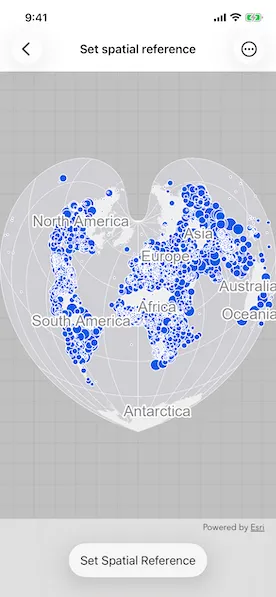
Pan and zoom around the map. Observe how the map is displayed in the World Bonne spatial reference. Pick a different spatial reference and see the map reproject.
How it works
- Instantiate a
Mapobject using a spatial reference. - Instantiate a
Basemapobject using anArcGISMapImageLayerobject. - Set the basemap to the map.
- Set the map to a
MapViewobject. - Change the map’s spatial reference using
setSpatialReferencemethod.
The ArcGIS map image layer will reproject into the spatial reference set to the map (such as World Bonne (WKID: 54024)), and not the map service’s default spatial reference.
Relevant API
- ArcGISMapImageLayer
- Basemap
- Map
- MapView
- SpatialReference
About the data
This sample uses a World Cities Population map service that displays world cities symbolized based on population.
Additional information
Operational layers will automatically project to this spatial reference when possible. There are 3 kinds of layer reprojection behaviors:
- Reprojected on device (on-the-fly reprojection), such as a
FeatureLayercreated from a mobile geodatabase - Reprojected from the service, such as an
ArcGISMapImageLayer - Not able to reproject, such as an
ArcGISTiledLayerwith defined spatial reference in its tile cache. These layers might be able to reproject in a future update
For more information, check out the API reference doc for setSpatialReference method.
Tags
coordinate system, project, projection, spatial reference, Web Mercator, WGS84, WKID
Sample code
// Copyright 2024 Esri//// Licensed under the Apache License, Version 2.0 (the "License");// you may not use this file except in compliance with the License.// You may obtain a copy of the License at////   https://www.apache.org/licenses/LICENSE-2.0//// Unless required by applicable law or agreed to in writing, software// distributed under the License is distributed on an "AS IS" BASIS,// WITHOUT WARRANTIES OR CONDITIONS OF ANY KIND, either express or implied.// See the License for the specific language governing permissions and// limitations under the License.
import ArcGISimport SwiftUI
struct SetSpatialReferenceView: View {    /// A map with spatial reference and a basemap.    @State private var map: Map = {        let map = Map(spatialReference: .worldBonne)        map.basemap = Basemap(            baseLayer: ArcGISMapImageLayer(url: .worldCities)        )        return map    }()    /// The currently selected spatial reference.    @State private var selectedSpatialReference: SpatialReference = .worldBonne
    var body: some View {        MapView(map: map)            .toolbar {                ToolbarItem(placement: .bottomBar) {                    Picker("Spatial Reference", selection: $selectedSpatialReference) {                        ForEach(SpatialReference.allOptions, id: \.wkid) { spatialReference in                            Text(spatialReference.name)                                .tag(spatialReference)                        }                    }                    .onChange(of: selectedSpatialReference) {                        map.setSpatialReference(selectedSpatialReference)                    }                    .fixedSize()                }            }    }}
private extension URL {    /// The URL to the World Cities map service for the map image layer.    static var worldCities: URL {        URL(string: "https://sampleserver6.arcgisonline.com/arcgis/rest/services/SampleWorldCities/MapServer")!    }}
// MARK: - Spatial References
private extension SpatialReference {    /// A human-readable name for the spatial reference.    var name: String {        switch self {        case .berghausStar:            "Berghaus Star AAG"        case .fuller:            "Fuller"        case .newZealandMapGrid:            "New Zealand Map Grid"        case .northPoleStereographic:            "North Pole Stereographic"        case .peirceQuincuncial:            "Peirce Quincuncial"        case .utmZone10N:            "UTM Zone 10 N"        case .worldBonne:            "World Bonne"        case .worldOrthographic:            "World Orthographic"        case .worldGoodeHomolosine:            "World Goode Homolosine"        case .webMercator:            "Web Mercator"        case .wgs84:            "WGS 84"        default:            "Unknown"        }    }
    /// Berghaus Star AAG (WKID: 102299).    static var berghausStar: SpatialReference {        SpatialReference(wkid: WKID(102299)!)!    }    /// Fuller (WKID: 54050).    static var fuller: SpatialReference {        SpatialReference(wkid: WKID(54050)!)!    }    /// New Zealand Map Grid (WKID: 27200).    static var newZealandMapGrid: SpatialReference {        SpatialReference(wkid: WKID(27200)!)!    }    /// North Pole Stereographic (WKID: 102018).    static var northPoleStereographic: SpatialReference {        SpatialReference(wkid: WKID(102018)!)!    }    /// Peirce quincuncial North Pole in a square (WKID: 54090).    static var peirceQuincuncial: SpatialReference {        SpatialReference(wkid: WKID(54090)!)!    }    /// UTM Zone 10 N (WKID: 32610).    static var utmZone10N: SpatialReference {        SpatialReference(wkid: WKID(32610)!)!    }    /// World Bonne (WKID: 54024).    static var worldBonne: SpatialReference {        SpatialReference(wkid: WKID(54024)!)!    }    /// World Goode Homolosine Land (WKID: 54052).    static var worldGoodeHomolosine: SpatialReference {        SpatialReference(wkid: WKID(54052)!)!    }    /// Orthographic projection of the World from Space (WKID: 102038).    static var worldOrthographic: SpatialReference {        SpatialReference(wkid: WKID(102038)!)!    }
    /// All available spatial references for selection.    static var allOptions: [SpatialReference] {        return [            .berghausStar,            .fuller,            .newZealandMapGrid,            .northPoleStereographic,            .peirceQuincuncial,            .utmZone10N,            .worldBonne,            .worldGoodeHomolosine,            .worldOrthographic,            .webMercator,            .wgs84        ]    }}
#Preview {    SetSpatialReferenceView()}