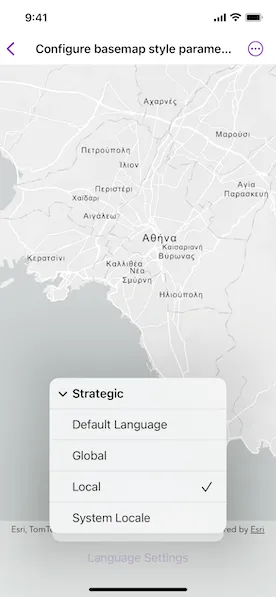
Apply basemap style parameters customization for a basemap, such as displaying all labels in a specific language or displaying every label in their corresponding local language.
Use case
When creating an application that is used in multiple countries, basemaps can reflect the languages and cultures of the users’ location. For example, if an application user is in Greece, displaying the labels on a basemap in Greek reflects the local language. Customizing the language setting on the basemap can be controlled by an application user (such as by setting preferences) or implicitly managed within the application logic (by querying the locale of the platform running the application).
How to use the sample
This sample showcases the workflow of configuring basemap style parameters by displaying a basemap with labels in different languages and launches with a Viewpoint near Athens, Greece. By default, the BasemapStyleLanguage is set to local, which displays all labels in their corresponding local language. This can be changed to global, which displays all labels in English. The specific option sets all labels to a selected language and overrides the BasemapStyleLanguage settings.
Pan and zoom to navigate the map to neighboring countries that use different alphabets, such as Bulgaria, and Turkey, to see how different labels are displayed depending on the selected BasemapStyleLanguage: all English, all Greek, all Bulgarian, all Turkish, or each their own.
How it works
- Create a
BasemapStyleParametersobject. - Configure customization preferences on the
BasemapStyleParametersobject, for instance:- setting the
BasemapStyleLanguagetolocalor specific("el")changes the label language to Greek.
- setting the
- Create a basemap using a
Basemap.Styleand theBasemapStyleParameters. - Assign the configured basemap to the
Map’sbasemapproperty. - To modify the basemap style, for example if you want to change your preferences, repeat the above steps.
Relevant API
- Basemap
- BasemapStyleLanguage
- BasemapStyleParameters
- Map
- MapView
About the data
The main data for this sample is the BasemapStyle, which includes basemaps that support both language localization and global language setting. The supported languages, along with their language code, can be found in the API’s documentation.
Additional information
For ArcGIS Basemap styles, language localization becomes visible when you zoom in closer.
Tags
basemap style, language, language strategy, map, point, viewpoint
Sample code
// Copyright 2024 Esri//// Licensed under the Apache License, Version 2.0 (the "License");// you may not use this file except in compliance with the License.// You may obtain a copy of the License at////   https://www.apache.org/licenses/LICENSE-2.0//// Unless required by applicable law or agreed to in writing, software// distributed under the License is distributed on an "AS IS" BASIS,// WITHOUT WARRANTIES OR CONDITIONS OF ANY KIND, either express or implied.// See the License for the specific language governing permissions and// limitations under the License.
import ArcGISimport SwiftUI
struct ConfigureBasemapStyleParametersView: View {    /// The view model for the sample.    @StateObject private var model = Model()
    /// The selected basemap style language strategy.    @State private var selectedLanguage: BasemapStyleLanguage = .strategic(.local)
    var body: some View {        MapView(map: model.map)            .toolbar {                ToolbarItemGroup(placement: .bottomBar) {                    Spacer()                    languageMenu                    Spacer()                }            }    }
    private var languageMenu: some View {        Menu("Language Settings") {            Menu("Strategic") {                ForEach(                    [BasemapStyleLanguageStrategy.default, .global, .local, .applicationLocale],                    id: \.label                ) { strategy in                    Button {                        selectedLanguage = .strategic(strategy)                    } label: {                        if selectedLanguage.strategy == strategy {                            Label(strategy.label, systemImage: "checkmark")                        } else {                            Text(strategy.label)                        }                    }                    .buttonStyle(.plain)                }            }            Menu("Specific") {                ForEach(model.languages, id: \.1) { label, languageCode in                    Button {                        selectedLanguage = .specific(.init(languageCode: languageCode))                    } label: {                        if selectedLanguage.localeLanguage?.languageCode == languageCode {                            Label(label, systemImage: "checkmark")                        } else {                            Text(label)                        }                    }                }            }        }        .menuOrder(.fixed)        .labelStyle(.titleAndIcon)        .onChange(of: selectedLanguage, initial: true) {            model.setBasemapLanguage(selectedLanguage)        }    }}
private extension ConfigureBasemapStyleParametersView {    /// The model used to store the geo model and other expensive objects    /// used in this view.    class Model: ObservableObject {        /// A an empty map with an initial viewpoint.        let map: Map = {            let map = Map()            // Start with a viewpoint around Bulgaria, Greece, and Turkey.            // They use three different alphabets: Cyrillic, Greek, and Latin,            // respectively. The scale is set to Metropolitan Area level.            map.initialViewpoint = Viewpoint(                center: Point(x: 2_640_000, y: 4_570_000),                scale: 288895.277144            )            return map        }()
        /// The language label and Esri language code for the basemap style parameters.        let languages: KeyValuePairs<String, Locale.LanguageCode> = [            "🇧🇬 Bulgarian": .bulgarian,            "🇬🇷 Greek": .greek,            "🇹🇷 Turkish": .turkish        ]
        /// Sets the basemap style parameter with a language strategy.        /// - Parameter language: The language setting for the basemap.        func setBasemapLanguage(_ language: BasemapStyleLanguage) {            let parameters = BasemapStyleParameters(language: language)            map.basemap = Basemap(style: .arcGISLightGray, parameters: parameters)        }    }}
private extension BasemapStyleLanguage {    var localeLanguage: Locale.Language? {        if case let .specific(language) = self {            return language        } else {            return nil        }    }
    var strategy: BasemapStyleLanguageStrategy? {        if case let .strategic(strategy) = self {            return strategy        } else {            return nil        }    }}
private extension BasemapStyleLanguageStrategy {    /// A human-readable label for the basemap style language.    var label: String {        switch self {        case .default:            return "Default Language"        case .global:            return "Global"        case .local:            return "Local"        case .applicationLocale:            return "System Locale"        @unknown default:            fatalError("Unknown basemap style language strategy")        }    }}