Query features on a map using an Arcade expression.
Use case
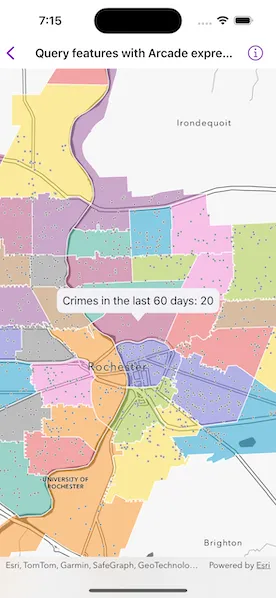
Arcade is a portable, lightweight, and secure expression language used to create custom content in ArcGIS applications. Like other expression languages, it can perform mathematical calculations, manipulate text, and evaluate logical statements. It also supports multi-statement expressions, variables, and flow control statements. What makes Arcade particularly unique when compared to other expression and scripting languages is its inclusion of feature and geometry data types. This sample uses an Arcade expression to query the number of crimes in a neighborhood in the last 60 days.
How to use the sample
Tap on any neighborhood to see the number of crimes in the last 60 days in a callout.
How it works
-
Create a
PortalItemusing a portal and the ID. -
Create a
Mapusing the portal item. -
Use the
onSingleTapGesturemodifier to listen for tap events on the map view. -
Identify the visible layer where it is tapped on and get the feature.
-
Create the following
ArcadeExpression:expressionValue = "var crimes = FeatureSetByName($map, 'Crime in the last 60 days');\n""return Count(Intersects($feature, crimes));" -
Create an
ArcadeEvaluatorusing the Arcade expression andArcadeProfile.formCalculation. -
Create a dictionary of profile variables with the following pairs:
["$feature": identifiedFeature]["$map": map] -
Call
evaluate(withProfileVariables:)on the Arcade evaluator object and pass the profile variables to evaluate the Arcade expression. -
Convert the result to a
Doublewithresult(as:)and populate the callout with the crime count.
Relevant API
- ArcadeEvaluationResult
- ArcadeEvaluator
- ArcadeExpression
- ArcadeProfile
- Portal
- PortalItem
About the data
This sample uses the Crimes in Police Beats Sample ArcGIS Online Web Map which contains 2 layers for city beats borders and crimes in the last 60 days as recorded by the Rochester, NY police department.
Additional information
Visit Getting Started on the Esri Developer website to learn more about Arcade expressions.
Tags
Arcade evaluator, Arcade expression, identify layers, portal, portal item, query
Sample code
// Copyright 2024 Esri//// Licensed under the Apache License, Version 2.0 (the "License");// you may not use this file except in compliance with the License.// You may obtain a copy of the License at////   https://www.apache.org/licenses/LICENSE-2.0//// Unless required by applicable law or agreed to in writing, software// distributed under the License is distributed on an "AS IS" BASIS,// WITHOUT WARRANTIES OR CONDITIONS OF ANY KIND, either express or implied.// See the License for the specific language governing permissions and// limitations under the License.
import ArcGISimport SwiftUI
struct QueryFeaturesWithArcadeExpressionView: View {    /// The view model for the sample.    @StateObject private var model = Model()
    /// The point on the screen where the user tapped.    @State private var tapScreenPoint: CGPoint?
    /// The placement of the callout on the map.    @State private var calloutPlacement: CalloutPlacement?
    /// The error shown in the error alert.    @State private var error: (any Error)?
    var body: some View {        MapViewReader { mapViewProxy in            MapView(map: model.map)                .callout(placement: $calloutPlacement.animation(.default.speed(2))) { placement in                    let crimeCount = placement.geoElement?.attributes["Crime_Count"] as! Int                    Text("Crimes in the last 60 days: \(crimeCount)")                        .font(.callout)                        .padding(8)                }                .onSingleTapGesture { screenPoint, _ in                    tapScreenPoint = screenPoint                }                .task(id: tapScreenPoint) {                    guard let tapScreenPoint else { return }                    calloutPlacement = nil
                    do {                        // Identify the tapped feature using the map view proxy.                        let identifyResults = try await mapViewProxy.identifyLayers(                            screenPoint: tapScreenPoint,                            tolerance: 10                        )
                        guard let identifiedGeoElements = identifyResults.first?.geoElements,                              let identifiedFeature = identifiedGeoElements.first as? ArcGISFeature,                              let tapMapPoint = mapViewProxy.location(fromScreenPoint: tapScreenPoint)                        else { return }
                        // Evaluate the crime count for the feature.                        let crimeCount = try await model.crimeCount(for: identifiedFeature)
                        // Update the callout with the evaluation results.                        identifiedFeature.setAttributeValue(crimeCount, forKey: "Crime_Count")                        calloutPlacement = .geoElement(identifiedFeature, tapLocation: tapMapPoint)
                        await mapViewProxy.setViewpointCenter(tapMapPoint)                    } catch {                        self.error = error                    }                }                .overlay(alignment: .center) {                    if model.isEvaluating {                        VStack {                            Text("Evaluating")                            ProgressView()                                .progressViewStyle(.circular)                        }                        .padding()                        .background(.ultraThickMaterial)                        .clipShape(.rect(cornerRadius: 10))                        .shadow(radius: 50)                    }                }                .task {                    await mapViewProxy.setViewpointScale(2e5)                }                .errorAlert(presentingError: $error)        }    }}
private extension QueryFeaturesWithArcadeExpressionView {    /// The view model for the sample.    @MainActor    class Model: ObservableObject {        /// A map of the "Crime in Police Beats" portal item.        let map: Map = {            // Create a portal item using a portal and item ID.            let portalItem = PortalItem(                portal: .arcGISOnline(connection: .anonymous),                id: .crimesInPoliceBeats            )
            // Create a map using the portal item.            let map = Map(item: portalItem)            return map        }()
        /// The Arcade evaluator for evaluating the crime count of a feature.        private let crimeCountEvaluator: ArcadeEvaluator = {            // Create a string containing the Arcade expression.            let expressionValue = """            var crimes = FeatureSetByName($map, 'Crime in the last 60 days');            return Count(Intersects($feature, crimes));            """
            // Create an Arcade expression using the string.            let expression = ArcadeExpression(expression: expressionValue)
            // Create an Arcade evaluator with the Arcade expression and an Arcade profile.            let evaluator = ArcadeEvaluator(expression: expression, profile: .formCalculation)            return evaluator        }()
        /// A Boolean value indicating whether there is a current evaluation operation.        @Published private(set) var isEvaluating = false
        /// Evaluates the crime count for a given feature.        /// - Parameter feature: The ArcGIS feature evaluate.        /// - Returns: The evaluated crime count in the last 60 days.        func crimeCount(for feature: ArcGISFeature) async throws -> Int {            isEvaluating = true            defer { isEvaluating = false }
            // Create the profile variables for the script with the feature and map.            let profileVariables: [String: any Sendable] = ["$feature": feature, "$map": map]
            // Evaluate for the profile variables using the evaluator.            let result = try await crimeCountEvaluator.evaluate(withProfileVariables: profileVariables)
            // Cast the result to get it's value.            let crimeCount = result.result(as: .double) as? Double ?? 0            return Int(crimeCount)        }    }}
private extension PortalItem.ID {    /// The ID used in the "Crimes in Police Beats" portal item.    static var crimesInPoliceBeats: Self {        Self("539d93de54c7422f88f69bfac2aebf7d")!    }}
#Preview {    QueryFeaturesWithArcadeExpressionView()}