Version 2.3.0 - April, 2026.
This page provides details about enhancements, deprecations, resolved issues, and known issues in the 2.3 release of ArcGIS Maps SDK for Unity.
Enhancements
This section outlines new features and improvements (what's new).
Point scene layer support
Support for point scene layers has been added in this release, enabling visualization and interaction with large collections of point-based features in 3D. These layers are designed to efficiently represent discrete, georeferenced entities—such as trees, street furniture, or infrastructure assets.
With this capability, developers can display point scene layers with attribute data-driven rendering that defines the rules and symbols used to categorize and display the data. This release includes support for simple renderers
This release introduces support for visualizing 3D models and 3D primitive markers. In future releases we plan to add support for 2D-based symbology, including flat or draped icons, marker symbols, text, and labels. For more information, see the Point Scene Layer topic.

3D Tiles loading improvements
In this release, the data loading and display of 3D Tiles has been improved to provide a more consistent experience. This release introduces a new LOD (Level of Detail) strategy for 3D Tiles, that avoids unnecessary unloading and reloading of data during camera movement.
Identify support for building scene layers
This release adds support for the identify operation in Building Scene Layers, allowing developers to interact directly with individual building components such as walls, floors, windows, and structural elements. By identifying a component through a click or tap, the operation returns the attribute data and geometry of the feature.
The identify results can be used to:
-
Display detailed information panels or pop-ups for the identified component.
-
Highlight specific elements within the building model using material-based or visual cues.
-
Enable interactive workflows such as zooming to a component, isolating identified features, or integrating with external systems for further analysis.
This enhancement eliminates the need for custom hit-testing or manual mapping of screen coordinates to building features, simplifying the development of interactive applications. It provides a more seamless and efficient approach to exploring complex building models, which is particularly valuable in architecture, engineering, and construction (AEC), and facilities management workflows where understanding individual building components and their attributes is critical.
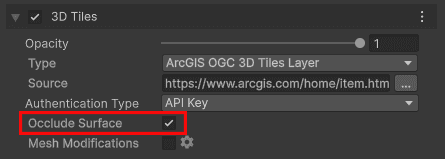
Occlude surface property available in UI
The Occlude Surface property is now available in the UI, allowing users to control whether a layer occludes (hides) intersecting elevation or terrain surfaces. When enabled (the default mode), the layer hides underlying geometry where intersections occur; when turned off, intersecting surfaces remain visible. This property currently affects only visual occlusion behavior and no longer influences the LOD strategy as it did in previous releases.
C# API
ArcGISenum has the following new enum values:Layer Type ArcGISPoint Scene Layer
ArcGISenum has the following new enum values:Error Type CriticalRendering Error CriticalRendering Requirements Not Met Error GeoModel Load Error GeoModel Incompatible Viewing Mode Error GeoModel Incompatible Vertical And Horizontal Datums Error GeoModel Incompatible Spatial Reference Error EmptyVertical Coordinate System Warning ClippingArea Not Projectable Warning RenderingWarning
ArcGISclass has been added to support point scene layers.Point Scene Layer ArcGISenum has been added to specify size units for symbols, includingSymbol Size Units DIandPs Meters.WKproperty has been added to the following classes to represent Well-Known Text (WKT2) representations of coordinate reference systems, compliant with OGC/ISO standards.Text2 ArcGISGeographic Transformation Step ArcGISHorizontal Vertical Transformation Step ArcGISSpatial Reference ArcGISSpatial Reference Builder
Components
- A Point Scene Layer option has been added to the ArcGISMap component in the layer type drop-down under the Layers section. Users can now add point scene layers to their maps from the ArcGISMap component.
Map Creator UI
- A Point Scene Layer option has been added to the layer type drop-down under the Layers tab in the Map Creator UI. Users can now add point scene layers to their maps directly from the UI.
- An Occlude Surface property checkbox has been added to the layer configuration when the ArcGIS 3D Tiles Layer is selected, allowing users to control surface occlusion behavior for 3D Tiles layers.
Behavior changes
- The default value for
Refreshin theToken Exchange Interval ArcGISOclass has been changed to 1440 minutes (24 hours). Previously the behavior was opt-in and the default value was 0 minutes. If the exchange interval is set to 0 or less than 0, the refresh token will expire after the period of time determined by theAuth User Configuration Refreshproperty, and it will not be exchanged, requiring the user to sign in again.Token Expiration Interval
- Classes
InstancedandMesh Renderer Pointare deprecated. These classes are for internal use only and will be removed in a future release.Cloud Instance Data
Deprecations
This section lists OS and framework deprecation information.
OS and framework deprecations
- Support for iOS/iPadOS 17 is deprecated. The last release to support this version of iOS/iPadOS is 2.3. A minimum of iOS/iPadOS 18 will be required at the next release.
- Support for macOS Sonoma (version 14) is deprecated. The last release to support this version of macOS is 2.3. A minimum of macOS Sequoia (version 15) will be required at the next release.
Issues resolved
- BUG-000181005: Identify returns incorrect date and time attribute values on certain services.
Known issues
-
Question on Esri Community: ArcGIS Maps SDK for Unity integrated mesh layer is rendered behind mountains when using the Universal Render Pipeline (URP).
Summary: When an integrated mesh scene layer is behind terrain such as behind a mountain, the layer is visible.
Workaround: None available.
-
BUG-000169956: Custom basemaps disappear from the basemap gallery after entering Play mode.
Summary: After adding custom basemaps from the Map Creator UI, click Play once removes all custom basemaps that are not currently selected.
Workaround: None available.
-
BUG-000169776: Custom basemap name is lost after clicking Play.
Summary: The name for the custom basemap that is added from the Map Creator UI is automatically changed to User Basemap after clicking Play.
Workaround: None available.
-
BUG-000169957: Local file packages cannot be added from the ArcGIS Map component using the ellipsis menu (three dots icon).
Summary: Adding local file packages from the ArcGIS Map component using the ellipsis menu does not add the file path to the Source field, and an
Invalidmessage is logged in the Unity Console.Operation Exception : Stack empty Workaround: Set the file path manually in the Source field. For example:
C.:/ Users/my _username/my _folder/example.slpk -
Question on Esri Community: Collider offsets in rendered OSM 3D buildings.
Summary: The collision mesh is not properly aligned with the corresponding rendered OSM 3D building, which can result in inaccurate collision detection or unexpected behavior when interacting with the 3D environment.
Workaround: None available.
Related topics
- Product life cycle (Esri Support Site)