In ArcGIS Enterprise, privileges are a set of strings used to manage access to secure resources
- ArcGIS accounts
An ArcGIS account is an identity with a user type and set of privileges that can access specific ArcGIS products, tools, APIs, services, and resources. The main account types that can be used for development are an ArcGIS Location Platform account, ArcGIS Online account, and ArcGIS Enterprise account. ArcGIS Location Platform and ArcGIS Online accounts are also associated with a subscription. used by ArcGIS users. - Access tokens
An access token is an authorization string that provides access to secure ArcGIS content, data, and services. Its capabilities are determined by the privileges it supports. It is obtained by implementing API key authentication, User authentication, or App authentication. used by applications.
Privileges for accounts
All ArcGIS accounts
Privileges for access tokens
All access tokens
Privileges for access tokens are based on the privileges of the token's associated ArcGIS account. They are assigned using two workflows:
-
The developer selects specific privileges to grant to an access token.
-
The access token inherits all account privileges of the ArcGIS account it is associated with.
Access tokens with selected privileges
Access tokens with selected privileges can be created using API key authentication
Selecting the privileges of an access token allows the developer to assign a minimal set of privileges to each token, reducing the potential harm in the event a token is compromised. Privileges are managed on a per-credential basis, meaning that all access tokens generated using the same developer credential will have the same privileges.
When using the developer credentials tool, select either of the following options to generate access tokens with selected privileges:
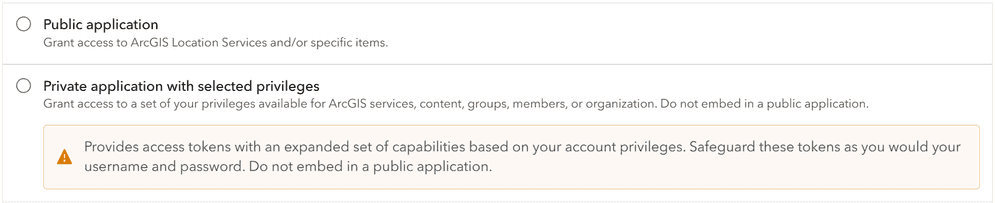
Access tokens that impersonate accounts
Access tokens can impersonate you and provide the full privileges of your ArcGIS account. An access token that impersonates an ArcGIS account has every privilege of the account it is associated with, as well as its access to content, groups, members, and organization settings.
Access tokens that impersonate accounts can be generated in the following ways:
-
User authentication
User authentication is a type of authentication that allows users with an ArcGIS account to sign into an application and allow it to access ArcGIS content, services, and resources on their behalf. The typical authorization protocol used is OAuth2.0. generates access tokens that impersonate the full capabilities of the signed-in ArcGIS account. -
API key authentication
API key authentication is a type of authentication that uses an API key to authenticate requests to ArcGIS services and secure portal items. or app authenticationApp authentication is a type of authentication that grants a short-lived access token based on an OAuth 2.0 client ID and client secret, authorizing an application to access ArcGIS services and items. can generate access tokens that impersonate the developer's account by choosing the Private application with all owner privileges setting in the developer credentials tool.
When using the developer credentials tool, select the following option to generate access tokens with all of your privileges:

List of privileges for access tokens

The privilege selection menu in the developer credentials tool.
The following table lists all privileges that can be assigned to access tokens
All selectable privileges for an ArcGIS Enterprise access token are shown. The actual privileges available in the developer credentials tool vary based on your account's user type and roles.
Organization (Portal) operations
These privileges grant access to operations in the portal
General privileges
| Category | Label | Privilege string | Description |
|---|---|---|---|
| Members | View | portal | Allow application to view members of the organization. |
| Groups | Create, update, and delete | portal | Allow application to create, edit, and delete their own groups. |
| Groups | Join organizational groups | portal | Allow application to join groups within your organization. |
| Groups | View groups shared with organization | portal | Allow application to view groups shared with the organization. |
| Groups | Add members from other organizations | portal | Allow application to create groups that allow members from other organizations, as well as invite external members to groups. |
| Content | Create, update, and delete | portal | Allow application to create, edit, and delete their own content. |
| Content | Publish hosted feature layers | portal | Allow application to publish hosted feature layers from shapefiles, CSVs, etc. |
| Content | Publish hosted tile layers | portal | Allow application to publish hosted tile layers from tile packages, features, etc. |
| Content | Publish hosted scene layers | portal | Allow application to publish hosted scene layers. |
| Content | Published hosted tiled imagery layers | portal | Allow application to publish hosted tiled imagery layers from a single image or collection of images. Requires an ArcGIS Image for ArcGIS Online user type extension. |
| Content | Publish hosted dynamic imagery layers | portal | Allow application to publish hosted dynamic imagery layers from a single image or collection of images. |
| Content | View content shared with organization | portal | Allow application to view content shared to the organization. |
| Content | View location tracks | portal | Allow application to view members' location tracks via shared track views when location sharing is enabled. |
| Content | Reassign content | portal | Allow application to reassign ownership of content owned by the account to another member. |
| Content | Receive content | portal | Allow application to receive content assigned to them by another member. |
| Content | Publish livestream video | portal | Allow application to publish livestream videos. |
| Content | Publish real-time analytics | portal | Allow application to publish real-time analytics to analyze and process real-time data using ArcGIS Velocity. |
| Content | Publish server-based layers | portal | Allow application to publish server-based layers. |
| Content | Publish video | portal | Allow application to publish videos. |
| Content | Register data stores | portal | Allow application to register video stores. |
| Content | View hosted feature services | portal | Allow application to view hosted feature services. |
| Content | View hosted tile services | portal | Allow application to view hosted tile services. |
| Content | Categorize items | portal | Allow application to set the category of items you own. |
| Content | Manage feature layer webhooks | portal | Allow application to manage webhooks for feature layers. |
| Content | Bulk publish from data stores | portal | Allow application to bulk publish data from data stores. |
| Content | Publish big data analytics | portal | Allow application to publish big data analytics and process historical observation data using ArcGIS Velocity. |
| Content | Publish feeds | portal | Allow application to publish feeds. |
| Content | Publish knowledge graphs | portal | Allow application to publish knowledge graphs. |
| Sharing | Share with groups | portal | Allow application to share content to groups. |
| Sharing | Share with organization | portal | Allow application to share content to your organization. |
| Sharing | Share with public | portal | Allow application to share their content publicly if permitted by the organization's public sharing policy. |
| Sharing | Make groups visible to organization | portal | Allow application to make groups discoverable by your organization. |
| Sharing | Make groups visible to public | portal | Allow application to make groups discoverable by the public. |
| Features | Edit | features | Allow application to edit features in editable layers that are not public, based on the edit options enabled on the layer. |
| Features | Edit with full control | features | Allow application to add, delete, and update features in an editable, hosted feature layer, regardless of the editing options enabled on the layer. |
| Features | Manage feature layer versions | features | Allow application to manage feature layer version control settings. |
| Premium content | Create notebooks | premium | Allow application to create and edit interactive notebooks. |
| Premium content | Schedule notebooks | premium | Allow application to schedule future automated runs of a notebook. |
| Premium content | Create advanced notebooks | premium | Allow application to import and use ArcPy modules in ArcGIS Notebooks. |
| Premium content | Demographic maps | premium | Allow application to access demographic maps in ArcGIS Living Atlas. |
| Premium content | Feature report | premium | Allow application to create feature reports in ArcGIS Survey123. |
| Premium content | Run web tools | portal | Allow application to run web tools. |
Administrative privileges
| Category | Label | Privilege string | Description |
|---|---|---|---|
| Members | View all | portal | Allow application to view full member account information within your organization. |
| Members | Update | portal | Allow application to reset passwords, update member account information, and update member categories within your organization. |
| Members | Delete | portal | Allow application to delete member accounts within your organization. |
| Members | Invite | portal | Allow application to invite members to your organization. |
| Members | Disable | portal | Allow application to enable and disable member accounts within your organization. |
| Members | Change roles | portal | Allow application to change the role a member account is assigned. Note, only members with the Administrator role can assign or unassign the Administrator role to other accounts. |
| Members | Manage licenses | portal | Allow application to assign licenses to members of your organization. |
| Members | Manage categories | portal | Allow application to configure organization member categories. |
| Groups | View all | portal | Allow application to view all groups within your organization. |
| Groups | Update | portal | Allow application to update groups within your organization. |
| Groups | Delete | portal | Allow application to delete groups within your organization. |
| Groups | Reassign ownership | portal | Allow application to reassign groups to other members within your organization. |
| Groups | Assign members | portal | Allow application to assign your members to, update your member's group role, and remove your members from groups within your organization. |
| Groups | Link to organization-specific group | portal | Allow application to link group membership to an organization-specific group. |
| Groups | Create with update capabilities | portal | Allow application to create groups with update capabilities. |
| Groups | Create with leaving disallowed | portal | Allow application to create and own groups that do not allow members to leave (administrative groups). |
| Content | View all | portal | Allow application to view all content within your organization. |
| Content | Update items | portal | Allow application to update and categorize content and edit hosted feature layers in your organization. |
| Content | Delete items | portal | Allow application to delete content within your organization. |
| Content | Reassign item ownership | portal | Allow application to reassign content to other members within your organization. |
| Content | Categorize items | portal | Allow application to set the categories of organization content. |
| Content | Manage categories | portal | Allow application to configure organization content categories. |
| Content | Publish web tools | portal | Allow application to publish web tools. |
| Content | Geoprocessing webhook | portal | Allow application to create geoprocessing webhooks. |
| Content | Manage servers | portal | Allow application to manage servers. |
| Content | Manage webhooks | portal | Allow application to manage webhooks. |
| Content | Share member content with organization | portal | Allow application to share content owned by other members in your organization with the organization. |
| Content | Share member content with public | portal | Allow application to share content owned by other members in your organization with the public. |
| Content | Create and manage administrative reports | portal | Allow application to create and manage administrative reports for your organization |
| Organization settings | Security and infrastructure | portal | Allow application to manage the organization's security and infrastructure settings. |
| Organization settings | Observability | portal | Allow application to view the organization's observability metrics. |
| Organization settings | Organization website | portal | Allow application to manage the organization's website settings. |
| Organization settings | Collaborations | portal | Allow application to manage the organization's collaborations. |
| Organization settings | Member roles | portal | Allow application to manage the organization's member roles. |
| Organization settings | Utility services | portal | Allow application to manage the organization's utility service settings |
More resources
Learn more about privileges and the services they grant access to in the developer guides:
Tutorials
Learn how to create access tokens with privileges in these tutorials:
Create an API key
Create and configure API key credentials to get a long-lived API key access token.