Create and add features whose attribute values satisfy a predefined set of contingencies.
Use case
Contingent values are a data design feature that allow you to make values in one field dependent on values in another field. Your choice for a value on one field further constrains the domain values that can be placed on another field. In this way, contingent values enforce data integrity by applying additional constraints to reduce the number of valid field inputs.
For example, a field crew working in a sensitive habitat area may be required to stay a certain distance away from occupied bird nests, but the size of that exclusion area differs depending on the bird’s level of protection according to presiding laws. Surveyors can add points of bird nests in the work area, and their selection of the size of the exclusion area will be contingent on the values in other attribute fields.
How to use the sample
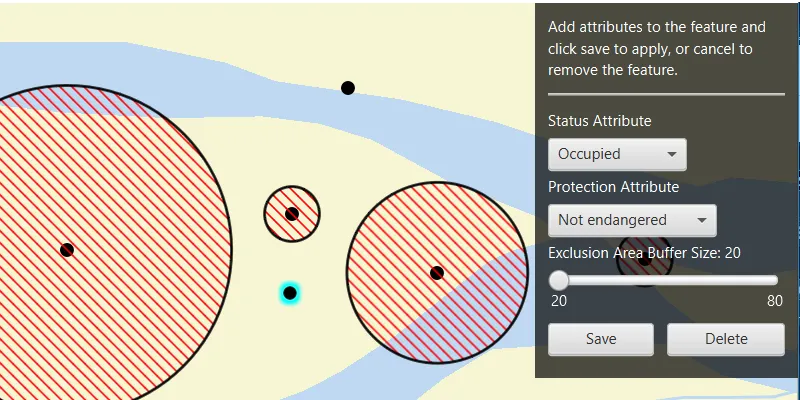
Click on the map to add a feature symbolizing a bird’s nest. Then choose values describing the nest’s status, protection, and buffer size. Notice how different values are available depending on the values of preceding fields. Once the contingent values are validated, click “Save” to add the feature to the map. To delete the feature as you are in progress, click “Delete”.
How it works
- Create and load the
Geodatabasefrom the mobile geodatabase location on file. - Load the
GeodatabaseFeatureTablefrom the geodatabase. - Create a new
FeatureLayerfrom the geodatabase feature table and add it to the map. - Create a new
ArcGISFeatureusinggeodatabaseFeatureTable.createFeature() - Load the
ContingentValuesDefinitionfrom the feature table. - Get the required geodatabase feature table field by name using
.getField(String fieldName). - Then get the
CodedValueDomainof the field withfield.getDomain(). - Get the coded value domain’s
CodedValues withcodedValueDomain.getCodedValues(). - After selecting a value from the initial coded values for the first field, retrieve the remaining valid contingent values for each field as you select the values for the attributes.
i. Get the
ContingentValueResults by usinggeodatabaseFeatureTable.getContingentValues(Feature feature, String field)with the feature and the target field by name. ii. Get an array of validContingentValues fromcontingentValuesResult.getContingentValuesByFieldGroup().get(String fieldGroupName)with the name of the relevant field group. iii. Iterate through the array of valid contingent values to create an array ofContingentCodedValuenames or the minimum and maximum values of aContingentRangeValuedepending on the type ofContingentValuereturned. - Validate the feature’s contingent values by using
validateContingencyConstraints(Feature feature)with the current feature. If the resulting array is empty, the selected values are valid.
Relevant API
- CodedValue
- CodedValueDomain
- ContingencyConstraintViolation
- ContingentCodedValue
- ContingentRangeValue
- ContingentValue
- ContingentValuesDefinition
- ContingentValuesResult
- GeodatabaseFeatureTable
Offline data
This sample uses the Contingent values birds nests mobile geodatabase and the Fillmore topographic map vector tile package for the basemap.
About the data
The mobile geodatabase contains birds nests in the Fillmore area, defined with contingent values. Each feature contains information about its status, protection, and buffer size.
Additional information
Learn more about contingent values and how to utilize them on the ArcGIS Pro documentation.
Tags
coded values, contingent values, feature table, geodatabase
Sample code
/* * Copyright 2022 Esri. * * Licensed under the Apache License, Version 2.0 (the "License"); you may not * use this file except in compliance with the License. You may obtain a copy of * the License at * * http://www.apache.org/licenses/LICENSE-2.0 * * Unless required by applicable law or agreed to in writing, software * distributed under the License is distributed on an "AS IS" BASIS, WITHOUT * WARRANTIES OR CONDITIONS OF ANY KIND, either express or implied. See the * License for the specific language governing permissions and limitations under * the License. */
package com.esri.samples.add_features_with_contingent_values;
import java.io.File;import java.util.ArrayList;import java.util.Arrays;import java.util.List;import java.util.concurrent.ExecutionException;
import javafx.beans.property.SimpleBooleanProperty;import javafx.collections.FXCollections;import javafx.fxml.FXML;import javafx.geometry.Point2D;import javafx.scene.control.Alert;import javafx.scene.control.ComboBox;import javafx.scene.control.Label;import javafx.scene.control.Slider;import javafx.scene.input.MouseButton;import javafx.scene.layout.VBox;import javafx.scene.paint.Color;
import com.esri.arcgisruntime.ArcGISRuntimeEnvironment;import com.esri.arcgisruntime.data.ArcGISFeature;import com.esri.arcgisruntime.data.CodedValue;import com.esri.arcgisruntime.data.CodedValueDomain;import com.esri.arcgisruntime.data.ContingencyConstraintViolation;import com.esri.arcgisruntime.data.ContingentCodedValue;import com.esri.arcgisruntime.data.ContingentRangeValue;import com.esri.arcgisruntime.data.ContingentValue;import com.esri.arcgisruntime.data.ContingentValuesDefinition;import com.esri.arcgisruntime.data.ContingentValuesResult;import com.esri.arcgisruntime.data.Feature;import com.esri.arcgisruntime.data.Geodatabase;import com.esri.arcgisruntime.data.GeodatabaseFeatureTable;import com.esri.arcgisruntime.data.QueryParameters;import com.esri.arcgisruntime.geometry.Geometry;import com.esri.arcgisruntime.geometry.GeometryEngine;import com.esri.arcgisruntime.geometry.Point;import com.esri.arcgisruntime.layers.ArcGISVectorTiledLayer;import com.esri.arcgisruntime.layers.FeatureLayer;import com.esri.arcgisruntime.loadable.LoadStatus;import com.esri.arcgisruntime.mapping.ArcGISMap;import com.esri.arcgisruntime.mapping.Basemap;import com.esri.arcgisruntime.mapping.view.Graphic;import com.esri.arcgisruntime.mapping.view.GraphicsOverlay;import com.esri.arcgisruntime.mapping.view.MapView;import com.esri.arcgisruntime.symbology.SimpleFillSymbol;import com.esri.arcgisruntime.symbology.SimpleLineSymbol;import com.esri.arcgisruntime.symbology.SimpleMarkerSymbol;import com.esri.arcgisruntime.symbology.SimpleRenderer;
public class AddFeaturesWithContingentValuesController {
  @FXML private MapView mapView;  @FXML private ComboBox<CodedValue> statusComboBox;  @FXML private ComboBox<CodedValue> protectionComboBox;  @FXML private Label label;  @FXML private Slider bufferSlider;  @FXML private VBox attributeControlsVBox;  @FXML private Label addFeatureLabel;  @FXML private Label attributesLabel;
  private ArcGISFeature newFeature;  private ContingentValuesDefinition contingentValuesDefinition;  private FeatureLayer featureLayer;  private Graphic graphic;  private Geodatabase geodatabase;  private GeodatabaseFeatureTable geodatabaseFeatureTable;  private GraphicsOverlay graphicsOverlay;
  private final SimpleBooleanProperty isEditingFeatureProperty = new SimpleBooleanProperty(false);
  /**   * Called after FXML loads. Sets up map.   */  public void initialize() {
    try {
      // authentication with an API key or named user is required to access basemaps and other location services      String yourAPIKey = System.getProperty("apiKey");      ArcGISRuntimeEnvironment.setApiKey(yourAPIKey);
      // display the name of the coded values in the attribute combo boxes      protectionComboBox.setButtonCell(new CodedValueListCell());      protectionComboBox.setCellFactory(c -> new CodedValueListCell());      statusComboBox.setButtonCell(new CodedValueListCell());      statusComboBox.setCellFactory(c -> new CodedValueListCell());
      // control updates to the UI      isEditingFeatureProperty.addListener(((observable, oldValue, newValue) -> {        if (newValue) {          addFeatureLabel.setVisible(false);          attributesLabel.setVisible(true);          attributeControlsVBox.setDisable(false);        } else {          addFeatureLabel.setVisible(true);          attributesLabel.setVisible(false);          attributeControlsVBox.setDisable(true);        }      }));
      // create a new vector tile package from a vector tile package path      var vectorTiledLayer = new ArcGISVectorTiledLayer(new File(System.getProperty("data.dir"), "./samples-data" +              "/FillmoreTopographicMap.vtpk").getAbsolutePath());      // create a new basemap with the vector tiled layer and create a new map from it      var basemap = new Basemap(vectorTiledLayer);      ArcGISMap map = new ArcGISMap(basemap);
      // set the map to the map view      mapView.setMap(map);
      // create a graphics overlay to display the nest buffer exclusion area      graphicsOverlay = new GraphicsOverlay();      var bufferSymbol = new SimpleFillSymbol(SimpleFillSymbol.Style.FORWARD_DIAGONAL,              Color.RED, new SimpleLineSymbol(SimpleLineSymbol.Style.SOLID, Color.BLACK, 2));      graphicsOverlay.setRenderer(new SimpleRenderer(bufferSymbol));      // create a new simple marker symbol to mark where new feature is being added on the map      var symbol = new SimpleMarkerSymbol(SimpleMarkerSymbol.Style.CIRCLE, Color.BLACK, 11);      // add the graphics overlay to the mapview      mapView.getGraphicsOverlays().add(graphicsOverlay);
      geodatabase = new Geodatabase(new File(System.getProperty("data.dir"),              "./samples-data/ContingentValuesBirdNests.geodatabase").getAbsolutePath());      // wait for the geodatabase to finish loading and check it has loaded      geodatabase.addDoneLoadingListener(() -> {        if (geodatabase.getLoadStatus() == LoadStatus.LOADED) {
          // get the BirdNests geodatabase feature table, and wait for it to load          geodatabaseFeatureTable = geodatabase.getGeodatabaseFeatureTable("BirdNests");          geodatabaseFeatureTable.addDoneLoadingListener(() -> {            if (geodatabaseFeatureTable.getLoadStatus() == LoadStatus.LOADED) {              // create a new feature that matches the schema of the geodatabase feature table              newFeature = (ArcGISFeature) geodatabaseFeatureTable.createFeature();              featureLayer = new FeatureLayer(geodatabaseFeatureTable);              map.getOperationalLayers().add(featureLayer);
              // when the feature layer has loaded, set the viewpoint on the map to its full extent, and add buffers to              // the features              featureLayer.addDoneLoadingListener(() -> {                if (featureLayer.getLoadStatus() == LoadStatus.LOADED) {                  mapView.setViewpointGeometryAsync(featureLayer.getFullExtent(), 50);                  // queries the features in the feature table and applies a buffer to them                  // set up query parameters for generating buffer graphic                  queryAndBufferFeatures();                  getAndLoadContingentDefinitionAndSetStatusAttribute();                  mapView.setDisable(false);                }              });            } else if (geodatabase.getLoadStatus() == LoadStatus.FAILED_TO_LOAD) {              new Alert(Alert.AlertType.ERROR, "Geodatabase failed to load").show();            }          });          // load the geodatabase feature table          geodatabaseFeatureTable.loadAsync();        }      });      // load the geodatabase      geodatabase.loadAsync();
      // set up mouse clicked listener      mapView.setOnMouseClicked(event -> {        if (event.isStillSincePress() && event.getButton() == MouseButton.PRIMARY) {          isEditingFeatureProperty.set(true);
          // if the newFeature object is null, create a new feature and set its attributes from the already populated UI          if (newFeature == null) {            newFeature = (ArcGISFeature) geodatabaseFeatureTable.createFeature();            newFeature.getAttributes().put("Status", statusComboBox.getSelectionModel().getSelectedItem().getCode());            newFeature.getAttributes().put("Protection",                    protectionComboBox.getSelectionModel().getSelectedItem().getCode());            newFeature.getAttributes().put("BufferSize", (int) bufferSlider.getValue());          }
          // create a point from where the user clicked          Point2D point = new Point2D(event.getX(), event.getY());          Point mapPoint = mapView.screenToLocation(point);          // get the normalized geometry for the clicked location and use it as the feature's geometry          Point normalizedMapPoint = (Point) GeometryEngine.normalizeCentralMeridian(mapPoint);          newFeature.setGeometry(normalizedMapPoint);
          // check if the graphics overlay already contains the graphic, and if not, add it to the graphics overlay          if (!graphicsOverlay.getGraphics().contains(graphic)) {            graphic = new Graphic();            graphicsOverlay.getGraphics().add(graphic);            graphic.setSymbol(symbol);            graphic.setGeometry(newFeature.getGeometry());            graphic.setSelected(true);          } else {            // otherwise, update the geometry of the graphic as the user clicks the map            graphic.setGeometry(newFeature.getGeometry());          }        }      });    } catch (Exception e) {      // on any error, display the stack trace      e.printStackTrace();    }  }
  /**   * Gets and loads the contingent values definition from the geodatabase feature table, checks it contains field groups, and gets   * the coded value domains from the "Status" field.   */  private void getAndLoadContingentDefinitionAndSetStatusAttribute() {
    // get and load the table's contingent values definition. this must be loaded after the table has loaded    contingentValuesDefinition = geodatabaseFeatureTable.getContingentValuesDefinition();    contingentValuesDefinition.addDoneLoadingListener(() -> {      // check the contingent values definition has field groups (if the list is empty, there are no      // contingent values defined for this table      if (contingentValuesDefinition.getLoadStatus() == LoadStatus.LOADED && !contingentValuesDefinition.getFieldGroups().isEmpty()) {        // get the coded value domains for the "Status" field name        CodedValueDomain statusCodedValueDomain =                (CodedValueDomain) geodatabaseFeatureTable.getField("Status").getDomain();        // add each returned coded value as an item to the status combo box        for (CodedValue codedValue : statusCodedValueDomain.getCodedValues()) {          // requires some mapping of object code back to string          statusComboBox.getItems().add(codedValue);        }        // once the combo box has been populated with coded values, select the first one        if (statusComboBox.getItems().size() == statusCodedValueDomain.getCodedValues().size()) {          statusComboBox.getSelectionModel().selectFirst();        }        // check the contingent values are valid        contingentValuesAreValid();      }    });    contingentValuesDefinition.loadAsync();  }
  /**   * Handles interaction with the status combo box. Gets the coded value chosen from the combo box and sets it as   * the feature's "Status" attribute.   */  @FXML  private void handleStatusComboBox() {    // add "Status" attribute to the new feature: this will allow the related contingent value in the    // "Protected" field to be detected    newFeature.getAttributes().put("Status", statusComboBox.getSelectionModel().getSelectedItem().getCode());
    // get contingent values for the protection field    ContingentValuesResult protectionContingentValues = geodatabaseFeatureTable.getContingentValues(newFeature,            "Protection");
    // get contingent values by field group for the protection field group    List<ContingentValue> protectionFieldGroupValues =            protectionContingentValues.getContingentValuesByFieldGroup().get("ProtectionFieldGroup");    List<CodedValue> contingentCodedValues = FXCollections.observableArrayList();    protectionFieldGroupValues.forEach(contingentValue -> {      var contingentCodedValue = (ContingentCodedValue) contingentValue; // cast to required contingent value type      contingentCodedValues.add(contingentCodedValue.getCodedValue());    });
    // add contingent coded values to the protection attribute combobox    protectionComboBox.setItems(FXCollections.observableArrayList(contingentCodedValues));
    // once the combo box has populated, select the first coded value    if (protectionComboBox.getItems().size() == protectionFieldGroupValues.size()) {      protectionComboBox.getSelectionModel().selectFirst();    }  }
  /**   * Handles interaction with the protection combo box. Gets the coded value chosen from the combo box and sets it as   * the feature's "Protection" attribute. Also sets the min and max value of the bufferSlider based on the contingent   * range value of the returned contingent range value.   */  @FXML  private void handleProtectionComboBox() {
    if (protectionComboBox.getSelectionModel().getSelectedItem() != null) {      // put the value chosen from the protection combobox as the attribute for the new feature      newFeature.getAttributes().put("Protection", protectionComboBox.getSelectionModel().getSelectedItem().getCode());
      // get contingent values for the buffer size field      ContingentValuesResult bufferContingentValues = geodatabaseFeatureTable.getContingentValues(newFeature,              "BufferSize");      // get contingent range values for the buffer size field group      ContingentRangeValue bufferRangeValue =              (ContingentRangeValue) bufferContingentValues.getContingentValuesByFieldGroup()                      .get("BufferSizeFieldGroup").get(0); // cast to required contingent value type
      // get the minimum and maximum value from the buffer contingent range values      var minValue = (Integer) bufferRangeValue.getMinValue();      var maxValue = (Integer) bufferRangeValue.getMaxValue();
      // set the min and max value of the buffer slider depending on the returned value of the contingent range value      bufferSlider.setMin(minValue);      bufferSlider.setMax(maxValue);      bufferSlider.setValue(minValue);      // set the "BufferSize" attribute to that of the value of the slider      newFeature.getAttributes().put("BufferSize", (int) bufferSlider.getValue());      // update label to show buffer size value      label.setText("Exclusion Area Buffer Size: " + (Math.round(bufferSlider.getValue())));    }  }
  /**   * Handles interaction with the buffer slider. Gets the buffer slider value and sets is as the feature's "BufferSize"   * attribute.   */  @FXML  private void handleBufferSlider() {
    // set the initial attribute and the text to the min of the contingent range value    newFeature.getAttributes().put("BufferSize", (int) Math.round(bufferSlider.getValue()));    label.setText("Exclusion Area Buffer Size: " + (Math.round(bufferSlider.getValue())));  }
  /**   * Queries features in the geodatabase feature table, and creates a buffer for each feature based on its "BufferSize"   * attribute.   */  private void queryAndBufferFeatures() {
    // create new query parameters and set its where clause    var queryParameters = new QueryParameters();    queryParameters.setWhereClause("BufferSize > 0");
    // get all the features that have buffer size greater than zero    var results = geodatabaseFeatureTable.queryFeaturesAsync(queryParameters);    results.addDoneListener(() -> {
      try {        // clear the existing buffer graphics        graphicsOverlay.getGraphics().clear();
        // get the features from the result        var featureQueryResult = results.get();        for (Feature feature : featureQueryResult) {
          // get the feature's buffer size attribute and create a new buffer geometry from it          Integer bufferDistance = (Integer) feature.getAttributes().get("BufferSize");          Geometry buffer = GeometryEngine.buffer(feature.getGeometry(), bufferDistance);          Graphic bufferGraphic = new Graphic(buffer);          graphicsOverlay.getGraphics().add(bufferGraphic);        }      } catch (InterruptedException | ExecutionException e) {        e.printStackTrace();      }    });  }
  /**   * Validate contingency constraints of the new feature. If there are constraints, an error dialog will display.   */  private boolean contingentValuesAreValid() {
    List<ContingencyConstraintViolation> contingencyConstraintViolations = geodatabaseFeatureTable            .validateContingencyConstraints(newFeature);    int numberOfViolations = contingencyConstraintViolations.size();
    // if the number of contingency constraint violations is zero, the attribute map satisfies all contingencies    if (numberOfViolations == 0) {      return true;    } else {      List<String> fieldGroupsNames = new ArrayList<>();      contingencyConstraintViolations.forEach(contingencyConstraintViolation -> {        fieldGroupsNames.add(contingencyConstraintViolation.getFieldGroup().getName());      });      String errorType = contingencyConstraintViolations.get(0).getType().toString();      new Alert(Alert.AlertType.ERROR,              errorType + "! " + numberOfViolations + " violations found in: " + Arrays.toString(fieldGroupsNames.toArray())).show();      return false;    }  }
  /**   * Handles interaction with the save button. Checks that the contingent values set to the feature are valid and   * adds the feature to the geodatabase feature table.   */  @FXML  private void handleSaveButton() {
    if (contingentValuesAreValid()) {      // add the feature to the table      geodatabaseFeatureTable.addFeatureAsync(newFeature).addDoneListener(() -> {        // query and buffer features again now that a new feature has been added to the table        queryAndBufferFeatures();        // now the new feature has been added set it to null to continue adding new features        newFeature = null;        // reset the UI until the user clicks to add a point        isEditingFeatureProperty.set(false);        graphic.setSelected(false);
      });    }  }
  /**   * Handles interaction with the Delete button. Deletes the created feature from the geodatabase feature table.   */  @FXML  private void deleteFeature() {
    // delete the feature from the geodatabase feature table    var delete = geodatabaseFeatureTable.deleteFeatureAsync(newFeature);
    // now the new feature has been deleted set it to null to continue adding new features, and remove the graphic    delete.addDoneListener(() -> {      newFeature = null;      graphicsOverlay.getGraphics().remove(graphic);    });
    // reset the UI until the user clicks to add a point    isEditingFeatureProperty.set(false);    graphic.setSelected(false);  }
  /**   * Stops and releases all resources used in application.   */  void terminate() {
    if (mapView != null) {      mapView.dispose();      geodatabase.close();    }  }}
/* * Copyright 2022 Esri. * * Licensed under the Apache License, Version 2.0 (the "License"); you may not * use this file except in compliance with the License. You may obtain a copy of * the License at * * http://www.apache.org/licenses/LICENSE-2.0 * * Unless required by applicable law or agreed to in writing, software * distributed under the License is distributed on an "AS IS" BASIS, WITHOUT * WARRANTIES OR CONDITIONS OF ANY KIND, either express or implied. See the * License for the specific language governing permissions and limitations under * the License. */
package com.esri.samples.add_features_with_contingent_values;
import java.io.IOException;
import javafx.application.Application;import javafx.fxml.FXMLLoader;import javafx.scene.Parent;import javafx.scene.Scene;import javafx.stage.Stage;
public class AddFeaturesWithContingentValuesSample extends Application {
private static AddFeaturesWithContingentValuesController controller;
@Override public void start(Stage stage) throws IOException { // set up the scene FXMLLoader loader = new FXMLLoader(getClass().getResource("/add_features_with_contingent_values/main.fxml")); Parent root = loader.load(); controller = loader.getController(); Scene scene = new Scene(root);
// set up the stage stage.setTitle("Add Features With Contingent Values Sample"); stage.setWidth(800); stage.setHeight(700); stage.setScene(scene); stage.show(); }
/** * Stops and releases all resources used in application. */ @Override public void stop() { controller.terminate(); }
/** * Opens and runs application. * * @param args arguments passed to this application */ public static void main(String[] args) {
Application.launch(args); }}/* * Copyright 2022 Esri. * * Licensed under the Apache License, Version 2.0 (the "License"); * you may not use this file except in compliance with the License. * You may obtain a copy of the License at * * http://www.apache.org/licenses/LICENSE-2.0 * * Unless required by applicable law or agreed to in writing, software * distributed under the License is distributed on an "AS IS" BASIS, * WITHOUT WARRANTIES OR CONDITIONS OF ANY KIND, either express or implied. * See the License for the specific language governing permissions and * limitations under the License. */
package com.esri.samples.add_features_with_contingent_values;
import javafx.scene.control.ListCell;
import com.esri.arcgisruntime.data.CodedValue;
/** * Shows the name of the Coded Value in the attribute selection ComboBox. */public class CodedValueListCell extends ListCell<CodedValue> { @Override protected void updateItem(CodedValue item, boolean empty) { super.updateItem(item, empty); if (empty) { setText(null); } else { setText(item.getName()); } }}