Synchronize offline edits with a feature service.
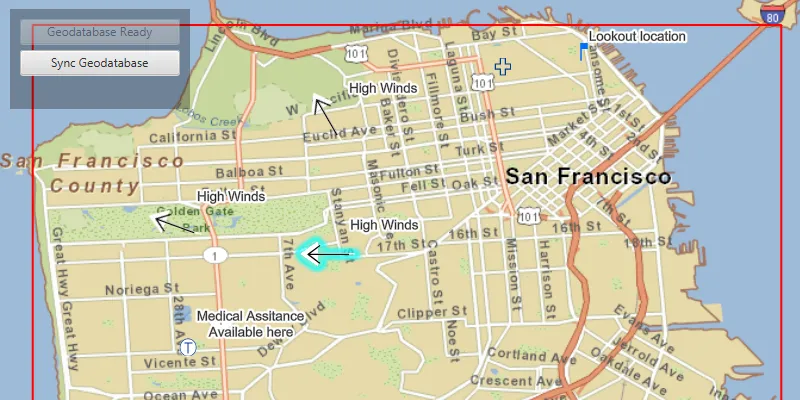
Use case
A survey worker who works in an area without an internet connection could take a geodatabase of survey features offline at their office, make edits and add new features to the offline geodatabase in the field, and sync the updates with the online feature service after returning to the office.
How to use the sample
Pan and zoom to position the red rectangle around the area you want to take offline. Click “Generate geodatabase” to take the area offline. When complete, the map will update to only show the offline area. To edit features, click to select a feature, and click again anywhere else on the map to move the selected feature to the clicked location. To sync the edits with the feature service, click the “Sync geodatabase” button.
How it works
- Create a
GeodatabaseSyncTaskfrom a URL to a feature service. - Use
createDefaultGenerateGeodatabaseParametersAsync()on the geodatabase sync task to createGenerateGeodatabaseParameters, passing in anEnvelopeextent as the parameter. - Create a
GenerateGeodatabaseJobfrom theGeodatabaseSyncTaskusinggenerateGeodatabaseAsync(...), passing in the parameters and a path to where the geodatabase should be downloaded locally. - Start the job and get the result
Geodatabase. - Load the geodatabase and get its feature tables. Create feature layers from the feature tables and add them to the map’s operational layers collection.
- Create
SyncGeodatabaseParametersand set the sync direction. - Create a
SyncGeodatabaseJobfromGeodatabaseSyncTaskusing.syncGeodatabaseAsync(...), passing in the parameters and geodatabase as arguments. - Start the sync job to synchronize the edits.
Relevant API
- FeatureLayer
- FeatureTable
- GenerateGeodatabaseJob
- GenerateGeodatabaseParameters
- GeodatabaseSyncTask
- SyncGeodatabaseJob
- SyncGeodatabaseParameters
- SyncLayerOption
Offline data
This sample uses a San Francisco offline basemap tile package.
About the data
The basemap uses an offline tile package of San Francisco. The online feature service has features with wildfire information.
Tags
feature service, geodatabase, offline, synchronize
Sample code
/* * Copyright 2019 Esri. * * Licensed under the Apache License, Version 2.0 (the "License"); you may not * use this file except in compliance with the License. You may obtain a copy of * the License at * * http://www.apache.org/licenses/LICENSE-2.0 * * Unless required by applicable law or agreed to in writing, software * distributed under the License is distributed on an "AS IS" BASIS, WITHOUT * WARRANTIES OR CONDITIONS OF ANY KIND, either express or implied. See the * License for the specific language governing permissions and limitations under * the License. */
package com.esri.samples.edit_and_sync_features;
import java.io.File;import java.io.IOException;import java.util.List;import java.util.concurrent.ExecutionException;
import javafx.beans.value.ChangeListener;import javafx.beans.value.ObservableValue;import javafx.fxml.FXML;import javafx.geometry.Point2D;import javafx.scene.control.Alert;import javafx.scene.control.Button;import javafx.scene.control.ProgressBar;import javafx.scene.input.MouseButton;import javafx.scene.paint.Color;
import com.esri.arcgisruntime.concurrent.Job;import com.esri.arcgisruntime.concurrent.ListenableFuture;import com.esri.arcgisruntime.data.Feature;import com.esri.arcgisruntime.data.Geodatabase;import com.esri.arcgisruntime.data.ServiceFeatureTable;import com.esri.arcgisruntime.data.TileCache;import com.esri.arcgisruntime.geometry.Envelope;import com.esri.arcgisruntime.geometry.GeometryEngine;import com.esri.arcgisruntime.geometry.GeometryType;import com.esri.arcgisruntime.geometry.Point;import com.esri.arcgisruntime.layers.ArcGISTiledLayer;import com.esri.arcgisruntime.layers.FeatureLayer;import com.esri.arcgisruntime.layers.LayerContent;import com.esri.arcgisruntime.loadable.LoadStatus;import com.esri.arcgisruntime.mapping.ArcGISMap;import com.esri.arcgisruntime.mapping.Basemap;import com.esri.arcgisruntime.mapping.GeoElement;import com.esri.arcgisruntime.mapping.view.DrawStatus;import com.esri.arcgisruntime.mapping.view.Graphic;import com.esri.arcgisruntime.mapping.view.GraphicsOverlay;import com.esri.arcgisruntime.mapping.view.IdentifyLayerResult;import com.esri.arcgisruntime.mapping.view.MapView;import com.esri.arcgisruntime.mapping.view.ViewpointChangedListener;import com.esri.arcgisruntime.symbology.SimpleLineSymbol;import com.esri.arcgisruntime.symbology.SimpleRenderer;import com.esri.arcgisruntime.tasks.geodatabase.GenerateGeodatabaseJob;import com.esri.arcgisruntime.tasks.geodatabase.GenerateGeodatabaseParameters;import com.esri.arcgisruntime.tasks.geodatabase.GeodatabaseSyncTask;import com.esri.arcgisruntime.tasks.geodatabase.SyncGeodatabaseJob;import com.esri.arcgisruntime.tasks.geodatabase.SyncGeodatabaseParameters;import com.esri.arcgisruntime.tasks.geodatabase.SyncLayerOption;
public class EditAndSyncFeaturesController {
  @FXML private Button generateButton;  @FXML private MapView mapView;  @FXML private ProgressBar progressBar;  @FXML private Button syncButton;
  private final Graphic downloadAreaGraphic = new Graphic();  private GeodatabaseSyncTask geodatabaseSyncTask;  private Geodatabase geodatabase;  private ArcGISMap map;  private ViewpointChangedListener viewpointChangedListener;  private Feature selectedFeature;
  private ServiceFeatureTable onlineFeatureTable; // keep loadable in scope to avoid garbage collection
  @FXML  private void initialize() {
    try {      // create a basemap from a local tile cache      File tpkFile = new File(System.getProperty("data.dir"), "./samples-data/sanfrancisco/SanFrancisco.tpk");      TileCache sanFranciscoTileCache = new TileCache(tpkFile.getAbsolutePath());      ArcGISTiledLayer tiledLayer = new ArcGISTiledLayer(sanFranciscoTileCache);      Basemap basemap = new Basemap(tiledLayer);
      // create a map with the basemap and set it to the map view      map = new ArcGISMap(basemap);      mapView.setMap(map);
      // create a graphics overlay for displaying the download area      GraphicsOverlay graphicsOverlay = new GraphicsOverlay();      graphicsOverlay.setRenderer(new SimpleRenderer(new SimpleLineSymbol(SimpleLineSymbol.Style.SOLID,          Color.RED, 2)));      graphicsOverlay.getGraphics().add(downloadAreaGraphic);      mapView.getGraphicsOverlays().add(graphicsOverlay);
      // update the download area graphic when the map is initially drawn and when the viewpoint is changed      viewpointChangedListener = viewpointChangedEvent -> updateDownloadArea();
      ChangeListener<DrawStatus> drawStatusPropertyChangedListener = new ChangeListener<>() {        @Override        public void changed(ObservableValue<? extends DrawStatus> observable, DrawStatus oldValue, DrawStatus newValue) {          if (newValue == DrawStatus.COMPLETED) {            updateDownloadArea();            mapView.drawStatusProperty().removeListener(this);          }        }      };      mapView.drawStatusProperty().addListener(drawStatusPropertyChangedListener);      mapView.addViewpointChangedListener(viewpointChangedListener);
      // create a geodatabase sync task using the feature service URL      String featureServiceUrl = "https://sampleserver6.arcgisonline" +          ".com/arcgis/rest/services/Sync/WildfireSync/FeatureServer";      geodatabaseSyncTask = new GeodatabaseSyncTask(featureServiceUrl);      geodatabaseSyncTask.loadAsync();
      // load the geodatabase sync task to get its contents      geodatabaseSyncTask.addDoneLoadingListener(() -> {        if (geodatabaseSyncTask.getLoadStatus() == LoadStatus.LOADED) {          // look through the feature service layers          geodatabaseSyncTask.getFeatureServiceInfo().getLayerInfos().forEach(layerInfo -> {            // get the URL for this particular layer            String featureLayerURL = featureServiceUrl + "/" + layerInfo.getId();
            // create the service feature table            onlineFeatureTable = new ServiceFeatureTable(featureLayerURL);            onlineFeatureTable.loadAsync();
            // add feature layers to the map from feature tables with point geometries (to make editing easier)            onlineFeatureTable.addDoneLoadingListener(() -> {              if (onlineFeatureTable.getLoadStatus() == LoadStatus.LOADED &&                  onlineFeatureTable.getGeometryType() == GeometryType.POINT) {                map.getOperationalLayers().add(new FeatureLayer(onlineFeatureTable));              }            });          });
          generateButton.setDisable(false);        } else {          new Alert(Alert.AlertType.ERROR, "Error loading geodatabase sync task").show();        }      });    } catch (Exception ex) {      // on any error, display the stacktrace      ex.printStackTrace();    }
  }
  /**   * Generates a local geodatabase of the features in the download area and displays it in the map.   */  @FXML  private void generateGeodatabase() {    // only allow geodatabase generation once    generateButton.setDisable(true);    // stop updating the download area when changing the viewpoint    mapView.removeViewpointChangedListener(viewpointChangedListener);
    // create generate geodatabase parameters for the download area    final ListenableFuture<GenerateGeodatabaseParameters> generateGeodatabaseParametersFuture = geodatabaseSyncTask        .createDefaultGenerateGeodatabaseParametersAsync(downloadAreaGraphic.getGeometry());    generateGeodatabaseParametersFuture.addDoneListener(() -> {      try {        // create generate geodatabase parameters not returning attachments        GenerateGeodatabaseParameters generateGeodatabaseParameters = generateGeodatabaseParametersFuture.get();        generateGeodatabaseParameters.setReturnAttachments(false);
        // create a temporary file for the geodatabase        File tempFile = File.createTempFile("gdb", ".geodatabase");        tempFile.deleteOnExit();
        // create and start the generate job        GenerateGeodatabaseJob generateGeodatabaseJob = geodatabaseSyncTask.generateGeodatabase(generateGeodatabaseParameters, tempFile.getAbsolutePath());        generateGeodatabaseJob.start();
        // show the job's progress in the progress bar        progressBar.setVisible(true);        generateGeodatabaseJob.addProgressChangedListener(() ->            progressBar.setProgress((double) generateGeodatabaseJob.getProgress() / 100.0)        );
        // get the geodatabase when done        generateGeodatabaseJob.addJobDoneListener(() -> {          if (generateGeodatabaseJob.getStatus() == Job.Status.SUCCEEDED) {            geodatabase = generateGeodatabaseJob.getResult();            geodatabase.loadAsync();
            // display the contents of the geodatabase to the map            geodatabase.addDoneLoadingListener(() -> {              progressBar.setVisible(false);              if (geodatabase.getLoadStatus() == LoadStatus.LOADED) {
                // remove the existing layers from the map                map.getOperationalLayers().clear();
                // iterate through the feature tables in the geodatabase and add new layers to the map                geodatabase.getGeodatabaseFeatureTables().forEach(geodatabaseFeatureTable -> {                  geodatabaseFeatureTable.loadAsync();                  geodatabaseFeatureTable.addDoneLoadingListener(() -> {                    if (geodatabaseFeatureTable.getGeometryType() == GeometryType.POINT) {                      // create a new feature layer from the table and add it to the map                      FeatureLayer featureLayer = new FeatureLayer(geodatabaseFeatureTable);                      map.getOperationalLayers().add(featureLayer);                    }                  });                });
                generateButton.setDisable(true);                allowEditing();              } else {                new Alert(Alert.AlertType.ERROR, "Error loading geodatabase").show();              }            });          } else {            new Alert(Alert.AlertType.ERROR, "Error generating geodatabase").show();          }        });
      } catch (InterruptedException | ExecutionException e) {        new Alert(Alert.AlertType.ERROR, "Error generating geodatabase parameters").show();        progressBar.setVisible(false);      } catch (IOException e) {        new Alert(Alert.AlertType.ERROR, "Error creating temp file for geodatabase").show();        progressBar.setVisible(false);      }    });  }
  /**   * Adds an event handler to allow the user to interactively select and move features in the map.   */  private void allowEditing() {    mapView.setOnMouseClicked(e -> {      if (e.isStillSincePress() && e.getButton() == MouseButton.PRIMARY) {        Point2D screenPoint = new Point2D(e.getX(), e.getY());        if (selectedFeature != null) {          // move the selected feature to the clicked location and update it in the feature table          Point point = mapView.screenToLocation(screenPoint);          if (GeometryEngine.intersects(point, downloadAreaGraphic.getGeometry())) {            selectedFeature.setGeometry(point);            selectedFeature.getFeatureTable().updateFeatureAsync(selectedFeature).addDoneListener(() -> syncButton.setDisable(false));          } else {            new Alert(Alert.AlertType.WARNING, "Cannot move feature outside downloaded area.").show();          }        } else {          // identify which feature was clicked and select it          ListenableFuture<List<IdentifyLayerResult>> identifyLayersFuture = mapView.identifyLayersAsync(screenPoint, 1,              false);          identifyLayersFuture.addDoneListener(() -> {            try {              // get the result of the query              List<IdentifyLayerResult> identifyLayerResults = identifyLayersFuture.get();              if (!identifyLayerResults.isEmpty()) {                // retrieve the first result and get it's contents                IdentifyLayerResult firstResult = identifyLayerResults.get(0);                LayerContent layerContent = firstResult.getLayerContent();                // check that the result is a feature layer and has elements                if (layerContent instanceof FeatureLayer && !firstResult.getElements().isEmpty()) {                  FeatureLayer featureLayer = (FeatureLayer) layerContent;                  // retrieve the geoelements in the feature layer                  GeoElement identifiedElement = firstResult.getElements().get(0);                  if (identifiedElement instanceof Feature) {                    Feature feature = (Feature) identifiedElement;                    featureLayer.selectFeature(feature);                    // keep track of the selected feature to move it                    selectedFeature = feature;                  }                }              }            } catch (InterruptedException | ExecutionException ex) {              ex.printStackTrace();            }          });        }      } else if (e.isStillSincePress() && e.getButton() == MouseButton.SECONDARY) {        // clear the selection on a right-click        clearSelection();        selectedFeature = null;      }    });  }
  /**   * Syncs changes made on either the local or web service geodatabase with each other.   */  @FXML  private void syncGeodatabase() {    clearSelection();    syncButton.setDisable(true);    selectedFeature = null;    mapView.setOnMouseClicked(null);
    // create parameters for the sync task    SyncGeodatabaseParameters syncGeodatabaseParameters = new SyncGeodatabaseParameters();    syncGeodatabaseParameters.setSyncDirection(SyncGeodatabaseParameters.SyncDirection.BIDIRECTIONAL);    syncGeodatabaseParameters.setRollbackOnFailure(false);
    // specify the layer IDs of the feature tables to sync (all in this case)    geodatabase.getGeodatabaseFeatureTables().forEach(geodatabaseFeatureTable -> {      long serviceLayerId = geodatabaseFeatureTable.getServiceLayerId();      SyncLayerOption syncLayerOption = new SyncLayerOption(serviceLayerId);      syncGeodatabaseParameters.getLayerOptions().add(syncLayerOption);    });
    // create a sync job with the parameters and start it    final SyncGeodatabaseJob syncGeodatabaseJob = geodatabaseSyncTask.syncGeodatabase(syncGeodatabaseParameters, geodatabase);    syncGeodatabaseJob.start();
    // show the job's progress in the progress bar    progressBar.setVisible(true);    syncGeodatabaseJob.addProgressChangedListener(() ->        progressBar.setProgress((double) syncGeodatabaseJob.getProgress() / 100.0)    );
    // notify the user when the sync is complete    syncGeodatabaseJob.addJobDoneListener(() -> {      if (syncGeodatabaseJob.getStatus() == Job.Status.SUCCEEDED) {        new Alert(Alert.AlertType.INFORMATION, "Geoatabase sync successful").show();      } else {        new Alert(Alert.AlertType.ERROR, "Error syncing geodatabase").show();      }
      progressBar.setVisible(false);      allowEditing();    });  }
  /**   * Clears selection in all layers of the map.   */  private void clearSelection() {    map.getOperationalLayers().forEach(layer -> {      if (layer instanceof FeatureLayer) {        ((FeatureLayer) layer).clearSelection();      }    });  }
  /**   * Updates the download area graphic to show a red border around the current view extent that will be downloaded if   * taken offline.   */  private void updateDownloadArea() {    if (map.getLoadStatus() == LoadStatus.LOADED) {      // upper left corner of the area to take offline      Point2D minScreenPoint = new Point2D(50, 50);      // lower right corner of the downloaded area      Point2D maxScreenPoint = new Point2D(mapView.getWidth() - 50, mapView.getHeight() - 50);      // convert screen points to map points      Point minPoint = mapView.screenToLocation(minScreenPoint);      Point maxPoint = mapView.screenToLocation(maxScreenPoint);      // use the points to define and return an envelope      if (minPoint != null && maxPoint != null) {        Envelope envelope = new Envelope(minPoint, maxPoint);        downloadAreaGraphic.setGeometry(envelope);      }    }  }
  /**   * Stops the animation and disposes of application resources.   */  void terminate() {
    if (mapView != null) {      mapView.dispose();    }  }}
/* * Copyright 2019 Esri. * * Licensed under the Apache License, Version 2.0 (the "License"); you may not * use this file except in compliance with the License. You may obtain a copy of * the License at * * http://www.apache.org/licenses/LICENSE-2.0 * * Unless required by applicable law or agreed to in writing, software * distributed under the License is distributed on an "AS IS" BASIS, WITHOUT * WARRANTIES OR CONDITIONS OF ANY KIND, either express or implied. See the * License for the specific language governing permissions and limitations under * the License. */
package com.esri.samples.edit_and_sync_features;
import java.io.IOException;
import javafx.application.Application;import javafx.fxml.FXMLLoader;import javafx.scene.Parent;import javafx.scene.Scene;import javafx.stage.Stage;
public class EditAndSyncFeaturesSample extends Application {
private static EditAndSyncFeaturesController controller;
@Override public void start(Stage stage) throws IOException { // set up the scene FXMLLoader loader = new FXMLLoader(getClass().getResource("/edit_and_sync_features/main.fxml")); Parent root = loader.load(); controller = loader.getController(); Scene scene = new Scene(root);
// set up the stage stage.setTitle("Edit And Sync Features Sample"); stage.setWidth(800); stage.setHeight(700); stage.setScene(scene); stage.show(); }
/** * Stops and releases all resources used in application. */ @Override public void stop() { controller.terminate(); }
/** * Opens and runs application. * * @param args arguments passed to this application */ public static void main(String[] args) {
Application.launch(args); }}