Create, query and edit a specific server version using service geodatabase.
Use case
Workflows often progress in discrete stages, with each stage requiring the allocation of a different set of resources and business rules. Typically, each stage in the overall process represents a single unit of work, such as a work order or job. To manage these, you can create a separate, isolated version and modify it. Once this work is complete, you can integrate the changes into the default version.
How to use the sample
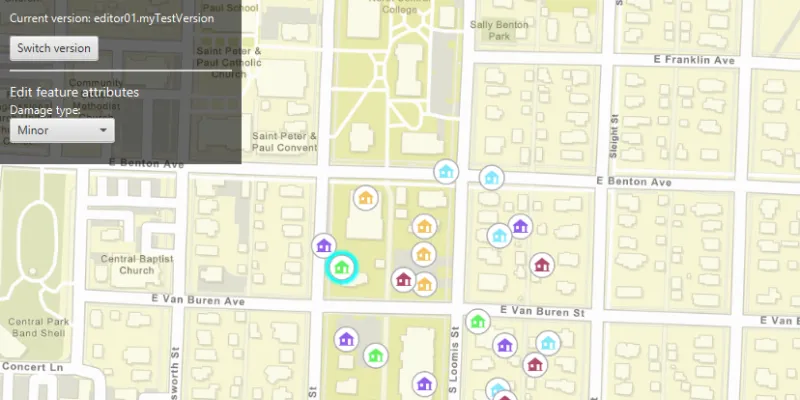
Once loaded, the map will zoom to the extent of the feature layer. The current version is indicated in the top left corner of the map. You can create a new version by specifying the version information (name, access, and description) in the form in the top right corner, and then clicking “Create version”. See the Additional Information section for restrictions on the version name.
Select a feature using the primary mouse button to edit an attribute and/or click again with the secondary mouse button to relocate the point.
Click the “Switch version” button in the top left corner to switch back and forth between the version you created and the default version. Edits will automatically be applied to your version when switching to the default version.
How it works
- Create and load a
ServiceGeodatabasewith a feature service URL that has enabled Version Management. - Get the
ServiceFeatureTablefrom the service geodatabase. - Create a
FeatureLayerfrom the service feature table. - Create
ServiceVersionParameterswith a unique name,VersionAccess, and description.- Note - See the additional information section for more restrictions on the version name.
- Create a new version by calling
ServiceGeodatabase.createVersionAsync()and passing in the service version parameters. - Retrieve the result of the async call, to obtain the
ServiceVersionInfoof the version created. - Switch to the version you have just created using
ServiceGeodatabase.switchVersionAsync(), passing in the version name obtained from the service version info. - Select a
Featurefrom the map to edit its “TYPDAMAGE” attribute and location. - Apply these edits to your version by calling
ServiceGeodatabase.applyEditsAsync().
Relevant API
- FeatureLayer
- ServiceFeatureTable
- ServiceGeodatabase
- ServiceVersionInfo
- ServiceVersionParameters
- VersionAccess
About the data
The feature layer used in this sample is Damage to commercial buildings located in Naperville, Illinois.
Additional information
Credentials:
- Username: editor01
- Passowrd: S7#i2LWmYH75
The name of the version must meet the following criteria:
- Must not exceed 62 characters
- Must not include: Period (.), Semicolon (;), Single quotation mark (’), Double quotation mark (”)
- Must not include a space for the first character
Note: the version name will have the username and a period (.) prepended to it e.g “editor01.MyNewUniqueVersionName”.
Branch versioning access permission:
- Public - Any portal user can view and edit the version.
- Protected - Any portal user can view, but only the version owner, feature layer owner, and portal administrator can edit the version.
- Private - Only the version owner, feature layer owner, and portal administrator can view and edit the version.
Tags
branch versioning, edit, version control, version management server
Sample code
/* * Copyright 2020 Esri. * * Licensed under the Apache License, Version 2.0 (the "License"); you may not * use this file except in compliance with the License. You may obtain a copy of * the License at * * http://www.apache.org/licenses/LICENSE-2.0 * * Unless required by applicable law or agreed to in writing, software * distributed under the License is distributed on an "AS IS" BASIS, WITHOUT * WARRANTIES OR CONDITIONS OF ANY KIND, either express or implied. See the * License for the specific language governing permissions and limitations under * the License. */
package com.esri.samples.edit_with_branch_versioning;
import java.util.List;import java.util.concurrent.ExecutionException;
import javafx.fxml.FXML;import javafx.geometry.Point2D;import javafx.scene.control.Alert;import javafx.scene.control.Button;import javafx.scene.control.ComboBox;import javafx.scene.control.Label;import javafx.scene.control.ProgressIndicator;import javafx.scene.control.TextField;import javafx.scene.input.MouseButton;import javafx.scene.layout.VBox;
import com.esri.arcgisruntime.ArcGISRuntimeEnvironment;import com.esri.arcgisruntime.arcgisservices.ServiceVersionInfo;import com.esri.arcgisruntime.arcgisservices.ServiceVersionParameters;import com.esri.arcgisruntime.arcgisservices.VersionAccess;import com.esri.arcgisruntime.concurrent.ListenableFuture;import com.esri.arcgisruntime.data.ArcGISFeature;import com.esri.arcgisruntime.data.FeatureTableEditResult;import com.esri.arcgisruntime.data.ServiceFeatureTable;import com.esri.arcgisruntime.data.ServiceGeodatabase;import com.esri.arcgisruntime.geometry.Point;import com.esri.arcgisruntime.layers.FeatureLayer;import com.esri.arcgisruntime.loadable.LoadStatus;import com.esri.arcgisruntime.mapping.ArcGISMap;import com.esri.arcgisruntime.mapping.BasemapStyle;import com.esri.arcgisruntime.mapping.GeoElement;import com.esri.arcgisruntime.mapping.Viewpoint;import com.esri.arcgisruntime.mapping.view.IdentifyLayerResult;import com.esri.arcgisruntime.mapping.view.MapView;import com.esri.arcgisruntime.security.UserCredential;
public class EditWithBranchVersioningController {
  @FXML private Button createVersionButton;  @FXML private Button switchVersionButton;  @FXML private ComboBox<String> damageTypeComboBox;  @FXML private ComboBox<VersionAccess> accessTypeComboBox;  @FXML private Label currentVersionLabel;  @FXML private MapView mapView;  @FXML private ProgressIndicator progressIndicator;  @FXML private TextField descriptionTextField;  @FXML private TextField nameTextField;  @FXML private VBox createVersionVBox;  @FXML private VBox editFeatureVBox;
  private ArcGISFeature selectedFeature;  private FeatureLayer featureLayer;  private ServiceFeatureTable serviceFeatureTable;  private ServiceGeodatabase serviceGeodatabase;  private String defaultVersionName;  private String userCreatedVersionName;
  public void initialize() {
    try {      // authentication with an API key or named user is required to access basemaps and other location services      String yourAPIKey = System.getProperty("apiKey");      ArcGISRuntimeEnvironment.setApiKey(yourAPIKey);
      // create a map with the streets basemap style      ArcGISMap map = new ArcGISMap(BasemapStyle.ARCGIS_STREETS);
      // set the map to the map view      mapView.setMap(map);
      // add the version access types to the access type combo box      accessTypeComboBox.getItems().addAll(VersionAccess.PUBLIC, VersionAccess.PROTECTED, VersionAccess.PRIVATE);
      // add the damage types to the damage type combo box      damageTypeComboBox.getItems().addAll("Destroyed", "Inaccessible", "Major", "Minor", "Affected");      // add a listener to handle damage type attribute selections and update the selected feature with the new value      damageTypeComboBox.getSelectionModel().selectedItemProperty().addListener((o, p, n) -> {        if (selectedFeature != null && !selectedFeature.getAttributes().get("TYPDAMAGE").equals(n)) {          selectedFeature.getAttributes().put("TYPDAMAGE", damageTypeComboBox.getValue());          updateFeature(selectedFeature);        }      });
      // create a service geodatabase      serviceGeodatabase = new ServiceGeodatabase("https://sampleserver7.arcgisonline" +        ".com/server/rest/services/DamageAssessment/FeatureServer");
      // set the user credentials required to authenticate with the service geodatabase      UserCredential userCredential = new UserCredential("editor01", "S7#i2LWmYH75");      serviceGeodatabase.setCredential(userCredential);
      // load the service geodatabase      serviceGeodatabase.loadAsync();
      serviceGeodatabase.addDoneLoadingListener(() -> {        if (serviceGeodatabase.getLoadStatus() == LoadStatus.LOADED) {
          // when the service geodatabase has loaded get the default version          defaultVersionName = serviceGeodatabase.getDefaultVersionName();
          // get the service feature table from the service geodatabase          if (serviceGeodatabase.getTable(0) != null) {            serviceFeatureTable = serviceGeodatabase.getTable(0);
            // create a feature layer from the service feature table and add it to the map            featureLayer = new FeatureLayer(serviceFeatureTable);            map.getOperationalLayers().add(featureLayer);            featureLayer.addDoneLoadingListener(() -> {              if (featureLayer.getLoadStatus() == LoadStatus.LOADED) {
                // when the feature layer has loaded set the viewpoint and update the UI                mapView.setViewpointAsync(new Viewpoint(featureLayer.getFullExtent()));                progressIndicator.setVisible(false);                createVersionButton.setDisable(false);                currentVersionLabel.setText("Current version: " + serviceGeodatabase.getVersionName());              } else showAlert("Feature layer failed to load" + featureLayer.getLoadError().getCause().getMessage());            });          } else showAlert("Unable to get the service feature table");        } else {          progressIndicator.setVisible(false);          showAlert("Service geodatabase failed to load\n" + serviceGeodatabase.getLoadError().getCause().getMessage());        }      });
      // listen to clicks on the map to select or move features      mapView.setOnMouseClicked(event -> {
        // create a point from where the user clicked        Point2D point = new Point2D(event.getX(), event.getY());
        if (event.isStillSincePress() && event.getButton() == MouseButton.PRIMARY) {          // reset the UI          featureLayer.clearSelection();          editFeatureVBox.setDisable(true);
          // select the clicked feature          selectFeature(point);        }
        if (event.isStillSincePress() && event.getButton() == MouseButton.SECONDARY) {          // if a feature is selected and the current version is not the default, update the feature's geometry          if (selectedFeature != null && !serviceGeodatabase.getVersionName().equals(defaultVersionName)) {            Point mapPoint = mapView.screenToLocation(point);            selectedFeature.setGeometry(mapPoint);            updateFeature(selectedFeature);          }        }      });    } catch (Exception e) {      // on any error, display the stack trace.      e.printStackTrace();    }  }
  /**   * Create a new branch version using user defined values.   */  @FXML  private void handleCreateVersionButtonClicked() {
    // validate version name input    String inputName = nameTextField.getText();    if (!isTextInputValid(inputName)) return;
    // validate version access input    if (accessTypeComboBox.getSelectionModel().getSelectedItem() == null) {      showAlert("Please select an access level");      return;    }
    // set the user defined name, access level and description as service version parameters    ServiceVersionParameters newVersionParameters = new ServiceVersionParameters();    newVersionParameters.setName(inputName);    newVersionParameters.setAccess(accessTypeComboBox.getSelectionModel().getSelectedItem());    newVersionParameters.setDescription(descriptionTextField.getText());
    // update the UI    createVersionButton.setText("Creating version....");    createVersionButton.setDisable(true);
    // create a new version with the specified parameters    ListenableFuture<ServiceVersionInfo> newVersion = serviceGeodatabase.createVersionAsync(newVersionParameters);    newVersion.addDoneListener(() -> {      try {
        // get the name of the created version and switch to it        ServiceVersionInfo createdVersionInfo = newVersion.get();        userCreatedVersionName = createdVersionInfo.getName();        switchVersion(userCreatedVersionName);
        // hide the form from the UI as the sample only allows 1 version to be created        createVersionVBox.setVisible(false);        switchVersionButton.setDisable(false);      } catch (Exception ex) {        // if there is an error creating a new version, display an alert and reset the UI        if (ex.getCause().toString().contains("The version already exists")) {          showAlert("A version with this name already exists.\nPlease enter a unique name");        } else showAlert("Error creating new version\n" + ex.getCause().getMessage());        createVersionButton.setText("Create version");        createVersionButton.setDisable(false);      }    });  }
  /**   * Apply local edits to the service geodatabase and switch branch version.   */  @FXML  private void handleSwitchVersionButtonClicked() {
    if (serviceGeodatabase.getVersionName().equals(defaultVersionName)) {      // if the current version is the default version, switch to the user created version      switchVersion(userCreatedVersionName);
    } else if (serviceGeodatabase.getVersionName().equals(userCreatedVersionName)) {      // if the current version is the user created version, check if there are local edits      if (!serviceGeodatabase.hasLocalEdits()) {        // if there are no local edits switch to the default version        switchVersion(defaultVersionName);
      } else {        // if local edits exist apply the edits to the service geodatabase        ListenableFuture<List<FeatureTableEditResult>> resultOfApplyEdits = serviceGeodatabase.applyEditsAsync();        resultOfApplyEdits.addDoneListener(() -> {          try {            // retrieve the edits            List<FeatureTableEditResult> edits = resultOfApplyEdits.get();            // if the edits were successful, switch to the default version            if (edits != null && !edits.isEmpty()) {              if (!edits.get(0).getEditResult().get(0).hasCompletedWithErrors()) {                new Alert(Alert.AlertType.INFORMATION, "Applied edits successfully on the server").show();                switchVersion(defaultVersionName);              } else {                throw edits.get(0).getEditResult().get(0).getError();              }            }          } catch (InterruptedException | ExecutionException e) {            showAlert("Error applying edits on server\n" + e.getCause().getMessage());          }        });      }    }  }
  /**   * Switch the active branch version.   *   * @param versionName name of the version to switch to   */  private void switchVersion(String versionName) {    ListenableFuture<Void> switchVersionFuture = serviceGeodatabase.switchVersionAsync(versionName);    switchVersionFuture.addDoneListener(() -> {      try {        // check if the active version has switched successfully and update the UI        if (serviceGeodatabase.getVersionName().equals(versionName)) {          currentVersionLabel.setText("Current version: " + serviceGeodatabase.getVersionName());          editFeatureVBox.setDisable(true);        } else showAlert("Error switching version");      } catch (Exception e) {        e.printStackTrace();      }    });  }
  /**   * Select a feature if one exists where the user clicked.   *   * @param point location where the user clicked   */  private void selectFeature(Point2D point) {    ListenableFuture<IdentifyLayerResult> identifyLayerResultFuture = mapView.identifyLayerAsync(featureLayer, point, 1, false);    identifyLayerResultFuture.addDoneListener(() -> {      try {        IdentifyLayerResult identifyLayerResult = identifyLayerResultFuture.get();        List<GeoElement> identifiedElements = identifyLayerResult.getElements();        if (!identifiedElements.isEmpty()) {          GeoElement element = identifiedElements.get(0);          if (element instanceof ArcGISFeature) {
            // get the selected feature            selectedFeature = (ArcGISFeature) element;            featureLayer.selectFeature(selectedFeature);            selectedFeature.addDoneLoadingListener(() -> {              if (selectedFeature.getLoadStatus() == LoadStatus.LOADED) {
                // when a feature has been selected, get it's damage type value and select it in the damage combo box                String selectedFeatureAttributeValue = (String) selectedFeature.getAttributes().get("TYPDAMAGE");
                if (damageTypeComboBox.getItems().contains(selectedFeatureAttributeValue)) {                  damageTypeComboBox.getSelectionModel().select(selectedFeatureAttributeValue);                } else showAlert("Unexpected attribute value");
                // enable feature editing UI if not on the default version                if (!serviceGeodatabase.getVersionName().equals(defaultVersionName)) {                  editFeatureVBox.setDisable(false);                }              } else showAlert(selectedFeature.getLoadError().getCause().getMessage());            });          }        }      } catch (InterruptedException | ExecutionException e) {        showAlert("Failed to identify the feature.\n" + e.getCause().getMessage());      }    });  }
  /**   * Update the selected feature in the service feature table.   *   * @param selectedFeature the selected feature to be updated   */  private void updateFeature(ArcGISFeature selectedFeature) {    if (serviceFeatureTable.canUpdate(selectedFeature) && !serviceGeodatabase.getVersionName().equals(defaultVersionName)) {
      // update the feature in the feature table      ListenableFuture<Void> updateFuture = serviceFeatureTable.updateFeatureAsync(selectedFeature);      updateFuture.addDoneListener(() -> {        Alert alert = new Alert(Alert.AlertType.INFORMATION);        alert.setHeaderText("Feature updated");        alert.setContentText("Changes will be synced to the service geodatabase\nwhen you switch version.");        alert.show();      });    } else showAlert("Feature cannot be updated");  }
  /**   * Validate the text input.   *   * @param inputText the text to be validated   */  private boolean isTextInputValid(String inputText){    if (inputText.contains(".") || inputText.contains(";") || inputText.contains("'") || inputText.contains("\"")) {      showAlert("Please enter a valid version name.\nThe name cannot contain the following characters:\n. ; ' \" ");      return false;    } else if (inputText.length() > 0 && Character.isWhitespace(nameTextField.getText().charAt(0))) {      showAlert("Version name cannot begin with a space");      return false;    } else if (inputText.length() > 62) {      showAlert("Version name must not exceed 62 characters");      return false;    } else if (inputText.length() == 0) {      showAlert("Please enter a version name");      return false;    } else return true;  }
  /**   * Display an error alert to the user with the given message.   *   * @param message text to display in the alert   */  private void showAlert(String message) {    new Alert(Alert.AlertType.ERROR, message).show();  }
  /**   * Disposes application resources.   */  void terminate() {    if (mapView != null) {      mapView.dispose();    }  }}
/* * Copyright 2020 Esri. * * Licensed under the Apache License, Version 2.0 (the "License"); you may not * use this file except in compliance with the License. You may obtain a copy of * the License at * * http://www.apache.org/licenses/LICENSE-2.0 * * Unless required by applicable law or agreed to in writing, software * distributed under the License is distributed on an "AS IS" BASIS, WITHOUT * WARRANTIES OR CONDITIONS OF ANY KIND, either express or implied. See the * License for the specific language governing permissions and limitations under * the License. */
package com.esri.samples.edit_with_branch_versioning;
import java.io.IOException;
import javafx.application.Application;import javafx.fxml.FXMLLoader;import javafx.scene.Parent;import javafx.scene.Scene;import javafx.stage.Stage;
public class EditWithBranchVersioningSample extends Application {
private static EditWithBranchVersioningController controller;
@Override public void start(Stage stage) throws IOException {
FXMLLoader loader = new FXMLLoader(getClass().getResource("/edit_with_branch_versioning/main.fxml")); Parent root = loader.load(); controller = loader.getController(); Scene scene = new Scene(root);
// set title, size, and add scene to stage stage.setTitle("Edit With Branch Versioning Sample"); stage.setWidth(800); stage.setHeight(700); stage.setScene(scene); stage.show(); }
/** * Stops and releases all resources used in application. */ @Override public void stop() { controller.terminate(); }
/** * Opens and runs application. * * @param args arguments passed to this application */ public static void main(String[] args) {
Application.launch(args); }}