Edit feature attributes which are linked to annotation through an expression.
Use case
Annotation is useful for displaying text that you don’t want to move or resize when the map is panned or zoomed (unlike labels which will move and resize). Feature-linked annotation will update when a feature attribute referenced by the annotation expression is also updated. Additionally, the position of the annotation will transform to match any transformation to the linked feature’s geometry.
How to use the sample
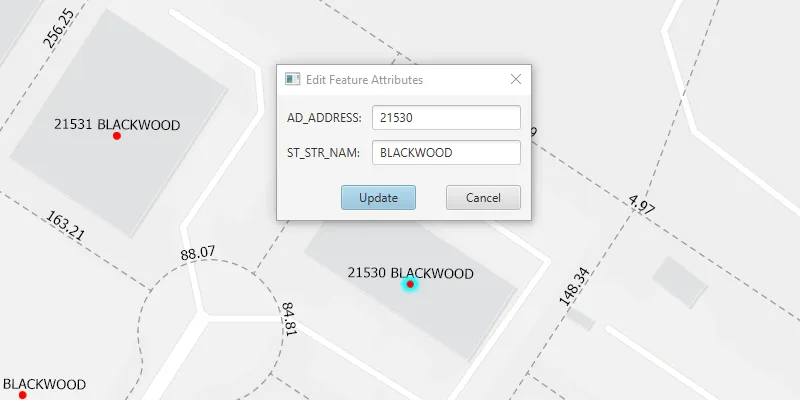
Pan and zoom the map to see that the text on the map is annotation, not labels. Click one of the address points to update the house number (AD_ADDRESS) and street name (ST_STR_NAM). Once you have edited the feature attributes, click “Update” and then click again on the map to move the address point to a new location. You can also click one of the dashed parcel polylines and click another location to change its geometry and update its annotation (distance in feet). NOTE: Selection is only enabled for points and straight (single segment) polylines. The feature-linked annotation will update accordingly.
How it works
- Load the geodatabase. NOTE: Read/write geodatabases should normally come from a
GeodatabaseSyncTask, but this has been omitted here. That functionality is covered in the sample Generate geodatabase. - Create
FeatureLayers fromGeodatabaseFeatureTables found in the geodatabase withGeodatabase.getGeodatabaseFeatureTable(). - Create
AnnotationLayers fromGeodatabaseFeatureTables found in the geodatabase withGeodatabase.getGeodatabaseAnnotationTables(). - Add the
FeatureLayers andAnnotationLayers to the map’s operational layers. - Use
MapView.setOnMouseClicked()to handle clicks on the map to either select address points or parcel polyline features. NOTE: Selection is only enabled for points and straight (single segment) polylines. - For the address points, a dialog opens to allow editing of the address number (AD_ADDRESS) and street name (ST_STR_NAM) attributes, which use the expression
$feature.AD_ADDRESS + " " + $feature.ST_STR_NAMfor annotation. - For the parcel lines, a second mouse click will change one of the polyline’s vertices. Note that the dimension annotation updates according to the expression
Round(Length(Geometry($feature), 'feet'), 2).
Both expressions were defined by the data author in ArcGIS Pro using the Arcade expression language.
Relevant API
- AnnotationLayer
- Feature
- FeatureLayer
- Geodatabase
About the data
This sample uses data derived from the Loudoun GeoHub.
Tags
annotation, attributes, features, feature-linked annotation, fields
Sample code
/* * Copyright 2020 Esri. * * Licensed under the Apache License, Version 2.0 (the "License"); you may not * use this file except in compliance with the License. You may obtain a copy of * the License at * * http://www.apache.org/licenses/LICENSE-2.0 * * Unless required by applicable law or agreed to in writing, software * distributed under the License is distributed on an "AS IS" BASIS, WITHOUT * WARRANTIES OR CONDITIONS OF ANY KIND, either express or implied. See the * License for the specific language governing permissions and limitations under * the License. */
package com.esri.samples.edit_features_with_feature_linked_annotation;
import javafx.fxml.FXML;import javafx.fxml.FXMLLoader;import javafx.scene.control.Alert;import javafx.scene.control.ButtonType;import javafx.scene.control.Dialog;import javafx.scene.control.TextField;
import com.esri.arcgisruntime.data.Feature;
/** * Custom dialog for editing feature attributes. */public class EditAttributesDialog extends Dialog<Boolean>{
  @FXML private TextField addressTextField;  @FXML private TextField streetNameTextField;  @FXML private ButtonType updateButton;
  EditAttributesDialog(Feature selectedFeature){    FXMLLoader loader = new FXMLLoader(getClass().getResource("/edit_features_with_feature_linked_annotation/edit_attributes_dialog.fxml"));    loader.setRoot(this);    loader.setController(this);
    setTitle("Edit Feature Attributes");
    try {      loader.load();    } catch (Exception e) {      e.printStackTrace();    }
    // populate text fields with current attribute values    addressTextField.setText(selectedFeature.getAttributes().get("AD_ADDRESS").toString());    streetNameTextField.setText(selectedFeature.getAttributes().get("ST_STR_NAM").toString());
    // convert the result to an address and street name when the update button is clicked    setResultConverter(dialogButton -> {      if (dialogButton == updateButton) {        try {          // ensure input is equal to or less than 5 characters (max length for addresses in area)          if (addressTextField.getLength() <= 5){            // set AD_ADDRESS value to the int from the text field            selectedFeature.getAttributes().put("AD_ADDRESS", Integer.parseInt(addressTextField.getText()));          } else  {            new Alert(Alert.AlertType.WARNING, "Field not updated. Integer must be less than 6 characters").showAndWait();          }          // set ST_STR_NAM value to the string from the text field          selectedFeature.getAttributes().put("ST_STR_NAM", streetNameTextField.getText());        } catch (Exception e) {          e.printStackTrace();        }        return true;      }      return null;    });  }}
/* * Copyright 2020 Esri. * * Licensed under the Apache License, Version 2.0 (the "License"); you may not * use this file except in compliance with the License. You may obtain a copy of * the License at * * http://www.apache.org/licenses/LICENSE-2.0 * * Unless required by applicable law or agreed to in writing, software * distributed under the License is distributed on an "AS IS" BASIS, WITHOUT * WARRANTIES OR CONDITIONS OF ANY KIND, either express or implied. See the * License for the specific language governing permissions and limitations under * the License. */
package com.esri.samples.edit_features_with_feature_linked_annotation;
import java.io.File;import java.util.Arrays;import java.util.List;import java.util.Optional;import java.util.concurrent.ExecutionException;
import javafx.application.Application;import javafx.geometry.Point2D;import javafx.scene.Scene;import javafx.scene.control.Alert;import javafx.scene.input.MouseButton;import javafx.scene.layout.StackPane;import javafx.stage.Stage;
import com.esri.arcgisruntime.ArcGISRuntimeEnvironment;import com.esri.arcgisruntime.concurrent.ListenableFuture;import com.esri.arcgisruntime.data.Feature;import com.esri.arcgisruntime.data.Geodatabase;import com.esri.arcgisruntime.geometry.GeometryEngine;import com.esri.arcgisruntime.geometry.GeometryType;import com.esri.arcgisruntime.geometry.Part;import com.esri.arcgisruntime.geometry.Point;import com.esri.arcgisruntime.geometry.Polyline;import com.esri.arcgisruntime.geometry.PolylineBuilder;import com.esri.arcgisruntime.geometry.ProximityResult;import com.esri.arcgisruntime.layers.AnnotationLayer;import com.esri.arcgisruntime.layers.FeatureLayer;import com.esri.arcgisruntime.loadable.LoadStatus;import com.esri.arcgisruntime.mapping.ArcGISMap;import com.esri.arcgisruntime.mapping.BasemapStyle;import com.esri.arcgisruntime.mapping.Viewpoint;import com.esri.arcgisruntime.mapping.view.IdentifyLayerResult;import com.esri.arcgisruntime.mapping.view.MapView;
public class EditFeaturesWithFeatureLinkedAnnotationSample extends Application {
private MapView mapView; private Geodatabase geodatabase; // keep loadable in scope to avoid garbage collection private Feature selectedFeature = null;
@Override public void start(Stage stage) {
try { // create stack pane and application scene StackPane stackPane = new StackPane(); Scene scene = new Scene(stackPane);
// set title, size, and add JavaFX scene to stage stage.setTitle("Edit Features With Feature-linked Annotation Sample"); stage.setWidth(800); stage.setHeight(700); stage.setScene(scene); stage.show();
// authentication with an API key or named user is required to access basemaps and other location services String yourAPIKey = System.getProperty("apiKey"); ArcGISRuntimeEnvironment.setApiKey(yourAPIKey);
// create a map with the light gray basemap style ArcGISMap map = new ArcGISMap(BasemapStyle.ARCGIS_LIGHT_GRAY);
// create a map view and set the map to it mapView = new MapView(); mapView.setMap(map);
// set a viewpoint on the map view centered on Loudoun, Virginia mapView.setViewpoint(new Viewpoint(39.0204, -77.4159, 2257));
// add the map view to stack pane stackPane.getChildren().addAll(mapView);
// create and load the geodatabase File geodatabaseFile = new File(System.getProperty("data.dir"), "./samples-data/loudon/loudoun_anno.geodatabase"); geodatabase = new Geodatabase(geodatabaseFile.getAbsolutePath());
geodatabase.loadAsync(); geodatabase.addDoneLoadingListener(() -> { if (geodatabase.getLoadStatus() == LoadStatus.LOADED) { // create feature layers from tables in the geodatabase var addressPointFeatureLayer = new FeatureLayer( geodatabase.getGeodatabaseFeatureTable("Loudoun_Address_Points_1")); var parcelLinesFeatureLayer = new FeatureLayer( geodatabase.getGeodatabaseFeatureTable("ParcelLines_1")); // create annotation layers from tables in the geodatabase var addressPointsAnnotationLayer = new AnnotationLayer( geodatabase.getGeodatabaseAnnotationTable("Loudoun_Address_PointsAnno_1")); var parcelLinesAnnotationLayer = new AnnotationLayer( geodatabase.getGeodatabaseAnnotationTable("ParcelLinesAnno_1"));
// add the feature and annotation layers to the map map.getOperationalLayers().addAll(Arrays.asList( addressPointFeatureLayer, parcelLinesFeatureLayer, addressPointsAnnotationLayer, parcelLinesAnnotationLayer)); } else { // show alert if geodatabase fails to load new Alert(Alert.AlertType.ERROR, "Error loading Geodatabase.").show(); } });
// select the nearest feature from where the user clicked, or move the selected feature to the given screen point mapView.setOnMouseClicked(event -> { if (event.isStillSincePress() && event.getButton() == MouseButton.PRIMARY) { // create a point where the user clicked Point2D screenPoint = new Point2D(event.getX(), event.getY()); // if a feature hasn't been selected, select the feature if (selectedFeature == null) { identifyFeature(screenPoint); } else { // convert the screen point to a map point Point mapPoint = mapView.screenToLocation(screenPoint);
// if the feature is a polyline, move the polyline if (selectedFeature.getGeometry().getGeometryType() == GeometryType.POLYLINE) { // get the selected feature's geometry as a polyline Polyline polyline = (Polyline) selectedFeature.getGeometry();
// create a polyline builder to add and remove parts from the polyline PolylineBuilder polylineBuilder = new PolylineBuilder(polyline);
// get the nearest vertex to the map point on the polyline ProximityResult nearestVertex = GeometryEngine.nearestVertex(polyline, (Point) GeometryEngine.project(mapPoint, polyline.getSpatialReference()));
// get the part of the polyline nearest to the map point Part part = polylineBuilder.getParts().get(Math.toIntExact(nearestVertex.getPartIndex()));
// remove the nearest point to the map point from the part part.removePoint((int) nearestVertex.getPointIndex());
// add the map point as the new point on the part part.addPoint((Point) GeometryEngine.project(mapPoint, polyline.getSpatialReference()));
// set the selected feature's geometry to the new polyline selectedFeature.setGeometry(polylineBuilder.toGeometry());
// if the feature is a point, move the point } else if (selectedFeature.getGeometry().getGeometryType() == GeometryType.POINT) { // set the selected feature's geometry to a new map point selectedFeature.setGeometry(mapPoint); } // update the selected feature's feature table updateAttributes(selectedFeature);
// remove the selection of the feature clearSelection(); } } }); } catch (Exception e) { e.printStackTrace(); } }
/** * Identifies a feature near the given screen point. * * @param screenPoint the screen point at which to identify a feature */ private void identifyFeature(Point2D screenPoint) {
// clear any previously selected features clearSelection();
// identify across all layers ListenableFuture<List<IdentifyLayerResult>> identifyLayerResultsFuture = mapView.identifyLayersAsync(screenPoint, 10, false); identifyLayerResultsFuture.addDoneListener(() -> { try { // get the list of results from the future List<IdentifyLayerResult> identifyLayerResults = identifyLayerResultsFuture.get(); // for each layer from which an element was identified for (IdentifyLayerResult layerResult : identifyLayerResults) { // check if the layer is a feature layer, thereby excluding annotation layers if (layerResult.getLayerContent() instanceof FeatureLayer) { // get a reference to the identified feature selectedFeature = (Feature) layerResult.getElements().get(0); // check the geometry and select the feature selectFeature(layerResult); return; } } } catch (Exception e) { new Alert(Alert.AlertType.ERROR, "Error identifying the clicked feature.").show(); } }); }
/** * Checks if the identified feature is a straight polyline or a point, and select the feature. * For a point feature, show a dialog to edit attributes. Future clicks will call move functions. * * @param layerResult the identify layer result from which to select a feature */ private void selectFeature(IdentifyLayerResult layerResult) {
// if the selected feature is a polyline, select the feature if (selectedFeature.getGeometry().getGeometryType() == GeometryType.POLYLINE) { // create a polyline builder from the selected feature PolylineBuilder polylineBuilder = new PolylineBuilder((Polyline) selectedFeature.getGeometry()); // iterate through the parts of the selected polyline polylineBuilder.getParts().forEach(part -> { // only select single segment lines if (part.getPointCount() <= 2) { ((FeatureLayer) layerResult.getLayerContent()).selectFeature(selectedFeature); } else { selectedFeature = null; // show message reminding user to select straight (single segment) polylines only new Alert(Alert.AlertType.WARNING, "Select straight (single segment) polylines only.").show(); } }); } // if the selected feature is a point, select the feature else if (selectedFeature.getGeometry().getGeometryType() == GeometryType.POINT) { ((FeatureLayer) layerResult.getLayerContent()).selectFeature(selectedFeature);
// create a dialog to edit the attributes of the selected feature EditAttributesDialog editAttributesDialog = new EditAttributesDialog(selectedFeature);
// show the dialog and wait for the user response Optional<Boolean> updatingFeature = editAttributesDialog.showAndWait();
// if the user chose to update the feature's attributes if (updatingFeature.isPresent()) { // update the selected feature's feature table updateAttributes(selectedFeature); } else { // if the user chose to cancel, clear selection of the feature clearSelection(); } } else { new Alert(Alert.AlertType.WARNING, "Feature of unexpected geometry type selected.").show(); } } /** * Updates the attributes of the selected feature. * * @param selectedFeature the feature to update */ static void updateAttributes(Feature selectedFeature) {
// update feature in the feature table ListenableFuture<Void> editResultFuture = selectedFeature.getFeatureTable().updateFeatureAsync(selectedFeature); editResultFuture.addDoneListener(() -> { try { editResultFuture.get(); } catch (InterruptedException | ExecutionException e) { new Alert(Alert.AlertType.ERROR, "Error updating attributes.").show(); } } ); }
/** * Clears any previously selected feature layers. */ private void clearSelection() {
mapView.getMap().getOperationalLayers().forEach(layer -> { if (layer instanceof FeatureLayer) { ((FeatureLayer) layer).clearSelection(); } }); selectedFeature = null; }
/** * Stops and releases all resources used in application. */ @Override public void stop() {
if (mapView != null) { mapView.dispose(); } }
/** * Opens and runs application. * * @param args arguments passed to this application */ public static void main(String[] args) {
Application.launch(args); }}