Get a server-defined trace configuration for a given tier and modify its traversability scope, add new condition barriers and control what is included in the subnetwork trace result.
Use case
While some traces are built from an ad-hoc group of parameters, many are based on a variation of the trace configuration taken from the subnetwork definition. For example, an electrical trace will be based on the trace configuration of the subnetwork, but may add additional clauses to constrain the trace along a single phase. Similarly, a trace in a gas or electric design application may include features with a status of “In Design” that are normally excluded from trace results.
How to use the sample
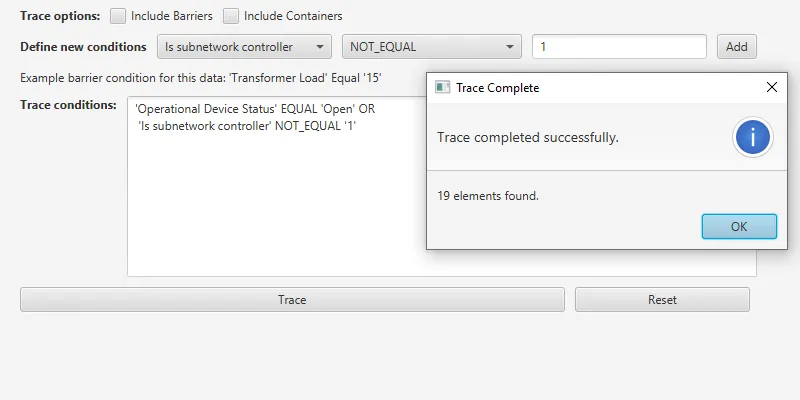
The sample loads with a server-defined trace configuration from a tier. Check or uncheck which options to include in the trace - such as containers or barriers. Use the selection boxes to define a new condition network attribute comparison, and then use ‘Add’ to add it to the trace configuration. Click ‘Trace’ to run a subnetwork trace with this modified configuration from a default starting location.
Example barrier conditions for the default dataset:
- ‘Transformer Load’ Equal ‘15’
- ‘Phases Current’ DoesNotIncludeTheValues ‘A’
- ‘Generation KW’ LessThan ‘50’
How it works
- Populate the choice list for the comparison source with the non-system defined
utilityNetwork.getDefinition().getNetworkAttributes(). Populate the choice list for the comparison operator with the enum values fromUtilityAttributeComparisonOperator. - Create and load a
UtilityNetworkwith a feature service URL, then get an asset type and a tier by their names. - Create a
UtilityElementfrom this asset type to use as the starting location for the trace. - Update the selected barrier expression and the checked options in the UI using this tier’s
UtilityTraceConfiguration. - When a ‘Network Attribute’ comparison source is selected, populate the choice list for the comparison value with its
CodedValues. Otherwise, display a free-form textbox for entering an attribute value. - When the ‘Add’ button is clicked from the UI, create a new
UtilityNetworkAttributeComparisonusing the selected comparison source, operator, and selected or typed value. Use the selected source’sUtilityNetworkAttribute.DataTypeto convert the comparison value to the correct data type. - If the Traversability’s list of
Barriersis not empty, create aUtilityTraceOrConditionwith the existingBarriersand the new comparison from step 7. - When the ‘Trace’ button is clicked, create
UtilityTraceParameterspassing inUtilityTraceType.SUBNETWORKfor the trace type and the default starting location. Set itsUtilityTraceConfigurationwith the modified options, selections, and expression; then run aUtilityNetwork.traceAsync(). - Display the count of elements returned within the
UtilityElementTraceResult. - When the ‘Reset’ button is clicked, set the trace configurations expression back to its original value.
Relevant API
- CodedValueDomain
- UtilityAssetGroup
- UtilityAssetType
- UtilityAttributeComparisonOperator
- UtilityCategory
- UtilityCategoryComparison
- UtilityCategoryComparisonOperator
- UtilityDomainNetwork
- UtilityElement
- UtilityElementTraceResult
- UtilityNetwork
- UtilityNetworkAttribute
- UtilityNetworkAttributeComparison
- UtilityNetworkDefinition
- UtilityNetworkSource
- UtilityTerminal
- UtilityTier
- UtilityTraceAndCondition
- UtilityTraceConditionalExpression
- UtilityTraceConfiguration
- UtilityTraceOrCondition
- UtilityTraceParameters
- UtilityTraceResult
- UtilityTraceType
- UtilityTraversability
- UtilityTraversabilityScope
About the data
The Naperville electrical network feature service, hosted on ArcGIS Online (authentication required: this is handled within the sample code), contains a utility network used to run the subnetwork-based trace shown in this sample.
Additional information
Using utility network on ArcGIS Enterprise 10.8 requires an ArcGIS Enterprise member account licensed with the Utility Network user type extension. Please refer to the utility network services documentation.
Tags
category comparison, condition barriers, network analysis, network attribute comparison, subnetwork trace, trace configuration, traversability, utility network, validate consistency
Sample code
/* * Copyright 2020 Esri. * * Licensed under the Apache License, Version 2.0 (the "License"); * you may not use this file except in compliance with the License. * You may obtain a copy of the License at * * http://www.apache.org/licenses/LICENSE-2.0 * * Unless required by applicable law or agreed to in writing, software * distributed under the License is distributed on an "AS IS" BASIS, * WITHOUT WARRANTIES OR CONDITIONS OF ANY KIND, either express or implied. * See the License for the specific language governing permissions and * limitations under the License. */
package com.esri.samples.configure_subnetwork_trace;
import javafx.scene.control.ListCell;
import com.esri.arcgisruntime.data.CodedValue;
/** * Shows the name of the Coded Value in the attribute selection ComboBox. */public class CodedValueListCell extends ListCell<CodedValue> {  @Override  protected void updateItem(CodedValue item, boolean empty) {    super.updateItem(item, empty);    if (empty) {      setText(null);    } else {      setText(item.getName());    }  }}
/* * Copyright 2020 Esri. * * Licensed under the Apache License, Version 2.0 (the "License"); * you may not use this file except in compliance with the License. * You may obtain a copy of the License at * * http://www.apache.org/licenses/LICENSE-2.0 * * Unless required by applicable law or agreed to in writing, software * distributed under the License is distributed on an "AS IS" BASIS, * WITHOUT WARRANTIES OR CONDITIONS OF ANY KIND, either express or implied. * See the License for the specific language governing permissions and * limitations under the License. */
package com.esri.samples.configure_subnetwork_trace;
import javafx.scene.control.ListCell;
import com.esri.arcgisruntime.utilitynetworks.UtilityNetworkAttribute;
/** * Shows the name of the UtilityNetworkAttribute in the attribute selection ComboBox. */public class ComparisonSourceListCell extends ListCell<UtilityNetworkAttribute> { @Override protected void updateItem(UtilityNetworkAttribute item, boolean empty) { super.updateItem(item, empty); if (empty) { setText(null); } else { setText(item.getName()); } }}/* * Copyright 2020 Esri. * * Licensed under the Apache License, Version 2.0 (the "License"); * you may not use this file except in compliance with the License. * You may obtain a copy of the License at * * http://www.apache.org/licenses/LICENSE-2.0 * * Unless required by applicable law or agreed to in writing, software * distributed under the License is distributed on an "AS IS" BASIS, * WITHOUT WARRANTIES OR CONDITIONS OF ANY KIND, either express or implied. * See the License for the specific language governing permissions and * limitations under the License. */
package com.esri.samples.configure_subnetwork_trace;
import javafx.fxml.FXML;import javafx.scene.control.Alert;import javafx.scene.control.CheckBox;import javafx.scene.control.ComboBox;import javafx.scene.control.TextArea;import javafx.scene.control.TextField;
import java.util.Collections;import java.util.List;import java.util.UUID;import java.util.stream.Collectors;
import com.esri.arcgisruntime.concurrent.ListenableFuture;import com.esri.arcgisruntime.data.CodedValue;import com.esri.arcgisruntime.data.CodedValueDomain;import com.esri.arcgisruntime.loadable.LoadStatus;import com.esri.arcgisruntime.security.UserCredential;import com.esri.arcgisruntime.utilitynetworks.UtilityAssetGroup;import com.esri.arcgisruntime.utilitynetworks.UtilityAssetType;import com.esri.arcgisruntime.utilitynetworks.UtilityAttributeComparisonOperator;import com.esri.arcgisruntime.utilitynetworks.UtilityCategoryComparison;import com.esri.arcgisruntime.utilitynetworks.UtilityDomainNetwork;import com.esri.arcgisruntime.utilitynetworks.UtilityElement;import com.esri.arcgisruntime.utilitynetworks.UtilityElementTraceResult;import com.esri.arcgisruntime.utilitynetworks.UtilityNetwork;import com.esri.arcgisruntime.utilitynetworks.UtilityNetworkAttribute;import com.esri.arcgisruntime.utilitynetworks.UtilityNetworkAttributeComparison;import com.esri.arcgisruntime.utilitynetworks.UtilityNetworkSource;import com.esri.arcgisruntime.utilitynetworks.UtilityTerminal;import com.esri.arcgisruntime.utilitynetworks.UtilityTier;import com.esri.arcgisruntime.utilitynetworks.UtilityTraceAndCondition;import com.esri.arcgisruntime.utilitynetworks.UtilityTraceConditionalExpression;import com.esri.arcgisruntime.utilitynetworks.UtilityTraceConfiguration;import com.esri.arcgisruntime.utilitynetworks.UtilityTraceOrCondition;import com.esri.arcgisruntime.utilitynetworks.UtilityTraceParameters;import com.esri.arcgisruntime.utilitynetworks.UtilityTraceResult;import com.esri.arcgisruntime.utilitynetworks.UtilityTraceType;import com.esri.arcgisruntime.utilitynetworks.UtilityTraversability;import com.esri.arcgisruntime.utilitynetworks.UtilityTraversabilityScope;
public class ConfigureSubnetworkTraceController {
@FXML private CheckBox includeBarriersCheckBox; @FXML private CheckBox includeContainersCheckBox; @FXML private ComboBox<CodedValue> comparisonValuesComboBox; @FXML private ComboBox<UtilityAttributeComparisonOperator> comparisonOperatorsComboBox; @FXML private ComboBox<UtilityNetworkAttribute> comparisonSourcesComboBox; @FXML private TextArea traceConditionsTextArea; @FXML private TextField comparisonValuesTextField;
private UtilityElement startingLocation; private UtilityNetwork utilityNetwork; private UtilityTerminal startingTerminal; private UtilityTraceConditionalExpression initialExpression; private UtilityTraceConfiguration initialUtilityTraceConfiguration; private UtilityTraceConfiguration utilityTraceConfiguration; private UtilityTraversability utilityTraversability;
@FXML public void initialize() {
try {
// add a listener to the comparison value text field, so that it only accepts numerical input separated by a decimal comparisonValuesTextField.textProperty().addListener((observable, oldValue, newValue) -> { if (!newValue.matches("\\d*([.]\\d*)?")) { comparisonValuesTextField.setText(oldValue); } });
// load the utility network utilityNetwork = new UtilityNetwork( "https://sampleserver7.arcgisonline.com/server/rest/services/UtilityNetwork/NapervilleElectric" + "/FeatureServer");
// set user credentials to authenticate with the service // NOTE: a licensed user is required to perform utility network operations UserCredential userCredential = new UserCredential("viewer01", "I68VGU^nMurF"); utilityNetwork.setCredential(userCredential);
utilityNetwork.loadAsync(); utilityNetwork.addDoneLoadingListener(() -> { if (utilityNetwork.getLoadStatus() == LoadStatus.LOADED) {
// build the choice list for the network attribute comparison sources List<UtilityNetworkAttribute> comparisonSources = utilityNetwork.getDefinition() .getNetworkAttributes() .stream() .filter(value -> !value.isSystemDefined()) .collect(Collectors.toList()); comparisonSourcesComboBox.getItems().addAll(comparisonSources); comparisonSourcesComboBox.getSelectionModel().select(0); // display the name of the comparison sources in the ComboBox comparisonSourcesComboBox.setButtonCell(new ComparisonSourceListCell()); comparisonSourcesComboBox.setCellFactory(c -> new ComparisonSourceListCell());
// build the choice list for the comparison operators comparisonOperatorsComboBox.getItems().addAll(UtilityAttributeComparisonOperator.values()); comparisonOperatorsComboBox.getSelectionModel().select(0);
// display the name of the comparison values in the ComboBox comparisonValuesComboBox.setButtonCell(new CodedValueListCell()); comparisonValuesComboBox.setCellFactory(c -> new CodedValueListCell());
// create a default starting location UtilityNetworkSource utilityNetworkSource = utilityNetwork.getDefinition().getNetworkSource("Electric Distribution Device"); UtilityAssetGroup utilityAssetGroup = utilityNetworkSource.getAssetGroup("Circuit Breaker"); UtilityAssetType utilityAssetType = utilityAssetGroup.getAssetType("Three Phase"); startingLocation = utilityNetwork.createElement(utilityAssetType, UUID.fromString("1CAF7740-0BF4-4113-8DB2-654E18800028"));
// set the terminal for the starting location. (For our case, we use the 'Load' terminal.) List<UtilityTerminal> terminals = startingLocation.getAssetType().getTerminalConfiguration().getTerminals(); terminals.forEach(terminal -> { if (terminal.getName().equals("Load")) { startingTerminal = terminal; } }); startingLocation.setTerminal(startingTerminal);
// get a default trace configuration from a tier to update the UI UtilityDomainNetwork utilityDomainNetwork = utilityNetwork.getDefinition().getDomainNetwork("ElectricDistribution"); UtilityTier utilityTier = utilityDomainNetwork.getTier("Medium Voltage Radial"); utilityTraceConfiguration = utilityTier.getDefaultTraceConfiguration();
// save the default trace configuration to restore when the application is reset initialUtilityTraceConfiguration = utilityTraceConfiguration;
// save the initial expression initialExpression = (UtilityTraceConditionalExpression) initialUtilityTraceConfiguration.getTraversability().getBarriers();
// show the initial expression in the text area traceConditionsTextArea.setText(expressionToString(initialExpression));
// set the traversability scope utilityTraversability = utilityTraceConfiguration.getTraversability(); utilityTraversability.setScope(UtilityTraversabilityScope.JUNCTIONS); } }); } catch (Exception e) { new Alert(Alert.AlertType.ERROR, "Error loading Utility Network.").show(); } }
/** * Uses the selected parameters to add a barrier expression to the utility trace configuration. */ @FXML private void onAddConditionClick() { try { // get the selected utility network attribute and attribute comparison operator UtilityNetworkAttribute selectedAttribute = comparisonSourcesComboBox.getSelectionModel().getSelectedItem(); UtilityAttributeComparisonOperator selectedOperator = comparisonOperatorsComboBox.getSelectionModel().getSelectedItem();
// check if a comparison value was specified, and capture it to use as the last parameter of the // UtilityNetworkAttributeComparison // NOTE: since the type of the comparison value is dictated by the selected comparison attribute, we must store // it in a generic Object variable and convert it appropriately Object otherValue; // if a comparison value is selected from the ComboBox, use it as the third parameter if (selectedAttribute.getDomain() instanceof CodedValueDomain && comparisonValuesComboBox.getSelectionModel().getSelectedItem() != null) { // convert the selected comparison value to the data type defined by the selected attribute otherValue = convertObjectDataType(comparisonValuesComboBox.getSelectionModel().getSelectedItem().getCode(), selectedAttribute.getDataType()); } else if (!comparisonValuesTextField.getText().equals("")) { // otherwise, a comparison value will be specified as text input to be used as the third parameter otherValue = convertObjectDataType(comparisonValuesTextField.getText(), selectedAttribute.getDataType()); } else { new Alert(Alert.AlertType.WARNING, "No valid comparison value entered").show(); return; }
// create the utility network attribute comparison expression using the specified parameters // NOTE: You may also create a UtilityNetworkAttributeComparison with another NetworkAttribute. UtilityTraceConditionalExpression expression = new UtilityNetworkAttributeComparison(selectedAttribute, selectedOperator, otherValue);
// check if an expression is already defined for the traversability barriers if (utilityTraversability.getBarriers() instanceof UtilityTraceConditionalExpression) { UtilityTraceConditionalExpression otherExpression = (UtilityTraceConditionalExpression) utilityTraversability.getBarriers(); // use the existing expression to create an `or` expression with the user-defined expression expression = new UtilityTraceOrCondition(otherExpression, expression); }
// set the new expression to the traversability's barriers utilityTraversability.setBarriers(expression);
// show the expression in the text area traceConditionsTextArea.setText(expressionToString(expression));
} catch (Exception e) { new Alert(Alert.AlertType.ERROR, "Error adding comparison value.").show(); } }
/** * Parses a utility trace conditional expression into text and returns it. * * @param expression a UtilityTraceConditionalExpression * @return string representing the expression */ private String expressionToString(UtilityTraceConditionalExpression expression) {
StringBuilder stringBuilder = new StringBuilder();
// for category comparison expressions, add the category name and comparison operator if (expression instanceof UtilityCategoryComparison) { UtilityCategoryComparison categoryComparison = (UtilityCategoryComparison) expression; stringBuilder.append( String.format("'%1$s' %2$s", categoryComparison.getCategory().getName(), categoryComparison.getComparisonOperator().name())); }
// for network attribute comparison expressions, add the network attribute name and comparison operator else if (expression instanceof UtilityNetworkAttributeComparison) { UtilityNetworkAttributeComparison attributeComparison = (UtilityNetworkAttributeComparison) expression;
UtilityNetworkAttribute utilityNetworkAttribute = attributeComparison.getNetworkAttribute();
stringBuilder.append( String.format("'%1$s' %2$s", utilityNetworkAttribute.getName(), attributeComparison.getComparisonOperator().name()));
if (utilityNetworkAttribute.getDomain() instanceof CodedValueDomain) { // for CodedValueDomains, add the name of a CodedValue that matches the network attribute's comparison value // (if any) CodedValueDomain codedValueDomain = (CodedValueDomain) utilityNetworkAttribute.getDomain();
if (!codedValueDomain.getCodedValues().isEmpty()) { // get the data type of the used network attribute comparison UtilityNetworkAttribute.DataType attributeComparisonDataType = utilityNetworkAttribute.getDataType();
// get the coded values from the domain and find the ones where the value matches the network attribute's // comparison value List<CodedValue> list = codedValueDomain.getCodedValues() .stream() .filter(value -> convertObjectDataType(value.getCode(), attributeComparisonDataType).equals( convertObjectDataType(attributeComparison.getValue(), attributeComparisonDataType))) .collect(Collectors.toList());
if (!list.isEmpty()) { // get the first coded value and add it's name to the string CodedValue codedValue = list.get(0); stringBuilder.append(String.format(" '%1$s'", codedValue.getName())); } }
} else { // for other types of domain, add the name of the "other" attribute in the comparison, or the value in the // comparison if there's no "other" attribute if (attributeComparison.getOtherNetworkAttribute() != null) { stringBuilder.append( String.format(" '%1$s'", attributeComparison.getOtherNetworkAttribute().getName())); } else { stringBuilder.append( String.format(" '%1$s'", attributeComparison.getValue().toString())); } } }
// for 'and'/'or' conditions, generate the expression for both sides else if (expression instanceof UtilityTraceAndCondition) { UtilityTraceAndCondition andCondition = (UtilityTraceAndCondition) expression; stringBuilder.append( String.format("%1$s AND%n %2$s", expressionToString(andCondition.getLeftExpression()), expressionToString(andCondition.getRightExpression()))); } else if (expression instanceof UtilityTraceOrCondition) { UtilityTraceOrCondition orCondition = (UtilityTraceOrCondition) expression; stringBuilder.append( String.format("%1$s OR%n %2$s", expressionToString(orCondition.getLeftExpression()), expressionToString(orCondition.getRightExpression()))); }
return stringBuilder.toString(); }
/** * Builds trace parameters using the constructed trace configurations and runs the trace in the utility network. On * completion, shows an alert with the number of found elements. */ @FXML private void onTraceClick() {
try { // build utility trace parameters for a subnetwork trace using the prepared starting location UtilityTraceParameters utilityTraceParameters = new UtilityTraceParameters(UtilityTraceType.SUBNETWORK, Collections.singletonList(startingLocation));
// set the defined trace configuration to the trace parameters utilityTraceParameters.setTraceConfiguration(utilityTraceConfiguration);
// apply the include barriers/containers settings according to the checkboxes utilityTraceParameters.getTraceConfiguration().setIncludeBarriers(includeBarriersCheckBox.isSelected()); utilityTraceParameters.getTraceConfiguration().setIncludeContainers(includeContainersCheckBox.isSelected());
// run the utility trace and get the results ListenableFuture<List<UtilityTraceResult>> utilityTraceResultsFuture = utilityNetwork.traceAsync(utilityTraceParameters); utilityTraceResultsFuture.addDoneListener(() -> { try { List<UtilityTraceResult> utilityTraceResults = utilityTraceResultsFuture.get();
if (utilityTraceResults.get(0) instanceof UtilityElementTraceResult) { UtilityElementTraceResult utilityElementTraceResult = (UtilityElementTraceResult) utilityTraceResults.get(0);
// show an alert with the number of elements found int elementsFound = utilityElementTraceResult.getElements().size(); Alert resultsDialog = new Alert(Alert.AlertType.INFORMATION, elementsFound + " " + "elements found."); resultsDialog.setHeaderText("Trace completed successfully."); resultsDialog.setTitle("Trace Complete"); resultsDialog.show();
} else { new Alert(Alert.AlertType.ERROR, "Trace result not a utility element.").show(); } } catch (Exception e) { new Alert(Alert.AlertType.ERROR, "Error running utility network trace. For a working barrier condition, try \"Transformer Load\" Equal \"15\".") .show(); } }); } catch (Exception e) { new Alert(Alert.AlertType.ERROR, "Error building trace parameters / configuration.").show(); } }
/** * Resets the trace configuration and UI back to the state at application start. */ @FXML private void onResetClick() {
// reset the utility trace configuration and traversability to the state at application start utilityTraceConfiguration = initialUtilityTraceConfiguration; utilityTraversability.setBarriers(initialExpression);
// show the configuration expression from the application start in the text area traceConditionsTextArea.setText(expressionToString(initialExpression));
// un-check the checkboxes for including barriers and containers includeContainersCheckBox.setSelected(false); includeBarriersCheckBox.setSelected(false);
// select the first item in each ComboBox comparisonSourcesComboBox.getSelectionModel().select(0); comparisonOperatorsComboBox.getSelectionModel().select(0); }
/** * Updates the contents of the comparison value choices ComboBox depending on the selected comparison source. */ @FXML private void onComparisonSourceChanged() {
// clear any previous text input comparisonValuesTextField.clear();
if (comparisonSourcesComboBox.getSelectionModel().getSelectedItem() != null) {
// determine if we need to show a selection of values in the combo box, or a text entry field UtilityNetworkAttribute selectedAttribute = comparisonSourcesComboBox.getSelectionModel().getSelectedItem(); if (selectedAttribute.getDomain() instanceof CodedValueDomain) {
// populate and show the comparison values combo box List<CodedValue> comparisonValues = ((CodedValueDomain) selectedAttribute.getDomain()).getCodedValues(); comparisonValuesComboBox.getItems().clear(); comparisonValuesComboBox.getItems().addAll(comparisonValues); comparisonValuesComboBox.getSelectionModel().select(0);
} else { comparisonValuesComboBox.getItems().clear(); }
// toggle the selection combo box to be visible if it has any items comparisonValuesComboBox.setVisible(!comparisonValuesComboBox.getItems().isEmpty()); // toggle the text field to be hidden if the combo box is visible, or show it if the combo box is invisible comparisonValuesTextField.setVisible(!comparisonValuesComboBox.isVisible()); } }
/** * Converts the data type of a provided Object into the data type specified through a UtilityNetworkAttribute.DataType. * * @param object the Object of which to convert the data type * @param dataType the requested data type to which to convert * @return the Object with a converted data type */ private Object convertObjectDataType(Object object, UtilityNetworkAttribute.DataType dataType) {
Object converted = null;
switch (dataType) { case BOOLEAN: converted = Boolean.valueOf(object.toString()); break; case DOUBLE: converted = Double.valueOf(object.toString()); break; case FLOAT: converted = Float.valueOf(object.toString()); break; case INTEGER: converted = Integer.parseInt(object.toString()); break; }
return converted; }}/* * Copyright 2020 Esri. * * Licensed under the Apache License, Version 2.0 (the "License"); * you may not use this file except in compliance with the License. * You may obtain a copy of the License at * * http://www.apache.org/licenses/LICENSE-2.0 * * Unless required by applicable law or agreed to in writing, software * distributed under the License is distributed on an "AS IS" BASIS, * WITHOUT WARRANTIES OR CONDITIONS OF ANY KIND, either express or implied. * See the License for the specific language governing permissions and * limitations under the License. */
package com.esri.samples.configure_subnetwork_trace;
import javafx.application.Application;import javafx.fxml.FXMLLoader;import javafx.scene.Parent;import javafx.scene.Scene;import javafx.stage.Stage;
public class ConfigureSubnetworkTraceSample extends Application {
private ConfigureSubnetworkTraceController controller;
@Override public void start(Stage stage) throws Exception {
// set up the scene FXMLLoader loader = new FXMLLoader(getClass().getResource("/configure_subnetwork_trace/main.fxml")); Parent root = loader.load(); controller = loader.getController(); Scene scene = new Scene(root);
// set title, size, and add scene to stage stage.setTitle("Configure Subnetwork Trace Sample"); stage.setWidth(800); stage.setHeight(400); stage.setScene(scene); stage.show(); }
/** * Opens and runs application. * * @param args arguments passed to this application */ public static void main(String[] args) {
Application.launch(args); }}