Discover connected features in a utility network using connected, subnetwork, upstream, and downstream traces.
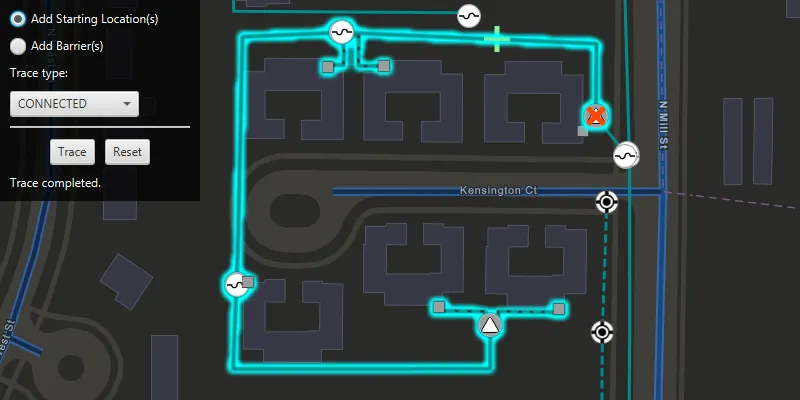
Use case
You can use a trace to visualize and validate the network topology of a utility network for quality assurance. Subnetwork traces are used for validating whether subnetworks, such as circuits or zones, are defined or edited appropriately.
How to use the sample
Click on one or more features while ‘Add starting locations’ or ‘Add barriers’ is selected. When a junction feature is identified, you may be prompted to select a terminal to use as the starting location/barrier. When an edge feature is identified, the distance from the tapped location to the beginning of the edge feature will be computed. Select the type of trace using the drop down menu. Click ‘Trace’ to initiate a trace on the network and see the results selected. Click ‘Reset’ to clear the trace parameters and start over.
How it works
- Create an
ArcGISMapand set it on aMapView. - Create and load a
ServiceGeodatabasewith a feature service URL and get tables with their layer IDs. - Create
FeatureLayers created from the service geodatabase’s tables, and add them to the operational layers of the map. - Create a
UtilityNetworkwith the same feature service URL and add it to the map’s utility networks list, then load it. - Add a
GraphicsOverlaywith symbology that distinguishes starting points from barriers. - Add a listener for clicks on the map view, and use
mapView.identifyLayersAsync()to identify clicked features. - Create a
UtilityElementthat represents its purpose (starting point or barrier) at the location of each identified feature, and save it to a list. - Determine the type of the identified feature using
utilityNetwork.getDefinition().getNetworkSource()passing its table name. - If a junction, display a terminal picker when more than one
UtilityTerminalis found and create aUtilityElementwith the selected terminal or the single terminal if there is only one. - If an edge, create a utility element from the identified feature and set its
FractionAlongEdgeusingGeometryEngine.fractionAlong(). - Create
UtilityTraceParameterswith the selected trace type along with the collected starting locations and barriers (if applicable). - Set the
TraceConfigurationof the utility trace parameters to the the utility tier’s trace configuration property. - Run a
utilityNetwork.traceAsync()with the specified parameters, and get theUtilityTraceResult. - From the utility trace result, get the
UtilityElementTraceResult. - For each feature layer in the map, create
QueryParametersto find features from the result whose network source name matches the layer’s feature table name, and useFeatureLayer.selectFeaturesAsync()to select these features.
Relevant API
- ServiceGeodatabase
- UtilityAssetType
- UtilityDomainNetwork
- UtilityElement
- UtilityElementTraceResult
- UtilityNetwork
- UtilityNetworkDefinition
- UtilityNetworkSource
- UtilityTerminal
- UtilityTier
- UtilityTraceConfiguration
- UtilityTraceParameters
- UtilityTraceResult
- UtilityTraceType
About the data
The Naperville electrical network feature service, hosted on ArcGIS Online, contains a utility network used to run the subnetwork-based trace shown in this sample.
Tags
condition barriers, downstream trace, network analysis, subnetwork trace, trace configuration, traversability, upstream trace, utility network, validate consistency
Sample code
/* * Copyright 2019 Esri. * * Licensed under the Apache License, Version 2.0 (the "License"); * you may not use this file except in compliance with the License. * You may obtain a copy of the License at * * http://www.apache.org/licenses/LICENSE-2.0 * * Unless required by applicable law or agreed to in writing, software * distributed under the License is distributed on an "AS IS" BASIS, * WITHOUT WARRANTIES OR CONDITIONS OF ANY KIND, either express or implied. * See the License for the specific language governing permissions and * limitations under the License. */
package com.esri.samples.trace_a_utility_network;
import java.util.ArrayList;import java.util.Arrays;import java.util.Collections;import java.util.List;import java.util.Optional;import java.util.concurrent.ExecutionException;
import javafx.fxml.FXML;import javafx.geometry.Point2D;import javafx.scene.control.Alert;import javafx.scene.control.Button;import javafx.scene.control.ChoiceDialog;import javafx.scene.control.ComboBox;import javafx.scene.control.Label;import javafx.scene.control.ProgressIndicator;import javafx.scene.control.RadioButton;import javafx.scene.input.MouseButton;import javafx.scene.input.MouseEvent;import javafx.scene.layout.GridPane;import javafx.scene.paint.Color;
import com.esri.arcgisruntime.ArcGISRuntimeEnvironment;import com.esri.arcgisruntime.concurrent.ListenableFuture;import com.esri.arcgisruntime.data.ArcGISFeature;import com.esri.arcgisruntime.data.FeatureQueryResult;import com.esri.arcgisruntime.data.QueryParameters;import com.esri.arcgisruntime.data.ServiceGeodatabase;import com.esri.arcgisruntime.geometry.Envelope;import com.esri.arcgisruntime.geometry.GeometryEngine;import com.esri.arcgisruntime.geometry.Point;import com.esri.arcgisruntime.geometry.Polyline;import com.esri.arcgisruntime.geometry.ProximityResult;import com.esri.arcgisruntime.geometry.SpatialReferences;import com.esri.arcgisruntime.layers.FeatureLayer;import com.esri.arcgisruntime.layers.LayerContent;import com.esri.arcgisruntime.loadable.LoadStatus;import com.esri.arcgisruntime.mapping.ArcGISMap;import com.esri.arcgisruntime.mapping.BasemapStyle;import com.esri.arcgisruntime.mapping.GeoElement;import com.esri.arcgisruntime.mapping.Viewpoint;import com.esri.arcgisruntime.mapping.view.Graphic;import com.esri.arcgisruntime.mapping.view.GraphicsOverlay;import com.esri.arcgisruntime.mapping.view.IdentifyLayerResult;import com.esri.arcgisruntime.mapping.view.MapView;import com.esri.arcgisruntime.security.UserCredential;import com.esri.arcgisruntime.symbology.SimpleLineSymbol;import com.esri.arcgisruntime.symbology.SimpleMarkerSymbol;import com.esri.arcgisruntime.symbology.SimpleRenderer;import com.esri.arcgisruntime.symbology.UniqueValueRenderer;import com.esri.arcgisruntime.utilitynetworks.UtilityDomainNetwork;import com.esri.arcgisruntime.utilitynetworks.UtilityElement;import com.esri.arcgisruntime.utilitynetworks.UtilityElementTraceResult;import com.esri.arcgisruntime.utilitynetworks.UtilityNetwork;import com.esri.arcgisruntime.utilitynetworks.UtilityNetworkSource;import com.esri.arcgisruntime.utilitynetworks.UtilityTerminal;import com.esri.arcgisruntime.utilitynetworks.UtilityTerminalConfiguration;import com.esri.arcgisruntime.utilitynetworks.UtilityTier;import com.esri.arcgisruntime.utilitynetworks.UtilityTraceParameters;import com.esri.arcgisruntime.utilitynetworks.UtilityTraceResult;import com.esri.arcgisruntime.utilitynetworks.UtilityTraceType;
public class TraceAUtilityNetworkController {
  @FXML private Button resetButton;  @FXML private Button traceButton;  @FXML private ComboBox<UtilityTraceType> traceTypeSelectionCombobox;  @FXML private Label statusLabel;  @FXML private MapView mapView;  @FXML private ProgressIndicator progressIndicator;  @FXML private RadioButton startingLocationsRadioButton;
  private ArrayList<UtilityElement> barriers;  private ArrayList<UtilityElement> startingLocations;  private GraphicsOverlay barriersGraphicsOverlay;  private GraphicsOverlay startingLocationsGraphicsOverlay;  private UtilityNetwork utilityNetwork;  private UtilityTier mediumVoltageTier;  private UtilityTraceParameters utilityTraceParameters;
  public void initialize() {    try {      // authentication with an API key or named user is required to access basemaps and other location services      String yourAPIKey = System.getProperty("apiKey");      ArcGISRuntimeEnvironment.setApiKey(yourAPIKey);
      // create a map with the streets night basemap style and set it to the map view      ArcGISMap map = new ArcGISMap(BasemapStyle.ARCGIS_STREETS_NIGHT);      mapView.setMap(map);
      // set the viewpoint to a subsection of the utility network      mapView.setViewpointAsync(new Viewpoint(          new Envelope(-9813547.35557238, 5129980.36635111, -9813185.0602376, 5130215.41254146,              SpatialReferences.getWebMercator())));
      String featureServiceURL =          "https://sampleserver7.arcgisonline.com/server/rest/services/UtilityNetwork/NapervilleElectric/FeatureServer";      // set user credentials for authenticating with the service      // NOTE: a licensed user is required to perform utility network operations      UserCredential userCredential = new UserCredential("viewer01", "I68VGU^nMurF");      // create a new service geodatabase from the feature service url and set the user credential      var serviceGeodatabase = new ServiceGeodatabase(featureServiceURL);      serviceGeodatabase.setCredential(userCredential);
      // load the service geodatabase and get tables by their layer IDs      serviceGeodatabase.loadAsync();      serviceGeodatabase.addDoneLoadingListener(() -> {        if (serviceGeodatabase.getLoadStatus() == LoadStatus.LOADED) {
          // the electric device layer ./0 and distribution line layer ./3 are created from the service geodatabase          var electricDeviceFeatureLayer = new FeatureLayer(serviceGeodatabase.getTable(0));          var distributionLineFeatureLayer = new FeatureLayer(serviceGeodatabase.getTable(3));          // add the utility network feature layers to the map for display          map.getOperationalLayers().addAll(Arrays.asList(electricDeviceFeatureLayer, distributionLineFeatureLayer));
          // create and apply a renderer for the electric distribution lines feature layer          UniqueValueRenderer.UniqueValue mediumVoltageValue = new UniqueValueRenderer.UniqueValue("N/A", "Medium Voltage",            new SimpleLineSymbol(SimpleLineSymbol.Style.SOLID, Color.DARKCYAN, 3),            Collections.singletonList(5));          UniqueValueRenderer.UniqueValue lowVoltageValue = new UniqueValueRenderer.UniqueValue("N/A", "Low Voltage",            new SimpleLineSymbol(SimpleLineSymbol.Style.DASH, Color.DARKCYAN, 3),            Collections.singletonList(3));          distributionLineFeatureLayer.setRenderer(new UniqueValueRenderer(Collections.singletonList("ASSETGROUP"),            Arrays.asList(mediumVoltageValue, lowVoltageValue), "", new SimpleLineSymbol()));
          // create and add the utility network to the map before loading          utilityNetwork = new UtilityNetwork(featureServiceURL);          map.getUtilityNetworks().add(utilityNetwork);          // load the utility network          utilityNetwork.loadAsync();          utilityNetwork.addDoneLoadingListener(() -> {            if (utilityNetwork.getLoadStatus() == LoadStatus.LOADED) {
              // get the utility tier used for traces in this network. For this data set, the "Medium Voltage Radial"              // tier from the "ElectricDistribution" domain network is used.              UtilityDomainNetwork domainNetwork = utilityNetwork.getDefinition().getDomainNetwork("ElectricDistribution");              mediumVoltageTier = domainNetwork.getTier("Medium Voltage Radial");
              // enable the UI              enableButtonInteraction();
              // hide the progress indicator              progressIndicator.setVisible(false);
              // update the status text              statusLabel.setText("");
            } else {              new Alert(Alert.AlertType.ERROR, "Error loading Utility Network.").show();            }          });        }      });
      // create graphics overlays and add them to the map view      startingLocationsGraphicsOverlay = new GraphicsOverlay();      barriersGraphicsOverlay = new GraphicsOverlay();      mapView.getGraphicsOverlays().addAll(Arrays.asList(startingLocationsGraphicsOverlay, barriersGraphicsOverlay));
      // create and apply renderers for the starting points and barriers graphics overlays      SimpleMarkerSymbol startingPointSymbol =          new SimpleMarkerSymbol(SimpleMarkerSymbol.Style.CROSS, Color.LIGHTGREEN, 25);      startingLocationsGraphicsOverlay.setRenderer(new SimpleRenderer(startingPointSymbol));
      SimpleMarkerSymbol barrierPointSymbol =          new SimpleMarkerSymbol(SimpleMarkerSymbol.Style.X, Color.ORANGERED, 25);      barriersGraphicsOverlay.setRenderer(new SimpleRenderer(barrierPointSymbol));
      // create a list of starting locations and barriers for the trace      startingLocations = new ArrayList<>();      barriers = new ArrayList<>();
      // build the trace configuration selection ComboBox and select the first value      traceTypeSelectionCombobox.getItems().addAll(UtilityTraceType.CONNECTED, UtilityTraceType.DOWNSTREAM, UtilityTraceType.UPSTREAM, UtilityTraceType.SUBNETWORK);      traceTypeSelectionCombobox.getSelectionModel().select(0);
    } catch (Exception e) {      e.printStackTrace();    }  }
  /**   * Uses the clicked map point to identify any utility elements in the utility network at the clicked location. Based   * on the selection mode, the clicked utility element is added either to the starting locations or barriers for the   * trace parameters. The appropriate graphic is created at the clicked location to mark the element as either a   * starting location or barrier.   *   * @param e mouse event registered when the map view is clicked on   */  @FXML  private void handleMapViewClicked(MouseEvent e) {    // ensure the utility network is loaded before processing clicks on the map view    if (utilityNetwork.getLoadStatus() == LoadStatus.LOADED && e.getButton() == MouseButton.PRIMARY &&        e.isStillSincePress()) {
      // show the progress indicator      progressIndicator.setVisible(true);
      // get the clicked map point      Point2D screenPoint = new Point2D(e.getX(), e.getY());      Point mapPoint = mapView.screenToLocation(screenPoint);
      // identify the feature to be used      ListenableFuture<List<IdentifyLayerResult>> identifyLayerResultsFuture =          mapView.identifyLayersAsync(screenPoint, 10, false);      identifyLayerResultsFuture.addDoneListener(() -> {        try {          // get the result of the query          List<IdentifyLayerResult> identifyLayerResults = identifyLayerResultsFuture.get();
          // return if no features are identified          if (!identifyLayerResults.isEmpty()) {            // retrieve the first result and get its contents            IdentifyLayerResult firstResult = identifyLayerResults.get(0);            LayerContent layerContent = firstResult.getLayerContent();            // check that the result is a feature layer and has elements            if (layerContent instanceof FeatureLayer && !firstResult.getElements().isEmpty()) {
              // retrieve the geoelements in the feature layer              GeoElement identifiedFeature = firstResult.getElements().get(0);              if (identifiedFeature instanceof ArcGISFeature) {
                // create element from the identified feature                UtilityElement utilityElement = utilityNetwork.createElement((ArcGISFeature) identifiedFeature);
                // check if the network source is a junction or an edge                if (utilityElement.getNetworkSource().getSourceType() == UtilityNetworkSource.Type.JUNCTION) {
                  // check if the feature has a terminal configuration and multiple terminals                  if (utilityElement.getAssetType().getTerminalConfiguration() != null) {                    UtilityTerminalConfiguration utilityTerminalConfiguration =                        utilityElement.getAssetType().getTerminalConfiguration();                    List<UtilityTerminal> terminals = utilityTerminalConfiguration.getTerminals();
                    if (terminals.size() > 1) {                      // prompt the user to select a terminal for this feature                      Optional<UtilityTerminal> userSelectedTerminal = promptForTerminalSelection(terminals);
                      // apply the selected terminal                      if (userSelectedTerminal.isPresent()) {                        UtilityTerminal terminal = userSelectedTerminal.get();                        utilityElement.setTerminal(terminal);                        // show the terminals name in the status label                        String terminalName = terminal.getName() != null ? terminal.getName() : "default";                        statusLabel.setText("Feature added at terminal: " + terminalName);
                        // don't create the element if no terminal was selected                      } else {                        statusLabel.setText("No terminal selected - no feature added");                        return;                      }                    }                  }
                } else if (utilityElement.getNetworkSource().getSourceType() == UtilityNetworkSource.Type.EDGE) {
                  // get the geometry of the identified feature as a polyline, and remove the z component                  Polyline polyline = (Polyline) GeometryEngine.removeZ(identifiedFeature.getGeometry());
                  // compute how far the clicked location is along the edge feature                  double fractionAlongEdge = GeometryEngine.fractionAlong(polyline, mapPoint, -1);                  if (Double.isNaN(fractionAlongEdge)) {                    new Alert(Alert.AlertType.ERROR, "Cannot add starting location / barrier here.");                    return;                  }
                  // set the fraction along edge                  utilityElement.setFractionAlongEdge(fractionAlongEdge);
                  // update the status label text                  statusLabel.setText("Fraction along edge: " + Math.round(utilityElement.getFractionAlongEdge() * 1000d) / 1000d );                }
                // create a graphic for the new utility element                Graphic traceLocationGraphic = new Graphic();
                // find the closest coordinate on the selected element to the clicked point                ProximityResult proximityResult =                    GeometryEngine.nearestCoordinate(identifiedFeature.getGeometry(), mapPoint);
                // set the graphic's geometry to the coordinate on the element                traceLocationGraphic.setGeometry(proximityResult.getCoordinate());
                // add the element to the appropriate list, and add the appropriate graphic to its graphics overlay                if (startingLocationsRadioButton.isSelected()) {                  startingLocations.add(utilityElement);                  startingLocationsGraphicsOverlay.getGraphics().add(traceLocationGraphic);                } else {                  barriers.add(utilityElement);                  barriersGraphicsOverlay.getGraphics().add(traceLocationGraphic);                }              }            }          }        } catch (InterruptedException | ExecutionException ex) {          statusLabel.setText("Error identifying clicked features.");          new Alert(Alert.AlertType.ERROR, "Error identifying clicked features.").show();        } finally {          progressIndicator.setVisible(false);        }      });    }  }
  /**   * Prompts the user to select a terminal from a provided list.   *   * @param terminals a list of terminals for the user to choose from   * @return the user's selected terminal   */  private Optional<UtilityTerminal> promptForTerminalSelection(List<UtilityTerminal> terminals) {
    // create a dialog for terminal selection    ChoiceDialog<UtilityTerminal> utilityTerminalSelectionDialog = new ChoiceDialog<>(terminals.get(0), terminals);    utilityTerminalSelectionDialog.initOwner(mapView.getScene().getWindow());    utilityTerminalSelectionDialog.setTitle("Choose Utility Terminal");    utilityTerminalSelectionDialog.setHeaderText("Junction selected. Choose the Utility Terminal to add as the trace element:");
    // override the list cell in the dialog's combo box to show the terminal name    @SuppressWarnings("unchecked") ComboBox<UtilityTerminal> comboBox =        (ComboBox<UtilityTerminal>) ((GridPane) utilityTerminalSelectionDialog.getDialogPane()            .getContent()).getChildren().get(1);    comboBox.setCellFactory(param -> new UtilityTerminalListCell());    comboBox.setButtonCell(new UtilityTerminalListCell());
    // show the terminal selection dialog and capture the user selection    return utilityTerminalSelectionDialog.showAndWait();  }
  /**   * Uses the elements selected as starting locations and (optionally) barriers to perform a connected trace, then   * selects all connected elements found in the trace to highlight them.   */  @FXML  private void handleTraceClick() {
    // clear the previous selection from the layer    mapView.getMap().getOperationalLayers().forEach(layer -> {      if (layer instanceof FeatureLayer) {        ((FeatureLayer) layer).clearSelection();      }    });
    // check that the utility trace parameters are valid    if (startingLocations.isEmpty()) {      new Alert(Alert.AlertType.ERROR, "No starting locations provided for trace.").show();      return;    }
    // get the selected trace type    UtilityTraceType traceType = traceTypeSelectionCombobox.getSelectionModel().getSelectedItem();
    // show the progress indicator and update the status text    progressIndicator.setVisible(true);    statusLabel.setText("Running " + traceType.toString().toLowerCase() + " trace...");
    // disable the UI    traceButton.setDisable(true);    resetButton.setDisable(true);
    // create utility trace parameters for a connected trace    utilityTraceParameters = new UtilityTraceParameters(traceType, startingLocations);
    // if any barriers have been created, add them to the parameters    utilityTraceParameters.getBarriers().addAll(barriers);
    // set the trace configuration using the tier from the utility domain network    utilityTraceParameters.setTraceConfiguration(mediumVoltageTier.getDefaultTraceConfiguration());
    // run the utility trace and get the results    ListenableFuture<List<UtilityTraceResult>> utilityTraceResultsFuture =        utilityNetwork.traceAsync(utilityTraceParameters);    utilityTraceResultsFuture.addDoneListener(() -> {      try {        List<UtilityTraceResult> utilityTraceResults = utilityTraceResultsFuture.get();
        if (utilityTraceResults.get(0) instanceof UtilityElementTraceResult) {          UtilityElementTraceResult utilityElementTraceResult = (UtilityElementTraceResult) utilityTraceResults.get(0);
          if (!utilityElementTraceResult.getElements().isEmpty()) {
            // iterate through the map's feature layers            mapView.getMap().getOperationalLayers().forEach(layer -> {              if (layer instanceof FeatureLayer) {
                // create query parameters to find features whose network source name matches the layer's feature                // table name                QueryParameters queryParameters = new QueryParameters();                utilityElementTraceResult.getElements().forEach(utilityElement -> {
                  String networkSourceName = utilityElement.getNetworkSource().getName();                  String featureTableName = ((FeatureLayer) layer).getFeatureTable().getTableName();
                  if (networkSourceName.equals(featureTableName)) {                    queryParameters.getObjectIds().add(utilityElement.getObjectId());                  }                });
                // select features that match the query                ListenableFuture<FeatureQueryResult> featureQueryResultListenableFuture =                    ((FeatureLayer) layer).selectFeaturesAsync(queryParameters, FeatureLayer.SelectionMode.NEW);
                // wait for the selection to finish                featureQueryResultListenableFuture.addDoneListener(() -> {                  // update the status text, enable the buttons and hide the progress indicator                  statusLabel.setText("Trace completed.");                  enableButtonInteraction();                  progressIndicator.setVisible(false);                  enableButtonInteraction();                });              }            });          }        } else {          statusLabel.setText("Trace failed.");          progressIndicator.setVisible(false);          new Alert(Alert.AlertType.ERROR, "Trace result not a utility element.").show();          enableButtonInteraction();        }
      } catch (Exception e) {        statusLabel.setText("Trace failed.");        progressIndicator.setVisible(false);        // Note: this sample server may return a generic message in some circumstances when incompatible trace        // parameters are specified        if (e.getMessage().contains("-2147208935")) {          new Alert(Alert.AlertType.ERROR, "Cannot run trace with the provided parameters.").show();        } else {          new Alert(Alert.AlertType.ERROR, "Error running utility network trace.").show();        }        enableButtonInteraction();      }    });  }
  /**   * Enables both buttons.   */  private void enableButtonInteraction() {
    // enable the UI    traceButton.setDisable(false);    resetButton.setDisable(false);  }
  /**   * Resets the sample by resetting the status text, hiding the progress indicator, clearing the trace parameters,   * de-selecting all features and removing any graphics.   */  @FXML  private void handleResetClick() {    statusLabel.setText("");    progressIndicator.setVisible(false);
    // clear the utility trace parameters    startingLocations.clear();    barriers.clear();    utilityTraceParameters = null;    traceTypeSelectionCombobox.getSelectionModel().select(0);
    // clear any selected features in all map layers    mapView.getMap().getOperationalLayers().forEach(layer -> {      if (layer instanceof FeatureLayer) {        ((FeatureLayer) layer).clearSelection();      }    });
    // clear the graphics overlays    barriersGraphicsOverlay.getGraphics().clear();    startingLocationsGraphicsOverlay.getGraphics().clear();
    // enable the trace button    traceButton.setDisable(false);  }
  /**   * Stops and releases all resources used in application.   */  public void terminate() {
    if (mapView != null) {      mapView.dispose();    }  }}
/* * Copyright 2019 Esri. * * Licensed under the Apache License, Version 2.0 (the "License"); * you may not use this file except in compliance with the License. * You may obtain a copy of the License at * * http://www.apache.org/licenses/LICENSE-2.0 * * Unless required by applicable law or agreed to in writing, software * distributed under the License is distributed on an "AS IS" BASIS, * WITHOUT WARRANTIES OR CONDITIONS OF ANY KIND, either express or implied. * See the License for the specific language governing permissions and * limitations under the License. */
package com.esri.samples.trace_a_utility_network;
import javafx.application.Application;import javafx.fxml.FXMLLoader;import javafx.scene.Parent;import javafx.scene.Scene;import javafx.stage.Stage;
public class TraceAUtilityNetworkSample extends Application {
private TraceAUtilityNetworkController controller;
@Override public void start(Stage stage) throws Exception {
// set up the scene FXMLLoader loader = new FXMLLoader(getClass().getResource("/trace_a_utility_network/main.fxml")); Parent root = loader.load(); controller = loader.getController(); Scene scene = new Scene(root);
// set title, size and add scene to stage stage.setTitle("Trace a Utility Network Sample"); stage.setWidth(800); stage.setHeight(700); stage.setScene(scene); stage.show(); }
/** * Stops and releases all resources used in application. */ @Override public void stop() { controller.terminate(); }
/** * Opens and runs application. * * @param args arguments passed to this application */ public static void main(String[] args) {
Application.launch(args); }
}/* * Copyright 2019 Esri. * * Licensed under the Apache License, Version 2.0 (the "License"); * you may not use this file except in compliance with the License. * You may obtain a copy of the License at * * http://www.apache.org/licenses/LICENSE-2.0 * * Unless required by applicable law or agreed to in writing, software * distributed under the License is distributed on an "AS IS" BASIS, * WITHOUT WARRANTIES OR CONDITIONS OF ANY KIND, either express or implied. * See the License for the specific language governing permissions and * limitations under the License. */
package com.esri.samples.trace_a_utility_network;
import javafx.scene.control.ListCell;
import com.esri.arcgisruntime.utilitynetworks.UtilityTerminal;
public class UtilityTerminalListCell extends ListCell<UtilityTerminal> { @Override protected void updateItem(UtilityTerminal item, boolean empty) { super.updateItem(item, empty); if (empty) { setText(null); } else { setText(item.getName()); } }}