A utility network container allows a dense collection of features to be represented by a single feature, which can be used to reduce map clutter.
Use case
Offering a container view for features aids in the review for valid structural attachment and containment relationships and helps determine if a dataset has an association role set. Container views often model a cluster of electrical devices on a pole top or inside a cabinet or vault.
How to use the sample
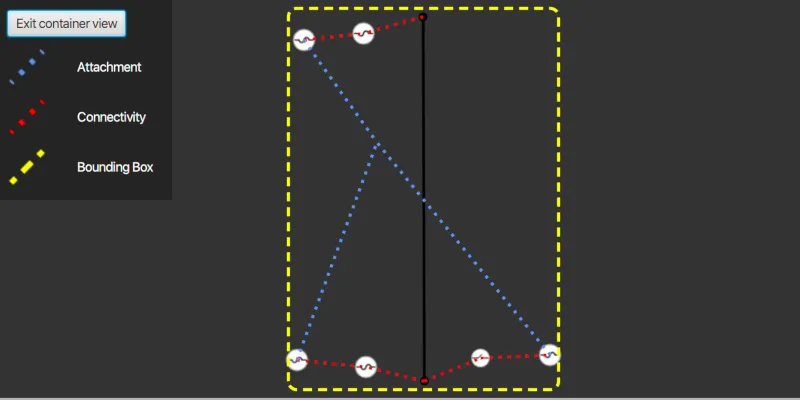
Click on a container feature to show all features inside the container (the container view bounding box is marked by a yellow dashed line). The container is shown with the content features contained within. The viewpoint and scale of the map are also changed to the container’s extent. Connectivity and attachment associations inside the container are shown as red and blue dotted lines respectively.
How it works
- Load a web map that includes ArcGIS Pro Subtype Group Layers with only container features visible (i.e. fuse bank, switch bank, transformer bank, hand hole and junction box).
- Create a
GraphicsOverlayfor displaying a container view. - Create and load a
UtilityNetworkwith the same feature service URL as the layers in the web map (Naperville electric network feature service in this sample). - Add an event handler for the
onMouseClickedevent of theMapView. - Identify a feature and create a
UtilityElementfrom it. - Get the associations for this element using
getAssociationsAsync(UtilityElement, UtilityAssociationType.Containment). - Turn off the visibility of all the map’s operational layers.
- Get the features for the
UtilityElement(s) from the associations usingfetchFeaturesForElementsAsync(List<UtilityElement>). - Add a
Graphicwith the same geometry and symbol as these features. - Add another
Graphicthat represents this extent and zoom to this extent with a buffer. - Get associations for this extent using
getAssociationsAsync(Envelope). - Add a
Graphicto represent the association geometry between them using a symbol that distinguishes between association types (attachment and connectivity in this sample data). - Turn on the visibility of all the map’s operational layers, clear the graphics in the graphics overlay, and zoom out to the previous extent to exit the container view.
Relevant API
- SubtypeFeatureLayer
- UtilityAssociation
- UtilityAssociationType
- UtilityElement
- UtilityNetwork
- UtilityNetworkDefinition
About the data
The Naperville electric network feature service, hosted on ArcGIS Online, contains a utility network used to find associations shown in this sample and a web map portal item, Naperville electric containers, that use the same feature service endpoint and displays only container features.
Tags
associations, connectivity association, containment association, structural attachment associations, utility network
Sample code
/* * Copyright 2021 Esri. * * Licensed under the Apache License, Version 2.0 (the "License"); * you may not use this file except in compliance with the License. * You may obtain a copy of the License at * * http://www.apache.org/licenses/LICENSE-2.0 * * Unless required by applicable law or agreed to in writing, software * distributed under the License is distributed on an "AS IS" BASIS, * WITHOUT WARRANTIES OR CONDITIONS OF ANY KIND, either express or implied. * See the License for the specific language governing permissions and * limitations under the License. */
package com.esri.samples.display_content_of_utility_network_container;
import com.esri.arcgisruntime.concurrent.ListenableFuture;import com.esri.arcgisruntime.data.ArcGISFeature;import com.esri.arcgisruntime.geometry.Geometry;import com.esri.arcgisruntime.geometry.GeometryEngine;import com.esri.arcgisruntime.geometry.Point;import com.esri.arcgisruntime.layers.SubtypeFeatureLayer;import com.esri.arcgisruntime.loadable.LoadStatus;import com.esri.arcgisruntime.mapping.ArcGISMap;import com.esri.arcgisruntime.mapping.Viewpoint;import com.esri.arcgisruntime.mapping.view.DrawStatus;import com.esri.arcgisruntime.mapping.view.Graphic;import com.esri.arcgisruntime.mapping.view.GraphicsOverlay;import com.esri.arcgisruntime.mapping.view.IdentifyLayerResult;import com.esri.arcgisruntime.mapping.view.MapView;import com.esri.arcgisruntime.security.AuthenticationChallengeHandler;import com.esri.arcgisruntime.security.AuthenticationChallengeResponse;import com.esri.arcgisruntime.security.AuthenticationManager;import com.esri.arcgisruntime.security.UserCredential;import com.esri.arcgisruntime.symbology.SimpleLineSymbol;import com.esri.arcgisruntime.symbology.Symbol;import com.esri.arcgisruntime.utilitynetworks.UtilityAssociation;import com.esri.arcgisruntime.utilitynetworks.UtilityAssociationType;import com.esri.arcgisruntime.utilitynetworks.UtilityElement;import com.esri.arcgisruntime.utilitynetworks.UtilityNetwork;
import javafx.fxml.FXML;import javafx.geometry.Point2D;import javafx.scene.control.Alert;import javafx.scene.control.ProgressIndicator;import javafx.scene.image.ImageView;import javafx.scene.input.MouseButton;import javafx.scene.input.MouseEvent;import javafx.scene.layout.VBox;import javafx.scene.paint.Color;
import java.util.ArrayList;import java.util.List;
public class DisplayContentOfUtilityNetworkContainerController {
  @FXML private VBox vBox;  @FXML private MapView mapView;  @FXML private ProgressIndicator progressIndicator;  @FXML private ImageView attachmentImageView;  @FXML private ImageView boundingBoxImageView;  @FXML private ImageView connectivityImageView;
  private ArcGISFeature selectedContainerFeature;  private GraphicsOverlay graphicsOverlay;  private SimpleLineSymbol boundingBoxSymbol;  private SimpleLineSymbol attachmentSymbol;  private SimpleLineSymbol connectivitySymbol;  private UtilityNetwork utilityNetwork;  private Viewpoint previousViewpoint;
  public void initialize() {
    try {
      // create a new graphics overlay to display container view contents      graphicsOverlay = new GraphicsOverlay();      mapView.getGraphicsOverlays().add(graphicsOverlay);
      // create three new simple line symbols for displaying container view features      boundingBoxSymbol = new SimpleLineSymbol(SimpleLineSymbol.Style.DASH, Color.YELLOW, 3);      attachmentSymbol = new SimpleLineSymbol(SimpleLineSymbol.Style.DOT, Color.CORNFLOWERBLUE, 3);      connectivitySymbol = new SimpleLineSymbol(SimpleLineSymbol.Style.DOT, Color.RED, 3);
      // set image views for the association and bounding box symbols to display them in the legend      attachmentImageView.setImage(attachmentSymbol.createSwatchAsync(Color.TRANSPARENT).get());      connectivityImageView.setImage(connectivitySymbol.createSwatchAsync(Color.TRANSPARENT).get());      boundingBoxImageView.setImage(boundingBoxSymbol.createSwatchAsync(Color.TRANSPARENT).get());
      // set user credentials to authenticate with the feature service and webmap url      // NOTE: a licensed user is required to perform utility network operations      // NOTE: Never hardcode login information in a production application. This is done solely for the sake of the sample.      var userCredential = new UserCredential("viewer01", "I68VGU^nMurF");      AuthenticationChallengeHandler authenticationChallengeHandler = authenticationChallenge ->        new AuthenticationChallengeResponse(AuthenticationChallengeResponse.Action.CONTINUE_WITH_CREDENTIAL, userCredential);      AuthenticationManager.setAuthenticationChallengeHandler(authenticationChallengeHandler);
      // create a new map from the web map URL (includes ArcGIS Pro subtype group layers with only container features visible)      ArcGISMap map = new ArcGISMap("https://sampleserver7.arcgisonline.com/portal/home/item.html?id=813eda749a9444e4a9d833a4db19e1c8");      // the feature service url contains a utility network used to find associations shown in this sample      String featureServiceURL = "https://sampleserver7.arcgisonline.com/server/rest/services/UtilityNetwork/NapervilleElectric/FeatureServer";
      // create a utility network, add it to the map's collection of utility networks, and load it      utilityNetwork = new UtilityNetwork(featureServiceURL);      map.getUtilityNetworks().add(utilityNetwork);      utilityNetwork.addDoneLoadingListener(() -> {        // show an error if the utility network did not load        if (utilityNetwork.getLoadStatus() != LoadStatus.LOADED) {          new Alert(Alert.AlertType.ERROR, "Error loading Utility Network.").show();        }      });      utilityNetwork.loadAsync();
      // bind progress indicator visibility to map view draw status      progressIndicator.visibleProperty().bind(mapView.drawStatusProperty().isEqualTo(DrawStatus.IN_PROGRESS));
      // set the map to the mapview and set the map view's viewpoint      mapView.setMap(map);      mapView.setViewpoint(new Viewpoint(41.801504, -88.163718, 4e3));
    } catch (Exception e) {      e.printStackTrace();    }  }
  /**   * Identifies the feature clicked on the map, gets their containment associations and elements, and displays the content   * of the elements features in a container view.   *   * @param e event registered when the map view is clicked on   */  @FXML  private void handleMapViewClicked(MouseEvent e) {
    if (e.getButton() == MouseButton.PRIMARY && e.isStillSincePress()) {      // get the clicked map point      Point2D screenPoint = new Point2D(e.getX(), e.getY());
      // identify the feature clicked on      ListenableFuture<List<IdentifyLayerResult>> identifyLayerResultsFuture =        mapView.identifyLayersAsync(screenPoint, 10, false);      identifyLayerResultsFuture.addDoneListener(() -> {        try {          // get the result of the query          List<IdentifyLayerResult> identifyLayerResults = identifyLayerResultsFuture.get();
          // check that results have been returned          if (!identifyLayerResults.isEmpty()) {
            identifyLayerResults.forEach(layerResult -> {              // check if the layer result is a subtype feature layer              if (layerResult.getLayerContent() instanceof SubtypeFeatureLayer) {                // loop through each sub layer result                layerResult.getSublayerResults().forEach(sublayerResult -> {                  // filter the sublayer result's elements to find the first one which is an ArcGIS feature                  sublayerResult.getElements().stream().filter(element -> element instanceof ArcGISFeature)                    .findFirst().ifPresent(geoElement -> selectedContainerFeature = (ArcGISFeature) geoElement);                });              }            });
            // create a container element using the selected feature            if (selectedContainerFeature != null) {
              UtilityElement containerElement = utilityNetwork.createElement(selectedContainerFeature);
              // get the containment associations from this element to display its content              ListenableFuture<List<UtilityAssociation>> containmentAssociationsFuture =                utilityNetwork.getAssociationsAsync(containerElement, UtilityAssociationType.CONTAINMENT);
              containmentAssociationsFuture.addDoneListener(() -> {                try {                  // get and store a list of elements from the result of the query                  List<UtilityElement> contentElements = new ArrayList<>();
                  // get the list of containment associations and loop through them to get their elements                  List<UtilityAssociation> containmentAssociations = containmentAssociationsFuture.get();                  containmentAssociations.forEach(association -> {                    UtilityElement utilityElement = association.getFromElement().getObjectId() ==                      containerElement.getObjectId() ? association.getToElement() : association.getFromElement();                    contentElements.add(utilityElement);                  });
                  // check the list of elements isn't empty, and store the current viewpoint (this will be used later                  // when exiting the container view                  if (!contentElements.isEmpty()) {                    previousViewpoint = mapView.getCurrentViewpoint(Viewpoint.Type.BOUNDING_GEOMETRY);                    mapView.getMap().getOperationalLayers().forEach(layer -> layer.setVisible(false));
                    // enable container view vbox and disable interaction with the map view to avoid navigating away from container view                    vBox.setVisible(true);                    mapView.setDisable(true);
                    // fetch the features from the elements                    ListenableFuture<List<ArcGISFeature>> fetchFeaturesFuture = utilityNetwork.fetchFeaturesForElementsAsync(contentElements);                    fetchFeaturesFuture.addDoneListener(() -> {                      try {                        // get the content features and give them each a symbol, and add them as a graphic to the graphics overlay                        List<ArcGISFeature> contentFeatures = fetchFeaturesFuture.get();                        contentFeatures.forEach(content -> {                          Symbol symbol = content.getFeatureTable().getLayerInfo().getDrawingInfo().getRenderer().getSymbol(content);                          graphicsOverlay.getGraphics().add(new Graphic(content.getGeometry(), symbol));                        });
                        Geometry firstGraphic = graphicsOverlay.getGraphics().get(0).getGeometry();                        double containerViewScale = containerElement.getAssetType().getContainerViewScale();
                        if (graphicsOverlay.getGraphics().size() == 1 && firstGraphic instanceof Point) {                          mapView.setViewpointCenterAsync((Point) firstGraphic, containerViewScale).addDoneListener(() -> {
                            // the bounding box, which defines the container view, may be computed using the extent of the features                            // it contains or centered around its geometry at the container's view scale                            Geometry boundingBox = mapView.getCurrentViewpoint(Viewpoint.Type.BOUNDING_GEOMETRY).getTargetGeometry();                            identifyAssociationsWithExtent(boundingBox);                            new Alert(Alert.AlertType.INFORMATION, "This feature has no associations").show();
                          });
                        } else {                          Geometry boundingBox = GeometryEngine.buffer(graphicsOverlay.getExtent(), 0.05);                          identifyAssociationsWithExtent(boundingBox);                        }
                      } catch (Exception ex) {                        new Alert(Alert.AlertType.ERROR, "Error fetching features for elements.").show();                        ex.printStackTrace();                      }                    });
                  } else {                    new Alert(Alert.AlertType.ERROR, "No content elements found").show();                  }
                } catch (Exception ex) {                  new Alert(Alert.AlertType.ERROR, "Error getting containment associations.").show();                  ex.printStackTrace();                }              });            } else new Alert(Alert.AlertType.ERROR, "No feature found").show();          }
        } catch (Exception ex) {          new Alert(Alert.AlertType.ERROR, "Error getting result of the query.").show();          ex.printStackTrace();        }      });    }  }
  /**   * Get associations for the specified geometry and display its associations.   *   * @param boundingBox the geometry from which to get associations.   */  private void identifyAssociationsWithExtent(Geometry boundingBox) {
    // adds a graphic representing the bounding box of the associations identified and zooms to its extent    graphicsOverlay.getGraphics().add(new Graphic(boundingBox, boundingBoxSymbol));    mapView.setViewpointGeometryAsync(GeometryEngine.buffer(graphicsOverlay.getExtent(), 0.05));
    // get the associations for this extent to display how content features are attached or connected.    ListenableFuture<List<UtilityAssociation>> extentAssociations = utilityNetwork.getAssociationsAsync(graphicsOverlay.getExtent());
    extentAssociations.addDoneListener(() -> {      try {        extentAssociations.get().forEach(association -> {          // assign the appropriate symbol if the association is an attachment or connectivity type          Symbol symbol = association.getAssociationType() == UtilityAssociationType.ATTACHMENT ? attachmentSymbol :            connectivitySymbol;          graphicsOverlay.getGraphics().add(new Graphic(association.getGeometry(), symbol));        });
      } catch (Exception ex) {        new Alert(Alert.AlertType.ERROR, "Error getting extent associations").show();        ex.printStackTrace();      }    });  }
  /**   * Hides the exit container button, clears the graphics that were added to the graphics overlay,   * returns the viewpoint to where it was prior to entering the container view, enables map view interaction,   * and sets all the layers in the map's operational layers to visible, when the container view is exited.   */  @FXML  private void handleExitButtonClicked() {
    vBox.setVisible(false);    graphicsOverlay.getGraphics().clear();    mapView.setDisable(false);    mapView.setViewpointAsync(previousViewpoint);    mapView.getMap().getOperationalLayers().forEach(layer -> layer.setVisible(true));
  }
  /**   * Stops and releases all resources used in application.   */  public void terminate() {
    if (mapView != null) {      mapView.dispose();    }  }}
/* * Copyright 2021 Esri. * * Licensed under the Apache License, Version 2.0 (the "License"); * you may not use this file except in compliance with the License. * You may obtain a copy of the License at * * http://www.apache.org/licenses/LICENSE-2.0 * * Unless required by applicable law or agreed to in writing, software * distributed under the License is distributed on an "AS IS" BASIS, * WITHOUT WARRANTIES OR CONDITIONS OF ANY KIND, either express or implied. * See the License for the specific language governing permissions and * limitations under the License. */
package com.esri.samples.display_content_of_utility_network_container;
import javafx.application.Application;import javafx.fxml.FXMLLoader;import javafx.scene.Parent;import javafx.scene.Scene;import javafx.stage.Stage;
public class DisplayContentOfUtilityNetworkContainerSample extends Application {
private DisplayContentOfUtilityNetworkContainerController controller;
@Override public void start(Stage stage) throws Exception {
// set up the scene FXMLLoader loader = new FXMLLoader(getClass().getResource("/display_content_of_utility_network_container/main.fxml")); Parent root = loader.load(); controller = loader.getController(); Scene scene = new Scene(root);
// set title, size, and add scene to stage stage.setTitle("Display Content of Utility Network Container Sample"); stage.setWidth(800); stage.setHeight(700); stage.setScene(scene); stage.show(); }
/** * Stops and releases all resources used in application. */ @Override public void stop() { controller.terminate(); }
/** * Opens and runs application. * * @param args arguments passed to this application */ public static void main(String[] args) {
Application.launch(args); }}