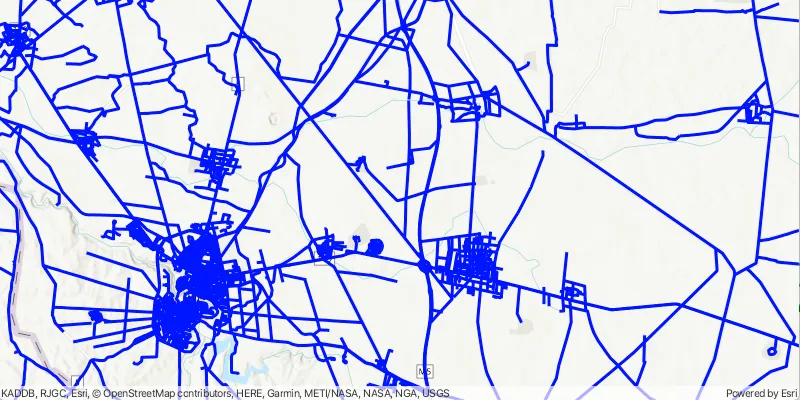
Display an OGC API feature collection and query features while navigating the map view.
Use case
When panning the map view, it is necessary to query the OGC API feature table to obtain additional features within the new visible extent.
How to use the sample
Pan the map and observe how new features are loaded from the OGC API feature service.
How it works
- Create an
OgcFeatureCollectionTableusing a URL to an OGC API feature service and a collection ID. - Set the feature table’s
FeatureRequestModeproperty toFeatureRequestMode.ManualCache. - Call
OgcFeatureCollectionTable.LoadAsync(). - Create a
FeatureLayerusing the feature collection table and add it to the map view. - Every time the map view navigation completes:
- Create
QueryParameters. - Set the parameter’s
Geometryto the current extent of the map view. - Set the parameter’s
SpatialRelationshipproperty toSpatialRelationship.Intersects. - Set the
MaxFeaturesproperty to 5000 (some services have a low default value for maximum features). - Call
OgcFeatureCollectionTable.PopulateFromServiceAsync()using the query parameters from the previous steps.
- Create
Relevant API
- OgcFeatureCollectionTable
- QueryParameters
About the data
The Daraa, Syria test data is OpenStreetMap data converted to the Topographic Data Store schema of NGA.
Additional information
See the OGC API website for more information on the OGC API family of standards.
Tags
feature, feature layer, feature table, OGC, OGC API, service, table, web
Sample code
DisplayOgcApiCollectionSample.java
/* * Copyright 2021 Esri. * * Licensed under the Apache License, Version 2.0 (the "License"); you may not * use this file except in compliance with the License. You may obtain a copy of * the License at * * http://www.apache.org/licenses/LICENSE-2.0 * * Unless required by applicable law or agreed to in writing, software * distributed under the License is distributed on an "AS IS" BASIS, WITHOUT * WARRANTIES OR CONDITIONS OF ANY KIND, either express or implied. See the * License for the specific language governing permissions and limitations under * the License. */
package com.esri.samples.display_ogc_api_collection;
import com.esri.arcgisruntime.ArcGISRuntimeEnvironment;import com.esri.arcgisruntime.data.OgcFeatureCollectionTable;import com.esri.arcgisruntime.data.QueryParameters;import com.esri.arcgisruntime.data.ServiceFeatureTable;import com.esri.arcgisruntime.geometry.Envelope;import com.esri.arcgisruntime.layers.FeatureLayer;import com.esri.arcgisruntime.loadable.LoadStatus;import com.esri.arcgisruntime.mapping.ArcGISMap;import com.esri.arcgisruntime.mapping.BasemapStyle;import com.esri.arcgisruntime.mapping.view.MapView;import com.esri.arcgisruntime.symbology.SimpleLineSymbol;import com.esri.arcgisruntime.symbology.SimpleRenderer;
import javafx.application.Application;import javafx.scene.Scene;import javafx.scene.control.Alert;import javafx.scene.control.ProgressIndicator;import javafx.scene.layout.StackPane;import javafx.scene.paint.Color;import javafx.stage.Stage;
public class DisplayOgcApiCollectionSample extends Application {
  private MapView mapView;  private OgcFeatureCollectionTable ogcFeatureCollectionTable; // keep loadable in scope to avoid garbage collection
  @Override  public void start(Stage stage) {
    try {      // create stack pane and JavaFX app scene      StackPane stackPane = new StackPane();      Scene scene = new Scene(stackPane);
      // set title, size, and add JavaFX scene to stage      stage.setTitle("Display OGC API Collection");      stage.setWidth(800);      stage.setHeight(700);      stage.setScene(scene);      stage.show();
      // authentication with an API key or named user is required to access basemaps and other location services      String yourAPIKey = System.getProperty("apiKey");      ArcGISRuntimeEnvironment.setApiKey(yourAPIKey);
      // create a map with the topographic basemap style      ArcGISMap map = new ArcGISMap(BasemapStyle.ARCGIS_TOPOGRAPHIC);
      // create a map view and set the map to it      mapView = new MapView();      mapView.setMap(map);
      // create a progress indicator      var progressIndicator = new ProgressIndicator();
      // add the map view and progress indicator to the stack pane      stackPane.getChildren().addAll(mapView, progressIndicator);
      // define strings for the service URL and collection id      // note that the service defines the collection id which can be accessed via OgcFeatureCollectionInfo.getCollectionId().      String serviceUrl = "https://demo.ldproxy.net/daraa";      String collectionId = "TransportationGroundCrv";
      // create an OGC feature collection table from the service url and collection id      ogcFeatureCollectionTable = new OgcFeatureCollectionTable(serviceUrl, collectionId);
      // set the feature request mode to manual      // in this mode, the table must be manually populated - panning and zooming won't request features automatically      ogcFeatureCollectionTable.setFeatureRequestMode(ServiceFeatureTable.FeatureRequestMode.MANUAL_CACHE);
      // load the table      ogcFeatureCollectionTable.loadAsync();
      // ensure the feature collection table has loaded successfully before creating a feature layer from it to display on the map      ogcFeatureCollectionTable.addDoneLoadingListener(() -> {        if (ogcFeatureCollectionTable.getLoadStatus() == LoadStatus.LOADED) {
          // create a feature layer and set a renderer to it to visualize the OGC API features          var featureLayer = new FeatureLayer(ogcFeatureCollectionTable);          var simpleRenderer = new SimpleRenderer(new SimpleLineSymbol(SimpleLineSymbol.Style.SOLID, Color.BLUE, 3));          featureLayer.setRenderer(simpleRenderer);
          // add the layer to the map          map.getOperationalLayers().add(featureLayer);
          // zoom to a small area within the dataset by default          Envelope datasetExtent = ogcFeatureCollectionTable.getExtent();          if (datasetExtent != null && !datasetExtent.isEmpty()) {            mapView.setViewpointGeometryAsync(              new Envelope(datasetExtent.getCenter(), datasetExtent.getWidth() / 3, datasetExtent.getHeight() / 3));          }
        } else {          // show an alert dialog if there is a loading failure          new Alert(Alert.AlertType.ERROR, "Failed to load OGC Feature Collection Table: " +            ogcFeatureCollectionTable.getLoadError().getCause().getMessage()).show();        }      });
      // once the map view navigation has completed, query the OGC API feature table for      // additional features within the new visible extent.      mapView.addViewpointChangedListener(e -> {        if (!e.getSource().isNavigating()) {
          // get the current extent          Envelope currentExtent = mapView.getVisibleArea().getExtent();
          // create a query based on the current visible extent          QueryParameters visibleExtentQuery = new QueryParameters();          visibleExtentQuery.setGeometry(currentExtent);          visibleExtentQuery.setSpatialRelationship(QueryParameters.SpatialRelationship.INTERSECTS);          // set a limit of 5000 on the number of returned features per request, the default on some services          // could be as low as 10          visibleExtentQuery.setMaxFeatures(5000);
          try {            // populate the table with the query, leaving existing table entries intact            // setting the outfields parameter to null requests all fields            ogcFeatureCollectionTable.populateFromServiceAsync(visibleExtentQuery, false, null).addDoneListener(() -> {              progressIndicator.setVisible(false);            });
          } catch (Exception exception) {            exception.printStackTrace();            new Alert(Alert.AlertType.ERROR, exception.getMessage()).show();          }        }      });
    } catch (Exception e) {      // on any error, display the stack trace.      e.printStackTrace();    }  }
  /**   * Stops and releases all resources used in application.   */  @Override  public void stop() {    if (mapView != null) {      mapView.dispose();    }  }
  /**   * Opens and runs application.   *   * @param args arguments passed to this application   */  public static void main(String[] args) {
    Application.launch(args);  }}