Change the style of a Web Map Service (WMS) layer.
Use case
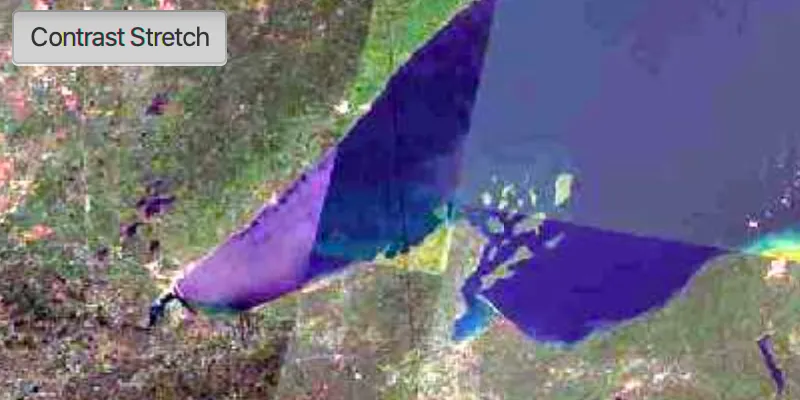
Layers hosted on WMS may have different pre-set styles available to apply to them. Swapping between these styles can help during visual examination of the data. For example, increasing the contrast of satellite images can help in identifying urban and agricultural areas within forested areas.
How to use the sample
Once the layer loads, the toggle button will be enabled. Click it to toggle between the first and second styles of the WMS layer.
How it works
- Create a
WmsLayerspecifying the URL of the service and the layer names you want as parameters. - When the layer is done loading, get its list of style strings using
wmsLayer.getSublayers().get(0).getSublayerInfo().getStyles(). - Set one of the styles using
wmsLayer.getSublayers().get(0).setCurrentStyle(styleString).
Relevant API
- WmsLayer
- WmsSublayer
- WmsSublayerInfo
About the data
This sample uses a public service managed by the State of Minnesota and provides composite imagery for the state and the surrounding areas.
Tags
imagery, styles, visualization, WMS
Sample code
StyleWmsLayerSample.java
/* * Copyright 2018 Esri. * * Licensed under the Apache License, Version 2.0 (the "License"); you may not * use this file except in compliance with the License. You may obtain a copy of * the License at * * http://www.apache.org/licenses/LICENSE-2.0 * * Unless required by applicable law or agreed to in writing, software * distributed under the License is distributed on an "AS IS" BASIS, WITHOUT * WARRANTIES OR CONDITIONS OF ANY KIND, either express or implied. See the * License for the specific language governing permissions and limitations under * the License. */
package com.esri.samples.style_wms_layer;
import java.util.Collections;import java.util.List;
import javafx.application.Application;import javafx.geometry.Insets;import javafx.geometry.Pos;import javafx.scene.Scene;import javafx.scene.control.Alert;import javafx.scene.control.ToggleButton;import javafx.scene.layout.StackPane;import javafx.stage.Stage;
import com.esri.arcgisruntime.layers.WmsLayer;import com.esri.arcgisruntime.loadable.LoadStatus;import com.esri.arcgisruntime.mapping.ArcGISMap;import com.esri.arcgisruntime.mapping.Viewpoint;import com.esri.arcgisruntime.geometry.SpatialReference;import com.esri.arcgisruntime.mapping.view.MapView;
public class StyleWmsLayerSample extends Application {
  private MapView mapView;  private WmsLayer wmsLayer; // keep loadable in scope to avoid garbage collection
  @Override  public void start(Stage stage) {
    try {      // create stack pane and application scene      StackPane stackPane = new StackPane();      Scene scene = new Scene(stackPane);
      // set title, size, and add scene to stage      stage.setTitle("Style WMS Layer Sample");      stage.setWidth(800);      stage.setHeight(700);      stage.setScene(scene);      stage.show();
      // create a map with spatial reference appropriate for the service (North American Datum 83)      ArcGISMap map = new ArcGISMap(SpatialReference.create(26915));      map.setMinScale(7000000);      // set the map to the map view      mapView = new MapView();      mapView.setMap(map);
      // create style toggle button, disable until layer is loaded      ToggleButton styleToggleButton = new ToggleButton();      styleToggleButton.setText("Default");      styleToggleButton.setDisable(true);
      // create a WMS layer      List<String> wmsLayerNames = Collections.singletonList("mncomp");      String url = "https://imageserver.gisdata.mn.gov/cgi-bin/mncomp?SERVICE=WMS&VERSION=1.3.0&REQUEST=GetCapabilities";      wmsLayer = new WmsLayer(url, wmsLayerNames);      wmsLayer.addDoneLoadingListener(() -> {        if (wmsLayer.getLoadStatus() == LoadStatus.LOADED) {          // add the layer to the map          map.getOperationalLayers().add(wmsLayer);
          // zoom to the layer on the map          mapView.setViewpoint(new Viewpoint(wmsLayer.getFullExtent()));
          // get styles          List<String> styles = wmsLayer.getSublayers().get(0).getSublayerInfo().getStyles();
          // set the style when the button is toggled          styleToggleButton.selectedProperty().addListener((observable, oldValue, newValue) -> {            if (styleToggleButton.isSelected()) {              // contrast Stretch - 2 Std. Deviations contrast stretch              styleToggleButton.setText("Contrast Stretch");              wmsLayer.getSublayers().get(0).setCurrentStyle(styles.get(1));            } else {              // default - color as it appears in aerial imagery              styleToggleButton.setText("Default");              wmsLayer.getSublayers().get(0).setCurrentStyle(styles.get(0));            }          });
          // enable the toggle button          styleToggleButton.setDisable(false);
        } else {          Alert alert = new Alert(Alert.AlertType.ERROR, "Failed to load WMS layer");          alert.show();        }      });      wmsLayer.loadAsync();
      // add the map view to stack pane      stackPane.getChildren().addAll(mapView, styleToggleButton);      StackPane.setAlignment(styleToggleButton, Pos.TOP_LEFT);      StackPane.setMargin(styleToggleButton, new Insets(10, 0, 0, 10));    } catch (Exception e) {      // on any error, display the stack trace.      e.printStackTrace();    }  }
  /**   * Stops and releases all resources used in application.   */  @Override  public void stop() {
    if (mapView != null) {      mapView.dispose();    }  }
  /**   * Opens and runs application.   *   * @param args arguments passed to this application   */  public static void main(String[] args) {
    Application.launch(args);  }
}