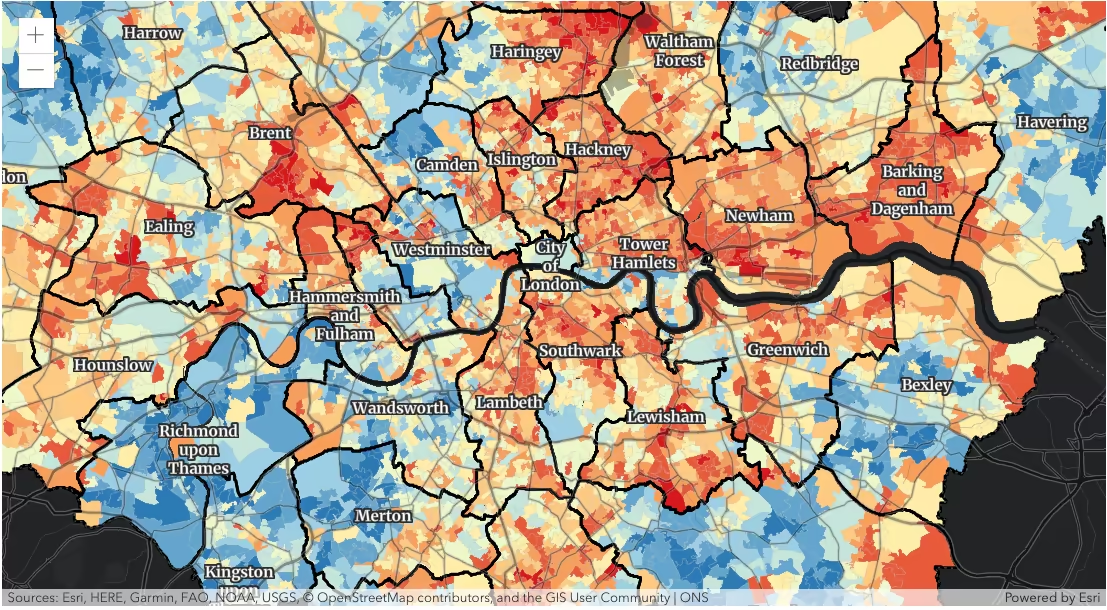
This sample shows how FeatureEffect can be used to draw attention features of interest. In this case, the map highlights areas in Greater London that intersect the boundaries of London boroughs. The map (inspired by this post on X) shows the overall index of multiple deprivation in 2019 experienced by people living in the Greater London area. This index is calculated for every Lower Layer Super Output Area (LSOA). The layer is symbolized to show an IMD decile, where 1 is the most deprived 10% of the LSOA.
How it works
Once the map component is ready, the IMD deprivation FeatureLayer is accessed from the map and the following feature effects are set on the layer. We apply a drop-shadow feature effect to the features that intersect the borough boundaries, while applying blur and brightness effects to the features that are excluded from the filter criteria. The resulting map will make it easier to spot if the residents are more likely to experience deprivation if they live on a borough boundary.
const viewElement = document.querySelector("arcgis-map");await viewElement.viewOnReady();
// find the layer that shows IMD 2019 deciles in// Lower layer Super Output Areas of greater Londonconst imdLayer = viewElement.map.layers.items[0];// filter Lower layer Super Output Areas that intersect// boundaries of boroughs in greater Londonconst featureFilter = {  where: "BoroughEdge='true'",};imdLayer.featureEffect = {  filter: featureFilter,  includedEffect: "drop-shadow(3px, 3px, 3px, black)",  excludedEffect: "blur(1px) brightness(65%)",};
The map would look like the following if the feature effect was not applied to the layer.