Note: Sign in to access the data in this sample. username: editor01 password: S7#i2LWmYH75
Getting Started
A knowledge graph allows you work with a graph network.
This network connects people, places, and things
(represented by entities) with each other through
relationships that define how they are associated.
Both entities and relationships can have associated properties.
An entity with a spatial location can be connected with other entities that do not have a spatial location.
There are three different types of edits that can be applied to a knowledge graph:
- Add new entities and relationships to the graph.
- Update the properties of entities and relationships that already exist in the graph.
- Delete entities and relationships from the graph.
This example shows each edit to the knowledge graph independently, however, multiple edits can be executed in a single executeApplyEdits() call.
The sample dataset contains observations of bumble bees made at locations around the United States. Each observation was made and verified by users and is of a specific species of bumble bee.
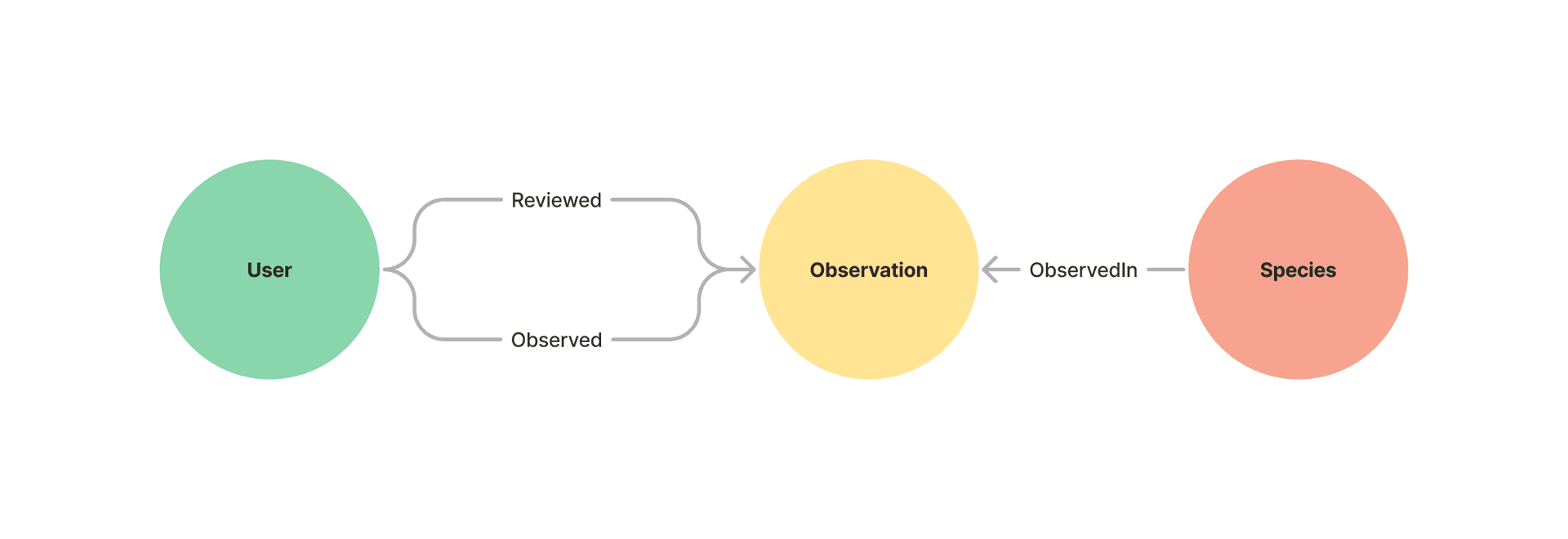
For additional information on working with knowledge graph services see:
- Introduction to Knowledge Graph in the JavaScript Maps SDK.
- Search a knowledge graph
- Query a knowledge graph
- Working with knowledge graph layers
- Get started with ArcGIS Knowledge Server for overview of ArcGIS Knowledge for ArcGIS Enterprise.
- Hosted Knowledge Graph Service for information on managing knowledge graph services via ArcGIS Enterprise and the REST API.
- Get started with ArcGIS Knowledge (ArcGIS Pro) for information on ArcGIS Knowledge in ArcGIS Pro.
How to use this sample
1. Sign in
The data in this example is secured, as most knowledge graph data will be since the ArcGIS Knowledge Graph Server license is required. Therefore, the first step is to sign in to load the data.
2. Edit Data
There is a separate section for each edit type and they can be applied in any order.
-
Add Entity:
Start by adding a new
Observationto the graph by providing the name (e.g. “Yellow faced bumble bee”). -
Add Relationship:
Add a new
Observedrelationship between a user and the observation. -
Update Entity
Update the
nameproperty of an existingObservation. -
Delete Entity
Delete an
Observationfrom the graph. This also deletes any associated relationships ifcascadeDeleteistrue.
How it works
Add
To specify new records to add to the graph, first define any new entities
and relationships and
their properties.
These properties must match the properties of the entity type
or relationship type that the record is being added to.
This example adds to the Observation entity type, which has the name property.
      const newEntity = new Entity({        typeName: "Observation",        properties: {          species_guess: speciesGuess,        },      });
      knowledgeGraphService        .executeApplyEdits(knowledgeGraph, {          entityAdds: [newEntity],        })        .then((results) => {
When adding a relationship, the origin and destination entities must already exist in the graph. This example adds
an Observed relationship between a User and an Observation. This relationship type has no additional properties.
//create the relationship const newRelationship = new Relationship({ typeName: "Observed", originId: originId, destinationId: destinationId, properties: {}, }); //apply the edit to the graph knowledgeGraphService .executeApplyEdits(knowledgeGraph, { relationshipAdds: [newRelationship], }) .then((results) => {The properties you specify for new entities and relationships must already exist on the entity type or relationship type. To add or delete properties from a named type see editing a knowledge graph data model.
Update
The values of properties on existing entities and relationships can also be updated using executeApplyEdits.
In this sample you can update the value for the ‘species_guess’ property on existing “Observation” entities.
The property must already exist on the entity type or relationship type. To add or delete properties from a
named type see editing a knowledge graph data model.
      const entityUpdate = new Entity({        typeName: "Observation",        id: id,        properties: {          species_guess: updatedSpecies,        },      });
      knowledgeGraphService        .executeApplyEdits(knowledgeGraph, {          entityUpdates: [entityUpdate],        })        .then((editResult) => {
Delete
Specify records to delete by providing the entity type or relationship type and a list of unique identifiers for records of that type to be deleted.
Note that by default, when deleting an entity you must also specify all connected relationships for deletion as well.
If you want these relationships to be deleted automatically, set cascadeDelete
to true. If cascadeDelete is false and the entity has connected relationships that are not in the edit, executeApplyEdits will fail.
knowledgeGraphService .executeApplyEdits(knowledgeGraph, { entityDeletes: [ { typeName: "Observation", ids: [id], }, ], options: { cascadeDelete: true, }, }) .then((editResult) => {