Cut a geometry along a polyline.
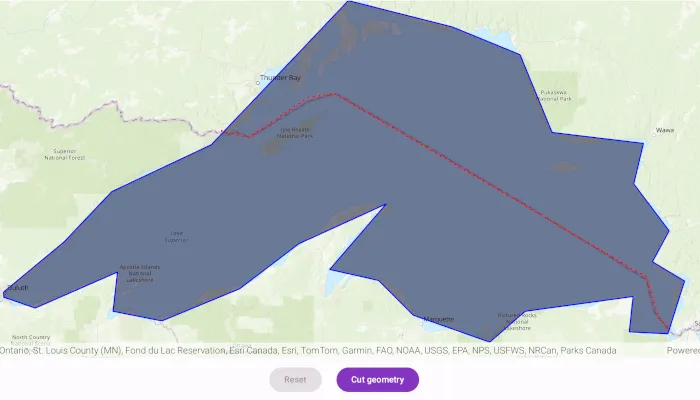
Use case
You might cut a polygon representing a large parcel to subdivide it into smaller parcels.
How to use the sample
Tap the “Cut” button to cut the polygon with the polyline and see the resulting parts (shaded in different colors).
How it works
- Pass the geometry and polyline to
GeometryEngine.cutto cut the geometry along the polyline. - Loop through the returned list of part geometries. Some of these geometries may be multi-part.
Relevant API
- GeometryEngine
- Polygon
- Polyline
Additional information
This sample uses the GeoView-Compose Toolkit module to be able to implement a composable MapView.
Tags
cut, geometry, geoview-compose, split, toolkit
Sample code
/* Copyright 2025 Esri * * Licensed under the Apache License, Version 2.0 (the "License"); * you may not use this file except in compliance with the License. * You may obtain a copy of the License at * *    http://www.apache.org/licenses/LICENSE-2.0 * * Unless required by applicable law or agreed to in writing, software * distributed under the License is distributed on an "AS IS" BASIS, * WITHOUT WARRANTIES OR CONDITIONS OF ANY KIND, either express or implied. * See the License for the specific language governing permissions and * limitations under the License. * */
package com.esri.arcgismaps.sample.cutgeometry.components
import android.app.Applicationimport androidx.compose.runtime.getValueimport androidx.compose.runtime.mutableStateOfimport androidx.lifecycle.AndroidViewModelimport androidx.lifecycle.viewModelScopeimport com.arcgismaps.Colorimport com.arcgismaps.geometry.GeometryEngineimport com.arcgismaps.geometry.Pointimport com.arcgismaps.geometry.Polygonimport com.arcgismaps.geometry.PolygonBuilderimport com.arcgismaps.geometry.Polylineimport com.arcgismaps.geometry.PolylineBuilderimport com.arcgismaps.geometry.SpatialReferenceimport com.arcgismaps.mapping.ArcGISMapimport com.arcgismaps.mapping.BasemapStyleimport com.arcgismaps.mapping.Viewpointimport com.arcgismaps.mapping.symbology.SimpleFillSymbolimport com.arcgismaps.mapping.symbology.SimpleFillSymbolStyleimport com.arcgismaps.mapping.symbology.SimpleLineSymbolimport com.arcgismaps.mapping.symbology.SimpleLineSymbolStyleimport com.arcgismaps.mapping.view.Graphicimport com.arcgismaps.mapping.view.GraphicsOverlayimport com.arcgismaps.toolkit.geoviewcompose.MapViewProxyimport com.esri.arcgismaps.sample.cutgeometry.Rimport com.esri.arcgismaps.sample.sampleslib.components.MessageDialogViewModelimport kotlinx.coroutines.flow.MutableStateFlowimport kotlinx.coroutines.flow.asStateFlowimport kotlinx.coroutines.launch
class CutGeometryViewModel(application: Application) : AndroidViewModel(application) {
    // create a map with the topographic basemap style    val arcGISMap by mutableStateOf(        ArcGISMap(BasemapStyle.ArcGISTopographic).apply {            initialViewpoint = Viewpoint(                latitude = 39.8,                longitude = -98.6,                scale = 10e7            )        }    )
    // create a MapViewProxy to interact with the MapView    val mapViewProxy = MapViewProxy()
    // get a polygon corresponding to Lake Superior    private val lakeSuperiorPolygon = makeLakeSuperior()
    // get a polyline that divides Lake Superior into a Canada side and US side    private val borderPolyline = makeBorderPolyline()
    // create a graphic for the polygon representing Lake Superior    private val polygonGraphic = Graphic(        geometry = lakeSuperiorPolygon,        symbol = SimpleFillSymbol(            style = SimpleFillSymbolStyle.Solid,            color = Color(R.color.transparentBlue),            outline = SimpleLineSymbol(                style = SimpleLineSymbolStyle.Solid,                color = Color.blue,                width = 2F            )        )    )
    // create a graphic for the cut line    private val polylineGraphic = Graphic(        geometry = borderPolyline,        symbol = SimpleLineSymbol(            style = SimpleLineSymbolStyle.Dot,            color = Color.red,            width = 3F        )    )
    // create a state flow to handle the reset button    private val _isResetButtonEnabled = MutableStateFlow(false)    val isResetButtonEnabled = _isResetButtonEnabled.asStateFlow()
    // create a state flow to handle the cut button    private val _isCutButtonEnabled = MutableStateFlow(false)    val isCutButtonEnabled = _isCutButtonEnabled.asStateFlow()
    // create a graphic overlay    val graphicsOverlay = GraphicsOverlay()
    // create a message dialog view model for handling error messages    val messageDialogVM = MessageDialogViewModel()
    init {        viewModelScope.launch {            arcGISMap.load().onFailure { error ->                messageDialogVM.showMessageDialog(                    title = "Failed to load map",                    description = error.message.toString()                )            }.onSuccess {                graphicsOverlay.graphics.add(polygonGraphic)                graphicsOverlay.graphics.add(polylineGraphic)                polygonGraphic.geometry?.let { polygonToCut ->                    mapViewProxy.setViewpoint(Viewpoint(polygonToCut))                }                _isCutButtonEnabled.value = true            }        }    }
    /**     * Clear the current graphics, then re-add the graphics for Lake Superior and the cut polyline.     */    fun resetGeometry() {        graphicsOverlay.graphics.clear()        graphicsOverlay.graphics.add(polygonGraphic)        graphicsOverlay.graphics.add(polylineGraphic)        polygonGraphic.geometry?.let { polygonToCut ->            mapViewProxy.setViewpoint(Viewpoint(polygonToCut))        }
        _isResetButtonEnabled.value = false        _isCutButtonEnabled.value = true    }
    /**     * Cut the Lake Superior graphic into a US side and Canada side using the cut polyline     * and then add the resulting graphics to the graphics overlay.     */    fun cutGeometry() {        polygonGraphic.geometry?.let { graphicGeometry ->            val parts = GeometryEngine.tryCut(                geometry = graphicGeometry,                cutter = polylineGraphic.geometry as Polyline            )
            // create graphics for the US and Canada sides            val canadaSide = Graphic(                geometry = parts[0],                symbol = SimpleFillSymbol(                    style = SimpleFillSymbolStyle.BackwardDiagonal,                    color = Color.green,                    outline = SimpleLineSymbol(                        style = SimpleLineSymbolStyle.Null,                        color = Color.blue,                        width = 0F                    )                )            )            val usSide = Graphic(                geometry = parts[1],                symbol = SimpleFillSymbol(                    style = SimpleFillSymbolStyle.ForwardDiagonal,                    color = Color.yellow,                    outline = SimpleLineSymbol(                        style = SimpleLineSymbolStyle.Null,                        color = Color.blue,                        width = 0F                    )                )            )            // add the graphics to the graphics overlay            graphicsOverlay.graphics.addAll(listOf(canadaSide, usSide))
            // update button state            _isCutButtonEnabled.value = false            _isResetButtonEnabled.value = true        }    }
    /**     * Define a blue color for polygon boundary.     */    private val Color.Companion.blue: Color        get() {            return fromRgba(                r = 0,                g = 0,                b = 255,                a = 255            )        }
    /**     * Create a polygon corresponding to Lake Superior.     */    private fun makeLakeSuperior() : Polygon {        return PolygonBuilder(SpatialReference.webMercator()) {            addPoint(Point(x = -10254374.668616, y = 5908345.076380))            addPoint(Point(x = -10178382.525314, y = 5971402.386779))            addPoint(Point(x = -10118558.923141, y = 6034459.697178))            addPoint(Point(x = -9993252.729399, y = 6093474.872295))            addPoint(Point(x = -9882498.222673, y = 6209888.368416))            addPoint(Point(x = -9821057.766387, y = 6274562.532928))            addPoint(Point(x = -9690092.583250, y = 6241417.023616))            addPoint(Point(x = -9605207.742329, y = 6206654.660191))            addPoint(Point(x = -9564786.389509, y = 6108834.986367))            addPoint(Point(x = -9449989.747500, y = 6095091.726408))            addPoint(Point(x = -9462116.153346, y = 6044160.821855))            addPoint(Point(x = -9417652.665244, y = 5985145.646738))            addPoint(Point(x = -9438671.768711, y = 5946341.148031))            addPoint(Point(x = -9398250.415891, y = 5922088.336339))            addPoint(Point(x = -9419269.519357, y = 5855797.317714))            addPoint(Point(x = -9467775.142741, y = 5858222.598884))            addPoint(Point(x = -9462924.580403, y = 5902686.086985))            addPoint(Point(x = -9598740.325877, y = 5884092.264688))            addPoint(Point(x = -9643203.813979, y = 5845287.765981))            addPoint(Point(x = -9739406.633691, y = 5879241.702350))            addPoint(Point(x = -9783061.694736, y = 5922896.763395))            addPoint(Point(x = -9844502.151022, y = 5936640.023354))            addPoint(Point(x = -9773360.570059, y = 6019099.583107))            addPoint(Point(x = -9883306.649729, y = 5968977.105610))            addPoint(Point(x = -9957681.938918, y = 5912387.211662))            addPoint(Point(x = -10055501.612742, y = 5871965.858842))            addPoint(Point(x = -10116942.069028, y = 5884092.264688))            addPoint(Point(x = -10111283.079633, y = 5933406.315128))            addPoint(Point(x = -10214761.742852, y = 5888134.399970))            addPoint(Point(x = -10254374.668616, y = 5901877.659929))        }.toGeometry()    }
    /**     * Create a polyline corresponding to the US/Canada border over Lake Superior.     */    private fun makeBorderPolyline() : Polyline {        return PolylineBuilder(SpatialReference.webMercator()) {            addPoint(Point(x = -9981328.687124, y = 6111053.281447))            addPoint(Point(x = -9946518.044066, y = 6102350.620682))            addPoint(Point(x = -9872545.427566, y = 6152390.920079))            addPoint(Point(x = -9838822.617103, y = 6157830.083057))            addPoint(Point(x = -9446115.050097, y = 5927209.572793))            addPoint(Point(x = -9430885.393759, y = 5876081.440801))            addPoint(Point(x = -9415655.737420, y = 5860851.784463))        }.toGeometry()    }
}
/* Copyright 2022 Esri * * Licensed under the Apache License, Version 2.0 (the "License"); * you may not use this file except in compliance with the License. * You may obtain a copy of the License at * * http://www.apache.org/licenses/LICENSE-2.0 * * Unless required by applicable law or agreed to in writing, software * distributed under the License is distributed on an "AS IS" BASIS, * WITHOUT WARRANTIES OR CONDITIONS OF ANY KIND, either express or implied. * See the License for the specific language governing permissions and * limitations under the License. * */
package com.esri.arcgismaps.sample.cutgeometry
import android.os.Bundleimport androidx.activity.ComponentActivityimport androidx.activity.compose.setContentimport androidx.activity.enableEdgeToEdgeimport androidx.compose.material3.MaterialThemeimport androidx.compose.material3.Surfaceimport androidx.compose.runtime.Composableimport com.arcgismaps.ApiKeyimport com.arcgismaps.ArcGISEnvironmentimport com.esri.arcgismaps.sample.sampleslib.theme.SampleAppThemeimport com.esri.arcgismaps.sample.cutgeometry.screens.CutGeometryScreen
class MainActivity : ComponentActivity() {
override fun onCreate(savedInstanceState: Bundle?) { super.onCreate(savedInstanceState) // authentication with an API key or named user is // required to access basemaps and other location services ArcGISEnvironment.apiKey = ApiKey.create(BuildConfig.ACCESS_TOKEN)
enableEdgeToEdge() setContent { SampleAppTheme { CutGeometryApp() } } }
@Composable private fun CutGeometryApp() { Surface(color = MaterialTheme.colorScheme.background) { CutGeometryScreen( sampleName = getString(R.string.cut_geometry_app_name) ) } }}/* Copyright 2025 Esri * * Licensed under the Apache License, Version 2.0 (the "License"); * you may not use this file except in compliance with the License. * You may obtain a copy of the License at * * http://www.apache.org/licenses/LICENSE-2.0 * * Unless required by applicable law or agreed to in writing, software * distributed under the License is distributed on an "AS IS" BASIS, * WITHOUT WARRANTIES OR CONDITIONS OF ANY KIND, either express or implied. * See the License for the specific language governing permissions and * limitations under the License. * */
package com.esri.arcgismaps.sample.cutgeometry.screens
import androidx.compose.foundation.layout.Arrangementimport androidx.compose.foundation.layout.Columnimport androidx.compose.foundation.layout.Rowimport androidx.compose.foundation.layout.fillMaxSizeimport androidx.compose.foundation.layout.fillMaxWidthimport androidx.compose.foundation.layout.paddingimport androidx.compose.material3.Buttonimport androidx.compose.material3.Scaffoldimport androidx.compose.material3.Textimport androidx.compose.runtime.Composableimport androidx.compose.runtime.getValueimport androidx.compose.ui.Modifierimport androidx.compose.ui.res.stringResourceimport androidx.compose.ui.unit.dpimport androidx.lifecycle.compose.collectAsStateWithLifecycleimport androidx.lifecycle.viewmodel.compose.viewModelimport com.arcgismaps.toolkit.geoviewcompose.MapViewimport com.esri.arcgismaps.sample.cutgeometry.Rimport com.esri.arcgismaps.sample.cutgeometry.components.CutGeometryViewModelimport com.esri.arcgismaps.sample.sampleslib.components.MessageDialogimport com.esri.arcgismaps.sample.sampleslib.components.SampleTopAppBar
/** * Main screen layout for the sample app. */@Composablefun CutGeometryScreen(sampleName: String) { val mapViewModel: CutGeometryViewModel = viewModel() val isResetButtonEnabled by mapViewModel.isResetButtonEnabled.collectAsStateWithLifecycle() val isCutButtonEnabled by mapViewModel.isCutButtonEnabled.collectAsStateWithLifecycle() Scaffold( topBar = { SampleTopAppBar(title = sampleName) }, content = { Column( modifier = Modifier .fillMaxSize() .padding(it), ) { MapView( modifier = Modifier .fillMaxSize() .weight(1f), arcGISMap = mapViewModel.arcGISMap, graphicsOverlays = listOf(mapViewModel.graphicsOverlay), mapViewProxy = mapViewModel.mapViewProxy ) Row( modifier = Modifier.fillMaxWidth(), horizontalArrangement = Arrangement.Center ) { Button( modifier = Modifier.padding(12.dp), enabled = isResetButtonEnabled, onClick = { mapViewModel.resetGeometry() } ) { Text( text = stringResource(R.string.reset_button_text) ) } Button( modifier = Modifier.padding(12.dp), enabled = isCutButtonEnabled, onClick = { mapViewModel.cutGeometry() } ) { Text( text = stringResource(R.string.cut_geometry_button_text) ) } }
mapViewModel.messageDialogVM.apply { if (dialogStatus) { MessageDialog( title = messageTitle, description = messageDescription, onDismissRequest = ::dismissDialog ) } } } } )}