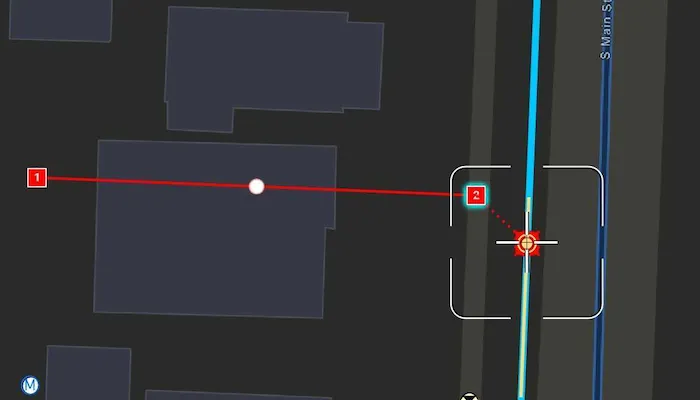
Use the Geometry Editor to edit a geometry and align it to existing geometries on a map.
Use case
A field worker can create new features by editing and snapping the vertices of a geometry to existing features on a map. In a water distribution network, service line features can be represented with the polyline geometry type. By snapping the vertices of a proposed service line to existing features in the network, an exact footprint can be identified to show the path of the service line and what features in the network it connects to. The feature layer containing the service lines can then be accurately modified to include the proposed line.
How to use the sample
To create a geometry, press the create button to choose the geometry type you want to create (i.e. points, multipoints, polyline, or polygon) and interactively tap and drag on the map view to create the geometry.
Snap settings can be configured by enabling and disabling snapping, feature snapping, geometry guides, and snap sources.
To interactively snap a vertex to a feature or graphic, ensure that snapping is enabled for the relevant snap source and move the map position of the reticle to nearby an existing feature or graphic. When the reticle is close to that existing geoelement, the edit position will be adjusted to coincide with (or snap to), edges and vertices of its geometry. Tap to place the vertex at the snapped location.
To edit a geometry, tap the geometry to be edited in the map and then edit the geometry by tapping and moving its vertices and snapping them to nearby features or graphics.
To edit a vertex using the reticle, tap when the reticle is located over the vertex, drag the map to move the position of the reticle, then tap a second time to place the vertex.
To undo changes made to the geometry, press the undo button.
To delete a vertex, tap when the reticle is located over the vertex and then press the delete button.
To save your edits, press the save button.
How it works
- Create a
Mapfrom theURLand connect it to theMapView. - Set the map’s
LoadSettings.featureTilingModetoenabledWithFullResolutionWhenSupported. - Create a
GeometryEditorand connect it to the map view. - Create a
ReticleVertexTooland set it into theGeometryEditor.tool. - Call
syncSourceSettingsafter the map’s operational layers are loaded and the geometry editor connected to the map view. - Set
SnapSettings.isEnabledandSnapSourceSettings.isEnabledto true for theSnapSourceof interest. - Enable or disable geometry guides using
SnapSettings.isGeometryGuidesEnabledand feature snapping usingSnapSettings.isFeatureSnappingEnabled. - Start the geometry editor with a
GeometryType.
Relevant API
- FeatureLayer
- Geometry
- GeometryEditor
- GeometryEditorReticle
- GeometryEditorStyle
- GraphicsOverlay
- MapView
- ReticleVertexTool
- SnapSettings
- SnapSource
- SnapSourceSettings
About the data
The Naperville water distribution network is based on ArcGIS Solutions for Water Utilities and provides a realistic depiction of a theoretical stormwater network.
Additional information
Snapping is used to maintain data integrity between different sources of data when editing, so it is important that each SnapSource provides full resolution geometries to be valid for snapping. This means that some of the default optimizations used to improve the efficiency of data transfer and display of polygon and polyline layers based on feature services are not appropriate for use with snapping.
To snap to polygon and polyline layers, the recommended approach is to set the FeatureLayer’s feature tiling mode to FeatureTilingMode.enabledWithFullResolutionWhenSupported and use the default ServiceFeatureTable feature request mode FeatureRequestMode.onInteractionCache. Local data sources, such as geodatabases, always provide full resolution geometries.
Snapping can be used during interactive edits that move existing vertices using the VertexTool or ReticleVertexTool. It is also supported for adding new vertices for input devices with a hover event (such as a mouse move without a mouse button press). Using the ReticleVertexTool to add and move vertices allows users of touch screen devices to clearly see the visual cues for snapping.
Geometry guides are enabled by default when snapping is enabled. These allow for snapping to a point coinciding with, parallel to, perpendicular to, or extending an existing geometry.
On supported platforms haptic feedback on SnapState.snappedToFeature and SnapState.snappedToGeometryGuide is enabled by default when snapping is enabled. Custom haptic feedback can be configured by setting SnapSettings.isHapticFeedbackEnabled to false and listening to GeometryEditor.snapChanged events to provide specific feedback depending on the SnapState.
When using SubtypeFeatureLayer objects as snap sources instead of FeatureLayer, child SubtypeSublayer objects are included as snap sources in the parent SnapSourceSettings.childSnapSources collection in the same order as the SubtypeFeatureLayer.subtypeSublayers collection.
This sample uses the GeoView-Compose Toolkit module to be able to implement a composable MapView.
Tags
edit, feature, geometryeditor, geoview-compose, graphics, layers, magnify, map, reticle, snapping
Sample code
/* Copyright 2024 Esri * * Licensed under the Apache License, Version 2.0 (the "License"); * you may not use this file except in compliance with the License. * You may obtain a copy of the License at * *    http://www.apache.org/licenses/LICENSE-2.0 * * Unless required by applicable law or agreed to in writing, software * distributed under the License is distributed on an "AS IS" BASIS, * WITHOUT WARRANTIES OR CONDITIONS OF ANY KIND, either express or implied. * See the License for the specific language governing permissions and * limitations under the License. * */
package com.esri.arcgismaps.sample.snapgeometryedits.components
import android.app.Applicationimport androidx.compose.runtime.mutableStateListOfimport androidx.compose.runtime.mutableStateOfimport androidx.compose.ui.unit.dpimport androidx.lifecycle.AndroidViewModelimport com.arcgismaps.geometry.GeometryTypeimport com.arcgismaps.geometry.Multipointimport com.arcgismaps.geometry.Pointimport com.arcgismaps.geometry.Polygonimport com.arcgismaps.geometry.Polylineimport com.arcgismaps.mapping.ArcGISMapimport com.arcgismaps.mapping.layers.FeatureTilingModeimport com.arcgismaps.mapping.view.Graphicimport com.arcgismaps.mapping.view.GraphicsOverlayimport com.arcgismaps.mapping.view.SingleTapConfirmedEventimport com.arcgismaps.mapping.view.geometryeditor.GeometryEditorimport com.arcgismaps.mapping.view.geometryeditor.GeometryEditorStyleimport com.arcgismaps.mapping.view.geometryeditor.ReticleVertexToolimport com.arcgismaps.mapping.view.geometryeditor.SnapSourceSettingsimport com.arcgismaps.toolkit.geoviewcompose.MapViewProxyimport com.esri.arcgismaps.sample.sampleslib.components.MessageDialogViewModelimport com.esri.arcgismaps.sample.snapgeometryedits.Rimport kotlinx.coroutines.CoroutineScopeimport kotlinx.coroutines.flow.MutableStateFlowimport kotlinx.coroutines.flow.StateFlowimport kotlinx.coroutines.launch
class SnapGeometryEditsViewModel(    application: Application,    private val sampleCoroutineScope: CoroutineScope) : AndroidViewModel(application) {    // create a map using the URL of the web map    val map = ArcGISMap(application.getString(R.string.web_map))
    // create a graphic, graphic overlay, and geometry editorenc    private var identifiedGraphic = Graphic()    val graphicsOverlay = GraphicsOverlay()    val geometryEditor = GeometryEditor()
    // create a mapViewProxy that will be used to identify features in the MapView and set the viewpoint    val mapViewProxy = MapViewProxy()
    // create a messageDialogViewModel to handle dialog interactions    val messageDialogVM: MessageDialogViewModel = MessageDialogViewModel()
    // create lists for displaying the snap sources in the bottom sheet    private val _snapSourceSettingsList = MutableStateFlow(listOf<SnapSourceSettings>())    val snapSourceList: StateFlow<List<SnapSourceSettings>> = _snapSourceSettingsList
    // create boolean flags to track the state of UI components    val isCreateButtonEnabled = mutableStateOf(false)    val isSnapSettingsButtonEnabled = mutableStateOf(false)    val isBottomSheetVisible = mutableStateOf(false)    val snappingCheckedState = mutableStateOf(geometryEditor.snapSettings.isEnabled)    val geometryGuidesCheckedState = mutableStateOf(geometryEditor.snapSettings.isGeometryGuidesEnabled)    val featureSnappingCheckedState = mutableStateOf(geometryEditor.snapSettings.isFeatureSnappingEnabled)    val snapSourceCheckedState = mutableStateListOf<Boolean>()    val isUndoButtonEnabled = geometryEditor.canUndo    val isSaveButtonEnabled = geometryEditor.isStarted    val isDeleteButtonEnabled = geometryEditor.isStarted
    /**     * Configure the map and enable the UI after the map's layers are loaded.     */    init {        // set the id for the graphics overlay        graphicsOverlay.id = "Editor Graphics Overlay"        // set the tool for the geometry editor to use a reticle        geometryEditor.tool = ReticleVertexTool()        // set the feature layer's tiling mode        map.loadSettings.featureTilingMode =            FeatureTilingMode.EnabledWithFullResolutionWhenSupported
        isCreateButtonEnabled.value = true        isSnapSettingsButtonEnabled.value = true
        sampleCoroutineScope.launch {            // load the map            map.load().onSuccess {                // load the map's operational layers                map.operationalLayers.forEach { layer ->                    layer.load().onFailure { error ->                        messageDialogVM.showMessageDialog(                            error.message.toString(),                            error.cause.toString()                        )                    }                }            }.onFailure { error ->                messageDialogVM.showMessageDialog(                    error.message.toString(),                    error.cause.toString()                )            }        }    }
    /**     * Synchronises the snap source collection with the map's operational layers, sets the bottom     * sheet UI, and shows it to configure snapping.     */    fun showBottomSheet() {        if (geometryEditor.snapSettings.sourceSettings.isEmpty()) {            // sync the snap source collection            geometryEditor.snapSettings.syncSourceSettings()            // initialise the snap source lists used for the bottom sheet            geometryEditor.snapSettings.sourceSettings.forEach { snapSource ->                snapSourceCheckedState.add(snapSource.isEnabled)            }            _snapSourceSettingsList.value = geometryEditor.snapSettings.sourceSettings        }        isBottomSheetVisible.value = true    }
    /**     * Toggles snapping overall (both geometry guides and feature snapping) using the     * [checkedValue] from the bottom sheet.     */    fun snappingEnabledStatus(checkedValue: Boolean) {        snappingCheckedState.value = checkedValue        geometryEditor.snapSettings.isEnabled = snappingCheckedState.value    }
    /**     * Toggles geometry guides using the [checkedValue] from the bottom sheet.     * Note geometry guides will still be disabled unless snapping is also enabled overall.     */    fun geometryGuidesEnabledStatus(checkedValue: Boolean) {        geometryGuidesCheckedState.value = checkedValue        geometryEditor.snapSettings.isGeometryGuidesEnabled = geometryGuidesCheckedState.value    }
    /**     * Toggles feature snapping using the [checkedValue] from the bottom sheet.     * Note feature snapping will still be disabled unless snapping is also enabled overall.     */    fun featureSnappingEnabledStatus(checkedValue: Boolean) {        featureSnappingCheckedState.value = checkedValue        geometryEditor.snapSettings.isFeatureSnappingEnabled = featureSnappingCheckedState.value    }
    /**     * Toggles snapping for the snap source at [index] using the [checkedValue] from the     * BottomSheet.     */    fun sourceEnabledStatus(checkedValue: Boolean, index: Int) {        snapSourceCheckedState[index] = checkedValue        geometryEditor.snapSettings.sourceSettings[index].isEnabled = snapSourceCheckedState[index]    }
    /**     * Hides the bottom sheet.     */    fun dismissBottomSheet() {        isBottomSheetVisible.value = false    }
    /**     * Starts the GeometryEditor using the selected [GeometryType].     */    fun startEditor(selectedGeometry: GeometryType) {        if (!geometryEditor.isStarted.value) {            geometryEditor.start(selectedGeometry)            isCreateButtonEnabled.value = false        }    }
    /**     * Stops the GeometryEditor and updates the identified graphic or calls [createGraphic].     */    fun stopEditor() {        if (identifiedGraphic.geometry != null) {            identifiedGraphic.geometry = geometryEditor.stop()            identifiedGraphic.isSelected = false        } else if (geometryEditor.isStarted.value) {            createGraphic()        }        isCreateButtonEnabled.value = true    }
    /**     * Creates a graphic from the geometry and add it to the GraphicsOverlay.     */    private fun createGraphic() {        val geometry = geometryEditor.stop()            ?: return messageDialogVM.showMessageDialog(                "Error!",                "Error stopping editing session"            )        val graphic = Graphic(geometry)
        when (geometry) {            is Point, is Multipoint -> graphic.symbol = GeometryEditorStyle().vertexSymbol            is Polyline -> graphic.symbol = GeometryEditorStyle().lineSymbol            is Polygon -> graphic.symbol = GeometryEditorStyle().fillSymbol            else -> {}        }        graphicsOverlay.graphics.add(graphic)        graphic.isSelected = false    }
    /**     * Deletes the selected element and stops the geometry editor if there are no     * more elements in the geometry.     */    fun deleteSelection() {        if (geometryEditor.geometry.value?.isEmpty == true) {            geometryEditor.stop()            isCreateButtonEnabled.value = true        }
        val selectedElement = geometryEditor.selectedElement.value        if (selectedElement?.canDelete == true) {            geometryEditor.deleteSelectedElement()        }    }
    /**     * Reverts the last event on the geometry editor.     */    fun editorUndo() {        geometryEditor.undo()    }
    /**     * Identifies the graphic at the tapped screen coordinate in the provided [singleTapConfirmedEvent]     * and starts the GeometryEditor using the identified graphic's geometry. Hide the BottomSheet on     * [singleTapConfirmedEvent].     */    fun identify(singleTapConfirmedEvent: SingleTapConfirmedEvent) {        sampleCoroutineScope.launch {            val graphicsResult = mapViewProxy.identifyGraphicsOverlays(                screenCoordinate = singleTapConfirmedEvent.screenCoordinate,                tolerance = 10.0.dp,                returnPopupsOnly = false            ).getOrNull()
            if (!geometryEditor.isStarted.value) {                if (graphicsResult != null) {                    if (graphicsResult.isNotEmpty()) {                        identifiedGraphic = graphicsResult[0].graphics[0]                        identifiedGraphic.isSelected = true                        identifiedGraphic.geometry?.let {                            geometryEditor.start(it)                            isCreateButtonEnabled.value = false                        }                    }                }                identifiedGraphic.geometry = null            }        }        dismissBottomSheet()    }}
/* Copyright 2024 Esri * * Licensed under the Apache License, Version 2.0 (the "License"); * you may not use this file except in compliance with the License. * You may obtain a copy of the License at * * http://www.apache.org/licenses/LICENSE-2.0 * * Unless required by applicable law or agreed to in writing, software * distributed under the License is distributed on an "AS IS" BASIS, * WITHOUT WARRANTIES OR CONDITIONS OF ANY KIND, either express or implied. * See the License for the specific language governing permissions and * limitations under the License. * */
package com.esri.arcgismaps.sample.snapgeometryedits
import android.os.Bundleimport androidx.activity.ComponentActivityimport androidx.activity.compose.setContentimport androidx.activity.enableEdgeToEdgeimport androidx.compose.material3.MaterialThemeimport androidx.compose.material3.Surfaceimport androidx.compose.runtime.Composableimport com.arcgismaps.ApiKeyimport com.arcgismaps.ArcGISEnvironmentimport com.esri.arcgismaps.sample.sampleslib.theme.SampleAppThemeimport com.esri.arcgismaps.sample.snapgeometryedits.screens.MainScreen
class MainActivity : ComponentActivity() {
override fun onCreate(savedInstanceState: Bundle?) { super.onCreate(savedInstanceState) // authentication with an API key or named user is // required to access basemaps and other location services ArcGISEnvironment.apiKey = ApiKey.create(BuildConfig.ACCESS_TOKEN)
enableEdgeToEdge() setContent { SampleAppTheme { SampleApp() } } }
@Composable private fun SampleApp() { Surface( color = MaterialTheme.colorScheme.background ) { MainScreen( sampleName = getString(R.string.snap_geometry_edits_app_name) ) } }}/* Copyright 2024 Esri * * Licensed under the Apache License, Version 2.0 (the "License"); * you may not use this file except in compliance with the License. * You may obtain a copy of the License at * * http://www.apache.org/licenses/LICENSE-2.0 * * Unless required by applicable law or agreed to in writing, software * distributed under the License is distributed on an "AS IS" BASIS, * WITHOUT WARRANTIES OR CONDITIONS OF ANY KIND, either express or implied. * See the License for the specific language governing permissions and * limitations under the License. * */
package com.esri.arcgismaps.sample.snapgeometryedits.screens
import androidx.compose.foundation.BorderStrokeimport androidx.compose.foundation.backgroundimport androidx.compose.foundation.layout.Arrangementimport androidx.compose.foundation.layout.Columnimport androidx.compose.foundation.layout.Rowimport androidx.compose.foundation.layout.fillMaxWidthimport androidx.compose.foundation.layout.paddingimport androidx.compose.foundation.rememberScrollStateimport androidx.compose.foundation.shape.RoundedCornerShapeimport androidx.compose.foundation.verticalScrollimport androidx.compose.material3.MaterialThemeimport androidx.compose.material3.Surfaceimport androidx.compose.material3.Switchimport androidx.compose.material3.Textimport androidx.compose.material3.TextButtonimport androidx.compose.runtime.Composableimport androidx.compose.runtime.Stateimport androidx.compose.ui.Alignmentimport androidx.compose.ui.Modifierimport androidx.compose.ui.unit.dpimport com.arcgismaps.geometry.GeometryTypeimport com.arcgismaps.mapping.layers.FeatureLayerimport com.arcgismaps.mapping.view.GraphicsOverlayimport com.arcgismaps.mapping.view.geometryeditor.SnapSourceSettingsimport com.esri.arcgismaps.sample.sampleslib.theme.SampleTypography
/** * Composable component to display the snapping configuration settings. */@Composablefun SnapSettings( snapSourceList: State<List<SnapSourceSettings>>, onSnappingChanged: (Boolean) -> Unit = { }, onGeometryGuidesChanged: (Boolean) -> Unit = { }, onFeatureSnappingChanged: (Boolean) -> Unit = { }, onSnapSourceChanged: (Boolean, Int) -> Unit = { _: Boolean, _: Int -> }, isSnappingEnabled: Boolean, isGeometryGuidesEnabled: Boolean, isFeatureSnappingEnabled: Boolean, isSnapSourceEnabled: List<Boolean>, onDismiss: () -> Unit = { }) { Surface( Modifier .background(MaterialTheme.colorScheme.background) .verticalScroll(rememberScrollState()) ) { Column(Modifier.background(MaterialTheme.colorScheme.background)) { Row( modifier = Modifier .fillMaxWidth() .padding(20.dp, 20.dp, 20.dp, 0.dp), verticalAlignment = Alignment.CenterVertically, horizontalArrangement = Arrangement.SpaceBetween ) { Text( style = SampleTypography.titleMedium, text = "Snapping", color = MaterialTheme.colorScheme.primary ) TextButton(onClick = onDismiss) { Text(text = "Done") } } if (snapSourceList.value.isEmpty()) { Surface( modifier = Modifier.padding(20.dp), tonalElevation = 1.dp, shape = RoundedCornerShape(20.dp), border = BorderStroke(1.dp, MaterialTheme.colorScheme.outlineVariant) ) { Column( modifier = Modifier.padding(14.dp) ) { Row( verticalAlignment = Alignment.CenterVertically, horizontalArrangement = Arrangement.Center ) { Text( style = SampleTypography.bodyMedium, color = MaterialTheme.colorScheme.primary, modifier = Modifier.weight(12f), text = "No valid snap sources." ) } } } } else { Surface( modifier = Modifier.padding(20.dp, 20.dp, 20.dp, 0.dp), tonalElevation = 1.dp, shape = RoundedCornerShape(20.dp), border = BorderStroke(1.dp, MaterialTheme.colorScheme.outlineVariant) ) { Column( modifier = Modifier.padding(14.dp) ) { Row( modifier = Modifier.fillMaxWidth(), verticalAlignment = Alignment.CenterVertically, horizontalArrangement = Arrangement.SpaceBetween ) { Text( modifier = Modifier.padding(20.dp, 0.dp, 0.dp, 0.dp), style = SampleTypography.bodyLarge, text = "Snapping enabled", ) Switch( checked = isSnappingEnabled, onCheckedChange = { onSnappingChanged(it) } ) } Row( modifier = Modifier.fillMaxWidth(), verticalAlignment = Alignment.CenterVertically, horizontalArrangement = Arrangement.SpaceBetween ) { Text( modifier = Modifier.padding(20.dp, 0.dp, 0.dp, 0.dp), style = SampleTypography.bodyLarge, text = "Geometry guides", ) Switch( checked = isGeometryGuidesEnabled, onCheckedChange = { onGeometryGuidesChanged(it) } ) } Row( modifier = Modifier.fillMaxWidth(), verticalAlignment = Alignment.CenterVertically, horizontalArrangement = Arrangement.SpaceBetween ) { Text( modifier = Modifier.padding(20.dp, 0.dp, 0.dp, 0.dp), style = SampleTypography.bodyLarge, text = "Feature snapping", ) Switch( checked = isFeatureSnappingEnabled, onCheckedChange = { onFeatureSnappingChanged(it) } ) } } } SnapSourceUI(snapSourceList, isSnapSourceEnabled, onSnapSourceChanged, GeometryType.Point) SnapSourceUI(snapSourceList, isSnapSourceEnabled, onSnapSourceChanged, GeometryType.Polyline) SnapSourceUI(snapSourceList, isSnapSourceEnabled, onSnapSourceChanged, null) } } }}
@Composablefun SnapSourceUI( snapSourceList: State<List<SnapSourceSettings>>, isSnapSourceEnabled: List<Boolean>, onSnapSourceChanged: (Boolean, Int) -> Unit, geometryType : GeometryType?) { Row( modifier = Modifier .fillMaxWidth() .padding(20.dp, 10.dp, 20.dp, 10.dp), verticalAlignment = Alignment.CenterVertically, horizontalArrangement = Arrangement.SpaceBetween ) { Text( style = SampleTypography.titleMedium, text = when (geometryType) { is GeometryType.Point -> "Point Layer" is GeometryType.Polyline -> "Polyline Layer" else -> "Graphics Overlays" }, color = MaterialTheme.colorScheme.primary ) TextButton( onClick = { snapSourceList.value.forEachIndexed { index, snapSource -> if (geometryType != null && (snapSource.source as? FeatureLayer)?.featureTable?.geometryType == geometryType) { onSnapSourceChanged(true, index) } else if (geometryType == null && snapSource.source is GraphicsOverlay) { onSnapSourceChanged(true, index) } } } ) { Text( text = if (geometryType != null) { "Enable All Layers" } else { "Enable All Overlays" } ) } } Surface( modifier = Modifier.padding(20.dp, 0.dp, 20.dp, 10.dp), tonalElevation = 1.dp, shape = RoundedCornerShape(20.dp), border = BorderStroke(1.dp, MaterialTheme.colorScheme.outlineVariant) ) { Column( modifier = Modifier.padding(14.dp) ) { Column { snapSourceList.value.forEachIndexed { index, snapSource -> if (geometryType != null && (snapSource.source as? FeatureLayer)?.featureTable?.geometryType == geometryType) { Row( modifier = Modifier.fillMaxWidth(), verticalAlignment = Alignment.CenterVertically, horizontalArrangement = Arrangement.SpaceBetween ) { Text( modifier = Modifier.padding(20.dp, 0.dp, 0.dp, 0.dp), text = (snapSource.source as FeatureLayer).name ) Switch( checked = isSnapSourceEnabled[index], onCheckedChange = { newValue -> onSnapSourceChanged(newValue, index) } ) } } else if (geometryType == null && snapSource.source is GraphicsOverlay) { Row( modifier = Modifier.fillMaxWidth(), verticalAlignment = Alignment.CenterVertically, horizontalArrangement = Arrangement.SpaceBetween ) { Text( modifier = Modifier.padding(20.dp, 0.dp, 0.dp, 0.dp), text = (snapSource.source as GraphicsOverlay).id ) Switch( checked = isSnapSourceEnabled[index], onCheckedChange = { newValue -> onSnapSourceChanged(newValue, index) } ) } } } } } }}/* Copyright 2024 Esri * * Licensed under the Apache License, Version 2.0 (the "License"); * you may not use this file except in compliance with the License. * You may obtain a copy of the License at * * http://www.apache.org/licenses/LICENSE-2.0 * * Unless required by applicable law or agreed to in writing, software * distributed under the License is distributed on an "AS IS" BASIS, * WITHOUT WARRANTIES OR CONDITIONS OF ANY KIND, either express or implied. * See the License for the specific language governing permissions and * limitations under the License. * */
package com.esri.arcgismaps.sample.snapgeometryedits.screens
import android.app.Applicationimport androidx.compose.foundation.layout.Columnimport androidx.compose.foundation.layout.fillMaxSizeimport androidx.compose.foundation.layout.paddingimport androidx.compose.material3.ExperimentalMaterial3Apiimport androidx.compose.material3.ModalBottomSheetimport androidx.compose.material3.Scaffoldimport androidx.compose.material3.rememberModalBottomSheetStateimport androidx.compose.runtime.Composableimport androidx.compose.runtime.collectAsStateimport androidx.compose.runtime.rememberimport androidx.compose.runtime.rememberCoroutineScopeimport androidx.compose.ui.Modifierimport androidx.compose.ui.platform.LocalContextimport com.arcgismaps.toolkit.geoviewcompose.MapViewimport com.esri.arcgismaps.sample.sampleslib.components.MessageDialogimport com.esri.arcgismaps.sample.sampleslib.components.SampleTopAppBarimport com.esri.arcgismaps.sample.snapgeometryedits.components.SnapGeometryEditsViewModel
/** * Main screen layout for the sample app */@OptIn(ExperimentalMaterial3Api::class)@Composablefun MainScreen(sampleName: String) { // coroutineScope that will be cancelled when this call leaves the composition val sampleCoroutineScope = rememberCoroutineScope() // get the application property that will be used to construct MapViewModel val sampleApplication = LocalContext.current.applicationContext as Application // create a ViewModel to handle MapView interactions val mapViewModel = remember { SnapGeometryEditsViewModel(sampleApplication, sampleCoroutineScope) } // the collection of graphics overlays used by the MapView val graphicsOverlayCollection = listOf(mapViewModel.graphicsOverlay) val bottomSheetState = rememberModalBottomSheetState()
Scaffold( topBar = { SampleTopAppBar(title = sampleName) }, content = { Column( modifier = Modifier .fillMaxSize() .padding(it) ) { MapView( modifier = Modifier .fillMaxSize() .weight(1f), arcGISMap = mapViewModel.map, geometryEditor = mapViewModel.geometryEditor, graphicsOverlays = graphicsOverlayCollection, mapViewProxy = mapViewModel.mapViewProxy, onSingleTapConfirmed = mapViewModel::identify, onPan = { mapViewModel.dismissBottomSheet() } ) ButtonMenu(mapViewModel = mapViewModel) mapViewModel.messageDialogVM.apply { if (dialogStatus) { MessageDialog( title = messageTitle, description = messageDescription, onDismissRequest = ::dismissDialog ) } } } if (mapViewModel.isBottomSheetVisible.value) { ModalBottomSheet( onDismissRequest = { mapViewModel.dismissBottomSheet() }, sheetState = bottomSheetState ) { SnapSettings( snapSourceList = mapViewModel.snapSourceList.collectAsState(), onSnappingChanged = mapViewModel::snappingEnabledStatus, onGeometryGuidesChanged = mapViewModel::geometryGuidesEnabledStatus, onFeatureSnappingChanged = mapViewModel::featureSnappingEnabledStatus, onSnapSourceChanged = mapViewModel::sourceEnabledStatus, isSnappingEnabled = mapViewModel.snappingCheckedState.value, isGeometryGuidesEnabled = mapViewModel.geometryGuidesCheckedState.value, isFeatureSnappingEnabled = mapViewModel.featureSnappingCheckedState.value, isSnapSourceEnabled = mapViewModel.snapSourceCheckedState ) { mapViewModel.dismissBottomSheet() } } } })}/* Copyright 2024 Esri * * Licensed under the Apache License, Version 2.0 (the "License"); * you may not use this file except in compliance with the License. * You may obtain a copy of the License at * * http://www.apache.org/licenses/LICENSE-2.0 * * Unless required by applicable law or agreed to in writing, software * distributed under the License is distributed on an "AS IS" BASIS, * WITHOUT WARRANTIES OR CONDITIONS OF ANY KIND, either express or implied. * See the License for the specific language governing permissions and * limitations under the License. * */
package com.esri.arcgismaps.sample.snapgeometryedits.screens
import androidx.compose.foundation.layout.Arrangementimport androidx.compose.foundation.layout.Boximport androidx.compose.foundation.layout.Rowimport androidx.compose.foundation.layout.fillMaxWidthimport androidx.compose.foundation.layout.paddingimport androidx.compose.material.icons.Iconsimport androidx.compose.material.icons.filled.Createimport androidx.compose.material.icons.filled.Deleteimport androidx.compose.material3.DropdownMenuimport androidx.compose.material3.DropdownMenuItemimport androidx.compose.material3.Iconimport androidx.compose.material3.IconButtonimport androidx.compose.material3.Textimport androidx.compose.material3.TextButtonimport androidx.compose.runtime.Composableimport androidx.compose.runtime.collectAsStateimport androidx.compose.runtime.getValueimport androidx.compose.runtime.mutableStateOfimport androidx.compose.runtime.rememberimport androidx.compose.runtime.setValueimport androidx.compose.ui.Modifierimport androidx.compose.ui.graphics.vector.ImageVectorimport androidx.compose.ui.res.vectorResourceimport androidx.compose.ui.unit.dpimport com.arcgismaps.geometry.GeometryTypeimport com.esri.arcgismaps.sample.snapgeometryedits.Rimport com.esri.arcgismaps.sample.snapgeometryedits.components.SnapGeometryEditsViewModel
/** * Composable component to display the menu buttons. */@Composablefun ButtonMenu( mapViewModel: SnapGeometryEditsViewModel) { Row( modifier = Modifier .padding(12.dp) .fillMaxWidth(), ) { var expanded by remember { mutableStateOf(false) } Box( modifier = Modifier ) { IconButton( enabled = mapViewModel.isCreateButtonEnabled.value, onClick = { expanded = !expanded } ) { Icon(imageVector = Icons.Default.Create, contentDescription = "Start") } DropdownMenu( expanded = expanded, onDismissRequest = { expanded = false } ) { DropdownMenuItem( text = { Text("Point") }, onClick = { mapViewModel.startEditor(GeometryType.Point) expanded = false } ) DropdownMenuItem( text = { Text("Multipoint") }, onClick = { mapViewModel.startEditor(GeometryType.Multipoint) expanded = false } ) DropdownMenuItem( text = { Text("Polyline") }, onClick = { mapViewModel.startEditor(GeometryType.Polyline) expanded = false } ) DropdownMenuItem( text = { Text("Polygon") }, onClick = { mapViewModel.startEditor(GeometryType.Polygon) expanded = false } ) } } val vector = ImageVector IconButton( enabled = mapViewModel.isUndoButtonEnabled.collectAsState().value, onClick = { mapViewModel.editorUndo() } ) { Icon(vector.vectorResource(R.drawable.undo), contentDescription = "Undo") } IconButton( enabled = mapViewModel.isDeleteButtonEnabled.collectAsState().value, onClick = { mapViewModel.deleteSelection() } ) { Icon(Icons.Filled.Delete, contentDescription = "Delete") } IconButton( enabled = mapViewModel.isSaveButtonEnabled.collectAsState().value, onClick = { mapViewModel.stopEditor() } ) { Icon(vector.vectorResource(R.drawable.save), contentDescription = "Save") } Row( modifier = Modifier.fillMaxWidth(), horizontalArrangement = Arrangement.End ) { TextButton( enabled = mapViewModel.isSnapSettingsButtonEnabled.value, onClick = { mapViewModel.showBottomSheet() } ) { Text(text = "Snap Settings") } } }}